题纲
-
- [MongoDB 字符串](#MongoDB 字符串)
-
- [连接 URI](#连接 URI)
- [C# 连接字符串实例](# 连接字符串实例)
- [实现一个电影信息查询 demo](#实现一个电影信息查询 demo)
- 总结
-
过去,
C#开发者可以使用MongoDB.Driver(MongoDB 的 C# 驱动程序),但无法获得针对EF Core的第一方支持。 -
现在,随着
MongoDB.EntityFrameworkCore(适用于 EF Core 的官方 MongoDB 提供程序)的正式发布,开发者在使用MongoDB构建生产级工作负载时可以放心地使用C#和EF Core。
链接 .NET/C# MongoDB.Driver MongoDB.EntityFrameworkCore MongoDB
.NET Nuget包发布情况:
2024-01-01 2024-04-01 2024-07-01 2024-10-01 2025-01-01 2025-04-01 7.0.0-preview.1 8.0.0---8.3.0 9.0.0-preview.1---9.0.0 .net nuget package Adding GANTT diagram functionality to MongoDB.EntityFrameworkCore
github项目地址,https://github.com/mongodb/mongo-efcore-provider
MongoDB 字符串
接下来介绍如何使用 MongoDB.Driver 连接到 MongoDB 实例或副本集部署。
连接 URI
连接 URI(也称为连接字符串)可告知驱动程序如何连接到 MongoDB 部署,以及连接后如何进行操作。
标准连接字符串包括以下部分:
| 字段 | 说明 |
|---|---|
| mongodb:// | 必需。将其标识为标准连接格式中字符串的前缀。 |
| username:password@ | 可选。身份验证凭证。如果包含这些内容,客户端将根据 authSource 中指定的数据库对用户进行身份验证。 |
| host[:port] | 必需。运行 MongoDB 的主机和可选端口号。如果未包含端口号,则驱动程序将使用默认端口 27017。 |
| /defaultauthdb | 可选。如果连接字符串包含 username:password@ 身份验证档案但未指定 authSource 选项,则要使用的身份验证数据库。如果您不包含这一内容,客户端将根据 admin 数据库对用户进行身份验证。 |
?<options> |
可选。将连接特定选项指定为 = 对的查询字符串。有关这些选项的完整说明,请参阅连接选项。 |
连接选项参考,https://www.mongodb.com/zh-cn/docs/drivers/csharp/current/fundamentals/connection/connection-options/#std-label-csharp-connection-options
C# 连接字符串实例
- 连接字符串语法
csharp
mongodb://<username>:<password>@<host1>:<port1>,<host2>:<port2>,<host3>:<port3>/?replicaSet=<replicaSetName>- 参数说明
<username>:MongoDB 的认证用户名(如果没有认证可省略)<password>:MongoDB 的用户密码(如果没有认证可省略)<host1>, <host2>, <host3>:MongoDB 副本集的各个节点 IP 或主机名;<port>:MongoDB 实例的端口号,默认为 27017<replicaSetName>:MongoDB 副本集的名称
- 示例代码
csharp
var connectionString = "mongodb://admin:password@host1:27017,host2:27017,host3:27017/?replicaSet=myReplicaSet";

var client = new MongoClient(connectionString);
var database = client.GetDatabase("test");- 其他常用选项
你还可以添加额外参数到连接字符串中,例如:
- ssl=true:启用
SSL加密连接 - authSource=admin:指定认证数据库
- readPreference=secondaryPreferred:优先读取从节点
示例:
csharp
mongodb://admin:password@host1:27017,host2:27017,host3:27017/test?replicaSet=myReplicaSet&ssl=true&authSource=admin实现一个电影信息查询 demo
- 添加 nuget 包
csharp
dotnet add package MongoDB.EntityFrameworkCore --version 9.0.0- 当前包版本为 9.0.0
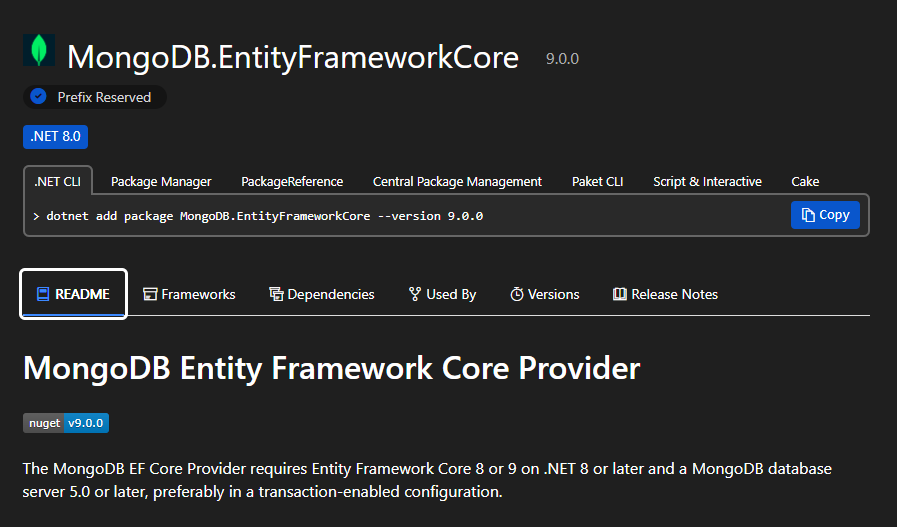
MongoDB EF Core 提供程序需要启用实体框架核心8或9。.NET 8或更高版本以及 MongoDB数据库服务器5.0或更高级别,最好是在 支持事务 的配置中。
创建项目
使用 .NET CLI 创建一个名为 MongoDbExample 的 Web API 项目,可以使用以下命令:
csharp
dotnet new webapi -n MongoDbExample
# 进入项目
cd MongoDbExample
dotnet run
创建实体
创建两个实体类,分别模拟电影信息和电影商品,定义如下:
- Movie 电影信息
csharp
using MongoDB.Bson.Serialization.Attributes;
using MongoDB.Bson;

namespace MongoDbExample.Database.Collections;

public sealed class Movie
{
    [BsonId]
    [BsonElement("_id")]
    public ObjectId Id { get; set; }

    [BsonElement("title")]
    public string Title { get; set; } = null!;

    [BsonElement("rated")]
    public string Rated { get; set; } = null!;

    [BsonElement("plot")]
    public string Plot { get; set; } = null!;
}- Product 电影商品
csharp
using MongoDB.Bson.Serialization.Attributes;
using MongoDB.Bson;

namespace MongoDbExample.Database.Collections;

public sealed class Product
{
    [BsonId]
    [BsonElement("_id")]
    public ObjectId Id { get; set; }

    [BsonElement("name")]
    public string? Name { get; set; }

    [BsonElement("price")]
    public decimal Price { get; set; }
}
实现 DbContext 上下文
- CinemaAppDbContext
csharp
using Microsoft.EntityFrameworkCore;
using MongoDB.Driver;
using MongoDB.EntityFrameworkCore.Extensions;
using MongoDbExample.Database.Collections;

namespace MongoDbExample;

public sealed class CinemaAppDbContext(ILogger<CinemaAppDbContext> logger,
    DbContextOptions<CinemaAppDbContext> options) : DbContext(options)
{
    public DbSet<Product> Products { get; init; }

    public DbSet<Movie> Movies { get; init; }

    public static CinemaAppDbContext Create(
        ILogger<CinemaAppDbContext> logger,
        IMongoDatabase database)
    {
        var options = new DbContextOptionsBuilder<CinemaAppDbContext>()
            .UseMongoDB(database.Client, database.DatabaseNamespace.DatabaseName)
            .Options;

        return new CinemaAppDbContext(logger, options);
    }

    public static IMongoDatabase GetDatabase(MongoClientSettings clientSettings, string name, MongoDatabaseSettings? dbSettings = null)
    {
        var client = new MongoClient(clientSettings);
        return dbSettings is null ? client.GetDatabase(name) : client.GetDatabase(name, dbSettings);
    }

    public static IMongoDatabase GetDatabase(string connectionString, string name, MongoDatabaseSettings? dbSettings = null)
    {
        var client = new MongoClient(connectionString);
        return dbSettings is null ? client.GetDatabase(name) : client.GetDatabase(name, dbSettings);
    }

    protected override void OnModelCreating(ModelBuilder modelBuilder)
    {
        base.OnModelCreating(modelBuilder);
        logger.LogInformation("Configuring entity mappings...");
        // 实体映射到集合
        modelBuilder.Entity<Product>().ToCollection("products");
        modelBuilder.Entity<Movie>().ToCollection("movies");
    }
}
仓储实现
创建仓储模式,实现上面实体的 crud 操作,实现如下:
- ICinemaAppRepository,定义仓储规范
csharp
using MongoDB.Bson;
using MongoDbExample.Database.Collections;

namespace MongoDbExample.Database.Repositorys;

public interface ICinemaAppRepository
{
    #region Movie
    IAsyncEnumerable<Movie> GetMoviesAsync();
    Task<Movie?> GetMovieByIdAsync(ObjectId id);
    Task<(bool isOk, ObjectId id)> AddMovieAsync(Movie movie);
    Task<(bool isOk, ObjectId id)> UpdateMovieAsync(Movie movie);
    Task<bool> DeleteMovieAsync(ObjectId id);
    #endregion

    #region Product
    IAsyncEnumerable<Product> GetProductsAsync();
    Task<Product?> GetProductByIdAsync(ObjectId id);
    Task<(bool isOk, ObjectId id)> AddProductAsync(Product product);
    Task<(bool isOk, ObjectId id)> UpdateProductAsync(Product product);
    Task<bool> DeleteProductAsync(ObjectId id);
    #endregion
}- CinemaAppRepository 仓储实现
此处使用 partial class (部分类)模拟工程化结构,分别拆分为两个独立的文件 CinemaAppRepository.Movie.cs 和 CinemaAppRepository.Product.cs。
csharp
using MongoDbExample.Database.Repositorys;

namespace MongoDbExample.Repositorys;

// 实现接口 ICinemaAppRepository
public partial class CinemaAppRepository(ILogger<CinemaAppRepository> logger,
    CinemaAppDbContext dbContext) : ICinemaAppRepository
{
    // CinemaAppRepository.Movie.cs
    // CinemaAppRepository.Product.cs
}- CinemaAppRepository.Movie.cs
csharp
using Microsoft.EntityFrameworkCore;
using MongoDB.Bson;
using MongoDbExample.Database.Collections;

namespace MongoDbExample.Repositorys;

public partial class CinemaAppRepository
{
    #region IMovieRepository
    public async IAsyncEnumerable<Movie> GetMoviesAsync()
    {
        var movies = await dbContext.Movies.ToListAsync();
        foreach (var movie in movies)
        {
            yield return movie;
        }
    }

    public Task<Movie?> GetMovieByIdAsync(ObjectId id)
       => dbContext.Movies.FindAsync(id).AsTask();

    public async Task<(bool isOk, ObjectId id)> AddMovieAsync(Movie movie)
    {
        if (movie.Id == ObjectId.Empty)
        {
            movie.Id = ObjectId.GenerateNewId(); // 确保生成新的 ObjectId
        }

        await dbContext.Movies.AddAsync(movie);
        int rcount = await dbContext.SaveChangesAsync();
        return (rcount > 0, movie.Id);
    }

    public async Task<(bool isOk, ObjectId id)> UpdateMovieAsync(Movie movie)
    {
        dbContext.Movies.Update(movie);
        int rcount = await dbContext.SaveChangesAsync();
        return (rcount > 0, movie.Id);
    }

    public async Task<bool> DeleteMovieAsync(ObjectId id)
    {
        int rcount = 0;
        var movie = await dbContext.Movies.FindAsync(id);
        if (movie != null)
        {
            dbContext.Movies.Remove(movie);
            rcount = await dbContext.SaveChangesAsync();
        }

        return rcount > 0;
    }
    #endregion
}- CinemaAppRepository.Product.cs
csharp
using Microsoft.EntityFrameworkCore;
using MongoDB.Bson;
using MongoDbExample.Database.Collections;

namespace MongoDbExample.Repositorys;

public partial class CinemaAppRepository
{
    #region Product
    public async IAsyncEnumerable<Product> GetProductsAsync()
    {
        var products = await dbContext.Products.ToListAsync();
        foreach (var product in products)
        {
            yield return product;
        }
    }

    public async Task<Product?> GetProductByIdAsync(ObjectId id)
    {
        return await dbContext.Products.FindAsync(id);
    }

    public async Task<(bool isOk, ObjectId id)> AddProductAsync(Product product)
    {
        if (product.Id == ObjectId.Empty)
        {
            product.Id = ObjectId.GenerateNewId(); // 确保生成新的 ObjectId
        }

        await dbContext.Products.AddAsync(product);
        int rcount = await dbContext.SaveChangesAsync();
        return (rcount > 0, product.Id);
    }

    public async Task<(bool isOk, ObjectId id)> UpdateProductAsync(Product product)
    {
        dbContext.Products.Update(product);
        int rcount = await dbContext.SaveChangesAsync();
        return (rcount > 0, product.Id);
    }

    public async Task<bool> DeleteProductAsync(ObjectId id)
    {
        int rcount = 0;
        var product = await dbContext.Products.FindAsync(id);
        if (product != null)
        {
            dbContext.Products.Remove(product);
            rcount = await dbContext.SaveChangesAsync();
        }

        return rcount > 0;
    }
    #endregion
}
服务实现
定义服务接口,分别实现如下:
- IMovieService
csharp
using MongoDB.Bson;
using MongoDbExample.Database.Collections;

namespace MongoDbExample.Services;

public interface IMovieService
{
    IAsyncEnumerable<Movie> GetMoviesAsync();
    Task<(bool success, string msg, Movie? data)> GetMovieByIdAsync(ObjectId id);
    Task<(bool success, string msg, ObjectId id)> CreateMovieAsync(Movie movie);
    Task<(bool success, string msg, ObjectId id)> UpdateMovieAsync(Movie movie);
    Task<(bool success, string msg)> DeleteMovieAsync(ObjectId id);
}- IProductService
csharp
using MongoDB.Bson;
using MongoDbExample.Database.Collections;

namespace MongoDbExample.Services;

public interface IProductService
{
    IAsyncEnumerable<Product> GetProductsAsync();
    Task<(bool success, string msg, Product? Data)> GetProductByIdAsync(ObjectId id);
    Task<(bool success, string msg, ObjectId Id)> CreateProductAsync(Product product);
    Task<(bool success, string msg, ObjectId Id)> UpdateProductAsync(Product product);
    Task<(bool success, string msg)> DeleteProductAsync(ObjectId id);
}
实现接口规范,代码如下:
- MovieService
csharp
using MongoDB.Bson;
using MongoDbExample.Database.Collections;
using MongoDbExample.Database.Repositorys;

namespace MongoDbExample.Services;

public class MovieService(ICinemaAppRepository _repository) : IMovieService
{
    #region Movie

    public IAsyncEnumerable<Movie> GetMoviesAsync() => _repository.GetMoviesAsync();

    public async Task<(bool success, string msg, Movie? data)> GetMovieByIdAsync(ObjectId id)
    {
        var movie = await _repository.GetMovieByIdAsync(id);
        if (movie == null) return (false, "Movie not found", null);

        return (true, "Success", movie);
    }

    public async Task<(bool success, string msg, ObjectId id)> CreateMovieAsync(Movie movie)
    {
        if (string.IsNullOrWhiteSpace(movie.Title))
            return (false, "Movie title is required.", ObjectId.Empty);

        var (isOk, id) = await _repository.AddMovieAsync(movie);
        if (!isOk) return (false, "Failed to add movie.", ObjectId.Empty);

        return (true, "Movie added successfully.", id);
    }

    public async Task<(bool success, string msg, ObjectId id)> UpdateMovieAsync(Movie movie)
    {
        var existing = await _repository.GetMovieByIdAsync(movie.Id);
        if (existing == null) return (false, "Movie not found.", ObjectId.Empty);

        var (isOk, id) = await _repository.UpdateMovieAsync(movie);
        if (!isOk) return (false, "Failed to update movie.", ObjectId.Empty);

        return (true, "Movie updated successfully.", id);
    }

    public async Task<(bool success, string msg)> DeleteMovieAsync(ObjectId id)
    {
        var exists = await _repository.GetMovieByIdAsync(id);
        if (exists == null) return (false, "Movie not found.");

        var success = await _repository.DeleteMovieAsync(id);
        if (!success) return (false, "Failed to delete movie.");

        return (true, "Movie deleted successfully.");
    }

    #endregion
}- ProductService
csharp
using MongoDB.Bson;
using MongoDbExample.Database.Collections;
using MongoDbExample.Database.Repositorys;

namespace MongoDbExample.Services;

public class ProductService(ICinemaAppRepository repository) : IProductService
{
    #region Product

    public IAsyncEnumerable<Product> GetProductsAsync() => repository.GetProductsAsync();

    public async Task<(bool success, string msg, Product? Data)> GetProductByIdAsync(ObjectId id)
    {
        var product = await repository.GetProductByIdAsync(id);
        if (product == null) return (false, "Product not found", null);

        return (true, "Success", product);
    }

    public async Task<(bool success, string msg, ObjectId Id)> CreateProductAsync(Product product)
    {
        if (string.IsNullOrWhiteSpace(product.Name))
            return (false, "Product name is required.", ObjectId.Empty);

        var (isOk, id) = await repository.AddProductAsync(product);
        if (!isOk) return (false, "Failed to add product.", ObjectId.Empty);

        return (true, "Product added successfully.", id);
    }

    public async Task<(bool success, string msg, ObjectId Id)> UpdateProductAsync(Product product)
    {
        var existing = await repository.GetProductByIdAsync(product.Id);
        if (existing == null) return (false, "Product not found.", ObjectId.Empty);

        var (isOk, id) = await repository.UpdateProductAsync(product);
        if (!isOk) return (false, "Failed to update product.", ObjectId.Empty);

        return (true, "Product updated successfully.", id);
    }

    public async Task<(bool success, string msg)> DeleteProductAsync(ObjectId id)
    {
        var exists = await repository.GetProductByIdAsync(id);
        if (exists == null) return (false, "Product not found.");

        var success = await repository.DeleteProductAsync(id);
        if (!success) return (false, "Failed to delete product.");

        return (true, "Product deleted successfully.");
    }

    #endregion
}
控制器实现
此处只给出 Products 接口实现(Movies类似)。
csharp
using Microsoft.AspNetCore.Mvc;
using MongoDB.Bson;
using MongoDbExample.Database.Collections;
using MongoDbExample.Services;

namespace MongoDbExample.Controllers;

[Route("api/[controller]")]
[ApiController]
public class ProductsController(IProductService productService) : ControllerBase
{
    [HttpGet]
    public IAsyncEnumerable<Product> GetProducts() => productService.GetProductsAsync();

    [HttpGet("{id}")]
    public async Task<IActionResult> GetProduct(ObjectId id)
    {
        var (success, msg, data) = await productService.GetProductByIdAsync(id);
        return success ? Ok(data) : NotFound(new { message = msg });
    }

    [HttpPost]
    public async Task<IActionResult> CreateProduct(Product product)
    {
        var (success, msg, id) = await productService.CreateProductAsync(product);
        return success
            ? CreatedAtAction(nameof(GetProduct), new { id }, new { message = msg, id })
            : BadRequest(new { message = msg });
    }

    [HttpPut]
    public async Task<IActionResult> UpdateProduct(Product product)
    {
        var (success, msg, id) = await productService.UpdateProductAsync(product);
        return success
            ? Ok(new { message = msg, id })
            : BadRequest(new { message = msg });
    }

    [HttpDelete("{id}")]
    public async Task<IActionResult> DeleteProduct(ObjectId id)
    {
        var (success, msg) = await productService.DeleteProductAsync(id);
        return success ? Ok(new { message = msg }) : NotFound(new { message = msg });
    }
}
服务注册
在 Program.cs 中实现服务注册。
csharp
using MongoDB.Driver;
using MongoDbExample;
using MongoDbExample.Database.Repositorys;
using MongoDbExample.Repositorys;

var builder = WebApplication.CreateBuilder(args);

// 添加日志等基础服务
// 创建 ILoggerFactory
var loggerFactory = LoggerFactory.Create(loggingBuilder =>
{
    loggingBuilder.AddConsole();
});

var logger = loggerFactory.CreateLogger<CinemaAppDbContext>();

// Add services to the container.

// 从环境变量获取连接字符串
var connectionString = Environment.GetEnvironmentVariable("MONGODB_URI");
if (connectionString == null)
{
    Console.WriteLine("You must set your 'MONGODB_URI' environment variable. To learn how to set it, see https://www.mongodb.com/docs/drivers/csharp/current/quick-start/#set-your-connection-string");
    Environment.Exit(0);
}

// 创建 DbContext 实例
var database = CinemaAppDbContext.GetDatabase(connectionString, "sample_mflix");
var cinemaContext = CinemaAppDbContext.Create(logger, database);

{
    var movie = cinemaContext.Movies.First(m => m.Title == "Back to the Future");
    Console.WriteLine(movie.Plot);
}

// 将实例注册为服务
builder.Services.AddSingleton(cinemaContext);
// 注册 ICinemaAppRepository 仓储
builder.Services.AddScoped<ICinemaAppRepository, CinemaAppRepository>();

// 添加控制器
builder.Services.AddControllers();
// Learn more about configuring OpenAPI at https://aka.ms/aspnet/openapi
builder.Services.AddOpenApi();

var app = builder.Build();

// Configure the HTTP request pipeline.
if (app.Environment.IsDevelopment())
{
    app.MapOpenApi();
}

app.UseAuthorization();
app.MapControllers();

await app.RunAsync();
快照注入数据库连接配置
以上就是使用 MongoDB.EntityFrameworkCore 示例的 demo 实现,获取数据库连接字符串可以使用 快照方式注入,改进如下:
- MongoDbSettings
csharp
public class MongoDbSettings
{
    public string ConnectionString { get; set; } = "mongodb://localhost:27017";
    public string DatabaseName { get; set; } = "cinema_app";
}
1. 注册配置类
在 Program.cs 中将 MongoDbSettings 注册为服务,并绑定到配置。
csharp
var builder = WebApplication.CreateBuilder(args);

// 从 appsettings.json 或其他配置源绑定 MongoDbSettings
builder.Services.Configure<MongoDbSettings>(builder.Configuration.GetSection("MongoDbSettings"));
2. 注入 IOptionsSnapshot<MongoDbSettings>
在需要使用的类中,通过构造函数注入 IOptionsSnapshot<MongoDbSettings>,并获取当前配置快照。
csharp
public class SomeService
{
    private readonly MongoDbSettings _mongoDbSettings;

    public SomeService(IOptionsSnapshot<MongoDbSettings> optionsSnapshot)
    {
        _mongoDbSettings = optionsSnapshot.Value;
    }

    public void PrintSettings()
    {
        Console.WriteLine($"ConnectionString: {_mongoDbSettings.ConnectionString}");
        Console.WriteLine($"DatabaseName: {_mongoDbSettings.DatabaseName}");
    }
}
3. 配置文件 appsettings.json 示例
添加 MongoDbSettings 配置:
json
{
  "Logging": {
    "LogLevel": {
      "Default": "Information",
      "Microsoft.AspNetCore": "Warning"
    }
  },
  "AllowedHosts": "*",
  "MongoDbSettings": {
    "ConnectionString": "mongodb://localhost:27017",
    "DatabaseName": "cinema_app"
  }
}
关于 MongoDB 更多信息,请查看官方文档
https://www.mongodb.com/zh-cn/docs/
总结
本文详细讲解了如何在 .NET/C# 项目中使用 MongoDB.EntityFrameworkCore 这一官方提供程序,轻松地连接并操作 MongoDB 数据库。文章从基础讲起,介绍了 MongoDB 连接字符串的格式和用法,并通过具体的 C# 示例演示了如何连接到 MongoDB 副本集。随后,通过构建一个完整的电影票信息查询 Web API 应用,逐步展示了基于 EF Core 的数据库上下文(DbContext)、实体类设计、仓储模式(Repository)、服务逻辑以及控制器的具体实现方式。最后,还补充了如何通过配置快照的方式动态注入 MongoDB 的连接配置信息。整篇文章内容由浅入深,结构清晰,适合希望将 .NET 应用与 MongoDB 结合使用的开发者参考学习。