StreamSaver实现大文件下载解决方案
web端
- 安装 StreamSaver.js
c++
npm install streamsaver
# 或
yarn add streamsaver- 在 Vue 组件中导入
javascript
import streamSaver from "streamsaver"; // 确保导入名称正确- 完整代码修正
javascript
<!--
  * @projectName:
  * @desc:
  * @author: duanfanchao
  * @date: 2024/06/20 10:00:00
-->
<template>
	<div class="async-table">
		<button @click="downloadLargeFile">下载大文件(带进度)</button>
		<div v-if="progress > 0">下载进度: {{ progress }}%</div>
	</div>
</template>

<script>
import streamSaver from "streamsaver";

export default {
	name: "AsyncTable",
	components: {},
	data() {
		return {
			progress: 0,
		};
	},
	methods: {
		async downloadLargeFile() {
			try {
				const fileUrl = "../系统架构师资料.zip"; // 替换为你的大文件URL
				const fileName = "largeFile.zip"; // 下载后的文件名

				// 使用 fetch 获取文件流
				const response = await fetch(fileUrl);
				if (!response.ok) throw new Error("下载失败");

				const contentLength = +response.headers.get("content-length");
				let downloadedBytes = 0;

				const fileStream = streamSaver.createWriteStream(fileName);
				const reader = response.body.getReader();
				const writer = fileStream.getWriter();

				const updateProgress = (chunk) => {
					downloadedBytes += chunk.length;
					this.progress = Math.round(
						(downloadedBytes / contentLength) * 100
					);
                    console.log('updateProgress', this.progress);
				};

				const pump = async () => {
					const { done, value } = await reader.read();
					if (done) {
						await writer.close();
						return;
					}
					updateProgress(value);
					await writer.write(value);
					return pump();
				};
				await pump();

				console.log("下载完成!");
			} catch (error) {
				console.error("下载出错:", error);
			}
		},
	},
	mounted() {},
};
</script>

<style lang="less" scoped>
.async-table {
    height: 100%;
	width: 100%;
}
</style>
注意
- StreamSaver.js 依赖 Service Worker,在 ·本地
localhost开发环境可用,但生产环境必须使用 HTTPS
node端
在 Node.js 环境下,StreamSaver.js 无法直接使用,因为它是专门为浏览器设计的库(依赖 Service Worker 和浏览器 API)。但 Node.js 本身支持流式文件处理,可以直接使用 fs 和 http/https` 模块实现大文件下载。
Node.js 实现大文件下载(替代 StreamSaver.js)
前置条件:需要安装对应的模块,如:npm i express http
推荐node版本 16.20.0
1. 使用 fs.createReadStream + res.pipe(推荐)
javascript
const express = require("express");
const fs = require("fs");
const path = require("path");

const app = express();
const PORT = 3001;

// 提供大文件下载
app.get("/download", (req, res) => {
    res.setHeader("Access-Control-Allow-Origin", "*"); // 允许所有来源
    res.setHeader("Access-Control-Allow-Methods", "GET"); // 允许 GET 请求

    const filePath = path.join(__dirname, "./系统架构师资料.zip"); // 文件路径
    const fileSize = fs.statSync(filePath).size; // 获取文件大小
    const fileName = path.basename(filePath); // 获取文件名

    // RFC 5987 编码(推荐)
    const encodedFileName = encodeURIComponent(fileName).replace(/'/g, "%27");
    // 设置响应头(支持断点续传)
    res.setHeader(
        "Content-Disposition",
        `attachment; filename*=UTF-8''${encodedFileName}`
    );
    res.setHeader("Content-Length", fileSize);
    res.setHeader("Content-Type", "application/octet-stream");

    // 创建可读流并管道传输到响应
    const fileStream = fs.createReadStream(filePath);
    fileStream.pipe(res); // 流式传输

    // 监听错误
    fileStream.on("error", (err) => {
        console.error("文件传输失败:", err);
        res.status(500).send("下载失败");
    });
});

app.listen(PORT, () => {
    console.log(`服务器运行在 http://localhost:${PORT}`);
});
html
<!DOCTYPE html>
<html lang="en">
  <head>
    <meta charset="UTF-8" />
    <meta name="viewport" content="width=device-width, initial-scale=1.0" />
    <title>Document</title>
  </head>
  <body>
    <!-- <a href="http://localhost:3001/download" download>下载大文件</a> -->
    <input type="button" value="下载大文件" onclick="download()" />
    <script>
      function download() {
        fetch("http://localhost:3001/download")
          .then((response) => response.blob())
          .then((blob) => {
            const url = URL.createObjectURL(blob);
            const a = document.createElement("a");
            a.href = url;
            a.download = "large-file.zip";
            a.click();
          });
      }
    </script>
  </body>
</html>
2. 使用 http 模块(原生 Node.js)
如果不想用 Express,可以用原生 http 模块:
javascript
const http = require("http");
const fs = require("fs");
const path = require("path");

const server = http.createServer((req, res) => {
  if (req.url === "/download") {
    const filePath = path.join(__dirname, "large-file.zip");
    const fileSize = fs.statSync(filePath).size;
    const fileName = path.basename(filePath);

    res.writeHead(200, {
      "Content-Disposition": `attachment; filename="${fileName}"`,
      "Content-Length": fileSize,
      "Content-Type": "application/octet-stream",
    });

    const fileStream = fs.createReadStream(filePath);
    fileStream.pipe(res);

    fileStream.on("error", (err) => {
      console.error("下载失败:", err);
      res.end("下载失败");
    });
  } else {
    res.end("访问 /download 下载文件");
  }
});

server.listen(3000, () => {
  console.log("服务器运行在 http://localhost:3000");
});
3. 大文件分块下载(支持断点续传)
Node.js 可以支持 Range 请求,实现断点续传:
javascript
const express = require("express");
const fs = require("fs");
const path = require("path");

const app = express();
const PORT = 3002;

app.get("/download", (req, res) => {
    res.setHeader("Access-Control-Allow-Origin", "*"); // 允许所有来源
    res.setHeader("Access-Control-Allow-Methods", "GET"); // 允许 GET 请求
    const filePath = path.join(__dirname, "系统架构师资料.zip");
    const fileName = path.basename(filePath);

    // RFC 5987 编码
    const encodedFileName = encodeURIComponent(fileName).replace(/'/g, "%27");

    try {
        const fileSize = fs.statSync(filePath).size;

        // 解析 Range 请求头
        const range = req.headers.range;
        if (range) {
            const [start, end] = range.replace(/bytes=/, "").split("-");
            const chunkStart = parseInt(start, 10);
            const chunkEnd = end ? parseInt(end, 10) : fileSize - 1;

            res.writeHead(206, {
                "Content-Range": `bytes ${chunkStart}-${chunkEnd}/${fileSize}`,
                "Content-Length": chunkEnd - chunkStart + 1,
                "Content-Type": "application/octet-stream",
                "Content-Disposition": `attachment; filename*=UTF-8''${encodedFileName}`
            });

            const fileStream = fs.createReadStream(filePath, { start: chunkStart, end: chunkEnd });
            fileStream.pipe(res);
        } else {
            res.writeHead(200, {
                "Content-Length": fileSize,
                "Content-Type": "application/octet-stream",
                "Content-Disposition": `attachment; filename*=UTF-8''${encodedFileName}`
            });
            fs.createReadStream(filePath).pipe(res);
        }
    } catch (err) {
        console.error("文件错误:", err);
        res.status(500).send("文件下载失败");
    }
});

app.listen(PORT, () => {
    console.log(`服务器运行在 http://localhost:${PORT}`);
});
html
<!DOCTYPE html>
<html lang="en">
  <head>
    <meta charset="UTF-8" />
    <meta name="viewport" content="width=device-width, initial-scale=1.0" />
    <title>大文件下载</title>
    <style>
      .progress-container {
        width: 100%;
        background-color: #f3f3f3;
        margin-top: 10px;
      }
      .progress-bar {
        width: 0%;
        height: 30px;
        background-color: #4caf50;
        text-align: center;
        line-height: 30px;
        color: #000;
      }
    </style>
  </head>
  <body>
    <h1>大文件下载示例</h1>

    <button id="downloadBtn">下载文件</button>
    <div class="progress-container">
      <div id="progressBar" class="progress-bar">0%</div>
    </div>

    <script>
      document
        .getElementById("downloadBtn")
        .addEventListener("click", async () => {
          const progressBar = document.getElementById("progressBar");
          const url = "http://localhost:3002/download";

          try {
            const response = await fetch(url);
            if (!response.ok) throw new Error("下载失败");

            const contentLength = +response.headers.get("Content-Length");
            let receivedLength = 0;

            const reader = response.body.getReader();
            const chunks = [];

            while (true) {
              const { done, value } = await reader.read();
              if (done) break;

              chunks.push(value);
              receivedLength += value.length;

              // 更新进度条
              const percent = Math.round(
                (receivedLength / contentLength) * 100
              );
              progressBar.style.width = percent + "%";
              progressBar.textContent = percent + "%";
            }

            // 合并所有chunks
            const blob = new Blob(chunks);
            const downloadUrl = URL.createObjectURL(blob);

            // 创建下载链接
            const a = document.createElement("a");
            a.href = downloadUrl;
            a.download = "系统架构师资料.zip";
            document.body.appendChild(a);
            a.click();

            // 清理
            setTimeout(() => {
              document.body.removeChild(a);
              URL.revokeObjectURL(downloadUrl);
            }, 100);
          } catch (error) {
            console.error("下载错误:", error);
            progressBar.style.backgroundColor = "red";
            progressBar.textContent = "下载失败";
          }
        });
    </script>
  </body>
</html>
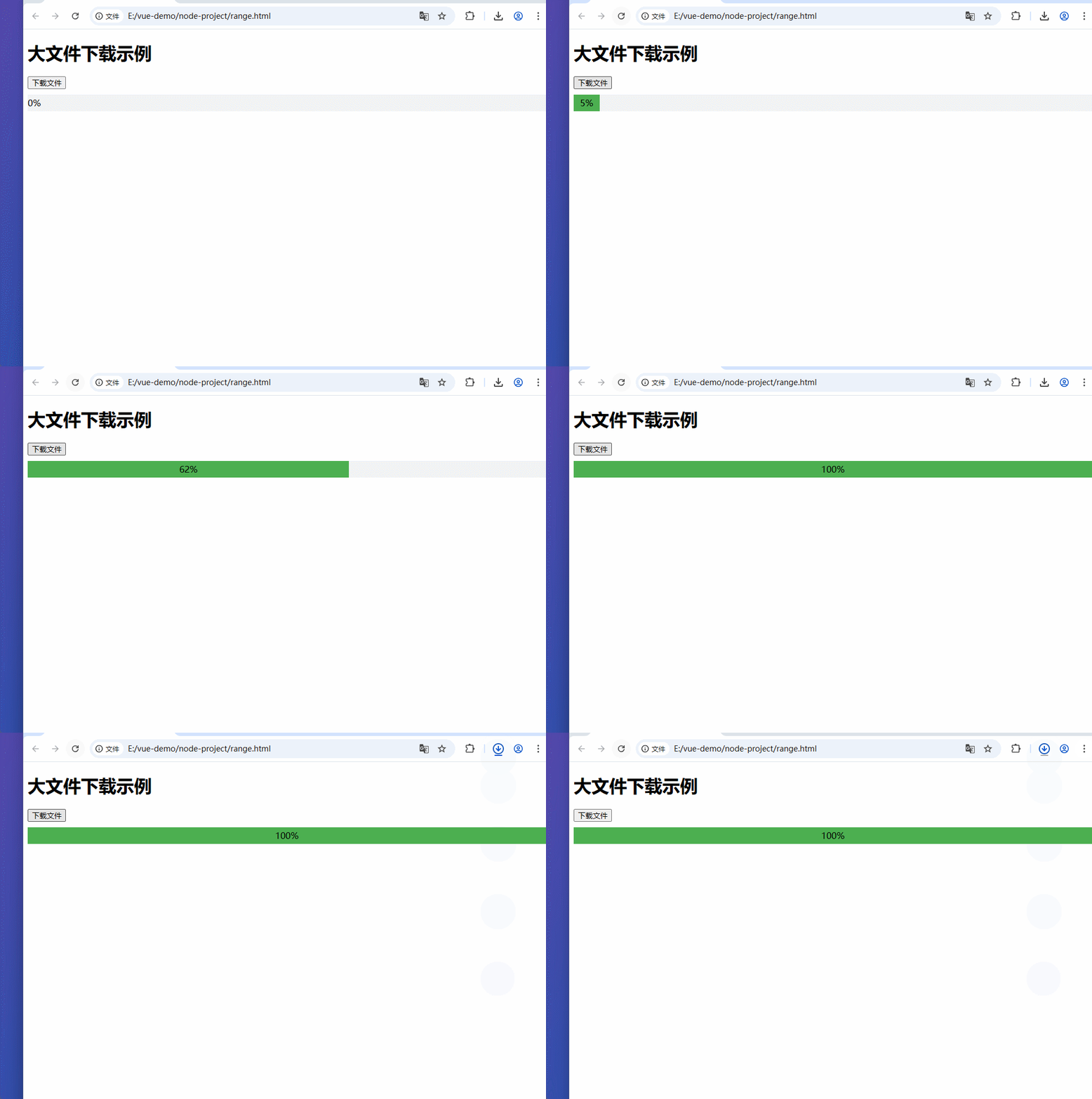
方案3的效果图