React
2.5 jsx的本质
jsx 仅仅只是 React.createElement(component, props, ...children) 函数的语法糖。所有的jsx最终都会被转换成React.createElement的函数调用。
createElement需要传递三个参数:
-
参数一:type
当前ReactElement的类型;
如果是标签元素,那么就使用字符串表示 "div";
如果是组件元素,那么就直接使用组件的名称;
-
参数二:config
所有jsx中的属性都在config中以对象的属性和值的形式存储
-
参数三:children
存放在标签中的内容,以children数组的方式进行存储;
当然,如果是多个元素呢?React内部有对它们进行处理,处理的源码在下方
我们知道默认jsx是通过babel帮我们进行语法转换的,所以我们之前写的jsx代码都需要依赖babel。 可以在babel的官网中快速查看转换的过程:https://babeljs.io/repl/#?presets=react
值得说明的是,type何config是一一对应的,children则是通过for循环(从滴2个开始)依次存储到一个数组当中的。
2.6 虚拟DOM
jsx的本质是createElemen t函数,而createElement函数会利用ReactElement对象 创建JavaScript的对象树->通过ReactDOM.render进行渲染成为真实的DOM
为什么要采用虚拟DOM,而不是直接修改真实的DOM呢
- 很难跟踪状态发生的改变:原有的开发模式,我们很难跟踪到状态发生的改变,不方便针对我们应用程序进行调试;
- 操作真实DOM性能较低:传统的开发模式会进行频繁的DOM操作 ,而这一的做法性能非常的低;
为什么操作真实DOM性能较低?
- 首先,document.createElement本身创建出来的就是一个非常复杂的对象;
- 其次,DOM操作会引起浏览器的回流和重绘,所以在开发中应该避免频繁的DOM操作;
2.7 阶段性案例
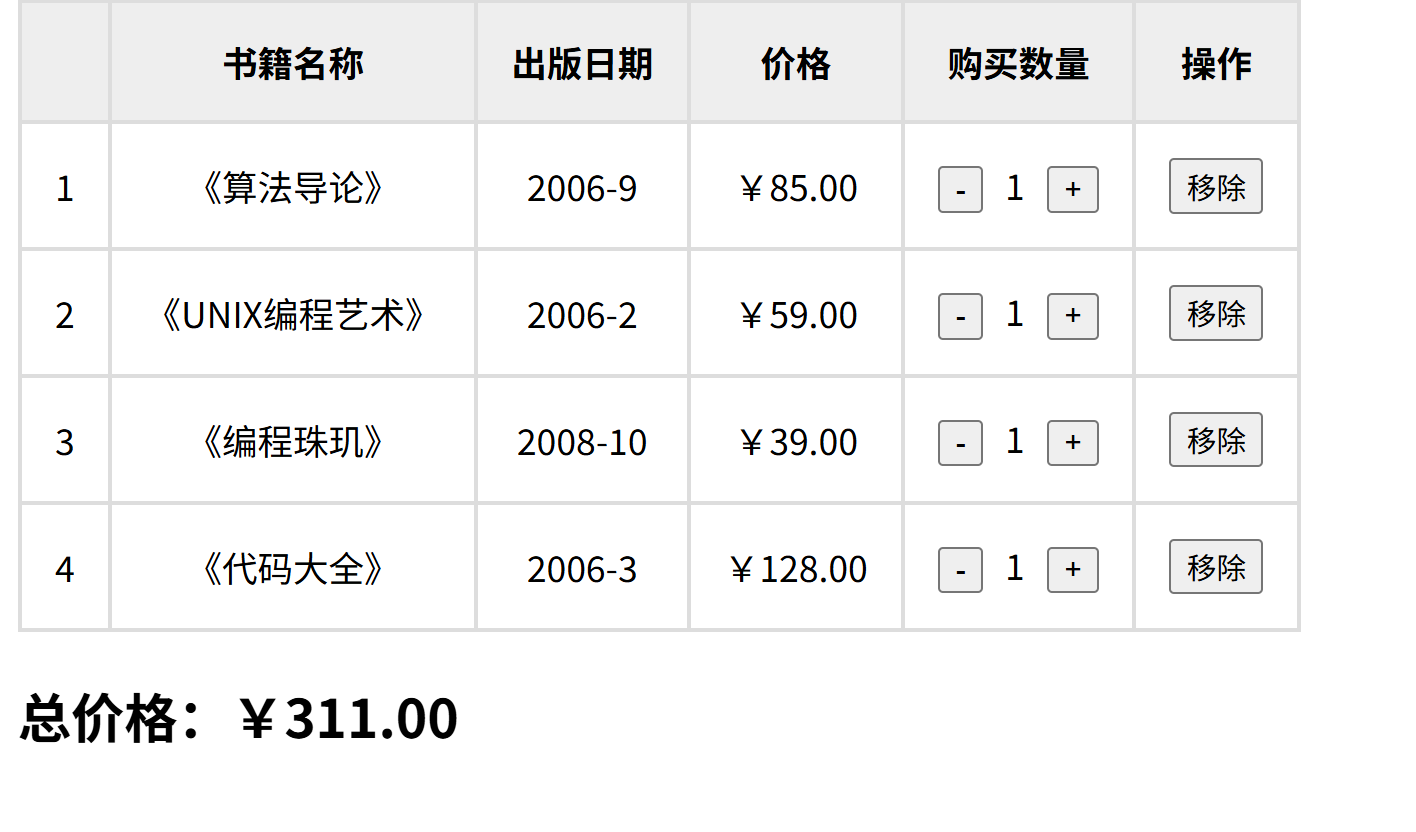
需求:展示书籍数据,算出总价格,数量可以点击增加和减少,选择移除可以移除
技术难点1:渲染数据
map渲染就可以啦
  <tbody>
                  {this.state.books.map((item, index) => (
                    <tr key={item.id}>
                      <td>{index + 1}</td>
                      <td>{item.name}</td>
                      <td>{item.date}</td>
                      <td>{formatPrice(item.price)}</td>
                      <td>
                        <button onClick={() => {this.changeBookNum(index , -1)}}>-</button>
                        <span className="count">{item.count}</span>
                        <button onClick={() => {this.changeBookNum(index , 1)}}>+</button>
                      </td>
                      <td>
                        <button onClick={() => {this.removeItem(index)}}>移除</button>
                      </td>
                    </tr>
                  ))}
                </tbody>
**算出总价格:**使用reduce函数
        getTotalPrice = () => {
          return this.state.books.reduce((total, book) => {
            return total + book.count * book.price;
          }, 0);
};数量可以点击增加和减少:需要一个新的数组,因为setState是不允许改变state里面的数据的
                changeBookNum = (index , count) => {
          // 因为不能违背setState不能改变数据本身
          let newArr = [...this.state.books];
          newArr[index].count += count;
          this.setState({
            books:newArr
          })

       }
**选择移除可以移除:**使用fiolter函数。可以返回一个满足条件的鑫数组
        removeItem = (index) => {
          this.setState ({
            books: this.state.books.filter((item, idx) => index !== idx),
          });
        };
**选择渲染:**如果是存在数据就渲染数据,如果数据全部都没有了就渲染"数据为空"
       renderBooks(){
            const totalPrice = this.getTotalPrice();
          return (
            <div>
              <table>
                <thead>
                  <tr>
                    <th></th>
                    <th>书籍名称</th>
                    <th>出版日期</th>
                    <th>价格</th>
                    <th>购买数量</th>
                    <th>操作</th>
                  </tr>
                </thead>
                <tbody>
                  {this.state.books.map((item, index) => (
                    <tr key={item.id}>
                      <td>{index + 1}</td>
                      <td>{item.name}</td>
                      <td>{item.date}</td>
                      <td>{formatPrice(item.price)}</td>
                      <td>
                        <button onClick={() => {this.changeBookNum(index , -1)}}>-</button>
                        <span className="count">{item.count}</span>
                        <button onClick={() => {this.changeBookNum(index , 1)}}>+</button>
                      </td>
                      <td>
                        <button onClick={() => {this.removeItem(index)}}>移除</button>
                      </td>
                    </tr>
                  ))}
                </tbody>
              </table>
              <h2>总价格:{formatPrice(totalPrice)}</h2>
            </div>
          );
        }
        renderEmpty(){
          return <h2>购物车为空</h2>
        }

        render() {
          return this.state.books.length ? this.renderBooks() : this.renderEmpty();
        }
总体代码如下:
<!DOCTYPE html>
<html lang="en">
  <head>
    <meta charset="UTF-8" />
    <meta name="viewport" content="width=device-width, initial-scale=1.0" />
    <title>react</title>
    <style>
      table {
        border: 2px solid #fff;
        border-collapse: collapse;
        padding: 10px;
      }
      th,
      td {
        text-align: center;
        border: 2px solid #ddd;
        padding: 15px;
      }
      thead {
        background-color: #eee;
        font-weight: 800;
      }
      .count {
        margin: 0 10px;
      }
      tfoot {
        margin-top: 10px;
        font-size: 20px;
        color: black;
        font-weight: 800;
      }
    </style>
  </head>
  <body>
    <div id="app"></div>
    <script
      src="https://unpkg.com/react@16/umd/react.development.js"
      crossorigin
    ></script>
    <script
      src="https://unpkg.com/react-dom@16/umd/react-dom.development.js"
      crossorigin
    ></script>
    <script src="https://unpkg.com/babel-standalone@6/babel.min.js"></script>
    <script src="./format.js"></script>
    <script type="text/babel">
      class App extends React.Component {
        constructor() {
          super();
          this.state = {
            books: [
              {
                id: 1,
                name: "《算法导论》",
                date: "2006-9",
                price: 85.0,
                count: 1,
              },
              {
                id: 2,
                name: "《UNIX编程艺术》",
                date: "2006-2",
                price: 59.0,
                count: 1,
              },
              {
                id: 3,
                name: "《编程珠玑》",
                date: "2008-10",
                price: 39.0,
                count: 1,
              },
              {
                id: 4,
                name: "《代码大全》",
                date: "2006-3",
                price: 128.0,
                count: 1,
              },
            ],
          };
        }
        getTotalPrice = () => {
          return this.state.books.reduce((total, book) => {
            return total + book.count * book.price;
          }, 0);
        };
        removeItem = (index) => {
          this.setState ({
            books: this.state.books.filter((item, idx) => index !== idx),
          });
        };
        renderBooks(){
            const totalPrice = this.getTotalPrice();
          return (
            <div>
              <table>
                <thead>
                  <tr>
                    <th></th>
                    <th>书籍名称</th>
                    <th>出版日期</th>
                    <th>价格</th>
                    <th>购买数量</th>
                    <th>操作</th>
                  </tr>
                </thead>
                <tbody>
                  {this.state.books.map((item, index) => (
                    <tr key={item.id}>
                      <td>{index + 1}</td>
                      <td>{item.name}</td>
                      <td>{item.date}</td>
                      <td>{formatPrice(item.price)}</td>
                      <td>
                        <button onClick={() => {this.changeBookNum(index , -1)}}>-</button>
                        <span className="count">{item.count}</span>
                        <button onClick={() => {this.changeBookNum(index , 1)}}>+</button>
                      </td>
                      <td>
                        <button onClick={() => {this.removeItem(index)}}>移除</button>
                      </td>
                    </tr>
                  ))}
                </tbody>
              </table>
              <h2>总价格:{formatPrice(totalPrice)}</h2>
            </div>
          );
        }
        renderEmpty(){
          return <h2>购物车为空</h2>
        }

        render() {
          return this.state.books.length ? this.renderBooks() : this.renderEmpty();


        }
                changeBookNum = (index , count) => {
          // 因为不能违背setState不能改变数据本身
          let newArr = [...this.state.books];
          newArr[index].count += count;
          this.setState({
            books:newArr
          })

       }
      }
      ReactDOM.render(<App />, document.getElementById("app"));
      // state数据具有不可变性,filter不会修改原来的数组,而是返回应该数组
    </script>
  </body>
</html>