原文链接:(增强)基于sqlite、mysql、redis的消息存储
教程说明
说明:本教程将采用2025年5月20日正式的GA版,给出如下内容
- 核心功能模块的快速上手教程
- 核心功能模块的源码级解读
- Spring ai alibaba增强的快速上手教程 + 源码级解读
版本:JDK21 + SpringBoot3.4.5 + SpringAI 1.0.0 + SpringAI Alibaba最新
将陆续完成如下章节教程。本章是第二章(advisor)快速上手---sqlite、mysql、redis消息存储
代码开源如下:https://github.com/GTyingzi/spring-ai-tutorial
(增强)基于 sqlite、mysql、redis 的消息存储
!TIP
实现了基于 sqlite、mysql、redis 的消息存储
实战代码可见:https://github.com/GTyingzi/spring-ai-tutorial 下的 advisor/advisor-memory-sqlite、advisor-memory-mysql、advisor-memory-redis
代码已贡献至:https://github.com/springaialibaba/spring-ai-alibaba-examples/pull/238
pom 文件
xml
<properties>
    <sqlite.verson>3.49.1.0</sqlite.verson>
    <mysql.version>8.0.32</mysql.version>
    <jedis.version>5.2.0</jedis.version>
</properties>


<dependencies>
    <dependency>
        <groupId>org.springframework.boot</groupId>
        <artifactId>spring-boot-starter-web</artifactId>
    </dependency>

    <dependency>
        <groupId>org.springframework.ai</groupId>
        <artifactId>spring-ai-autoconfigure-model-openai</artifactId>
    </dependency>

    <dependency>
        <groupId>org.springframework.ai</groupId>
        <artifactId>spring-ai-autoconfigure-model-chat-client</artifactId>
    </dependency>


    <dependency>
        <groupId>com.alibaba.cloud.ai</groupId>
        <artifactId>spring-ai-alibaba-starter-memory</artifactId>
    </dependency>

    <dependency>
        <groupId>com.alibaba.cloud.ai</groupId>
        <artifactId>spring-ai-alibaba-starter-memory-jdbc</artifactId>
    </dependency>

    <dependency>
        <groupId>com.alibaba.cloud.ai</groupId>
        <artifactId>spring-ai-alibaba-starter-memory-redis</artifactId>
    </dependency>

    <dependency>
        <groupId>org.xerial</groupId>
        <artifactId>sqlite-jdbc</artifactId>
        <version>${sqlite.verson}</version>
    </dependency>

    <dependency>
        <groupId>mysql</groupId>
        <artifactId>mysql-connector-java</artifactId>
        <version>${mysql.version}</version>
    </dependency>

    <dependency>
        <groupId>redis.clients</groupId>
        <artifactId>jedis</artifactId>
        <version>${jedis.version}</version>
    </dependency>

</dependencies>
application.yml
yaml
server:
  port: 8080

spring:
  application:
    name: advisor-memory-mysql

  ai:
    openai:
      api-key: ${DASHSCOPE_API_KEY}
      base-url: https://dashscope.aliyuncs.com/compatible-mode
      chat:
        options:
          model: qwen-max

    chat:
      memory:
        repository:
          jdbc:
            mysql:
              jdbc-url: jdbc:mysql://localhost:3306/spring_ai_alibaba_mysql?useUnicode=true&characterEncoding=utf-8&useSSL=false&allowPublicKeyRetrieval=true&zeroDateTimeBehavior=convertToNull&transformedBitIsBoolean=true&allowMultiQueries=true&tinyInt1isBit=false&allowLoadLocalInfile=true&allowLocalInfile=true&allowUrl
              username: root
              password: root
              driver-class-name: com.mysql.cj.jdbc.Driver
              enabled: true

    memory:
      redis:
        host: localhost
        port: 6379
        timeout:  5000
        password:
Sqllite
SqliteMemoryConfig
java
package com.spring.ai.tutorial.advisor.memory.config;

import com.alibaba.cloud.ai.memory.jdbc.SQLiteChatMemoryRepository;
import org.springframework.context.annotation.Bean;
import org.springframework.context.annotation.Configuration;
import org.springframework.jdbc.core.JdbcTemplate;
import org.springframework.jdbc.datasource.DriverManagerDataSource;

@Configuration
public class SqliteMemoryConfig {

    @Bean
    public SQLiteChatMemoryRepository sqliteChatMemoryRepository() {
        DriverManagerDataSource dataSource = new DriverManagerDataSource();
        dataSource.setDriverClassName("org.sqlite.JDBC");
        dataSource.setUrl("jdbc:sqlite:advisor/advisor-memory-sqlite/src/main/resources/chat-memory.db");
        JdbcTemplate jdbcTemplate = new JdbcTemplate(dataSource);
        return SQLiteChatMemoryRepository._sqliteBuilder_()
                .jdbcTemplate(jdbcTemplate)
                .build();
    }
}
SqliteMemoryController
java
package com.spring.ai.tutorial.advisor.memory.controller;

import com.alibaba.cloud.ai.memory.jdbc.SQLiteChatMemoryRepository;
import org.springframework.ai.chat.client.ChatClient;
import org.springframework.ai.chat.client.advisor.MessageChatMemoryAdvisor;
import org.springframework.ai.chat.memory.MessageWindowChatMemory;
import org.springframework.ai.chat.messages.Message;
import org.springframework.web.bind.annotation.GetMapping;
import org.springframework.web.bind.annotation.RequestMapping;
import org.springframework.web.bind.annotation.RequestParam;
import org.springframework.web.bind.annotation.RestController;

import java.util.List;

import static org.springframework.ai.chat.memory.ChatMemory._CONVERSATION_ID_;

@RestController
@RequestMapping("/advisor/memory/sqlite")
public class SqliteMemoryController {

    private final ChatClient chatClient;
    private final int MAX_MESSAGES = 100;
    private final MessageWindowChatMemory messageWindowChatMemory;

    public SqliteMemoryController(ChatClient.Builder builder, SQLiteChatMemoryRepository sqliteChatMemoryRepository) {
        this.messageWindowChatMemory = MessageWindowChatMemory._builder_()
                .chatMemoryRepository(sqliteChatMemoryRepository)
                .maxMessages(MAX_MESSAGES)
                .build();

        this.chatClient = builder
                .defaultAdvisors(
                        MessageChatMemoryAdvisor._builder_(messageWindowChatMemory)
                                .build()
                )
                .build();
    }

    @GetMapping("/call")
    public String call(@RequestParam(value = "query", defaultValue = "你好,我的外号是影子,请记住呀") String query,
                       @RequestParam(value = "conversation_id", defaultValue = "yingzi") String conversationId
    ) {
        return chatClient.prompt(query)
                .advisors(
                        a -> a.param(_CONVERSATION_ID_, conversationId)
                )
                .call().content();
    }

    @GetMapping("/messages")
    public List<Message> messages(@RequestParam(value = "conversation_id", defaultValue = "yingzi") String conversationId) {
        return messageWindowChatMemory.get(conversationId);
    }
}
效果
以会话"yingzi"发送消息,此时消息存储至 sqllite
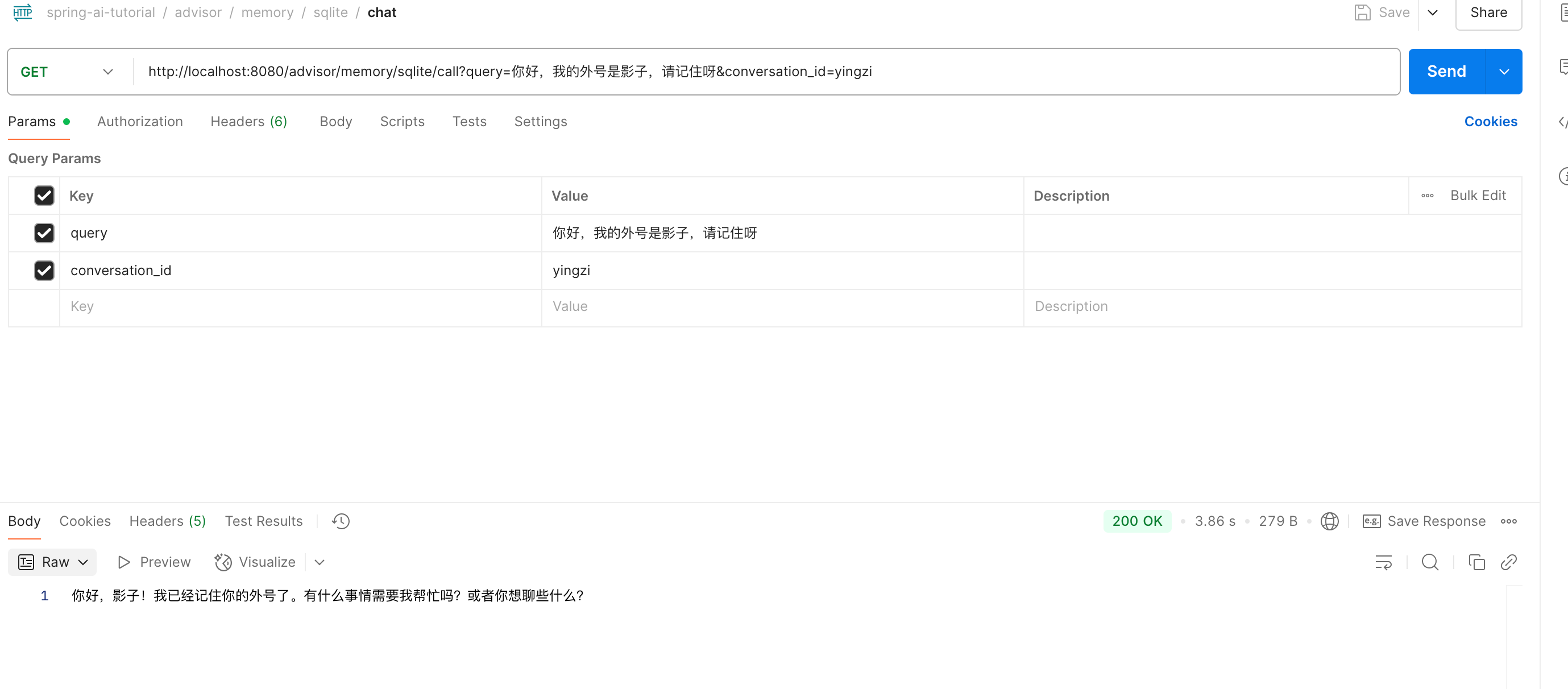
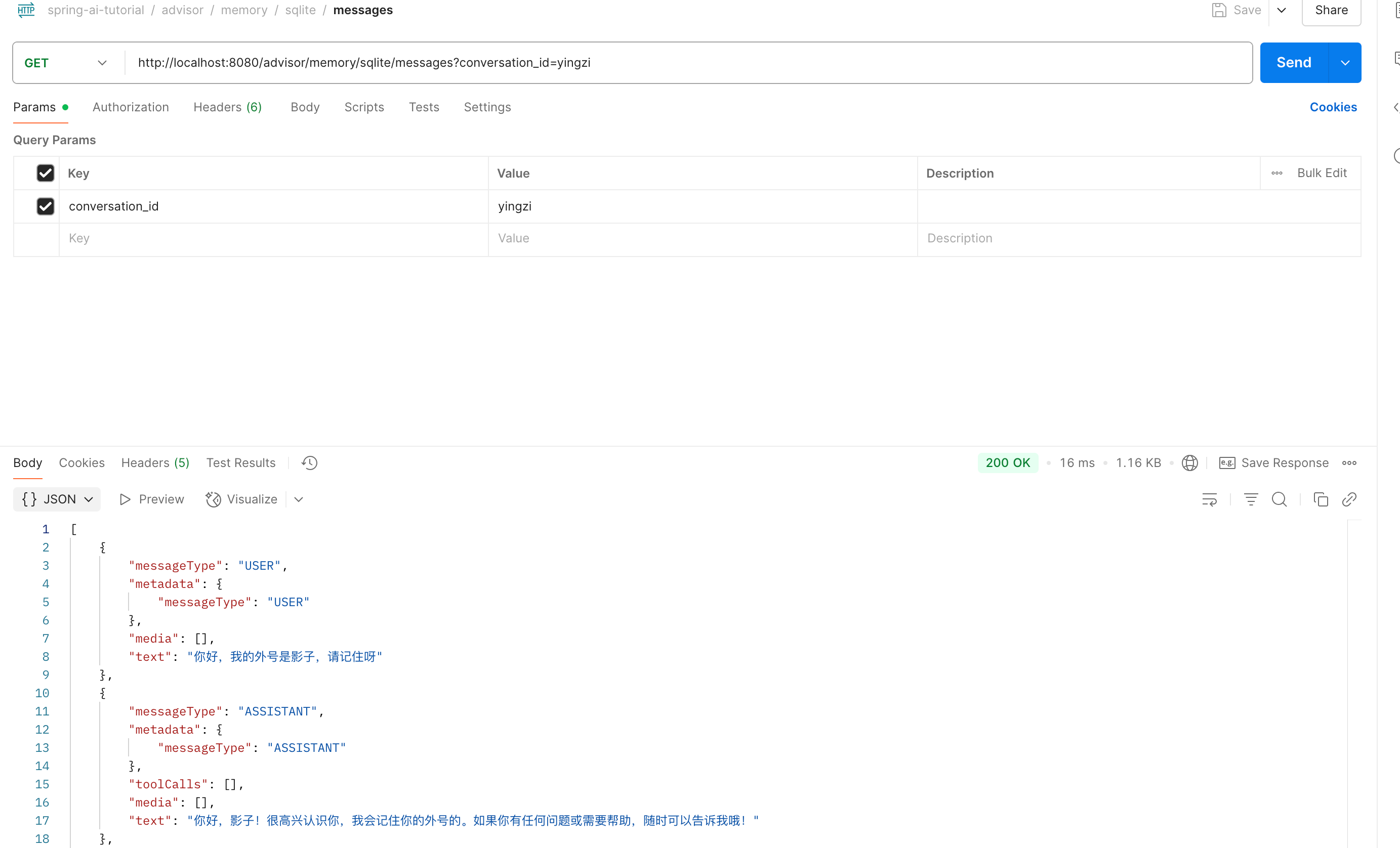
从 sqllite 获取会话"yingzi"对应的消息
Mysql
MysqlMemoryConfig
java
package com.spring.ai.tutorial.advisor.memory.config;

import com.alibaba.cloud.ai.memory.jdbc.MysqlChatMemoryRepository;
import org.springframework.beans.factory.annotation.Value;
import org.springframework.context.annotation.Bean;
import org.springframework.context.annotation.Configuration;
import org.springframework.jdbc.core.JdbcTemplate;
import org.springframework.jdbc.datasource.DriverManagerDataSource;

@Configuration
public class MysqlMemoryConfig {

    @Value("${spring.ai.chat.memory.repository.jdbc.mysql.jdbc-url}")
    private String mysqlJdbcUrl;
    @Value("${spring.ai.chat.memory.repository.jdbc.mysql.username}")
    private String mysqlUsername;
    @Value("${spring.ai.chat.memory.repository.jdbc.mysql.password}")
    private String mysqlPassword;
    @Value("${spring.ai.chat.memory.repository.jdbc.mysql.driver-class-name}")
    private String mysqlDriverClassName;

    @Bean
    public MysqlChatMemoryRepository mysqlChatMemoryRepository() {
        DriverManagerDataSource dataSource = new DriverManagerDataSource();
        dataSource.setDriverClassName(mysqlDriverClassName);
        dataSource.setUrl(mysqlJdbcUrl);
        dataSource.setUsername(mysqlUsername);
        dataSource.setPassword(mysqlPassword);
        JdbcTemplate jdbcTemplate = new JdbcTemplate(dataSource);
        return MysqlChatMemoryRepository._mysqlBuilder_()
                .jdbcTemplate(jdbcTemplate)
                .build();
    }
}
MysqlMemoryController
java
package com.spring.ai.tutorial.advisor.memory.controller;

import com.alibaba.cloud.ai.memory.jdbc.MysqlChatMemoryRepository;
import org.springframework.ai.chat.client.ChatClient;
import org.springframework.ai.chat.client.advisor.MessageChatMemoryAdvisor;
import org.springframework.ai.chat.memory.MessageWindowChatMemory;
import org.springframework.ai.chat.messages.Message;
import org.springframework.web.bind.annotation.GetMapping;
import org.springframework.web.bind.annotation.RequestMapping;
import org.springframework.web.bind.annotation.RequestParam;
import org.springframework.web.bind.annotation.RestController;

import java.util.List;

import static org.springframework.ai.chat.memory.ChatMemory._CONVERSATION_ID_;

@RestController
@RequestMapping("/advisor/memory/mysql")
public class MysqlMemoryController {

    private final ChatClient chatClient;
    private final int MAX_MESSAGES = 100;
    private final MessageWindowChatMemory messageWindowChatMemory;

    public MysqlMemoryController(ChatClient.Builder builder, MysqlChatMemoryRepository mysqlChatMemoryRepository) {
        this.messageWindowChatMemory = MessageWindowChatMemory._builder_()
                .chatMemoryRepository(mysqlChatMemoryRepository)
                .maxMessages(MAX_MESSAGES)
                .build();

        this.chatClient = builder
                .defaultAdvisors(
                        MessageChatMemoryAdvisor._builder_(messageWindowChatMemory)
                                .build()
                )
                .build();
    }

    @GetMapping("/call")
    public String call(@RequestParam(value = "query", defaultValue = "你好,我的外号是影子,请记住呀") String query,
                       @RequestParam(value = "conversation_id", defaultValue = "yingzi") String conversationId
    ) {
        return chatClient.prompt(query)
                .advisors(
                        a -> a.param(_CONVERSATION_ID_, conversationId)
                )
                .call().content();
    }

    @GetMapping("/messages")
    public List<Message> messages(@RequestParam(value = "conversation_id", defaultValue = "yingzi") String conversationId) {
        return messageWindowChatMemory.get(conversationId);
    }
}
效果
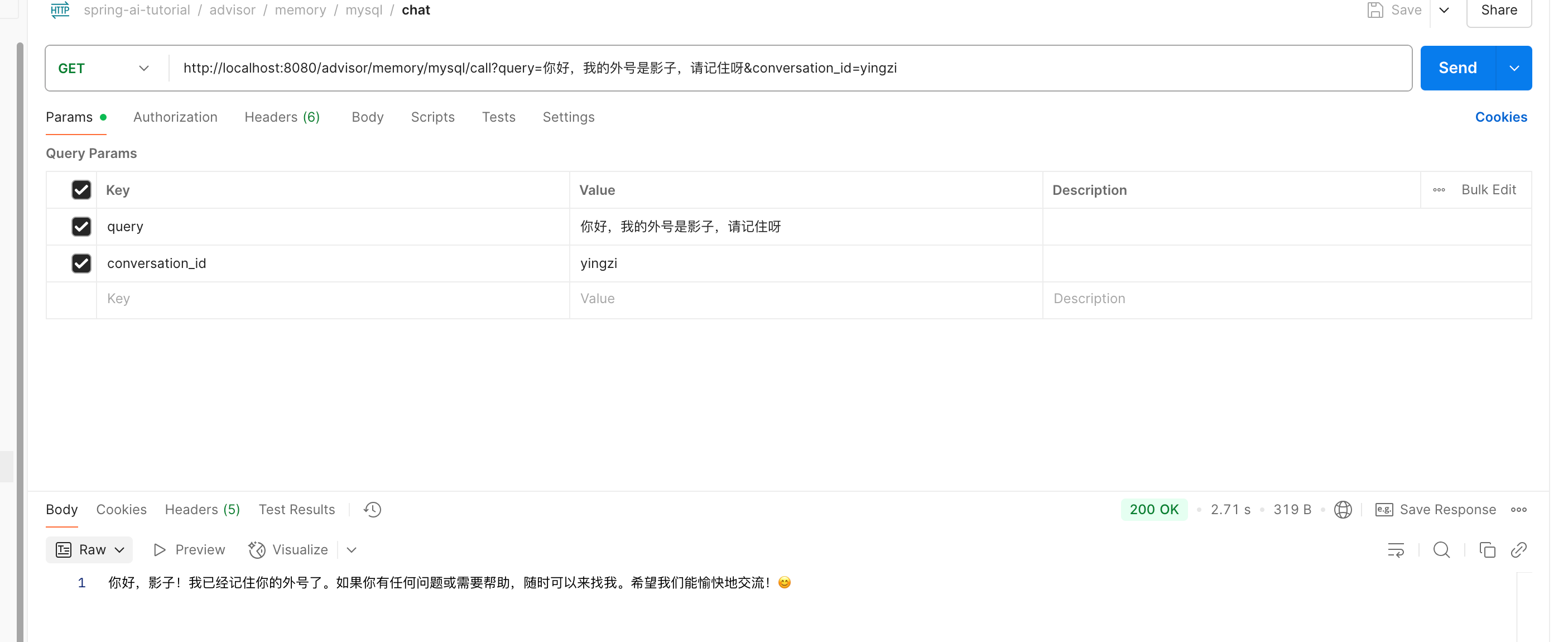
以会话"yingzi"发送消息,此时消息存储至 mysql
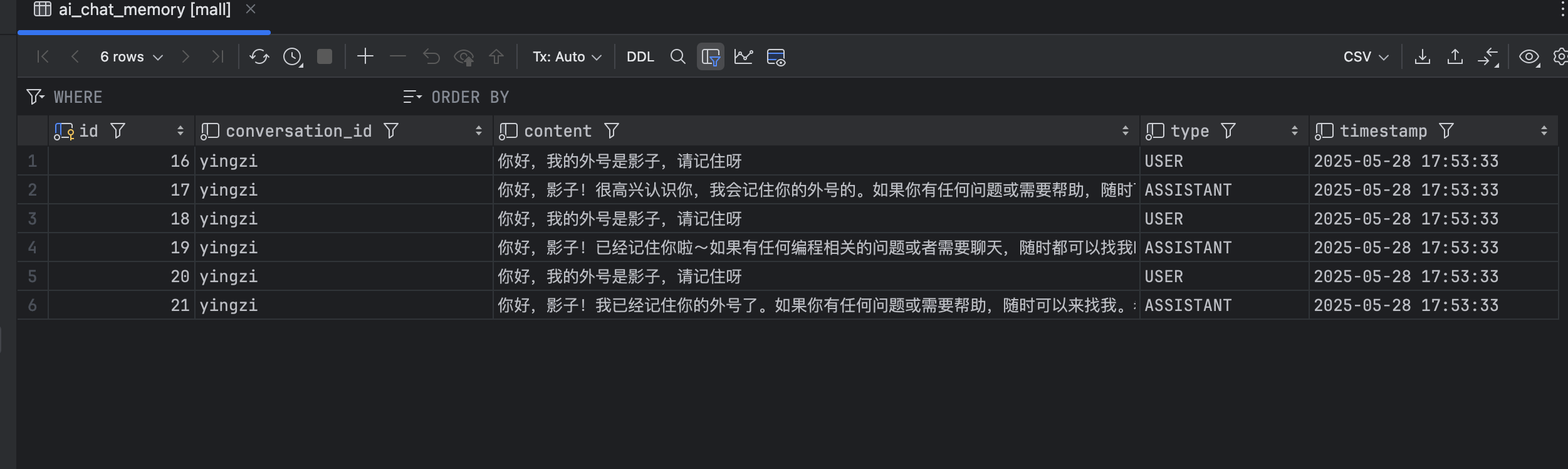
消息被存储至 mysql 中
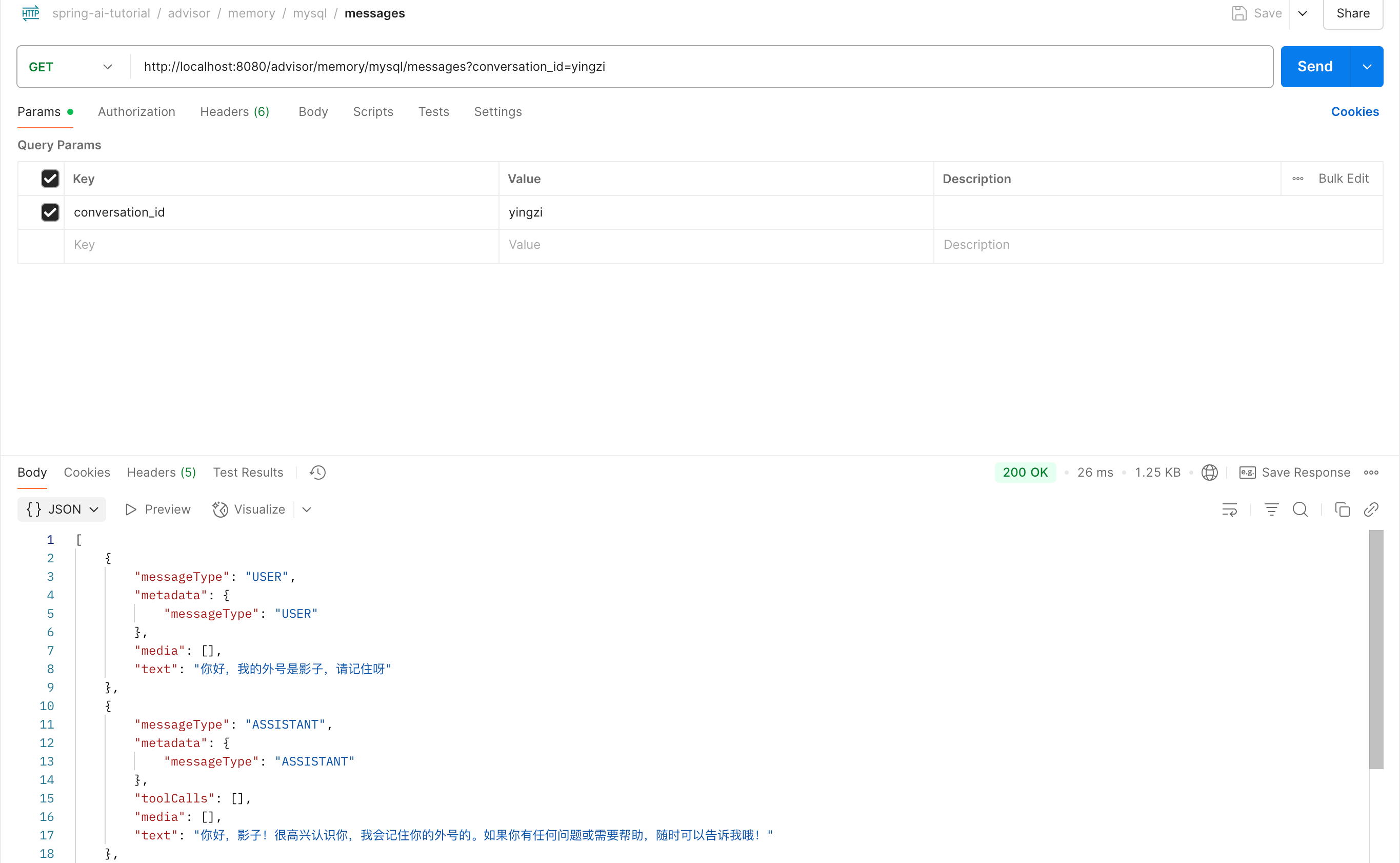
从 mysql 获取会话"yingzi"对应的消息
Redis
RedisMemoryConfig
java
package com.spring.ai.tutorial.advisor.memory.config;

import com.alibaba.cloud.ai.memory.redis.RedisChatMemoryRepository;
import org.springframework.beans.factory.annotation.Value;
import org.springframework.context.annotation.Bean;
import org.springframework.context.annotation.Configuration;

@Configuration
public class RedisMemoryConfig {

    @Value("${spring.ai.memory.redis.host}")
    private String redisHost;
    @Value("${spring.ai.memory.redis.port}")
    private int redisPort;
    @Value("${spring.ai.memory.redis.password}")
    private String redisPassword;
    @Value("${spring.ai.memory.redis.timeout}")
    private int redisTimeout;

    @Bean
    public RedisChatMemoryRepository redisChatMemoryRepository() {
        return RedisChatMemoryRepository._builder_()
                .host(redisHost)
                .port(redisPort)
                // 若没有设置密码则注释该项
//           .password(redisPassword)
                .timeout(redisTimeout)
                .build();
    }
}
RedisMemoryController
java
package com.spring.ai.tutorial.advisor.memory.controller;

import com.alibaba.cloud.ai.memory.redis.RedisChatMemoryRepository;
import org.springframework.ai.chat.client.ChatClient;
import org.springframework.ai.chat.client.advisor.MessageChatMemoryAdvisor;
import org.springframework.ai.chat.memory.MessageWindowChatMemory;
import org.springframework.ai.chat.messages.Message;
import org.springframework.web.bind.annotation.GetMapping;
import org.springframework.web.bind.annotation.RequestMapping;
import org.springframework.web.bind.annotation.RequestParam;
import org.springframework.web.bind.annotation.RestController;

import java.util.List;

import static org.springframework.ai.chat.memory.ChatMemory._CONVERSATION_ID_;

@RestController
@RequestMapping("/advisor/memory/redis")
public class RedisMemoryController {

    private final ChatClient chatClient;
    private final int MAX_MESSAGES = 100;
    private final MessageWindowChatMemory messageWindowChatMemory;

    public RedisMemoryController(ChatClient.Builder builder, RedisChatMemoryRepository redisChatMemoryRepository) {
        this.messageWindowChatMemory = MessageWindowChatMemory._builder_()
                .chatMemoryRepository(redisChatMemoryRepository)
                .maxMessages(MAX_MESSAGES)
                .build();

        this.chatClient = builder
                .defaultAdvisors(
                        MessageChatMemoryAdvisor._builder_(messageWindowChatMemory)
                                .build()
                )
                .build();
    }

    @GetMapping("/call")
    public String call(@RequestParam(value = "query", defaultValue = "你好,我的外号是影子,请记住呀") String query,
                       @RequestParam(value = "conversation_id", defaultValue = "yingzi") String conversationId
    ) {
        return chatClient.prompt(query)
                .advisors(
                        a -> a.param(_CONVERSATION_ID_, conversationId)
                )
                .call().content();
    }

    @GetMapping("/messages")
    public List<Message> messages(@RequestParam(value = "conversation_id", defaultValue = "yingzi") String conversationId) {
        return messageWindowChatMemory.get(conversationId);
    }
}
效果
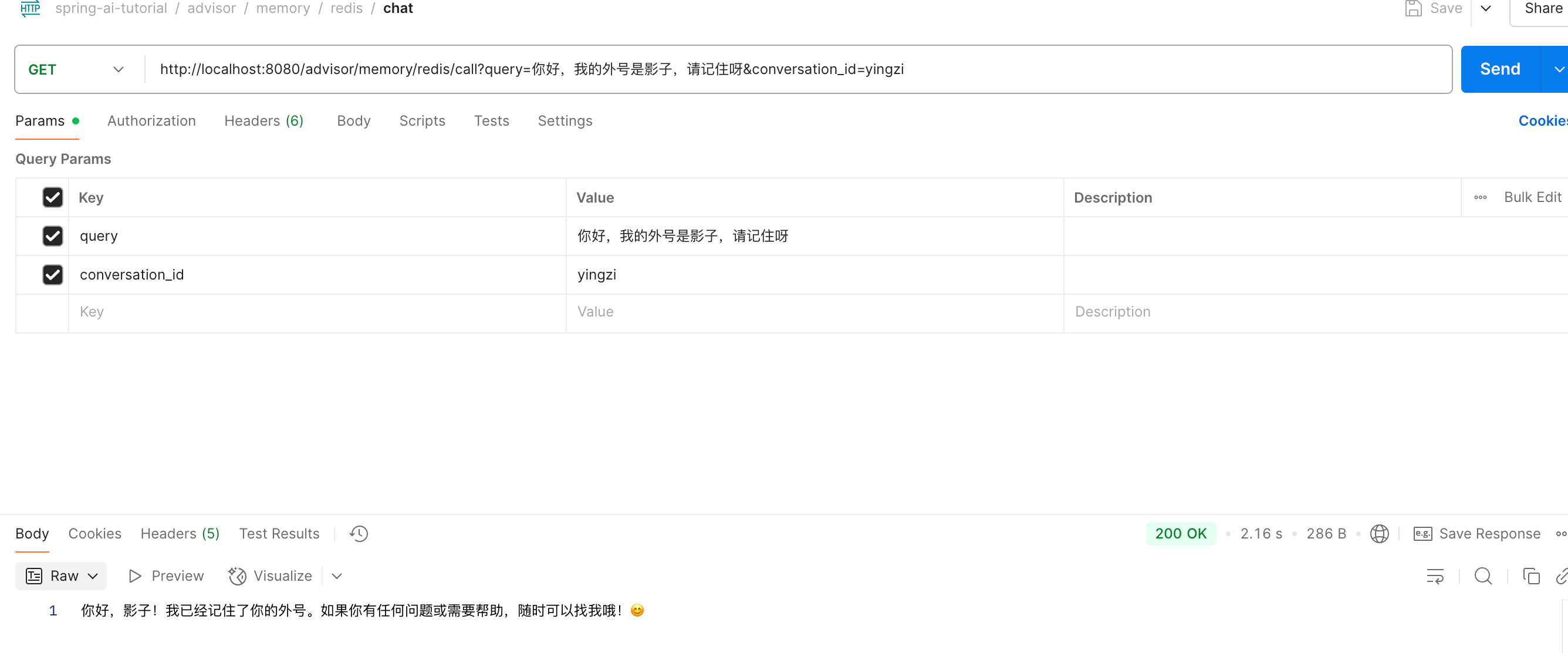
以会话"yingzi"发送消息,此时消息存储至 redis
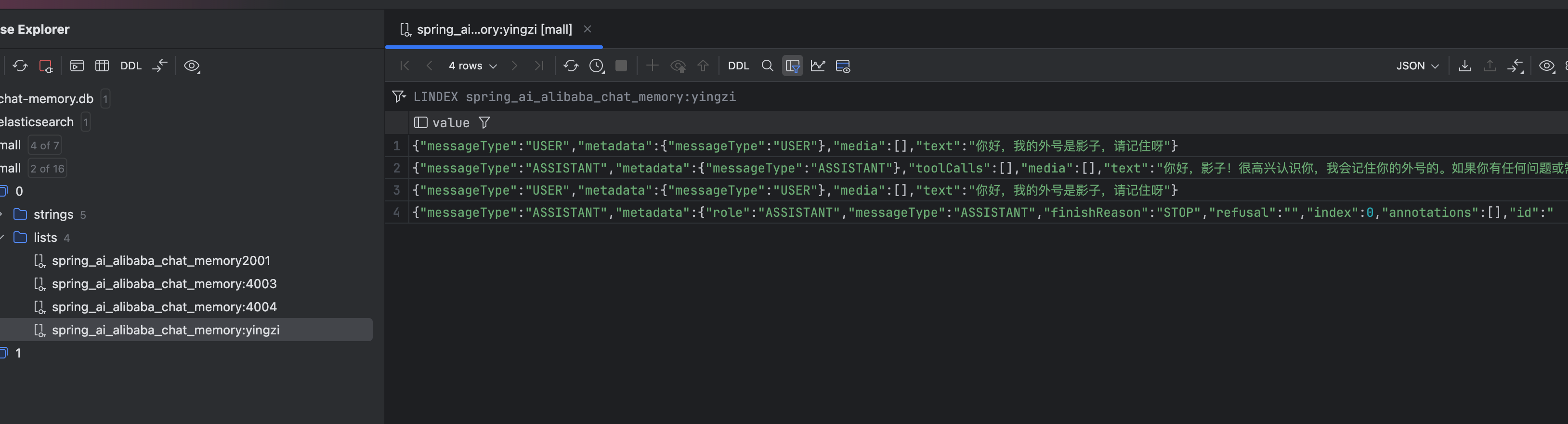
消息被存储至 redis 中
从 redis 获取会话"yingzi"对应的消息