序列化和反序列化概念
序列化是将对象的状态信息转换为可以存储或传输的形式的过程。在序列化期间,对象将其当前状态写入到临时或持久性存储区。以后可以通过从存储区中读取或反序列化对象的状态,重新创建该对象。简单来说,就是把内存中的数据对象按照一定的规则变成一个线性的字节序列 ,这样就方便存储到文件、数据库或者在网络上传输。
在网络通信中,数据并不是简单的把数据"揉合"在一起,然后再发送出去。而是将数据按照一定的方式组合起来,才能让接收方进行合理的解析。假如有以下数据。
新年快乐2025.1.10Jack
按照我们人类的思考方式,这个数据是叫一个Jack的用户在2025.1.10发送了一个消息,叫新年快乐,这是很容易理解的。但是对于计算机来说,这段数据可能是叫新年快乐的用户在2025.1.10发送了Jack的消息,或者是其他形式的消息组合。所以对于计算机来说,这段数据之间应该如何进行区分,分节符在哪里?
对于上面的问题,我们要设定一些规则来组织数据,这种行为被称为序列化。而从组织好的数据中还原出目标信息,称为反序列化。反序列化是序列化的逆过程,它将序列化后的字节流、XML、JSON 等格式的数据重新转换为原来的数据结构或对象的过程。这样就可以在程序中再次使用这些数据,就好像它们从未离开过内存一样。
当前主流的序列化方式有三种,分别是是XML,JSON,protobuf。接下来我们将重点学习JSON的序列化方式,如果想用二进制的方式来序列化数据,可以使用protobuf,不过学习起来会比较难。我会在后面进行protobuf的讲解。
jsoncpp的使用
jsoncpp库中的类被定义到了一个Json命名空间中,建议在使用这个库的时候先声明这个命名空间。
cpp
using namespace Json;使用jsoncpp库解析json格式的数据,我们只需要掌握三个类:
Value类:将json支持的数据类型进行了包装,最终得到一个Value类型。FastWriter类:将Value对象中的数据序列化为字符串。Reader类:反序列化,将json字符串解析成Value类型。
Value类
这个类可以看做是一个包装器,它可以封装Json支持的所有类型,这样我们在处理数据的时候就方便多了。
| 枚举类型 | 说明 | 翻译 |
|---|---|---|
| nullValue | 'null value' | 不表示任何数据,空值 |
| intValue | signed integer value | 表示有符号整数 |
| uintValue | usigned integer value | 表示无符号整数 |
| realValue | double value | 表示浮点数 |
| stringValue | UTF-8 string value | 表示utf8格式的字符串 |
| booleanValue | bool value | 表示布尔数 |
| arrayValue | array value(ordered list) | 表示数组,即Json串中的\[\] |
| objectValue | object value(collection of name/value pairs) | 表示键值对,即Json串中的{} |
构造函数
Value类为我们提供了很多构造函数,通过构造函数来封装数据,最终得到一个统一的类型。
cpp
Value(ValueType type = nullValue);
Value(Int value);
Value(UInt value);
Value(Int64 value);
Value(double value);
Value(const char* value);
Value(const char* begin, const char* end);
Value(bool value);
Value(const Value& other);
Value(Value&& other);
检测保存的数据类型
cpp
bool isNull() const;
bool isBool() const;
bool isInt() const;
bool isInt64() const;
bool isUInt() const;
bool isUInt64() const;
bool isIntegral() const;
bool isDouble() const;
bool isNumberic() const;
bool isString() const;
bool isArray() const;
bool isObject() const;
其中这里有两个接口比较特殊,一个是 isNumeric() 另一个是 isIntegral()。
先对 isNumeric() 进行说明,字面意思就是"是否为数字",实际上在 Json::Value 类的实现中等同于 isDouble(),因此这两个函数是等效的,实现代码如下:
cpp
bool Value::isNumeric() const {
   return isDouble(); }
在使用过程中可以直接用 isDouble() 代替 isNumeric(),反之亦然。
isIntegral() 的作用主要是对浮点型数据的值进行了严格限制,如果类型为 int 或者 uint,该接口直接返回真值。如果类型为 double,因为 m a x U I n t 64 = 2 64 − 1 maxUInt64=2^{64}-1 maxUInt64=264−1 不能精确表示为 double,因此 double(maxUInt64)将四舍五入为 2 64 2^{64} 264。因此,我们要求该值严格小于限制。
将Value对象转换为实际类型
cpp
Int asInt() const;
UInt asUInt() const;
Int64 asInt64() const;
UInt64 asUInt64() const;
LargestInt asLargestInt() const;
LargestUInt asLargestUInt() const;
JSONCPP_STRING asString() const;  //返回C++风格的字符串
float asFloat() const;
double asDouble() const;
bool asBool() const;
const char* asCString() const;  //返回C分格的字符串
对json数组的操作
cpp
ArrayIndex size() const;
Value& operator[](ArrayIndex index);
Value& operator[](int index);
const Value& operator[](ArrayIndex index) const;
const Value& operator[](int index) const;
// 根据下标的index返回这个位置的value值
// 如果没找到这个index对应的value,这回第二个参数的defaultValue
Value get(ArrayIndex index,const Value& defaultValue) const;
Value& append(const Value& value);
const_iterator begin() const;
const_iterator end() const;
iterator begin() const;
iterator end();
对json对象的操作
cpp
Value& operator[](const char* key);
const Value& opertaor[](const char* key) const;
Value& operator[](const JSONCPP_STRING key);
const Value& operator[](const JSON_STRING& key) const;
Value& operator[](const StaticString& key);

// 通过key,得到value的值
Value get(const char* key, const Value& defaultValue) const;
Value get(const JSONCPP_STRING& key, const Value& defaultValue) const;
Value get(const CppTL::ConstString& key, const Value& defaultValue) const;

// 得到对象中所有的键值
typedef std::vector<std::string> Members;
Members getMemberNames() const;
将Value对象数据序列化为string
cpp
// 序列化得到的字符串有样式 -> 带换行 -> 方便阅读
// 写配置文件的时候
std::string toStyledString() const;
FastWriter类
cpp
// 将数据序列化 -> 换行
// 进行数据的网络传输
std::string Json::FastWriter::write(const Value& root);
Reader类
当需要进行反序列化的时候,就需要Reader类,核心函数接口如下:
bool Json::Reader::parse(const string& document, Value& root, bool collectComments = true);
参数:
document:json格式字符串root:传出参数,存储了json字符串中解析出的数据collectComments:是否保存json字符串中的注释信息
bool Json::Reader::parse(const char* beginDoc, const char* endDoc, Value& root, bool colletcComments = true);
通过begindoc和enddoc指针定位一个json字符串,这个字符串可以是完成的json字符串,也可以是部分json字符串。
bool parse(istream& is, Value& root, bool collectComments = true);
write的文件流(ostream),read的文件流(istream)。假设要解析的json数据在磁盘文件中,is流对象指向一个磁盘文件,读操作
举例
序列化
假设我们要将下面的数据进行序列化:
name = Jack;
age = 12;
message = hello world;
time = 2025.1.10
代码如下:
cpp
#include <iostream>
#include <jsoncpp/json/json.h>

using namespace std;

int main()
{
    // 创建一个Json::Value对象
    Json::Value root;

    // 向对象中添加数据
    root["name"] = "Jack";
    root["age"] = 22;
    root["messmge"] = "hello world";
    root["time"] = "2025.1.10";

    // 创建一个Json::FastWriter
    Json::FastWriter w;

    // 创建一个Json::StyledWriter
    Json::StyledWriter w1;

    // 将Json::Value对象转换为字符串
    string output = w.write(root);
    string res = w1.write(root);

    // 打印输出
    cout << "FastWriter格式:" << endl;
    cout << output << endl;

    cout << "StyledWriter格式:" << endl;
    cout << res << endl;
    return 0;
}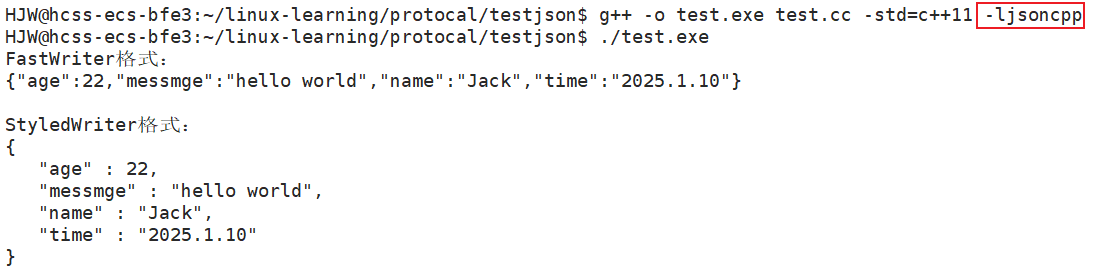
我们可以发现顺序是按照字母顺序进行排列的。Fastwriter类和StyledWriter类的序列化形式的数据内容是一样的,区别在于序列化格式不同。
-
StyledWriter:会给json数据添加换行,让数据看起来更美观。 -
FastWriter:去掉所有的换行,数据之间用逗号隔开。整个json就是一行数据。
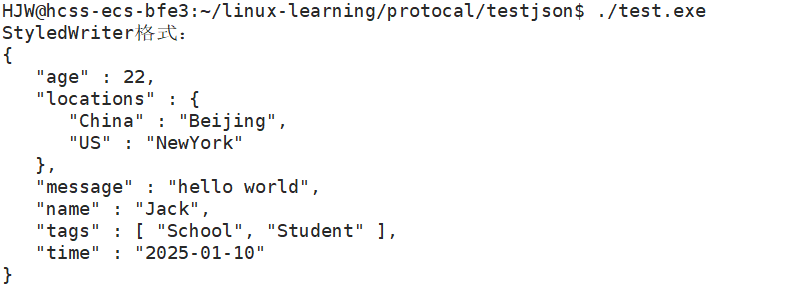
如过我们的数据需要用数组和对象来进行表示,其中用[]是数组,用{}是对象,如下:name = Jack;
age = 12;
message = hello world;
time = 2025.1.10
[
"School",
"student"
]
{
"China":"Beijing",
"US":"NewYork"
}
那么代码就可以这样写:
cpp
#include <iostream>
#include <jsoncpp/json/json.h>

using namespace std;
int main()
{
    // 创建一个Json::Value对象
    Json::Value root;

    // 向对象中添加数据
    root["name"] = "Jack";
    root["age"] = 22;
    root["message"] = "hello world";
    root["time"] = "2025-01-10";

    // 创建数组并添加到root中合适的键对应位置
    Json::Value arr;
    arr.append("School");
    arr.append("Student");
    root["tags"] = arr; // 修改添加方式,让数组作为"tags"键对应的值

    // 创建子对象并添加到root中合适的键对应位置
    Json::Value object;
    object["China"] = "Beijing";
    object["US"] = "NewYork";
    root["locations"] = object; // 修改添加方式,让该对象作为"locations"键对应的值

    // 创建一个Json::StyledWriter
    Json::StyledWriter w1;

    // 将Json::Value对象转为字符串
    string res = w1.write(root);

    // 打印输出
    cout << "StyledWriter格式:" << endl;
    cout << res << endl;

    return 0;
}
反序列化
cpp
int main()
{

    std::string str = "{\"content\": \"Hello JsonCpp\"}";
    Json::Reader reader;
    Json::Value root;
    if (reader.parse(str, root))
        std::cout << root["content"].asString() << std::endl;
    return 0;
}
调用 Reader.parse() 接口尝试解析 json 字符串 str,当 str 满足 json 格式之后,调用 Value 的 [] 操作符将 "content" 的值取出来,然后再进行类型转换,取出实际的类型数据。
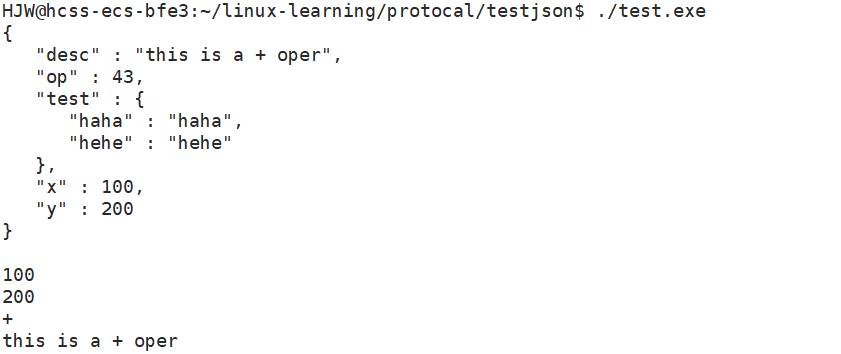
cpp
int main()
{
    Json::Value part1;
    part1["haha"] = "haha";
    part1["hehe"] = "hehe";

    Json::Value root;
    root["x"] = 100;
    root["y"] = 200;
    root["op"] = '+';
    root["desc"] = "this is a + oper";
    root["test"] = part1;
    //Json::FastWriter w;
    Json::StyledWriter w;
    std::string res = w.write(root);
    std::cout << res << std::endl;

    sleep(3);

    Json::Value v;
    Json::Reader r;
    r.parse(res, v);
    int x = v["x"].asInt();  // 类型转换
    int y = v["y"].asInt();
    char op = v["op"].asInt();
    std::string desc = v["desc"].asString();
    Json::Value temp = v["test"];
    std::cout << x << std::endl;
    std::cout << y << std::endl;
    std::cout << op << std::endl;
    std::cout << desc << std::endl;

    return 0;
}