人家antd都支持,elementplus 也支持,vue2的没有,很烦。
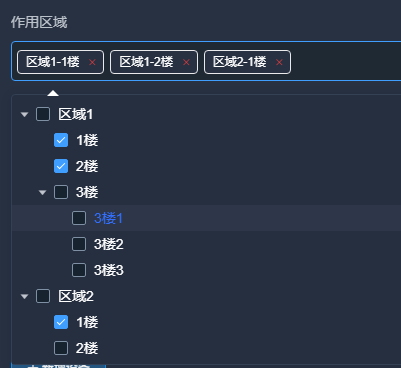
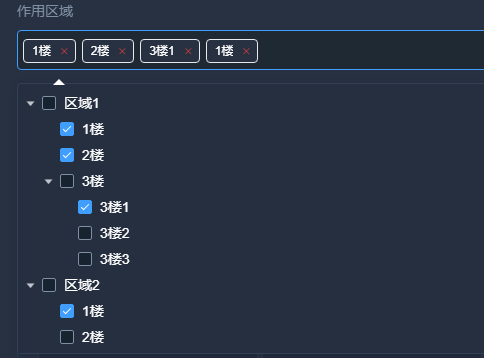
网上其实可以搜到各种的,不过大部分不支持重名,在删除的时候可能会删错,比如树结构1F的1楼啊,2F的1楼啊这种同时勾选的情况。。
可以全路径
干净点不要全路径也可以,
一股脑全放,可能有一点无效代码,懒得删了,等出bug再说
javascript
<template>
  <!-- <t-tree-select
  :options="treeList"
  placeholder="请选择tree结构"
  width="50%"
  :defaultData="defaultValue"
  :treeProps="treeProps"
  @handleNodeClick="selectDrop"
/> -->
  <el-select
    ref="select"
    v-model="displayValues"
    :multiple="multiple"
    :filter-method="dataFilter"
    @remove-tag="removeTag"
    @clear="clearAll"
    popper-class="t-tree-select"
    :style="{width: width||'100%'}"
    v-bind="attrs"
    v-on="$listeners"
    popper-append-to-body
    class="select-tree"
  >
    <el-option v-model="selectTree" class="option-style" disabled  >
      <div class="check-box" v-if="multiple&&checkBoxBtn">
        <el-button type="text" @click="handlecheckAll">{{checkAllText}}</el-button>
        <el-button type="text" @click="handleReset">{{resetText}}</el-button>
        <el-button type="text" @click="handleReverseCheck">{{reverseCheckText}}</el-button>
      </div>
      <el-tree
        :data="options"
        :props="treeProps"
        class="tree-style"
        ref="treeNode"
              :check-strictly="true"
        :show-checkbox="multiple"
        :node-key="treeProps.value"
        :filter-node-method="filterNode"
        :default-checked-keys="defaultValue"
        :current-node-key="currentKey"
        @node-click="handleTreeClick"
        @check-change="handleNodeChange"
        v-bind="treeAttrs"
        v-on="$listeners"
      ></el-tree>
    </el-option>
  </el-select>
</template>

<script>
export default {
  name: 'TTreeSelect',
  props: {
    // 多选默认值数组
    defaultValue: {
      type: Array,
      default: () => []
    },
    // 单选默认展示数据必须是{id:***,label:***}格式
    defaultData: {
      type: Object
    },
    // 全选文字
    checkAllText: {
      type: String,
      default: '全选'
    },
    // 清空文字
    resetText: {
      type: String,
      default: '清空'
    },
    // 反选文字
    reverseCheckText: {
      type: String,
      default: '反选'
    },
    // 可用选项的数组
    options: {
      type: Array,
      default: () => []
    },
    // 配置选项------>属性值为后端返回的对应的字段名
    treeProps: {
      type: Object,
      default: () => ({
        value: 'value', // ID字段名
        label: 'title', // 显示名称
        children: 'children' // 子级字段名
      })
    },
    // 是否显示全选、反选、清空操作
    checkBoxBtn: {
      type: Boolean,
      default: false
    },
    // 是否多选
    multiple: {
      type: Boolean,
      default: true
    },
    // 选择框宽度
    width: {
      type: String
    },
    // 是否显示完整路径, 如 1楼-1f-101
    showFullPath: {
      type: Boolean,
      default: true
    }
  },
  data() {
    return {
      selectTree: this.multiple ? [] : '', // 绑定el-option的值
      currentKey: null, // 当前选中的节点
      filterText: null, // 筛选值
      VALUE_NAME: this.treeProps.value, // value转换后的字段
      VALUE_TEXT: this.treeProps.label, // label转换后的字段
      selectedNodes: [] // 存储选中的完整节点信息
    }
  },
  computed: {
    attrs() {
      return {
        'popper-append-to-body': false,
        clearable: true,
        filterable: true,
        ...this.$attrs
      }
    },
    // tree属性
    treeAttrs() {
      return {
        'default-expand-all': true,
        ...this.$attrs
      }
    },
    // 显示值:根据showFullPath决定显示内容
    displayValues() {
      if (this.multiple) {
        return this.selectedNodes.map(node =>
          this.showFullPath ? this.getNodePath(node) : node[this.VALUE_TEXT]
        )
      }
      const firstNode = this.selectedNodes[0]
      if (!firstNode) return ''
      return this.showFullPath ? this.getNodePath(firstNode) : firstNode[this.VALUE_TEXT]
    }
  },
  watch: {
    defaultValue: {
      handler() {
        this.$nextTick(() => {
          // 多选
          if (this.multiple) {
            let datalist = this.$refs.treeNode.getCheckedNodes()
            this.selectTree = datalist
            this.selectedNodes = [...datalist]
          }
        })
      },
      deep: true
    },
    // 对树节点进行筛选操作
    filterText(val) {
      this.$refs.treeNode.filter(val)
    }
  },
  mounted() {
    this.$nextTick(() => {
        const scrollWrap = document.querySelectorAll(
          ".el-scrollbar .el-select-dropdown__wrap"
        )[0];
        const scrollBar = document.querySelectorAll(
          ".el-scrollbar .el-scrollbar__bar"
        );
        scrollWrap.style.cssText =
          "margin: 0px; max-height: none; overflow: hidden;";
        scrollBar.forEach((ele) => {
          ele.style.width = 0;
        });
      });
    if (this.multiple) {
      let datalist = this.$refs.treeNode.getCheckedNodes()
      this.selectTree = datalist
      this.selectedNodes = [...datalist]
    }
    // 有defaultData值才回显默认值
    if (this.defaultData?.id) {
      this.setDefaultValue(this.defaultData)
    }
  },
  methods: {
    // 获取节点的完整路径
    getNodePath(node) {
      const path = []
      let currentNode = node

      // 向上查找父节点,构建路径
      while (currentNode) {
        path.unshift(currentNode[this.VALUE_TEXT])
        currentNode = this.findParentNode(currentNode, this.options)
      }

      return path.join('-')
    },

    // 查找父节点
    findParentNode(targetNode, nodes, parent = null) {
      for (let node of nodes) {
        if (node[this.VALUE_NAME] === targetNode[this.VALUE_NAME]) {
          return parent
        }
        if (node.children && node.children.length > 0) {
          const found = this.findParentNode(targetNode, node.children, node)
          if (found !== null) {
            return found
          }
        }
      }
      return null
    },

    // 单选设置默认值
    setDefaultValue(obj) {
      if (obj.label !== '' && obj.id !== '') {
        this.selectTree = obj.id
        this.selectedNodes = [{ [this.VALUE_NAME]: obj.id, [this.VALUE_TEXT]: obj.label }]
        this.$nextTick(() => {
          this.currentKey = this.selectTree
          this.setTreeChecked(this.selectTree)
        })
      }
    },
    // 全选
    handlecheckAll() {
      setTimeout(() => {
        this.$refs.treeNode.setCheckedNodes(this.options)
      }, 200)
    },
    // 清空
    handleReset() {
      setTimeout(() => {
        this.$refs.treeNode.setCheckedNodes([])
      }, 200)
    },
    /**
     * @description: 反选处理方法
     * @param {*} nodes 整个tree的数据
     * @param {*} refs  this.$refs.treeNode
     * @param {*} flag  选中状态
     * @param {*} seleteds 当前选中的节点
     * @return {*}
     */
    batchSelect(nodes, refs, flag, seleteds) {
      if (Array.isArray(nodes)) {
        nodes.forEach(element => {
          refs.setChecked(element, flag, true)
        })
      }
      if (Array.isArray(seleteds)) {
        seleteds.forEach(node => {
          refs.setChecked(node, !flag, true)
        })
      }
    },
    // 反选
    handleReverseCheck() {
      setTimeout(() => {
        let res = this.$refs.treeNode
        let nodes = res.getCheckedNodes(true, true)
        this.batchSelect(this.options, res, true, nodes)
      }, 200)
    },
    // 输入框关键字
    dataFilter(val) {
      setTimeout(() => {
        this.filterText = val
      }, 100)
    },
    /**
     * @description: tree搜索过滤
     * @param {*} value 搜索的关键字
     * @param {*} data  筛选到的节点
     * @return {*}
     */
    filterNode(value, data) {
      if (!value) return true
      return data[this.treeProps.label].toLowerCase().indexOf(value.toLowerCase()) !== -1
    },
    /**
     * @description: 勾选树形选项
     * @param {*} data 该节点所对应的对象
     * @param {*} self 节点本身是否被选中
     * @param {*} child 节点的子树中是否有被选中的节点
     * @return {*}
     */
    // 多选赋值组件
    handleNodeChange(data, self, child) {
      let datalist = this.$refs.treeNode.getCheckedNodes()
      this.$nextTick(() => {
        this.selectTree = datalist
        this.selectedNodes = [...datalist]
        this.$emit('handleNodeClick', this.selectTree)
      })
    },
    // 单选tree点击赋值
    handleTreeClick(data, node) {
      if (this.multiple) {

      } else {
        this.filterText = ''
        this.selectTree = data[this.VALUE_NAME]
        this.selectedNodes = [data]
        this.currentKey = this.selectTree
        this.highlightNode = data[this.VALUE_NAME]
        this.$emit('handleNodeClick', { id: this.selectTree, label: data[this.VALUE_TEXT] }, node)
        this.setTreeChecked(this.highlightNode)
        this.$refs.select.blur()
      }
    },
    setTreeChecked(highlightNode) {
      if (this.treeAttrs.hasOwnProperty('show-checkbox')) {
        // 通过 keys 设置目前勾选的节点,使用此方法必须设置 node-key 属性
        this.$refs.treeNode.setCheckedKeys([highlightNode])
      } else {
        // 通过 key 设置某个节点的当前选中状态,使用此方法必须设置 node-key 属性
        this.$refs.treeNode.setCurrentKey(highlightNode)
      }
    },
    // 移除单个标签
    removeTag(displayText) {
      let nodeIndex = -1

      if (this.showFullPath) {
        // 完整路径模式:根据完整路径精确匹配
        nodeIndex = this.selectedNodes.findIndex(node =>
          this.getNodePath(node) === displayText
        )
      } else {
        // 普通模式:根据文本匹配,删除最后一个匹配项
        nodeIndex = this.selectedNodes.map(node => node[this.VALUE_TEXT]).lastIndexOf(displayText)
      }

      if (nodeIndex !== -1) {
        const nodeToRemove = this.selectedNodes[nodeIndex]

        // 从selectedNodes中移除
        this.selectedNodes.splice(nodeIndex, 1)

        // 从selectTree中移除对应的节点
        const treeNodeIndex = this.selectTree.findIndex(v =>
          v[this.VALUE_NAME] === nodeToRemove[this.VALUE_NAME]
        )
        if (treeNodeIndex !== -1) {
          this.selectTree.splice(treeNodeIndex, 1)
        }

        // 更新树的选中状态
        this.$nextTick(() => {
          this.$refs.treeNode.setCheckedNodes(this.selectTree)
        })
        this.$emit('handleNodeClick', this.selectTree)
      }
    },
    // 文本框清空
    clearAll() {
      this.selectTree = this.multiple ? [] : ''
      this.selectedNodes = []
      this.$refs.treeNode.setCheckedNodes([])
      this.$emit('handleNodeClick', this.selectTree)
    }
  }

}
</script>

<style scoped lang="scss">
.t-tree-select {
  .check-box {
    padding: 0 20px;
  }
  .option-style {
    height: 100%;
    max-height: 300px;
    margin: 0;
    overflow-y: auto;
    cursor: default !important;
  }
  .tree-style {
    ::v-deep .el-tree-node.is-current > .el-tree-node__content {
      color: #3370ff;
    }
  }
  .el-select-dropdown__item.selected {
    font-weight: 500;
  }
  .el-input__inner {
    height: 36px;
    line-height: 36px;
  }
  .el-input__icon {
    line-height: 36px;
  }
  .el-tree-node__content {
    height: 32px;
  }

}
</style>
<style lang="scss" scoped>
::v-deep .el-tree{
  background: #262F40 !important;
  color: #FFFFFF;
}
.el-scrollbar .el-scrollbar__view .el-select-dropdown__item {
  height: auto;
  max-height: 300px;
  padding: 0;
  overflow: hidden;
  overflow-y: auto;
}

.el-select-dropdown__item.selected {
  font-weight: normal;
}

ul li >>> .el-tree .el-tree-node__content {
  height: auto;
  padding: 0 20px;
}

.el-tree-node__label {
  font-weight: normal;
}

.el-tree >>> .is-current .el-tree-node__label {
  // color: #409eff;
  font-weight: 700;
}

.el-tree >>> .is-current .el-tree-node__children .el-tree-node__label {
  // color: #606266;
  font-weight: normal;
}

::v-deep .el-tree-node__content:hover,
::v-deep .el-tree-node__content:active,
::v-deep .is-current > div:first-child,
::v-deep .el-tree-node__content:focus {
  background-color: rgba(#333F52, 0.5);
  color: #409eff;
}
::v-deep .el-tree-node__content:hover {
  background-color: rgba(#333F52, 0.5);
  color: #409eff;
}
 ::v-deep .el-tree-node:focus>.el-tree-node__content{
    background-color: rgba(#333F52, 0.5);
  }
.el-popper {
  z-index: 9999;
}

.el-select-dropdown__item::-webkit-scrollbar {
  display: none !important;
}

.el-select {
  ::v-deep.el-tag__close {
    // display: none !important; //隐藏在下拉框多选时单个删除的按钮
  }
}
</style>

<style lang="scss"  >
.select-tree {
  .el-tag.el-tag--info{
    color: #fff;
    border-color:none;
    background: #273142 !important;
  }
  .el-icon-close:before{
   color: rgba(245, 63, 63, 1);
  }
  .el-tag__close.el-icon-close{
    background-color: transparent !important;
  }
}
</style>