smolvlm-realtime-webcam 是一个开源项目,结合了轻量级多模态模型 SmolVLM 和本地推理引擎 llama.cpp,能够在本地实时处理摄像头视频流,生成自然语言描述, 开源项目地址
https://github.com/ngxson/smolvlm-realtime-webcam https://github.com/ngxson/smolvlm-realtime-webcam需要依赖https://github.com/ggml-org/llama.cpp/releases/tag/b5581https://github.com/ggml-org/llama.cpp/releases/tag/b5581但是问题来了,如果直接下载现成的llama-b5581-bin-ubuntu-arm64.zip,
下载命令资源后会提示
Illegal instruction
需要自己编译一下https://github.com/ggml-org/llama.cpp 才可以在rk3588上运行
Build llama.cpp locally

The main product of this project is the llama library. Its C-style interface can be found in include/llama.h.

The project also includes many example programs and tools using the llama library. The examples range from simple, minimal code snippets to sophisticated sub-projects such as an OpenAI-compatible HTTP server.

To get the Code:

git clone https://github.com/ggml-org/llama.cpp
cd llama.cpp

The following sections describe how to build with different backends and options.
CPU Build

Build llama.cpp using CMake:

sudo apt install curl
sudo apt install libcurl4-openssl-dev
cmake -B build
cmake --build build --config Release
在rk3588上大约要编译个十来分钟,算是大工程了。最后生成的文件在
/build/bin中
运行试一下,要用代理下载哦
export http_proxy=http://你的代理IP:端口
export https_proxy=http://你的代理IP:端口

./llama-server -hf ggml-org/SmolVLM-500M-Instruct-GGUF
最后出现
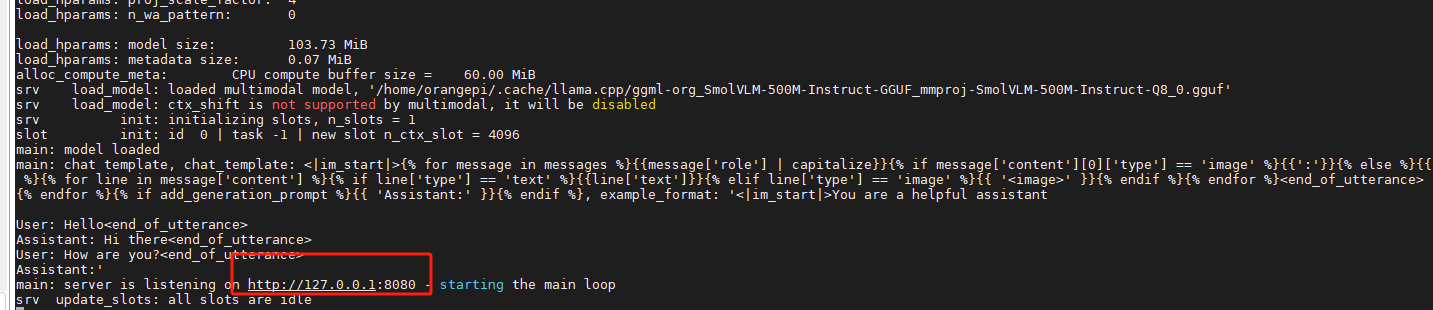
就表示成功了,这时运行,https://github.com/ngxson/smolvlm-realtime-webcam.git 工程中的index.html就会打开摄像头
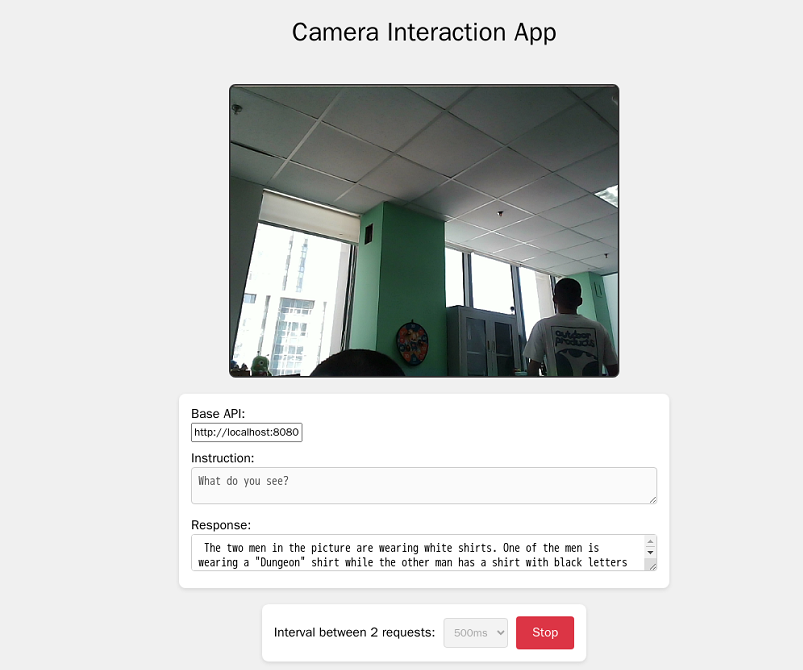
另外这个缺省的模型对中文不太友好,可以换成 中文的,但是速度就不太行了,推荐在有gpu的情况下使用。
# Gemma 3
(tool_name) -hf ggml-org/gemma-3-4b-it-GGUF
(tool_name) -hf ggml-org/gemma-3-12b-it-GGUF
(tool_name) -hf ggml-org/gemma-3-27b-it-GGUF

# SmolVLM
(tool_name) -hf ggml-org/SmolVLM-Instruct-GGUF
(tool_name) -hf ggml-org/SmolVLM-256M-Instruct-GGUF
(tool_name) -hf ggml-org/SmolVLM-500M-Instruct-GGUF
(tool_name) -hf ggml-org/SmolVLM2-2.2B-Instruct-GGUF
(tool_name) -hf ggml-org/SmolVLM2-256M-Video-Instruct-GGUF
(tool_name) -hf ggml-org/SmolVLM2-500M-Video-Instruct-GGUF

# Pixtral 12B
(tool_name) -hf ggml-org/pixtral-12b-GGUF

# Qwen 2 VL
(tool_name) -hf ggml-org/Qwen2-VL-2B-Instruct-GGUF
(tool_name) -hf ggml-org/Qwen2-VL-7B-Instruct-GGUF

# Qwen 2.5 VL
(tool_name) -hf ggml-org/Qwen2.5-VL-3B-Instruct-GGUF
(tool_name) -hf ggml-org/Qwen2.5-VL-7B-Instruct-GGUF
(tool_name) -hf ggml-org/Qwen2.5-VL-32B-Instruct-GGUF
(tool_name) -hf ggml-org/Qwen2.5-VL-72B-Instruct-GGUF

# Mistral Small 3.1 24B (IQ2_M quantization)
(tool_name) -hf ggml-org/Mistral-Small-3.1-24B-Instruct-2503-GGUF

# InternVL 2.5 and 3
(tool_name) -hf ggml-org/InternVL2_5-1B-GGUF
(tool_name) -hf ggml-org/InternVL2_5-4B-GGUF
(tool_name) -hf ggml-org/InternVL3-1B-Instruct-GGUF
(tool_name) -hf ggml-org/InternVL3-2B-Instruct-GGUF
(tool_name) -hf ggml-org/InternVL3-8B-Instruct-GGUF
(tool_name) -hf ggml-org/InternVL3-14B-Instruct-GGUF

# Llama 4 Scout
(tool_name) -hf ggml-org/Llama-4-Scout-17B-16E-Instruct-GGUF

# Moondream2 20250414 version
(tool_name) -hf ggml-org/moondream2-20250414-GGUF
使用下面的模型就可以返回中文了
llama-server -hf ggml-org/Qwen2.5-VL-3B-Instruct-GGUF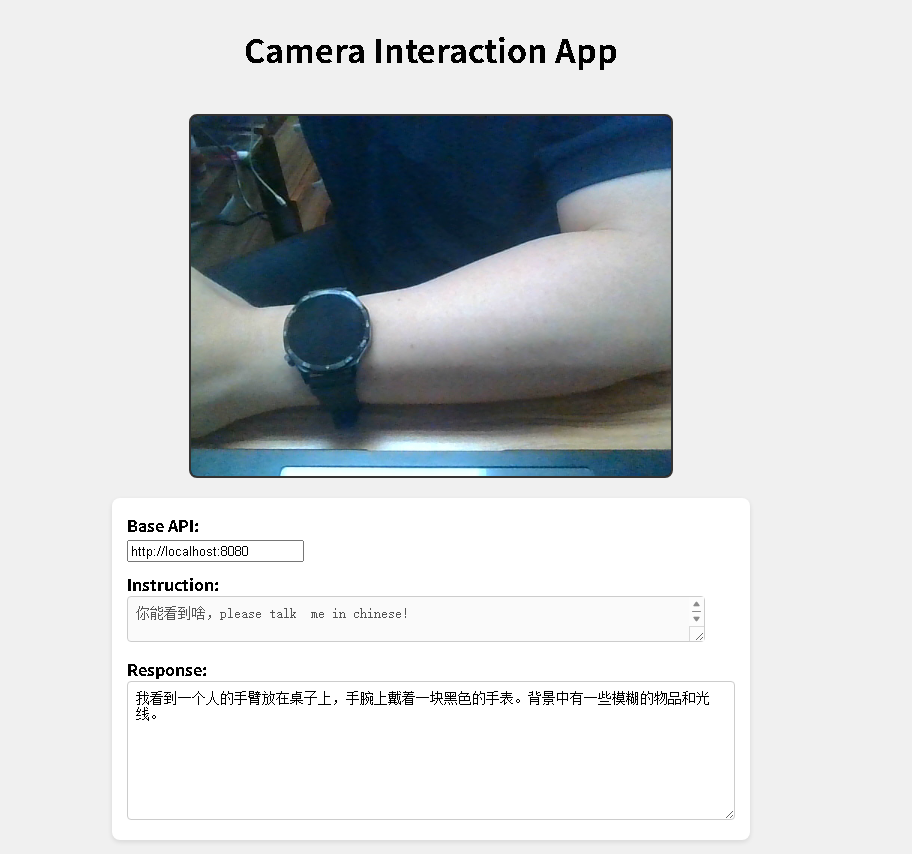
smolvlm-realtime-webcam 是一个开源项目,结合了轻量级多模态模型 SmolVLM 和本地推理引擎 llama.cpp,能够在本地实时处理摄像头视频流,生成自然语言描述。
🧠 项目概述
-
实时图像理解:通过调用摄像头,项目将捕获的图像发送到本地运行的 llama.cpp 服务器,使用 SmolVLM 模型进行处理,返回对图像的自然语言描述。
-
轻量级部署:SmolVLM 模型参数量在 256M 到 500M 之间,设计上优化了计算效率,适合在资源受限的设备上运行。
-
本地运行,无需联网:所有处理均在本地完成,增强了隐私保护,降低了部署门槛
🚀 实际用途
-
辅助视觉障碍者:为视力受限人士提供实时的环境描述,增强其独立性。
-
智能家居监控:识别家中异常情况,如宠物行为、火灾迹象等,提升家庭安全。
-
教育与学习:在教学中实时描述实验过程或自然现象,增强学习体验。
-
工业质量控制:在生产线上实时检测产品缺陷,提高生产效率。
-
机器人视觉系统:为机器人提供实时环境理解,提升其自主导航和操作能力。
🌈 创意扩展
-
实时字幕生成:为视频或直播内容生成实时字幕,提升可访问性。
-
个性化虚拟助手:结合语音识别和图像理解,创建更智能的个人助手。
-
增强现实(AR)应用:在 AR 设备中实时识别和标注现实世界中的物体,增强用户体验。
-
艺术创作工具:将实时图像描述转化为诗歌或故事,激发创作灵感。
-
环境数据收集:在野外部署设备,实时记录和描述自然环境变化,用于科研。
🔧 快速上手
-
安装 llama.cpp:按照官方指南编译并运行 llama.cpp。
-
下载 SmolVLM 模型:获取适用于 llama.cpp 的 SmolVLM 模型文件。
-
运行服务器:启动 llama.cpp 服务器,并加载 SmolVLM 模型。
-
启动前端界面 :打开项目中的
index.html文件,连接摄像头,开始实时描述。
该项目展示了在本地设备上实现实时多模态 AI 应用的可能性,为边缘计算和隐私保护提供了新的解决方案。