详细流程及描述参见仓库(如果有用的话,请给个收藏):
 https://github.com/xurongtang/DocRevision_Proj
当完成很长的文字工作后,很害怕其中有明显的错别字或表述错误,但是又不想自己重头再读一遍怎么办?
我使用OCR和LLM做了一个自动检校脚本。其逻辑如下:
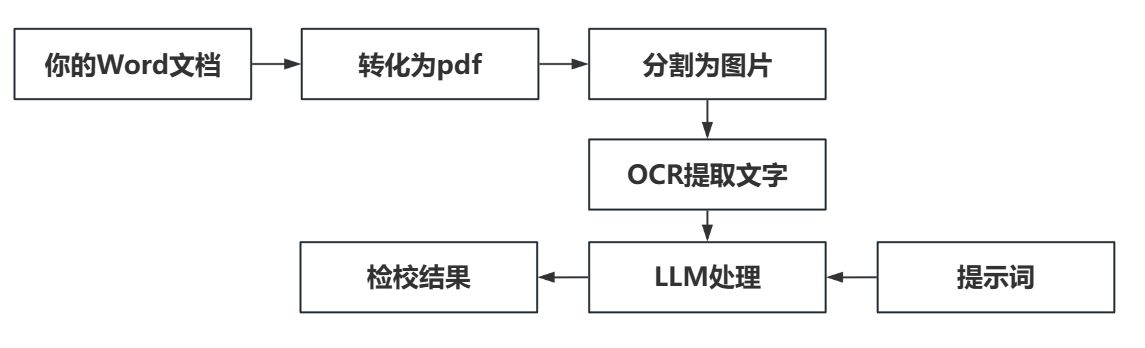
工作流设计如下:
python
from openai import OpenAI
import time
import yaml, json
import io
from PIL import Image
import base64
import fitz         # pip install pymupdf
from tqdm import tqdm

def get_apikey(path="apikey.yaml"):
    with open(path, 'r') as f:
        config = yaml.safe_load(f)
    res = config["apikey"]
    return res

def qwen_ocr(base64_image_code, addr_type):
    client = OpenAI(
        api_key=get_apikey()['dashscope'],
        base_url="https://dashscope.aliyuncs.com/compatible-mode/v1",
    )
    completion = client.chat.completions.create(
        model="qwen-vl-ocr-2025-04-13",
        # model="qwen2.5-vl-72b-instruct",
        messages=[
            {
                "role": "user",
                "content": [
                    {
                        "type": "image_url",
                        # "image_url": "https://help-static-aliyun-doc.aliyuncs.com/file-manage-files/zh-CN/20241108/ctdzex/biaozhun.jpg",
                        "image_url": f"data:image/{addr_type};base64,{base64_image_code}",
                        "min_pixels": 28 * 28 * 4,
                        "max_pixels": 1280 * 784
                    },
                    # 目前为保证识别效果,模型内部会统一使用"Read all the text in the image."作为text的值,用户输入的文本不会生效。
                    {"type": "text",
                     "text": "Read all the text in the image"},
                ]
            }
        ])
    res_dict = json.loads(completion.model_dump_json())
    res_text = res_dict['choices'][0]['message']['content']
    return {"ocr_res": res_text}


def qwen_max_repeat(content):
    client = OpenAI(
        api_key=get_apikey()['dashscope'],
        base_url="https://dashscope.aliyuncs.com/compatible-mode/v1",
    )
    completion = client.chat.completions.create(
        model="qwen-max-2025-01-25",
        # model = "qwen3-235b-a22b",
        messages=[
            {
                "role": "system",
                "content": """
                # 角色 #
                你是一个专业的文字编辑,你需要对用户输入论文文本进行文字检查,以确保其准确。
                # 任务 #
                请逐句检查以下文本中的错别字、语法错误、用词不当及表达不清晰之处。
                按照指定格式输出结果:原文为:"XXX",其中"XXX"可能存在问题,可考虑修改为"XXX"。
                # 要求 #
                只检查以下两类问题:
                1、同音异形字错误
                2、形近字错误
                # 限制 #
                1、确保每处问题独立呈现,不合并说明。
                2、不检查标点符号。
                3、只检测错误,不进行润色或改进。
                # 输出 #
                只记录有问题的句子,并严格按模板输出结果,不输入任何其他的无关内容。
                """
            },
            {
                "role": "user",
                "content": f"""
                {content}
                """
            }
        ],
        max_tokens=4096,
        temperature=0.01,
        stream=False
    )
    res = json.loads(completion.model_dump_json())
    return {"response": res["choices"][0]["message"]["content"]}

def main_process(base64_image_code,addr_type):
    content = qwen_ocr(base64_image_code, addr_type)
    out = qwen_max_repeat(content)
    return out["response"]

def read_pdf2ImgLs(pdf_path) -> list:
    pdf = fitz.open(pdf_path)
    images_ls = []
    zoom_x = 2.0
    zoom_y = 2.0
    for i,pg in enumerate(pdf):
        mat = fitz.Matrix(zoom_x, zoom_y)
        pix = pg.get_pixmap(matrix=mat)
        img = Image.frombytes("RGB", [pix.width, pix.height], pix.samples)
        images_ls.append(img)
    return images_ls

def PILimage2base64(image):
    buffered = io.BytesIO()
    image_type = 'PNG'
    image.save(buffered, format=image_type)
    return base64.b64encode(buffered.getvalue()).decode(),image_type

def paper_revision(pdf_path,OUTPUT_PATH):
    # 设置输出txt路径
    # 设置名字命名为年月日时分
    output_txt = OUTPUT_PATH
    image_ls = read_pdf2ImgLs(pdf_path)
    for page,image in enumerate(tqdm(image_ls, desc='Processing pages')):
        base64code,addr_type = PILimage2base64(image)
        repeat_response = main_process(base64code,addr_type)
        result = repeat_response
        cleaned_string = result.strip('"')
        decoded_string = cleaned_string.replace('\\n', '\n').replace('\\\\', '\\')
        with open(output_txt, 'a', encoding='utf-8') as f:
            f.write(decoded_string+'\n')
            f.write(f'(page:{page+1})\n')


if __name__ == '__main__':
    today = time.strftime("%Y-%m-%d-%H-%M", time.localtime())
    today = today.replace('-', '_')
    OUTPUT_PATH = f'{today}_output.txt'
    paper_revision('paper.pdf', OUTPUT_PATH)
其识别结果:

其结果为:
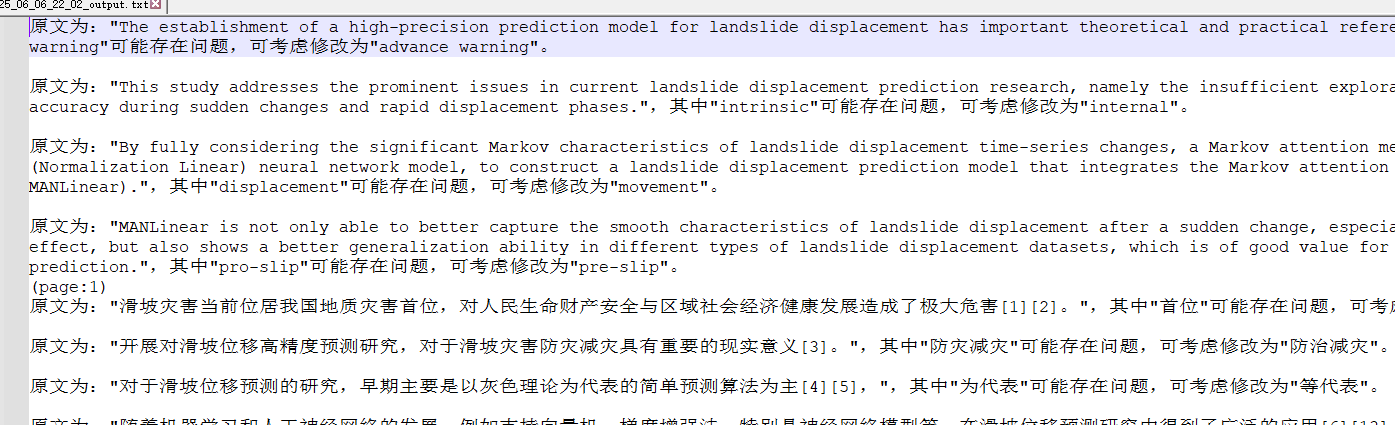
该工作流具有较好的泛化性,可以用于AI润色、AI翻译等。
欢迎批评交流