一、软件介绍
文末提供程序和源码下载
PINA 是一个开源 Python 库,旨在简化和加速科学机器学习 (SciML) 解决方案的开发。PINA 基于 PyTorch、PyTorch Lightning 和 PyTorch Geometry 构建,提供了一个直观的框架,用于使用神经网络、物理信息神经网络 (PINN)、神经运算符等定义、试验和解决复杂问题
-
Modular Architecture : Designed with modularity in mind and relying on powerful yet composable abstractions, PINA allows users to easily plug, replace, or extend components, making experimentation and customization straightforward.
模块化架构:PINA 在设计时考虑了模块化,并依赖于强大但可组合的抽象,允许用户轻松插入、替换或扩展组件,使实验和定制变得简单明了。
-
Scalable Performance : With native support for multi-device training, PINA handles large datasets efficiently, offering performance close to hand-crafted implementations with minimal overhead.
可扩展的性能:凭借对多设备训练的原生支持,PINA 可以高效处理大型数据集,以最小的开销提供接近手工构建的性能。
-
Highly Flexible : Whether you're looking for full automation or granular control, PINA adapts to your workflow. High-level abstractions simplify model definition, while expert users can dive deep to fine-tune every aspect of the training and inference process.
高度灵活:无论您是在寻找完全自动化还是精细控制,PINA 都能适应您的工作流程。高级抽象简化了模型定义,而专家用户可以深入研究以微调训练和推理过程的各个方面。
二、Installation 安装
Installing a stable PINA release
安装稳定的 PINA 版本
Install using pip: 使用 pip 安装:
pip install "pina-mathlab"Install from source: 从源码安装:
git clone https://github.com/mathLab/PINA
cd PINA
git checkout master
pip install .
Install with extra packages:
使用额外的软件包进行安装:
To install extra dependencies required to run tests or tutorials directories, please use the following command:
要安装运行 tests 或 tutorials 目录所需的额外依赖项,请使用以下命令:
pip install "pina-mathlab[extras]" Available extras include:
可用的额外服务包括:
devfor development purpuses, use this if you want to Contribute.
dev对于开发目的,如果您想要 贡献,请使用此项。testfor running test locally.
test用于在本地运行 TEST。docfor building documentation locally.
doc用于本地构建文档。tutorialfor running Tutorials.
tutorial用于运行 Tutorials。
三、Quick Tour for New Users新用户快速导览
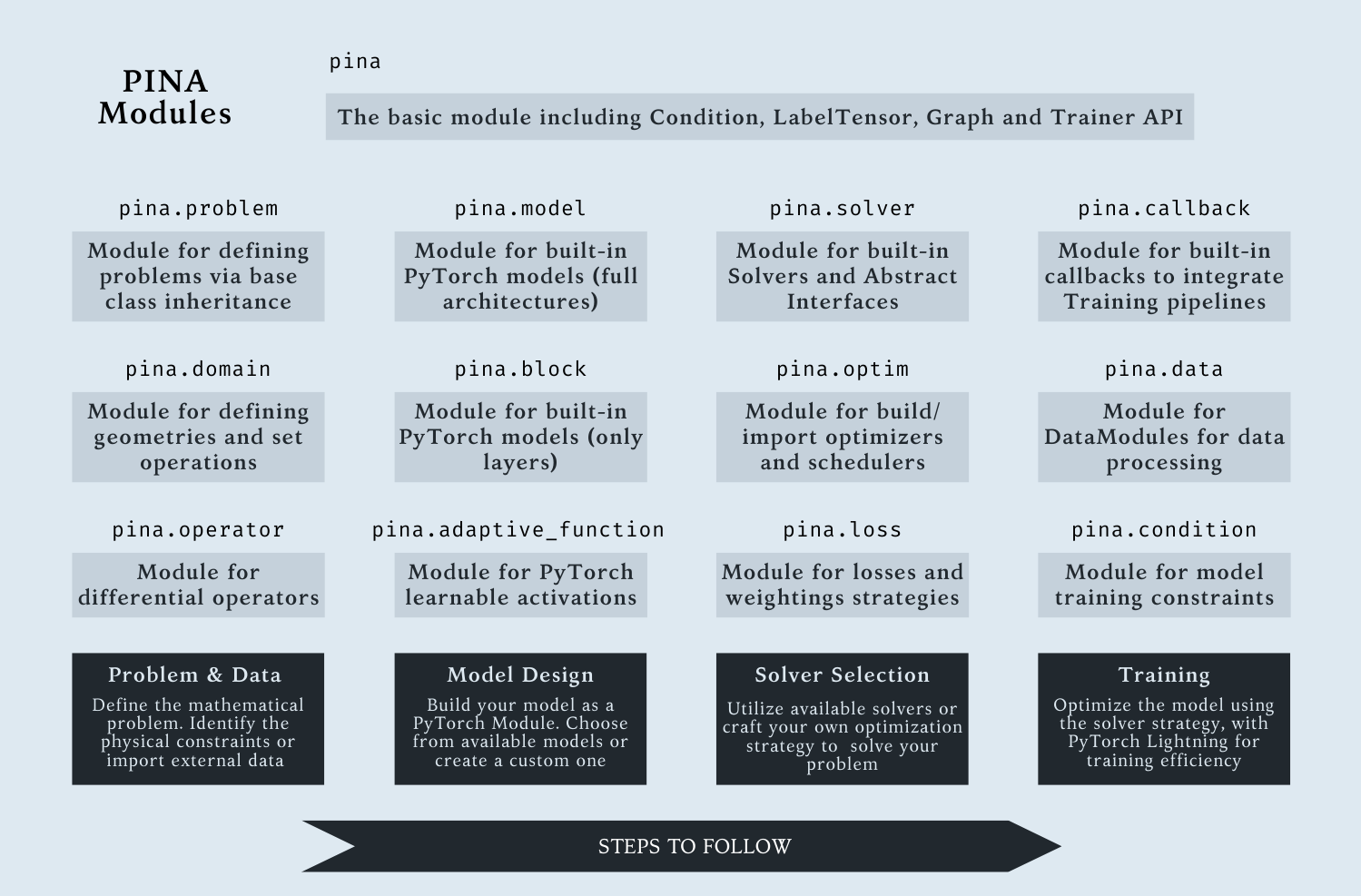
Solving a differential problem in PINA follows the four steps pipeline :
在 PINA 中求解差分问题遵循四个步骤 pipeline:
-
Define the problem to be solved with its constraints using the Problem API.
使用 Problem API 定义要解决的问题及其约束。
-
Design your model using PyTorch, or for graph-based problems, leverage PyTorch Geometric to build Graph Neural Networks. You can also import models directly from the Model API.
使用 PyTorch 设计模型,或者对于基于图形的问题,利用 PyTorch Geometric 构建图形神经网络。您还可以直接从 Model API 导入模型。
-
Select or build a Solver for the Problem, e.g., supervised solvers, or physics-informed (e.g., PINN) solvers. PINA Solvers are modular and can be used as-is or customized.
为问题选择或构建求解器,例如,监督式求解器或物理信息(例如 PINN)求解器。PINA 求解器是模块化的,可以按原样使用或自定义使用。
-
Train the model using the Trainer API class, built on PyTorch Lightning, which supports efficient, scalable training with advanced features.
使用基于 PyTorch Lightning 构建的 Trainer API 类训练模型,该类支持具有高级功能的高效、可扩展训练。
Do you want to learn more about it? Look at our Tutorials.
您想了解更多相关信息吗?查看我们的教程。
四、Solve Data Driven Problems解决数据驱动的问题
Data driven modelling aims to learn a function that given some input data gives an output (e.g. regression, classification, ...). In PINA you can easily do this by:
数据驱动建模旨在学习给定一些输入数据给出输出的函数(例如回归、分类等)。在 PINA 中,您可以通过以下方式轻松做到这一点:
from pina import Trainer
from pina.model import FeedForward
from pina.solver import SupervisedSolver
from pina.problem.zoo import SupervisedProblem

input_tensor  = torch.rand((10, 1))
output_tensor = input_tensor.pow(3)

# Step 1. Define problem
problem = SupervisedProblem(input_tensor, target_tensor)
# Step 2. Design model (you can use your favourite torch.nn.Module in here)
model   = FeedForward(input_dimensions=1, output_dimensions=1, layers=[64, 64])
# Step 3. Define Solver
solver  = SupervisedSolver(problem, model)
# Step 4. Train
trainer = Trainer(solver, max_epochs=1000, accelerator='gpu')
trainer.train()
Solve Physics Informed Problems
解决 Physics Informed 问题
Physics-informed modeling aims to learn functions that not only fit data, but also satisfy known physical laws, such as differential equations or boundary conditions. For example, the following differential problem:
基于物理场的建模旨在学习不仅拟合数据,而且满足已知物理定律(例如微分方程或边界条件)的函数。例如,以下 differential 问题:
{����(�)=�(�)�∈(0,1)�(�=0)=1
in PINA, can be easily implemented by:
在 PINA 中,可以通过以下方式轻松实现:
from pina import Trainer, Condition
from pina.problem import SpatialProblem
from pina.operator import grad
from pina.solver import PINN
from pina.model import FeedForward
from pina.domain import CartesianDomain
from pina.equation import Equation, FixedValue

def ode_equation(input_, output_):
    u_x = grad(output_, input_, components=["u"], d=["x"])
    u = output_.extract(["u"])
    return u_x - u

# build the problem
class SimpleODE(SpatialProblem):
    output_variables = ["u"]
    spatial_domain = CartesianDomain({"x": [0, 1]})
    domains = {
        "x0": CartesianDomain({"x": 0.0}),
        "D": CartesianDomain({"x": [0, 1]}),
    }
    conditions = {
        "bound_cond": Condition(domain="x0", equation=FixedValue(1.0)),
        "phys_cond": Condition(domain="D", equation=Equation(ode_equation)),
    }

# Step 1. Define problem
problem = SimpleODE()
# Step 2. Design model (you can use your favourite torch.nn.Module in here)
model   = FeedForward(input_dimensions=1, output_dimensions=1, layers=[64, 64])
# Step 3. Define Solver
solver  = PINN(problem, model)
# Step 4. Train
trainer = Trainer(solver, max_epochs=1000, accelerator='gpu')
trainer.train()
五、Application Programming Interface
应用程序编程接口
Here's a quick look at PINA's main module. For a better experience and full details, check out the documentation.
以下是 PINA 的主模块的快速浏览。要获得更好的体验和完整的详细信息,请查看文档。
五、软件下载
本文信息来源于GitHub作者地址:https://github.com/mathLab/PINA