文章目录
1.最终效果预览
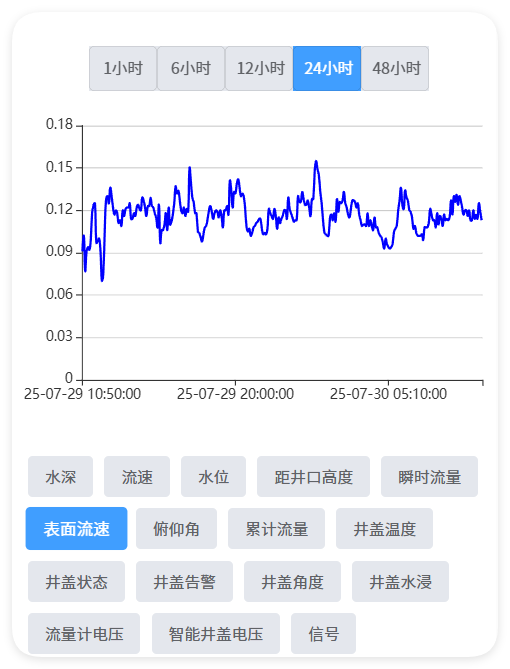
2.顶部时间选择,中间echart图,底部监测项
<view class="button-group-top">
			<button v-for="(item, index) in buttonList" :key="index"
				:class="['time-btn', { 'active': currentBtnIndex === index }]" @click="handleClick(index,item)">
				{{ item.name }}
			</button>
		</view>

		<view @click="echarts.onClick" :prop="option" :change:prop="echarts.updateEcharts" id="echarts" class="echarts">
		</view>

		<view class="btn-group">
			<view v-for="(item, index) in project" :key="index"
				:class="['btn-item', { active: currentIndex === index }]" @click="switchIndicator(index,item)">
				{{ item.structName }}
			</view>
		</view>
3.Echart集成
在uni插件市场找到插件renderjs-echarts-demo,我们运行demo就可以出现一个柱状图,我们基于这个demo改造下我们的项目即可。
<script module="echarts" lang="renderjs">
	let myChart
	export default {
		mounted() {
			if (typeof window.echarts === 'function') {
				this.initEcharts()
			} else {

				const script = document.createElement('script')

				script.src = 'static/echarts.js'
				script.onload = this.initEcharts.bind(this)
				document.head.appendChild(script)
			}
		},
		methods: {
			initEcharts() {
				myChart = echarts.init(document.getElementById('echarts'))

				myChart.setOption(this.option)
			},
			updateEcharts(newValue, oldValue, ownerInstance, instance) {

				myChart.setOption(newValue)
			},
			onClick(event, ownerInstance) {

				ownerInstance.callMethod('onViewClick', {
					test: 'test'
				})
			}
		}
	}
</script>
4.集成网络请求
uni.request({
					url: 'xxxx',
					data: obj,
					success: (res) => {
						this.initData(res.data.data)
					}
				});
在页面中直接用这个网络请求就能拿到数据,不知道为啥将网络请求封装后发反而拿不到数据了,返回的参数多了好几层
5.底部按钮切换调用方法
switchIndicator(index, item) {
				this.currentIndex = index
				this.getSluiceMoniDataPicitemId(item.siteItemId)
			}

            getSluiceMoniDataPicitemId(siteItemId) {
				let arr = this.project.filter(item => {
					return siteItemId == item.siteItemId
				})
				if (arr && arr.length > 0) {
					this.structName = arr[0].structName
				}
				this.siteItemId = siteItemId;
				this.getDataByTime()
			}
6.调用接口获取echart数据
getEchartData(obj) {
				this.yArr = []
				this.xArr = []
				uni.request({
					url: 'xxxxx',
					data: obj,
					success: (res) => {
						let arr = res.data.data;
						for (let i in arr) {
							if (arr[i].DATA_TIME) {
								this.yArr.push(arr[i].DATA_VALUE)
								this.xArr.push(arr[i].DATA_TIME)
							}
						}
						if (this.yArr) {
							this.addOption();
						}

					}
				});


			}
7.设置echart图的option
addOption() {
				this.option = {
					grid: {
						left: '7%',
						right: '5%',
						bottom: '11%',
						top: '7%',
						containLabel: true
					},
					xAxis: [{
						splitLine: {
							show: false
						},
						type: 'category',
						boundaryGap: true,
						data: this.xArr
					}],
					yAxis: [{
						type: 'value',
						splitLine: {
							show: true
						},
					}],
					series: [{
						name: '',
						type: 'line',
						stack: '总量',
						smooth: true,
						symbol: 'none',
						areaStyle: {
							normal: {
								color: 'rgba(255,255,255,0.4)'
							}
						},
						itemStyle: {
							normal: {
								color: 'rgba(3,169,244,1)'
							}
						},
						lineStyle: {
							normal: {
								color: 'blue'
							}
						},
						data: this.yArr
					}]
				}
			}
8.顶部时间点击方法
handleClick(index, item) {
				this.currentBtnIndex = index
				this.btnHourValue = item.value
				this.getDataByTime()
			}

            getDataByTime(){
				let tTime = new Date()
				let endTimeValue = timeFormat(tTime, 'yyyy-MM-dd HH:mm:ss')
				let sValue = tTime.setHours(tTime.getHours() - parseInt(this.btnHourValue)) // value小时前
				let startTimeValue = timeFormat(sValue, 'yyyy-MM-dd HH:mm:ss')

				let obj = {
					'itemMoniId': this.siteItemId,
					'startTime': startTimeValue,
					'endTime': endTimeValue,
				}
				this.getEchartData(obj);
			}