Task
Write a program that draws a triangle in the center of the screen. The triangle should have an apex at
(0.5, 0.75)in normalized device coordinates, and an apex angle of120degrees. The height of the triangle should be0.5times the height of the screen.
编写一个程序,在屏幕正中央绘制一个三角形。该三角形的顶点位于归一化设备坐标(NDC)的 (0.5, 0.75),顶角为 120 度,且三角形的高度为屏幕高度的 0.5 倍。
Theory
函数介绍
dot 函数用于计算两个向量的点积(数量积),返回一个标量值。
主要用途
- 计算夹角余弦值
ini
vec2 a = normalize(vector1);
vec2 b = normalize(vector2);
float angle = dot(a, b); // cos(夹角)- 计算投影长度
ini
//投影长度 = dot(a, b) / length(b)
vec2 direction = normalize(dir);
vec2 toPoint = point - origin;
float projectionLength = dot(direction, toPoint);- 判断向量方向关系
dot(A, B) = 1:方向完全相同。dot(A, B) = 0:方向互相垂直。dot(A, B) = -1:方向完全相反。
Answer
glsl
uniform vec2 iResolution;

#define PI 3.14

void main() {
  vec2 uv = gl_FragCoord.xy / iResolution.xy;

  vec2 ratio = vec2(iResolution.x / iResolution.y, 1.0);
  uv -= 0.5;
  uv *= ratio;

  // 顶上的点(0.5, 0.75)
  vec2 p1 = vec2(0, 0.25);
  // 底部点
  vec2 p2 = vec2(0, -0.25);
  // 已知线的方向
  vec2 p1Dir = normalize(p2 - p1);
  // 当前点到顶点的向量
  vec2 dis = uv - p1;
   // 当前点到顶点的方向
  vec2 p2Dir = normalize(dis);
  // 计算夹角
  float t = dot(p1Dir, p2Dir);
  // 剔除大于60° cos(60) == 0.5
  float red = step(0.5, t);
  // 获取当前点在已知线上的投影长度(已知线的长度为0.5)
  float d = dot(p1Dir, dis);
  red *= (1.0 - step(0.5, d));

  gl_FragColor = vec4(red, 0.0, 0.0, 1.0);
}
效果
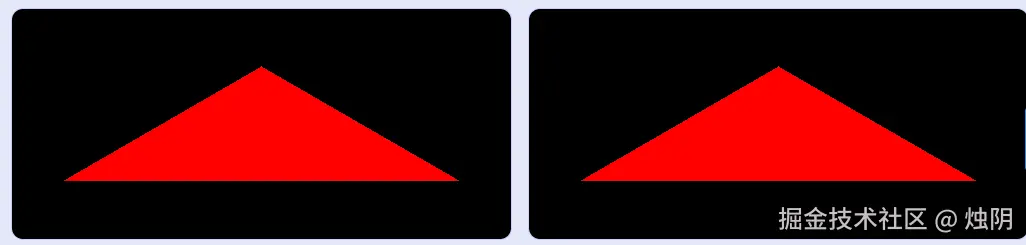
练习
最后
如果你觉得这篇文章有用,记得点赞、关注、收藏,学Shader更轻松!!