c#-mqtt服务端
csinternal class MqttServer { private List<string> clientId = new List<string>(); private IMqttServer mqttServer = new MqttFactory().CreateMqttServer(); string pwd = "123456"; string username = "admin"; private static MqttServer _Instance = null; public static MqttServer Instance { get { if (_Instance == null) _Instance = new MqttServer(); _Instance.MqttServerInit(); return _Instance; } } void MqttServerInit() { try { mqttServer.StartedHandler = new MqttServerStartedHandlerDelegate(ServerStarted);//启动 mqttServer.StoppedHandler = new MqttServerStoppedHandlerDelegate(ServerStop);//关闭 mqttServer.ClientConnectedHandler = new MqttServerClientConnectedHandlerDelegate(GetClientId);//客户端连接 mqttServer.ClientDisconnectedHandler = new MqttServerClientDisconnectedHandlerDelegate(delClient);//客户端断开连接 mqttServer.ApplicationMessageReceivedHandler = new MqttApplicationMessageReceivedHandlerDelegate(GetMessage);//接收客户端信息 mqttServer.ClientSubscribedTopicHandler = new MqttServerClientSubscribedHandlerDelegate(ClientSubscribed);//客户端订阅 mqttServer.ClientUnsubscribedTopicHandler = new MqttServerClientUnsubscribedTopicHandlerDelegate(ClientUnsubscribed);//客户端取消订阅 } catch (Exception ex) { MqttLog.m.MqttOpen().Info("Mqtt启动失败:" + ex.Message); } } [Obsolete] public void MqttOpen() { try { // 声明一个服务端配置建立 MqttServerOptionsBuilder mqttServerOptionsBuilder = new MqttServerOptionsBuilder(); //绑定IP地址 mqttServerOptionsBuilder.WithDefaultEndpointBoundIPAddress(Server.LocalIP); //绑定端口号 mqttServerOptionsBuilder.WithDefaultEndpointPort(Server.MqttPort); //客户端验证(账号和密码) mqttServerOptionsBuilder.WithConnectionValidator(ConnectionValidator);//验证 IMqttServerOptions options = mqttServerOptionsBuilder.Build();//将配置建立 //开启服务 mqttServer.StartAsync(options); //停止服务 //mqttServer.StopAsync(); } catch (Exception ex) { MqttLog.m.MqttOpen().Info("Mqtt启动失败2:" + ex.Message); } } public void TimerCallback(object state) { try { if (mqttServer.IsStarted) { var mqttMessage = new MqttApplicationMessageBuilder() .WithTopic("system/admin") .WithPayload("这是系统主题,每5秒推送是一次") .WithQualityOfServiceLevel(MqttQualityOfServiceLevel.AtLeastOnce) .Build(); mqttServer.PublishAsync(mqttMessage); } } catch (Exception ex) { MqttLog.m.MqttOpen().Info("推送失败"+ ex.Message); } // 业务逻辑 } public void StopSetver() { mqttServer.StopAsync(); } //服务端对客户端验证 [Obsolete] void ConnectionValidator(MqttConnectionValidatorContext context) { if (context != null && context.Password == pwd && context.Username == username) { context.ReturnCode = MQTTnet.Protocol.MqttConnectReturnCode.ConnectionAccepted;//连接进入 }else{ context.ReturnCode = MQTTnet.Protocol.MqttConnectReturnCode.ConnectionRefusedBadUsernameOrPassword;//连接失败账号或者密码错误 } } //启动 void ServerStarted(EventArgs e) { MqttLog.m.MqttOpen().Info("mqtt服务已开启,等待用户连接..."); Debug.WriteLine("mqtt服务已开启,等待用户连接..."); } //停止 void ServerStop(EventArgs e) { MqttLog.m.MqttOpen().Info("mqtt服务停止..."); Debug.WriteLine("mqtt服务停止..."); } //客户端连接 void GetClientId(MqttServerClientConnectedEventArgs e) { clientId.Add(e.ClientId); MqttLog.m.MqttOpen().Info($"客户端:{e.ClientId}已连接"); Debug.WriteLine($"客户端:{e.ClientId}已连接"); } void delClient(MqttServerClientDisconnectedEventArgs e) { clientId.Remove(e.ClientId); MqttLog.m.MqttOpen().Info($"客户端:{e.ClientId}断开连接"); Debug.WriteLine($"客户端:{e.ClientId}断开连接"); } //接收客户端信息 void GetMessage(MqttApplicationMessageReceivedEventArgs message) { //this.Invoke(new Action(() => //{ //})); MqttLog.m.MqttOpen().Info($"客户端:{message.ClientId}\\n\\n发送:{Encoding.Default.GetString(message.ApplicationMessage.Payload)}"); Debug.WriteLine($"客户端:{message.ClientId}"); Debug.WriteLine($"发送:{Encoding.Default.GetString(message.ApplicationMessage.Payload)}"); } //客户端订阅 void ClientSubscribed(MqttServerClientSubscribedTopicEventArgs e) { MqttLog.m.MqttOpen().Info($"客户端:{e.ClientId}---订阅{e.TopicFilter.Topic})"); Debug.WriteLine($"客户端:{e.ClientId}---订阅{e.TopicFilter.Topic})"); } //客户端取消订阅 void ClientUnsubscribed(MqttServerClientUnsubscribedTopicEventArgs e) { MqttLog.m.MqttOpen().Info($"客户端:{e.ClientId}---取消订阅{e.TopicFilter})"); Debug.WriteLine($"客户端:{e.ClientId}---取消订阅{e.TopicFilter})"); } }esp32客户端;
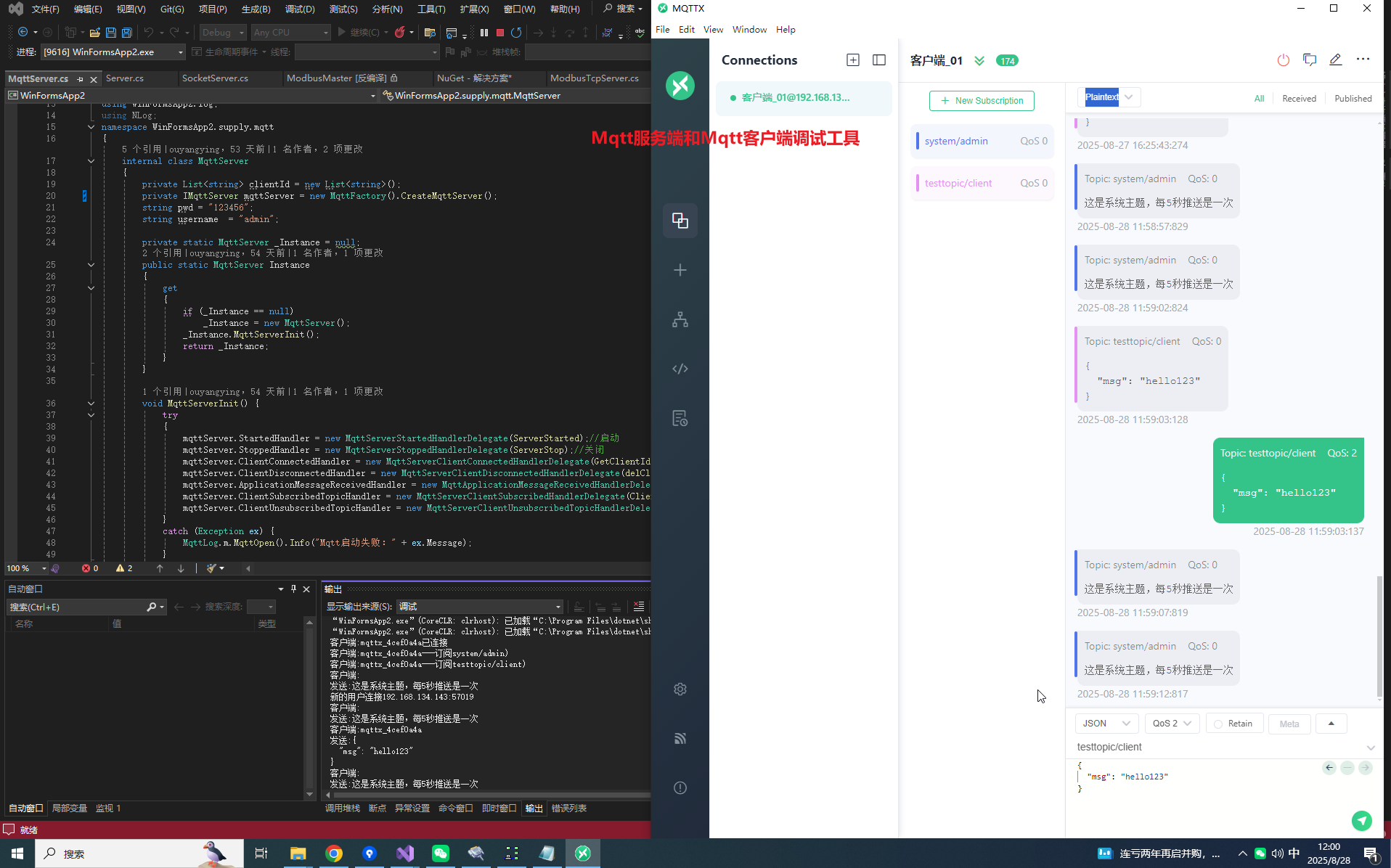
python#设备客户端代码 import network import time from umqtt.simple import MQTTClient import ubinascii import machine ssid = '24LOU' password = '12356789' # 连接wifi wlan = network.WLAN(network.STA_IF) wlan.active(True) if not wlan.isconnected(): print('connecting to network...') wlan.connect(ssid, password) while not wlan.isconnected(): pass print('网络配置:', wlan.ifconfig()) # ===== 配置参数 ===== MQTT_BROKER_IP = "192.168.3.79" # 替换为运行Broker的PC的IP地址 MQTT_PORT = 1883 MQTT_CLIENT_ID = ubinascii.hexlify(machine.unique_id()) # 生成唯一客户端ID PUBLISH_TOPIC = b"esp32/data" # 发布消息的主题 SUBSCRIBE_TOPIC = b"esp32/command" # 订阅消息的主题 # ===== 2. MQTT消息回调函数 ===== def mqtt_callback(topic, msg): print(f"收到消息 [主题: {topic.decode()}]: {msg.decode()}") # 示例:收到"ON"消息时点亮LED(需硬件支持) if topic == SUBSCRIBE_TOPIC and msg == b"ON": led = machine.Pin(2, machine.Pin.OUT) # ESP32内置LED通常对应GPIO2 led.value(0) # ===== 3. 连接MQTT Broker并发布消息 ===== def connect_mqtt(): client = MQTTClient( client_id=MQTT_CLIENT_ID, server=MQTT_BROKER_IP, port=MQTT_PORT ) client.set_callback(mqtt_callback) try: client.connect() print(f"已连接MQTT Broker: {MQTT_BROKER_IP}:{MQTT_PORT}") client.subscribe(SUBSCRIBE_TOPIC) print(f"已订阅主题: {SUBSCRIBE_TOPIC.decode()}") return client except Exception as e: print("MQTT连接失败:", e) return None # ===== 4. 主循环 ===== def main(): mqtt_client = connect_mqtt() if not mqtt_client: return publish_count = 0 try: while True: # 每5秒发布一次数据 publish_count += 1 print('------------------5---------------------') message = f"Hello Broker! 计数: {publish_count}" mqtt_client.publish(PUBLISH_TOPIC, message.encode()) print(f"已发布: {PUBLISH_TOPIC.decode()} -> {message}") # 检查订阅消息(非阻塞) mqtt_client.check_msg() time.sleep(5) # 降低CPU占用 finally: mqtt_client.disconnect() print("MQTT连接已断开") if __name__ == "__main__": main()mqtt客户端调试通讯工具
C#-mqtt通讯,服务端和客户端,以及esp32-mqtt
技术支持者python,php2025-09-01 2:39
相关推荐
强哥聊算力4 小时前
《算力江湖·英伟达传奇》第七集:ChatGPT出现前夜,英伟达发生了什么?砚凝霜6 小时前
【软考信息安全】第二十二章 Web服务器安全分析与增强——Apache与IISAndroid系统攻城狮6 小时前
Linux Gstreamer深度解析之gst_audio_ring_buffer_delay调用流程与实战(七十二)数字新视界7 小时前
机房动环监控提升运维效率U-Mail邮件系统8 小时前
自建邮箱服务器有哪些软件?三款主流邮件服务器软件推荐倒头就睡的小比特9 小时前
Linux基础指令3Smoothcloud润云9 小时前
PyTorch推理服务模型热切换与失败回滚实战:降低版本更新中断半杯咖啡半行码10 小时前
Linux 驱动开发入门:内核模块编程基础honsor11 小时前
机房IP化改造首选:以太网温湿度传感器,PoE供电+Modbus TCP一网搞定2401_8685347811 小时前
数据交换方式