一、需求
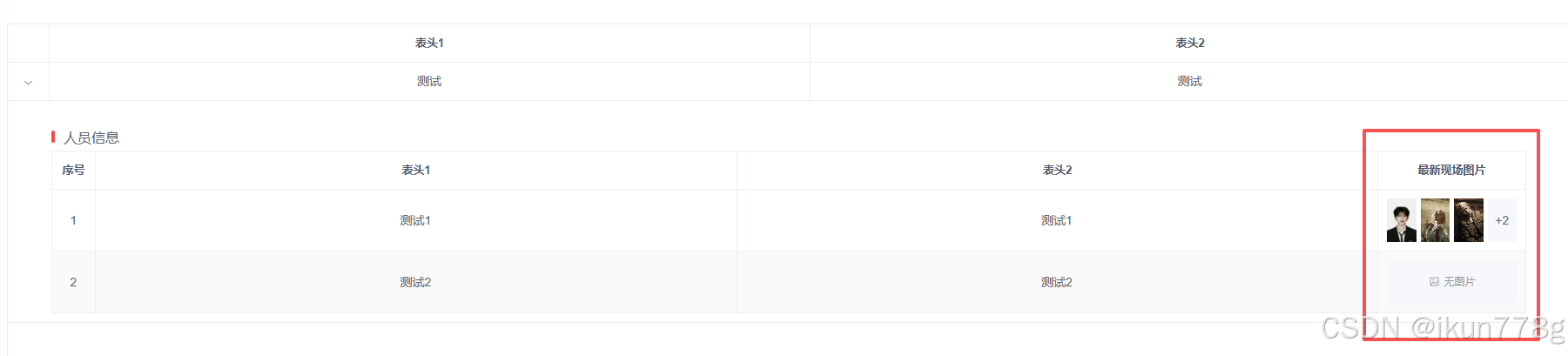
1.在table表格中添加图片
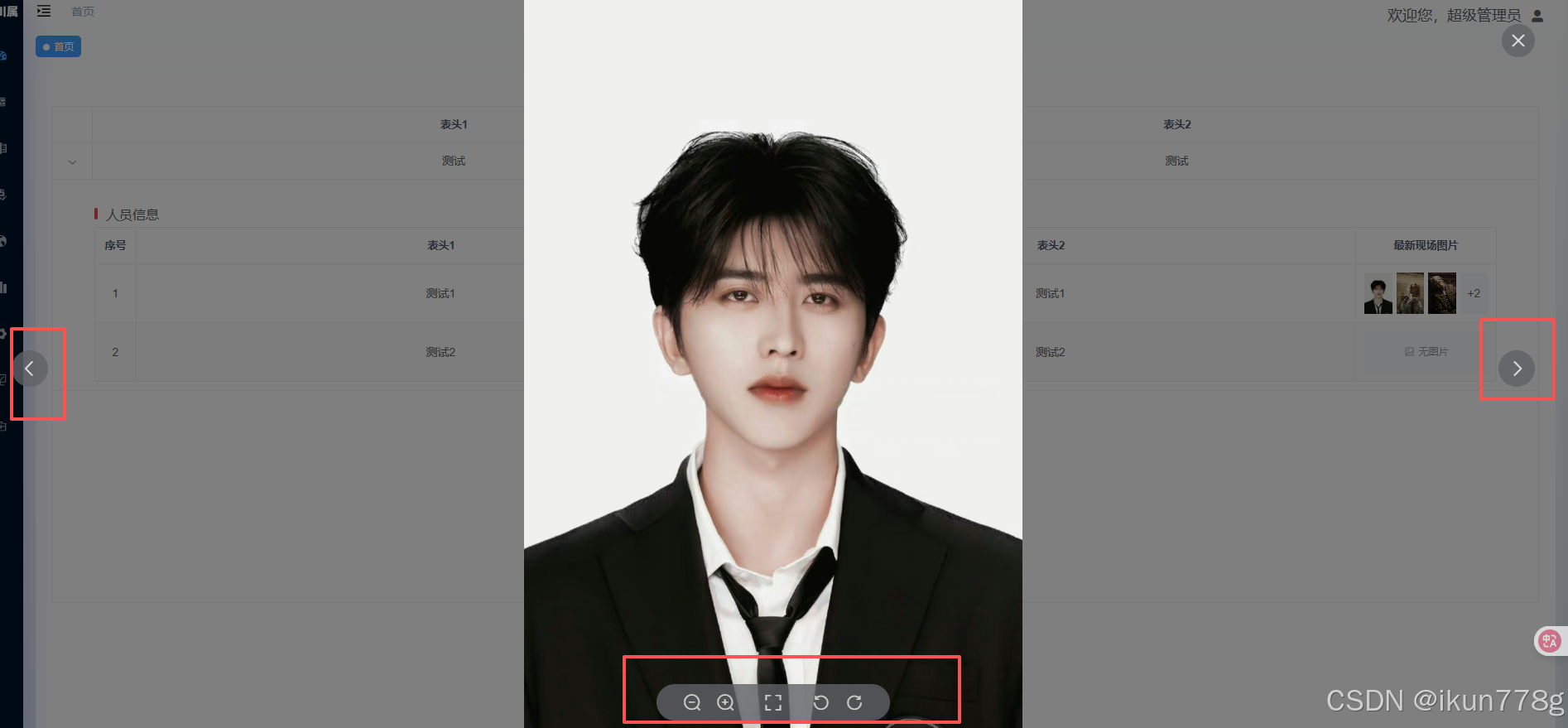
2.图片展示统一大小,默认展示三张图片,超过3张其余隐藏,点击可查看大图
3.无图时展示暂无图片
如图
二、源码
javascript
<template>
  <div class="app-container">


    <el-table :data="listData" border stripe height="600" class="tableBox">
      <el-table-column type="expand">
        <template slot-scope="props">
          <div class="contentBox">
            <div class="titleBox">
              <div class="rectangular"></div>
              <div class="text">人员信息</div>
            </div>
            <el-table :data="props.row.dispatchInfoList" border stripe>
              <el-table-column type="index" width="50" align="center" label="序号">
              </el-table-column>
              <el-table-column label="表头1" align="center" prop="test" show-overflow-tooltip />
              <el-table-column label="表头2" align="center" prop="test" show-overflow-tooltip />

              <el-table-column label="最新现场图片" align="center" prop="images" width="170">
                <template slot-scope="prop">
                  <!-- 拆分图片列表并过滤空值 -->
                  <div v-if="prop.row.images" style="display: flex; align-items: center;">
                    <!-- 只显示前3张图片 -->
                    <el-image v-for="(img, index) in prop.row.images.split(',').filter(i => i).slice(0, 3)" :key="index"
                      style="width: 50px; height: 50px; margin-right: 5px; cursor: pointer" :src="img"
                      :preview-src-list="prop.row.images.split(',').filter(i => i)" fit="cover" lazy>
                      <template #error>
                        <div
                          style="width: 50px; height: 50px; background: #f5f7fa; display: flex; align-items: center; justify-content: center; font-size: 12px; color: #999;">
                          缺
                        </div>
                      </template>
                    </el-image>

                    <!-- 超过3张时显示剩余数量 -->
                    <div v-if="prop.row.images.split(',').filter(i => i).length > 3"
                      style="width: 50px; height: 50px; background: #f5f7fa; display: flex; align-items: center; justify-content: center; font-size: 14px; color: #666;">
                      +{{prop.row.images.split(',').filter(i => i).length - 3}}
                    </div>
                  </div>

                  <!-- 无图片时显示占位 -->
                  <div v-else
                    style="width: 150px; height: 50px; background: #f5f7fa; display: flex; align-items: center; justify-content: center; font-size: 12px; color: #999;">
                    <i class="el-icon-picture-outline" style="margin-right: 5px;"></i>
                    无图片
                  </div>
                </template>
              </el-table-column>


            </el-table>
          </div>
        </template>
      </el-table-column>
      <el-table-column label="表头1" align="center" prop="test" show-overflow-tooltip />
      <el-table-column label="表头2" align="center" prop="test" show-overflow-tooltip />

    </el-table>


  </div>
</template>

<script>
export default {
  name: 'AlertList',
  data() {
    return {
      // 任务表格数据
      listData: [
        {
          "test": "测试",
          "dispatchInfoList": [
            {

              "test": "测试1",
              "images": "https://pic.rmb.bdstatic.com/bjh/01cf57565968e78b239b0eda34e6f3bd5502.jpeg@h_1280,https://sns-webpic-qc.xhscdn.com/202509011558/534f8c33a77056e47b666161ade4b34e/notes_pre_post/1040g3k831kukea78j0205nolaf1g8188joacp88!nd_dft_wlteh_webp_3,https://sns-webpic-qc.xhscdn.com/202509011558/347f4ca62f8cdd7f585e0328b08e9446/notes_pre_post/1040g3k831kukea78j01g5nolaf1g8188fe059lo!nd_dft_wlteh_webp_3,https://sns-webpic-qc.xhscdn.com/202509011558/6e9b3c49daa6bd784def68eaa63bf8cc/notes_pre_post/1040g3k831kukea78j0105nolaf1g8188tbcojdg!nd_dft_wlteh_webp_3,https://sns-webpic-qc.xhscdn.com/202509011558/5d58a6f33329148a1e38f71ca84c91bd/notes_pre_post/1040g3k831kukea78j00g5nolaf1g81880bev4q8!nd_dft_wlteh_webp_3",

            },
            {

              "test": "测试2",
              "images": "",

            },
          ]
        }
      ]
    }
  },
  async mounted() {

  },
  created() {

  },
  methods: {

  }
}
</script>
<style lang="scss" scoped>

//main-container全局样式
.app-container {
  background: #fff;
  height: calc(100%);
  padding: 20px;
}

.tableBox {
  margin-top: 20px;
}

.contentBox {
  width: 100%;
  height: 100%;
  padding: 0px 50px;
  margin-top: 20px;
  display: flex;
  flex-direction: column;

  .titleBox {
    width: 100%;
    height: 22px;
    display: flex;
    align-items: center;
    margin-bottom: 5px;

    .rectangular {
      height: 14px;
      width: 4px;
      background: #eb4b4b;
      border-radius: 8px;
      margin-right: 10px;
    }

    .text {
      font-size: 16px;
      font-weight: 500;
    }
  }
}

.cardBox {
  padding: 20px;
}

::v-deep .el-drawer__header {
  align-items: center;
  color: #72767b;
  display: flex;
  margin-bottom: 32px;
  padding: 20px 20px 0;

  span {
    font-size: 16px
  }
}
</style>