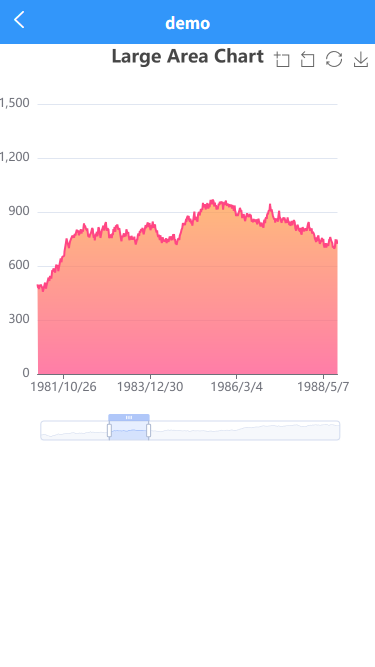
<template>
<view class="container">
<view id="myChart" class="chart"></view>
</view>
</template>
<script>
import * as echarts from 'echarts/dist/echarts.min.js';
// 开启触摸事件支持,用于适配移动端触摸屏设备。
echarts.env.touchEventsSupported = true;
// 明确关闭微信小程序适配模式,因为当前是浏览器环境
echarts.env.wxa = false;
// 同时启用SVG和Canvas两种渲染模式,ECharts会根据浏览器能力自动选择:
// Canvas更适合大数据量场景
// SVG更适合交互操作和动画
echarts.env.svgSupported = true;
echarts.env.canvasSupported = true;
// 启用DOM操作支持,这是浏览器环境下图表渲染的基础能力
echarts.env.domSupported = true;
export default {
data() {
return {
chart: null
}
},
methods: {
initChart() {
let base = +new Date(1968, 9, 3);
let oneDay = 24 * 3600 * 1000;
let date = [];
let data = [Math.random() * 300];
for (let i = 1; i < 20000; i++) {
var now = new Date((base += oneDay));
date.push([now.getFullYear(), now.getMonth() + 1, now.getDate()].join('/'));
data.push(Math.round((Math.random() - 0.5) * 20 + data[i - 1]));
}
const option = {
tooltip: {
trigger: 'axis',
position: function (pt) {
return [pt[0], '10%'];
}
},
title: {
left: 'center',
text: 'Large Area Chart'
},
toolbox: {
feature: {
dataZoom: {
yAxisIndex: 'none'
},
restore: {},
saveAsImage: {}
}
},
xAxis: {
type: 'category',
boundaryGap: false,
data: date
},
yAxis: {
type: 'value',
boundaryGap: [0, '100%']
},
dataZoom: [
{
type: 'inside',
start: 0,
end: 10
},
{
type: 'slider',
start: 0,
end: 10,
height: 20,
bottom: 10,
handleSize: '100%'
}
],
series: [
{
name: 'Fake Data',
type: 'line',
symbol: 'none',
sampling: 'lttb',
itemStyle: {
color: 'rgb(255, 70, 131)'
},
areaStyle: {
color: new echarts.graphic.LinearGradient(0, 0, 0, 1, [
{
offset: 0,
color: 'rgb(255, 158, 68)'
},
{
offset: 1,
color: 'rgb(255, 70, 131)'
}
])
},
data: data
}
]
};
// 确保 DOM 渲染完成后再初始化图表
this.$nextTick(() => {
const chartDom = document.getElementById('myChart');
if (chartDom) {
this.chart = echarts.init(chartDom);
this.chart.setOption(option);
// 手动绑定触摸事件
this.bindTouchEvents(chartDom);
}
});
},
bindTouchEvents(element) {
let startX = 0;
let startY = 0;
element.addEventListener('touchstart', (e) => {
if (e.touches.length === 1) {
startX = e.touches[0].clientX;
startY = e.touches[0].clientY;
}
}, {passive: false});
element.addEventListener('touchmove', (e) => {
// 阻止默认滚动行为
e.preventDefault();
}, {passive: false});
},
handleResize() {
if (this.chart) {
this.chart.resize();
}
}
},
mounted() {
// 延迟初始化确保 DOM 完全加载
this.initChart();
window.addEventListener('resize', this.handleResize);
},
beforeDestroy() {
if (this.chart) {
this.chart.dispose();
}
window.removeEventListener('resize', this.handleResize);
}
}
</script>
<style scoped>
.container {
width: 100%;
height: 100%;
}
.chart {
width: 100vw;
height: 400px;
touch-action: none; /* 关键:禁用浏览器默认的触摸行为 */
}
</style>