文章介绍了Browser-Use这一Python库,它让AI能通过自然语言描述自主与网页交互,支持多种大模型。基于此库,AI自动化测试可探索prompt工程、MCP协议和一体化测试平台等方向。相关项目如VibeSurf、QA-Use等已实现智能测试功能,能自动执行UI测试、数据采集和业务流程。未来需平衡AI测试效果与token成本,实现高效且经济的自动化测试解决方案。
AI 发展比较快,公司组内分享于 9.23
随着 Vibe Coding 的快速发展,Anthropic 官方演讲:Vibe Coding 如何用到线上正式项目中 中介绍的我们需要一个帮助我们验证系统正确性的工具。brower-use 为我们提供了一个自动化测试的强有力的工具。
分 brower-use 和 AI 自动化测试两部分介绍:
brower-use
项目概述
Browser-Use 是一个开源的 Python 库,旨在让 AI 能够自主地与网页进行交互。
该项目允许用户通过自然语言描述任务,AI 通过 Chrome DevTools Protocol(CDP 协议) 执行 Chrome/Chromium 浏览器复杂的网页操作,如网页导航、表单填写、数据提取、在线购物等。
核心特性
- 纯文本任务描述:用户只需用自然语言描述任务,无需编写代码
- 自主浏览器操作:支持点击、输入、滚动、多标签页管理等全套浏览器操作
- 多模型支持:支持 OpenAI、Anthropic、Google、Azure、Groq、Ollama 等多种大语言模型
- 实时屏幕截图:具备视觉理解能力,可以看到页面内容
- 跨平台支持:支持 Windows、macOS、Linux
- 云端服务:提供托管的云端解决方案
本地安装时候需要镜像源:
安装 brower-use
uv pip install -i https://pypi.tuna.tsinghua.edu.cn/simple browser-use
安装 playwright
plaintext
# 1) 把 uv 的包源指向清华镜像(PyPI 国内镜像)

export UV_INDEX_URL="https://pypi.tuna.tsinghua.edu.cn/simple"

# 2) 拉长 http 超时时间(默认 30s 太短)

export UV_HTTP_TIMEOUT=600

# 3) 仍然使用淘宝的 Playwright 浏览器镜像

export PLAYWRIGHT_DOWNLOAD_HOST="https://npmmirror.com/mirrors/playwright"

# 4) 用 uvx 安装并拉浏览器(可指定版本,避免解析到别的版本)

uvx --index "$UV_INDEX_URL" playwright@1.55.0 install chromium --with-deps
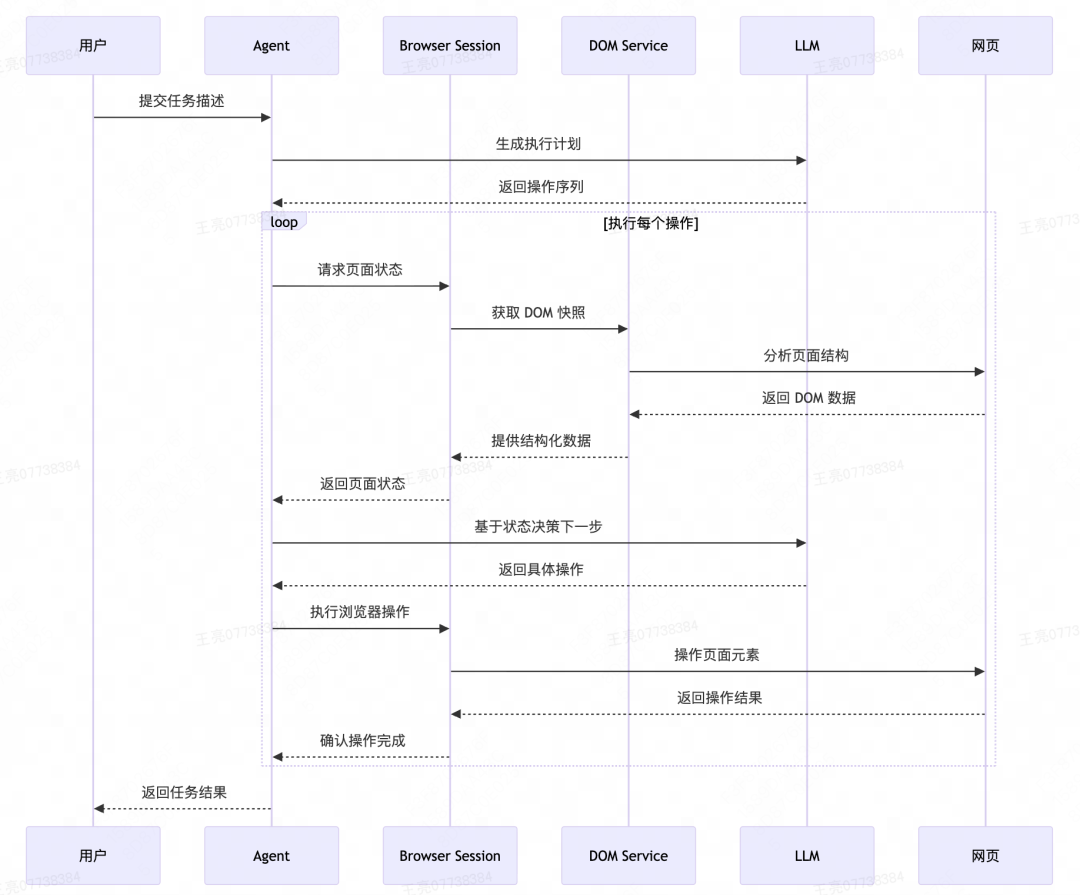
核心原理
核心思想是一个 ReAct,可以看 一文入门 agent:从理论到代码实战 这篇文章介绍的。
使用示例
-
基础搜索示例
plaintextimport asyncio from browser_use import Agent, ChatOpenAI asyncdefmain(): agent = Agent( task="在 Google 上搜索 'browser automation' 并告诉我前 3 个结果", llm=ChatOpenAI(model="gpt-4o-mini"), ) await agent.run() asyncio.run(main()) -
在线购物示例
plaintext# 复杂的购物任务 task = """ 访问 Migros 在线商店,搜索以下商品并添加到购物车: - 牛肉末 (1kg) - 格鲁耶尔奶酪 - 全脂牛奶 (2升) - 黄油 - 胡萝卜 (1kg) 完成购买流程并选择 TWINT 支付方式 """ -
多标签页操作
plaintext# 在多个标签页中执行任务 task = "打开 3 个标签页分别搜索 Elon Musk、Sam Altman 和 Steve Jobs,然后返回第一个标签页" -
文件上传功能
plaintext# 自定义文件上传工具 @tools.action('上传文件到指定元素') asyncdefupload_file(index: int, path: str, browser_session: BrowserSession): # 获取 DOM 元素 dom_element = await browser_session.get_dom_element_by_index(index) # 执行文件上传 event = browser_session.event_bus.dispatch(UploadFileEvent(node=dom_element, file_path=path)) await event
应用场景
- 自动化测试 (✅本文主要探讨的方向)
- UI 测试:自动化用户界面测试
- 回归测试:自动执行回归测试用例
- 性能测试:监控页面加载和响应时间
- 数据采集
- 网页爬虫:智能网页数据抓取
- 竞品分析:自动收集竞争对手信息
- 市场调研:自动化市场数据收集
- 业务流程自动化
- 表单填写:自动化表单处理
- 订单处理:自动化订单管理
- 客户服务:自动化客户支持流程
- 个人助手应用
- 在线购物:智能购物助手
- 信息查询:自动化信息检索
- 账户管理:自动化账户操作
GUI
web-ui
https://github.com/browser-use/web-ui
基于 brower-use 的一个可视化操作工具。
VibeSurf
https://github.com/vvincent1234/VibeSurf
基于 brower-use 和浏览器插件的可视化操作工具。
AI 自动化测试
基于 brower-use,渐进式的可以有三个方向进行探索。
- prompt
- MCP
- 一体化测试平台
prompt
可参考 awesome-prompts,
测试相关的:
Website Functionality Testing
plaintext
Perform a comprehensive functionality test of {website} focusing on the {specific_feature} and core user journeys.

Test the following user flows:

1. User registration and login process
   - Create a new account with test credentials
   - Verify email confirmation process
   - Log out and log back in
   - Test password reset functionality

2. {specific_feature} functionality
   - Test all UI elements (buttons, forms, dropdowns)
   - Verify data entry and validation
   - Test error handling and messaging
   - Check performance under various conditions

3. Critical user journeys
   - {user_journey1} (e.g., product search to checkout)
   - {user_journey2} (e.g., account settings update)
   - {user_journey3} (e.g., content submission)

4. Cross-browser compatibility
   - Test core functionality on Chrome, Firefox, and Safari
   - Document any rendering or functionality differences

For each test, document:

- Test case description
- Expected behavior
- Actual behavior
- Screenshots of issues encountered
- Severity rating (Critical, High, Medium, Low)
Responsive Design Testing
plaintext
Test the responsive design of {website} across various device types and screen sizes.

1. Test the following key pages:
   - Homepage
   - {page1} (e.g., product listing)
   - {page2} (e.g., product detail)
   - {page3} (e.g., checkout)
   - {page4} (e.g., account settings)

2. For each page, test the following screen sizes and orientations:
   - Mobile: 320px, 375px, 414px (portrait and landscape)
   - Tablet: 768px, 1024px (portrait and landscape)
   - Desktop: 1366px, 1920px

3. For each combination, evaluate:
   - Content visibility and readability
   - Navigation usability
   - Image and media scaling
   - Form functionality
   - Touch targets and interactive elements
   - Load time and performance

4. Test specific responsive features:
   - Hamburger menu functionality on mobile
   - Collapsible sections
   - Image carousels/sliders
   - Tables or complex data representations
   - Modal windows and popups

Document all issues with screenshots, device information, and recommended fixes. Prioritize issues based on severity and frequency of user encounter.
User Registration Flow Testing
plaintext
Test the entire user registration flow on {website} to identify any usability issues or bugs.

1. Begin by navigating to the site's homepage and finding the registration option
2. Test the following registration methods:
   - Email registration
   - Google/social media account registration (if available)
   - Phone number registration (if available)

3. For email registration, test:
   - Form validation for each field
   - Password strength requirements
   - Email verification process
   - "Already registered" error handling

4. Document the following for each step:
   - Field requirements and validations
   - Error messages (clarity and helpfulness)
   - Number of steps in the process
   - Time taken to complete each step

5. Test edge cases:
   - Using an email that's already registered
   - Using invalid formats for fields
   - Abandoning the process mid-way and returning
   - Registering from different browsers or devices

6. After successful registration, verify:
   - Welcome email receipt and content
   - Initial account state and settings
   - Any onboarding processes or tutorials
   - Logout and login functionality with the new account

Provide a detailed report with screenshots of any issues found, along with severity ratings and suggestions for improvement.
Accessibility Testing
plaintext
Conduct an accessibility test of {website} to identify issues that may impact users with disabilities.

1. Test keyboard navigation:
   - Tab through all interactive elements on key pages
   - Verify visible focus indicators
   - Test all functionality without using a mouse
   - Check for keyboard traps or inaccessible elements

2. Test screen reader compatibility:
   - Enable VoiceOver (Mac) or NVDA (Windows)
   - Navigate through key pages and verify all content is announced
   - Check for appropriate alt text on images
   - Verify form fields have proper labels
   - Test dynamic content updates

3. Test color contrast and visual presentation:
   - Check text contrast against backgrounds
   - Verify information is not conveyed by color alone
   - Test the site at 200% zoom
   - Verify the site works in high contrast mode

4. Test form and interactive elements:
   - Verify clear error messages
   - Check for appropriate input validation
   - Test timeout warnings and session management
   - Verify multimedia has captions or transcripts

5. Check against WCAG 2.1 AA standards:
   - Verify semantic HTML structure
   - Check for proper heading hierarchy
   - Test ARIA implementations
   - Verify appropriate landmark regions

Document all issues with screenshots, steps to reproduce, and references to relevant WCAG criteria.
MCP
https://github.com/browser-use/vibetest-use
基于 AI 的自动化 QA 测试工具,专门用于测试 AI 生成的网站。使用多个 Browser-Use 智能代理来并行测试网站的 UI 缺陷、损坏的链接、可访问性问题和其他技术问题提供了一个 MCP,可以与 Claude 和 Cursor 等 AI 编程工具集成。
demo 性质,项目比较简单,一个 agent ,一个 mcp 。
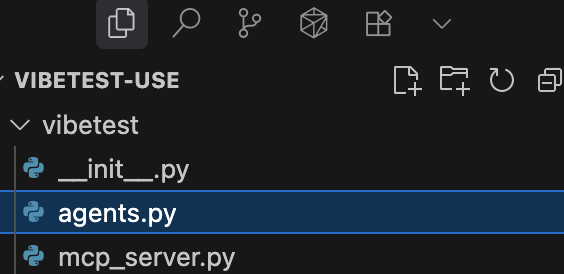
值得学习的还是 agents 中的 prompt,prompt 技巧可以参考 Anthropic 官方提示词工程教程收获总结:Prompt 提示词工程快速入门。
plaintext
"""
You are an objective QA analyst. Review the following test reports from agents that explored the website {test_data['url']}.

Identify only actual functional issues, broken features, or technical problems. Do NOT classify subjective opinions, missing features that may be intentional, or design preferences as issues.

Only report issues if they represent:

- Broken functionality (buttons that don't work, forms that fail)
- Technical errors (404s, JavaScript errors, broken links)
- Accessibility violations (missing alt text, poor contrast)
- Performance problems (very slow loading, timeouts)

IMPORTANT: For each issue you identify, provide SPECIFIC and DETAILED descriptions including:

- The exact element that was tested (button name, link text, form field, etc.)
- The specific action taken (clicked, typed, submitted, etc.)
- The exact result or error observed (404 error, no response, broken redirect, etc.)
- Any relevant context from the agent's testing

DO NOT use vague descriptions like "broken link" or "404 error". Instead use specific descriptions like:

- "Upon clicking the 'Contact Us' button in the header navigation, the page redirected to a 404 error"
- "When submitting the newsletter signup form with a valid email, the form displayed 'Server Error 500' instead of confirmation"

Here are the test reports:
{bug_reports_text}

Format the output as JSON with the following structure:
{{
    "high_severity": [
        {{ "category": "category_name", "description": "specific detailed description with exact steps and results" }},
        ...
    ],
    "medium_severity": [
        {{ "category": "category_name", "description": "specific detailed description with exact steps and results" }},
        ...
    ],
    "low_severity": [
        {{ "category": "category_name", "description": "specific detailed description with exact steps and results" }},
        ...
    ]
}}

Only include real issues found during testing. Provide clear, concise descriptions. Deduplicate similar issues.
"""
一体化测试平台
https://github.com/browser-use/qa-use
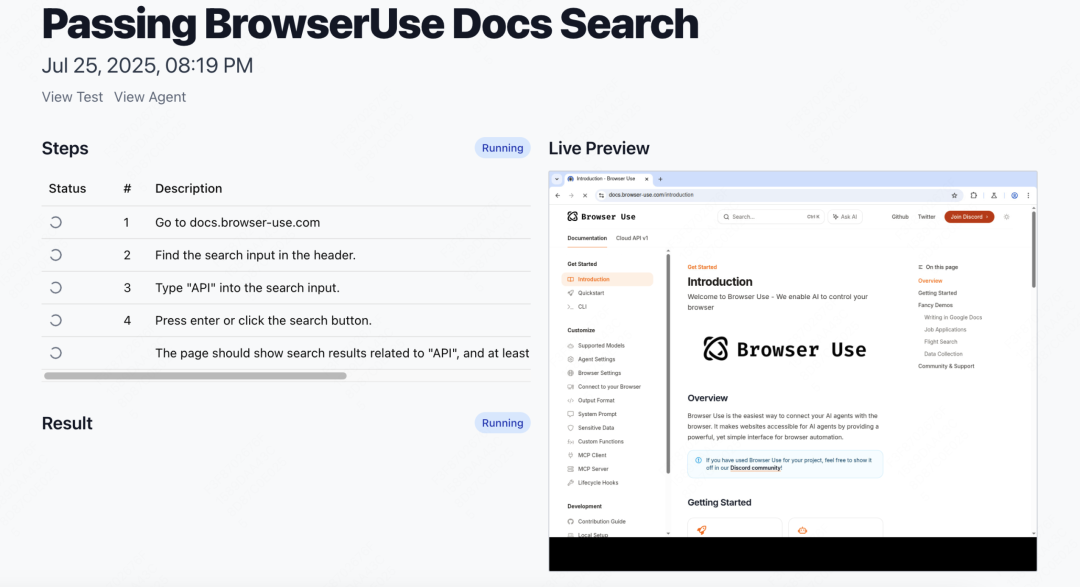
QA-Use 是一个基于 AI 的智能化端到端测试平台,让用户可以用自然语言描述测试场景(如"访问登录页面,输入用户名和密码,点击登录按钮"),然后由 AI 代理自动在真实浏览器中执行这些测试步骤。
平台支持测试套件的创建和管理、定时自动执行(每小时或每天)、实时监控测试过程、完整的执行历史追踪,以及测试失败时的邮件通知功能。
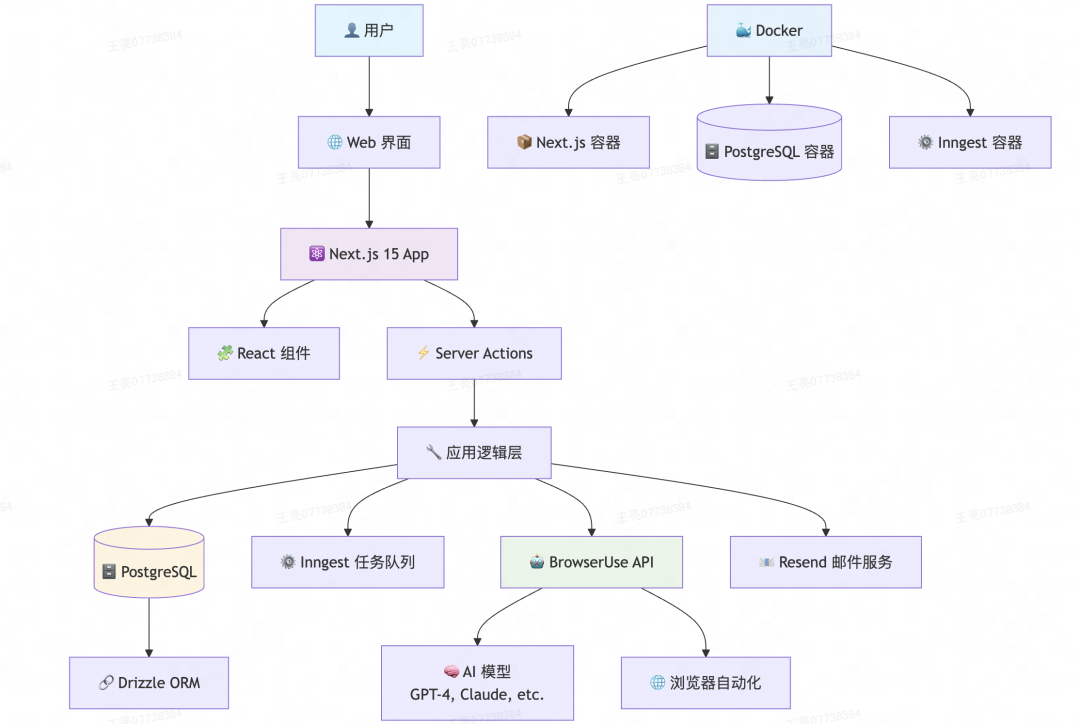
内部集成了 BrowserUse Cloud API ,直接使用需要收费,但整体项目的架构可以学习。
其他项目
SDET-GENIE
https://github.com/WaiGenie/SDET-GENIE
将用户输入的简单想法自动生成综合的手工测试用例,通过智能浏览器代理在真实浏览器环境中执行测试并收集交互数据,最后生成支持多种主流框架(如Selenium、Playwright、Cypress等)的自动化代码。
用户输入:As a user, I want to log in with valid credentials so that I can access my account.
生成 case:
plaintext
Feature: User Authentication

  @positive
  Scenario: Successful login with valid credentials
    Given I am on the login page
    When I enter "standard_user"in the username field
    And I enter "secret_sauce"in the password field
    And I click the login button
    Then I should be redirected to the inventory page

  @negative
  Scenario: Failed login with invalid credentials
    Given I am on the login page
    When I enter "invalid_user"in the username field
    And I enter "wrong_password"in the password field
    And I click the login button
    Then I should see an error message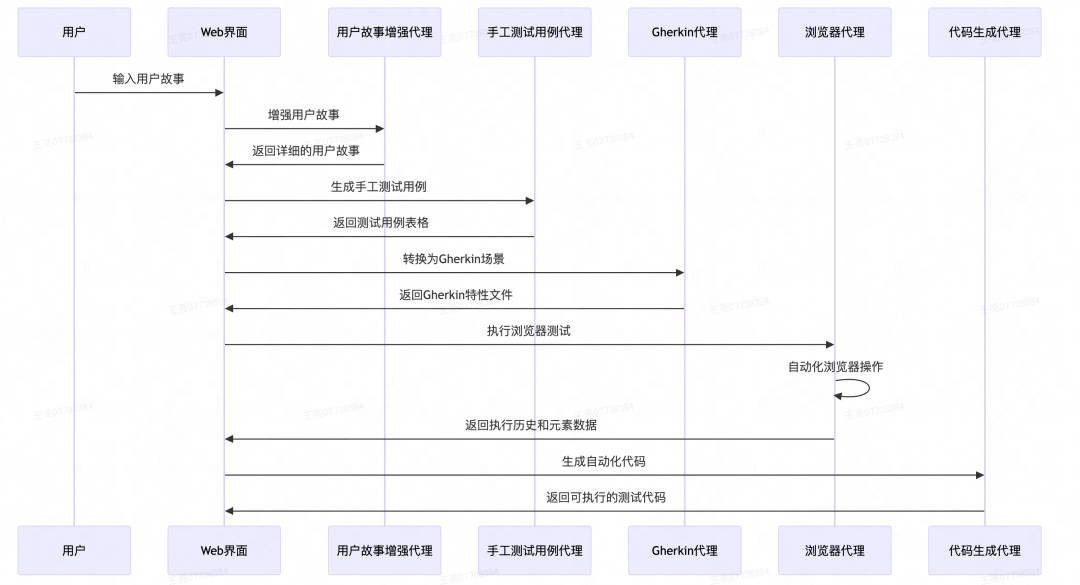
web-eval-agent
https://github.com/Operative-Sh/web-eval-agent
帮开发者提效,开发过程中的测试让 AI 完成。
基于 AI 的智能 Web 应用测试和调试平台。它通过 MCP 协议集成到 IDE 中,使用 Claude 大语言模型驱动 browser-use 库自动执行浏览器操作,能够智能地导航网页、填写表单、点击按钮等,同时实时捕获控制台日志、网络请求和页面截图。
开发者可以通过可视化界面监控 AI 代理的执行过程,支持暂停/恢复/停止操作,并能生成详细的 UX 评估报告,包括发现的问题、交互流程分析和改进建议,从而让开发者从繁琐的手动测试中解放出来,专注于更重要的开发工作。
总
可以看到很多项目已经基于 brower-use 做 AI 自动化测试了,过去前端的 UI 测试确实是一个问题,基本依赖于手动操作,对于重构、跑 CASE 是一个很大的痛点。
未来可以持续探索 AI 的自动化测试,但卡点可能将会是 token 的花费,简单任务试了一下对于 claude 模型单次会有几毛钱(如果并行 agent 执行复杂任务花费将不可控),试了ollama 本地的模型效果会差很多,速度也比较慢。
普通人如何抓住AI大模型的风口?
为什么要学习大模型?
在DeepSeek大模型热潮带动下,"人工智能+"赋能各产业升级提速。随着人工智能技术加速渗透产业,AI人才争夺战正进入白热化阶段。如今近**60%的高科技企业已将AI人才纳入核心招聘目标,**其创新驱动发展的特性决定了对AI人才的刚性需求,远超金融(40.1%)和专业服务业(26.7%)。餐饮/酒店/旅游业核心岗位以人工服务为主,多数企业更倾向于维持现有服务模式,对AI人才吸纳能力相对有限。
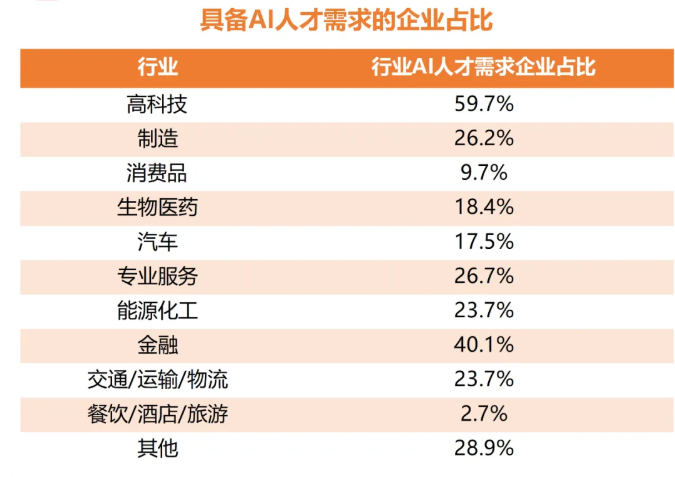
这些数字背后,是产业对AI能力的迫切渴求:互联网企业用大模型优化推荐算法,制造业靠AI提升生产效率,医疗行业借助大模型辅助诊断......而餐饮、酒店等以人工服务为核心的领域,因业务特性更依赖线下体验,对AI人才的吸纳能力相对有限。显然,AI技能已成为职场"加分项"乃至"必需品",越早掌握,越能占据职业竞争的主动权
随着AI大模型技术的迅速发展,相关岗位的需求也日益增加。大模型产业链催生了一批高薪新职业:
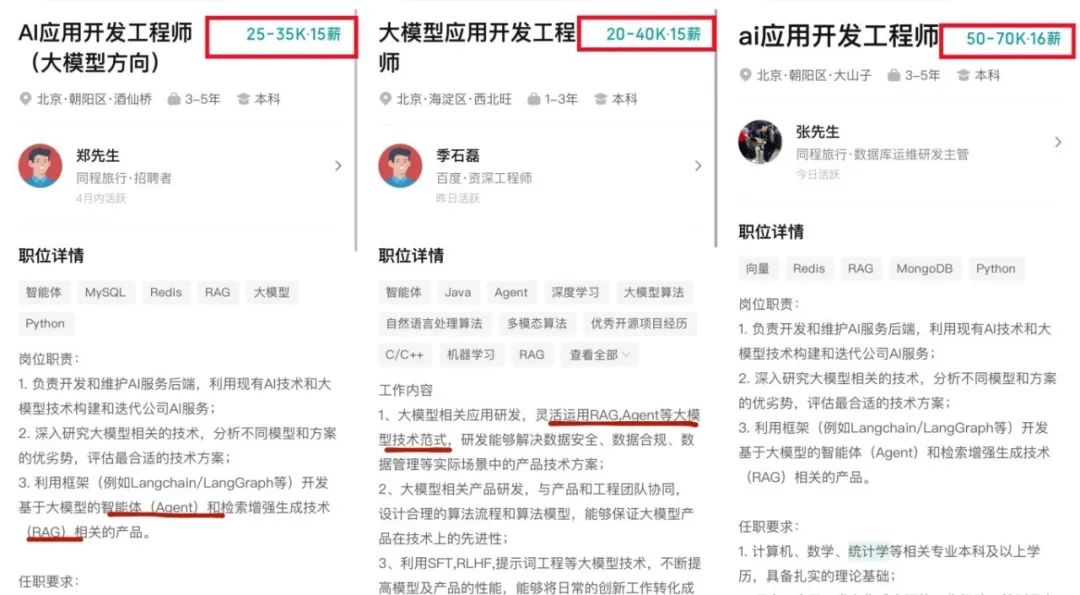
人工智能大潮已来,不加入就可能被淘汰。如果你是技术人,尤其是互联网从业者,现在就开始学习AI大模型技术,真的是给你的人生一个重要建议!
如果你真的想学习大模型,请不要去网上找那些零零碎碎的教程,真的很难学懂!你可以根据我这个学习路线和系统资料,制定一套学习计划,只要你肯花时间沉下心去学习,它们一定能帮到你!
大模型全套学习资料领取
这里我整理了一份AI大模型入门到进阶全套学习包,包含学习路线+实战案例+视频+书籍PDF+面试题+DeepSeek部署包和技巧,需要的小伙伴文在下方免费领取哦,真诚无偿分享!!!
vx扫描下方二维码即可
部分资料展示
一、 AI大模型学习路线图
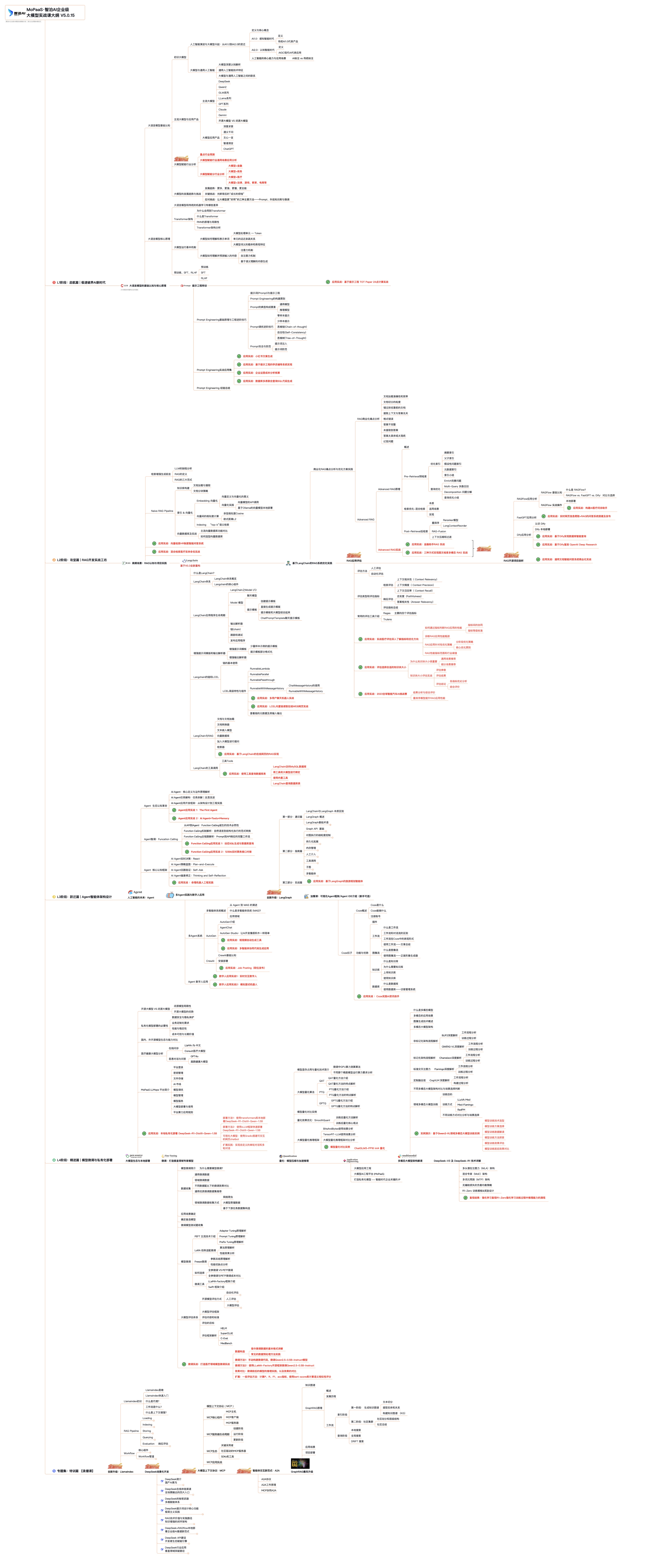
这份路线图以"阶段性目标+重点突破方向"为核心,从基础认知(AI大模型核心概念)到技能进阶(模型应用开发),再到实战落地(行业解决方案),每一步都标注了学习周期和核心资源,帮你清晰规划成长路径。
二、 全套AI大模型应用开发视频教程
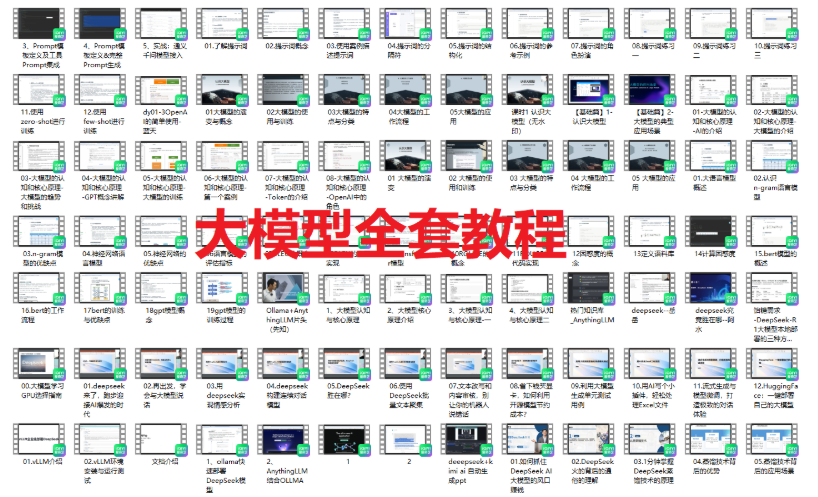
从入门到进阶这里都有,跟着老师学习事半功倍。
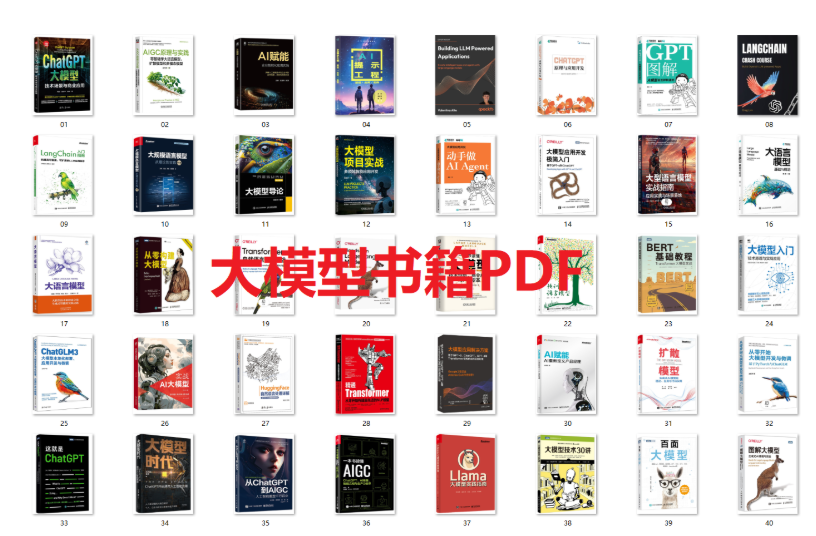
三、 大模型学习书籍&文档
收录《从零做大模型》《动手做AI Agent》等经典著作,搭配阿里云、腾讯云官方技术白皮书,帮你夯实理论基础。
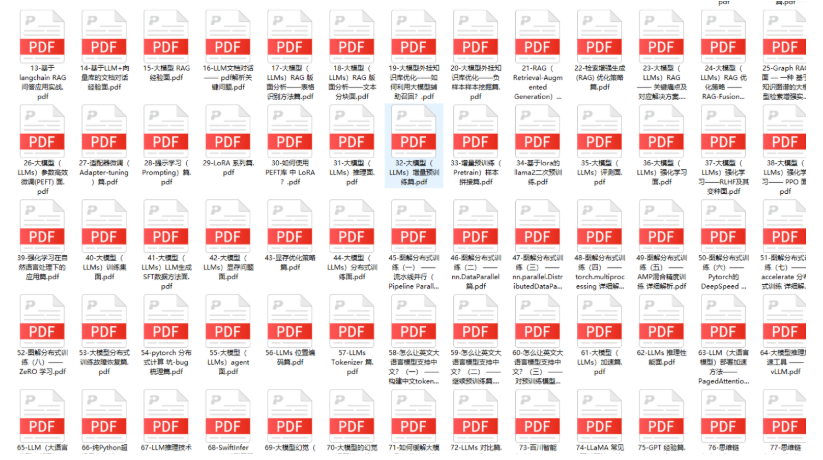
四、大模型大厂面试真题
整理了百度、阿里、字节等企业近三年的AI大模型岗位面试题,涵盖基础理论、技术实操、项目经验等维度,每道题都配有详细解析和答题思路,帮你针对性提升面试竞争力。
适用人群
第一阶段(10天):初阶应用
该阶段让大家对大模型 AI有一个最前沿的认识,对大模型 AI 的理解超过 95% 的人,可以在相关讨论时发表高级、不跟风、又接地气的见解,别人只会和 AI 聊天,而你能调教 AI,并能用代码将大模型和业务衔接。
- 大模型 AI 能干什么?
- 大模型是怎样获得「智能」的?
- 用好 AI 的核心心法
- 大模型应用业务架构
- 大模型应用技术架构
- 代码示例:向 GPT-3.5 灌入新知识
- 提示工程的意义和核心思想
- Prompt 典型构成
- 指令调优方法论
- 思维链和思维树
- Prompt 攻击和防范
- ...
第二阶段(30天):高阶应用
该阶段我们正式进入大模型 AI 进阶实战学习,学会构造私有知识库,扩展 AI 的能力。快速开发一个完整的基于 agent 对话机器人。掌握功能最强的大模型开发框架,抓住最新的技术进展,适合 Python 和 JavaScript 程序员。
- 为什么要做 RAG
- 搭建一个简单的 ChatPDF
- 检索的基础概念
- 什么是向量表示(Embeddings)
- 向量数据库与向量检索
- 基于向量检索的 RAG
- 搭建 RAG 系统的扩展知识
- 混合检索与 RAG-Fusion 简介
- 向量模型本地部署
- ...
第三阶段(30天):模型训练
恭喜你,如果学到这里,你基本可以找到一份大模型 AI相关的工作,自己也能训练 GPT 了!通过微调,训练自己的垂直大模型,能独立训练开源多模态大模型,掌握更多技术方案。
到此为止,大概2个月的时间。你已经成为了一名"AI小子"。那么你还想往下探索吗?
- 为什么要做 RAG
- 什么是模型
- 什么是模型训练
- 求解器 & 损失函数简介
- 小实验2:手写一个简单的神经网络并训练它
- 什么是训练/预训练/微调/轻量化微调
- Transformer结构简介
- 轻量化微调
- 实验数据集的构建
- ...
第四阶段(20天):商业闭环
对全球大模型从性能、吞吐量、成本等方面有一定的认知,可以在云端和本地等多种环境下部署大模型,找到适合自己的项目/创业方向,做一名被 AI 武装的产品经理。
- 硬件选型
- 带你了解全球大模型
- 使用国产大模型服务
- 搭建 OpenAI 代理
- 热身:基于阿里云 PAI 部署 Stable Diffusion
- 在本地计算机运行大模型
- 大模型的私有化部署
- 基于 vLLM 部署大模型
- 案例:如何优雅地在阿里云私有部署开源大模型
- 部署一套开源 LLM 项目
- 内容安全
- 互联网信息服务算法备案
- ...
学习是一个过程,只要学习就会有挑战。天道酬勤,你越努力,就会成为越优秀的自己。
如果你能在15天内完成所有的任务,那你堪称天才。然而,如果你能完成 60-70% 的内容,你就已经开始具备成为一名大模型 AI 的正确特征了。
这份完整版的大模型 AI 学习资料已经上传CSDN,朋友们如果需要可以微信扫描下方CSDN官方认证二维码免费领取【保证100%免费】