一、无监督学习(Unsupervised Learning)

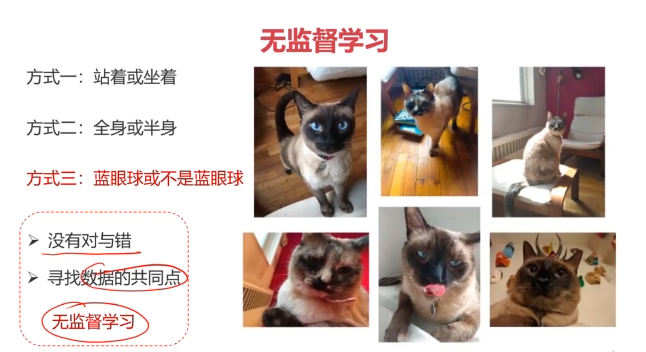
机器学习的一种方法,没有给定事先标记过的训练示例,自动对输入的数据进行分类或分群。
优点:
- 算法不受监督信息(偏见)的约束,可能考虑到新的信息
- 不需要标签数据,极大程度扩大数据样本
主要应用:聚类分析、关联规则、维度缩减
应用最广:聚类分析(clustering)
二、聚类分析
聚类分析又称为群分析,根据对象某些属性的相似度,将其自动化分为不同的类别。
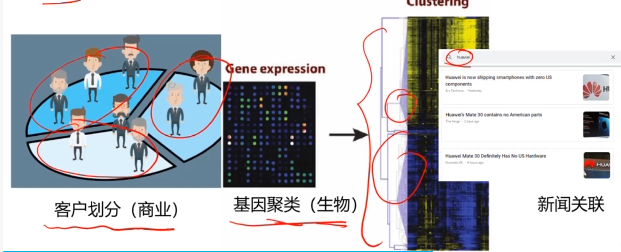
常用的聚类算法
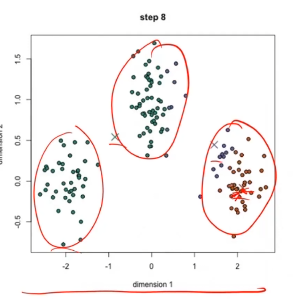
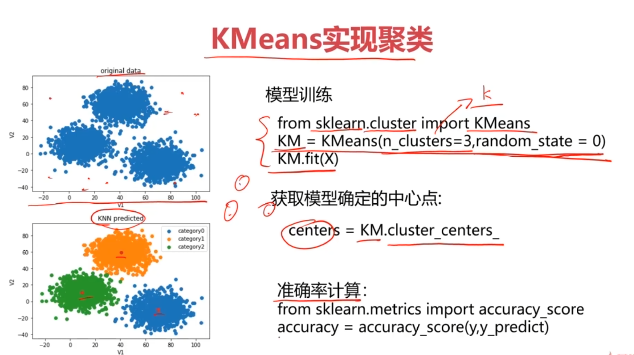
1、KMeans聚类
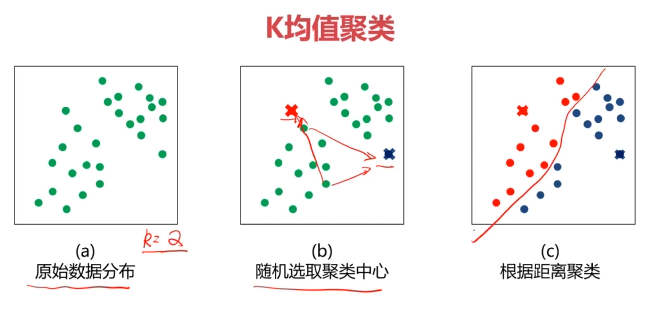
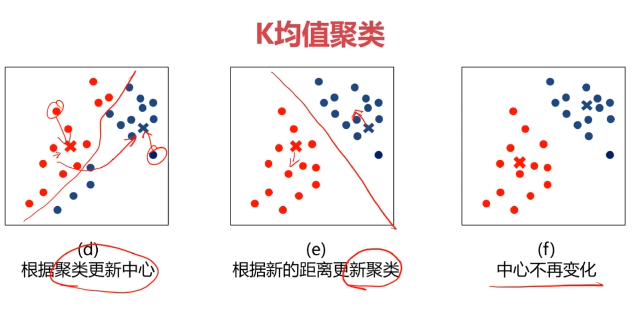
- 根据数据与中心点距离划分类别
- 基于类别数据更新中心点
- 重复过程直到收敛
特点:
1、实现简单,收敛快
2、需要指定类别数量
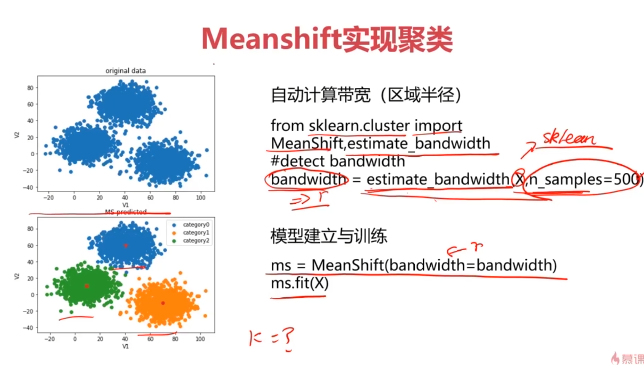
2、均值漂移聚类(Meanshift)
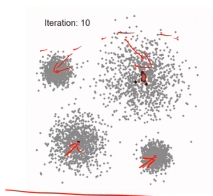
- 在中心点一定区域检索数据点
- 更新中心
- 重复流程到中心点稳定
特点:
1、自动发现类别数量,不需要人工选择
2、需要选择区域半径
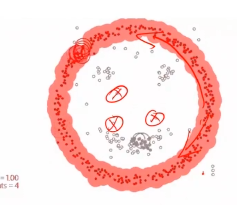
3、DBSCAN算法(基于密度的空间聚类算法)
- 基于区域点密度筛选有效数据
- 基于有效数据向周边扩张,直到没有新点加入
特点:
1、过滤噪音数据
2、不需要人为选择类别数量
3、数据密度不同时影响结果
4、什么是K均值聚类?(KMeans Analysis)
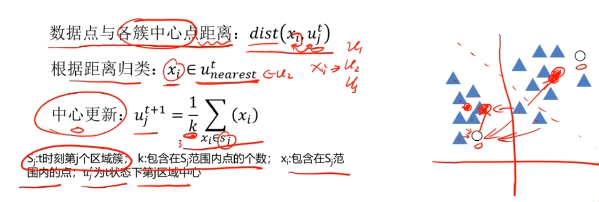
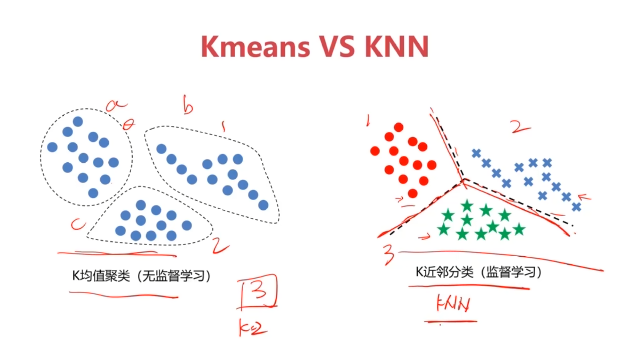
K-均值算法:以空间中k个点为中心进行聚类,对最靠近他们的对象归类,是聚类算法中最为基础但也最为重要的算法。

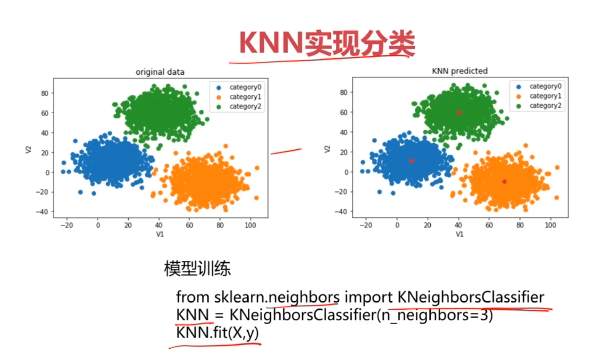
5、K近邻分类模型(KNN)
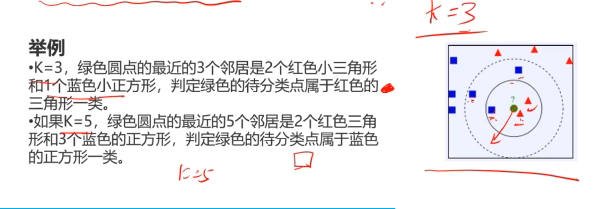
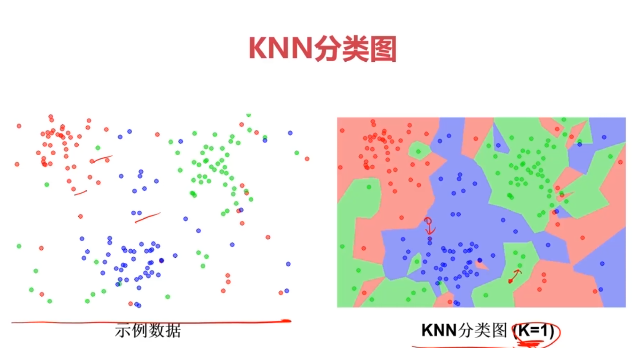
给定一个训练数据集,对新的输入实例,在训练数据集中找到与该实例最邻近的K个实例(也就是上面所说的K个邻居),这K个实例的多数属于某个类,就把该输入实例分类到这个类中
- 最简单的机器学习算法之一
5、均值漂移聚类(Meanshift)
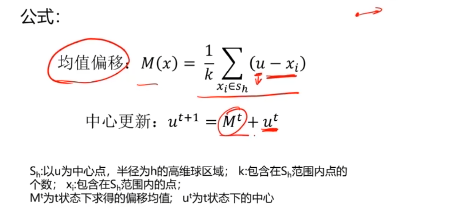
均值漂移算法:一种基于密度梯度上升的聚类算法(沿着密度上升方向寻找聚类中心点)
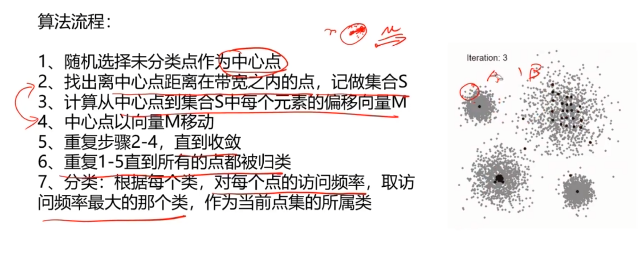
6、实现过程
三、使用Kmeans算法实现2D数据自动聚类
#使用Kmeans算法实现2D数据自动聚类,使用数据集kmeans_data.csv
#加载数据
import pandas as pd
import numpy as np
data = pd.read_csv('kmeans_data.csv')
data.head()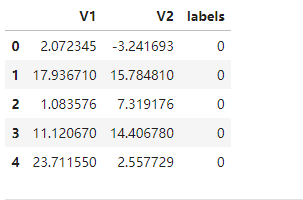
#赋值x y
x = data.drop('labels',axis=1)
y = data.loc[:,'labels']
y.head()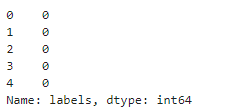
#查看labels有多少类别
pd.Series.value_counts(y)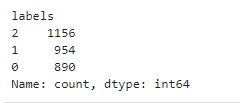
#画图
from matplotlib import pyplot as plt
fig1 = plt.figure()
plt.scatter(x.loc[:,'V1'],x.loc[:,'V2'])
plt.title('un-labeld data')
plt.xlabel('V1')
plt.ylabel('V2')
plt.show()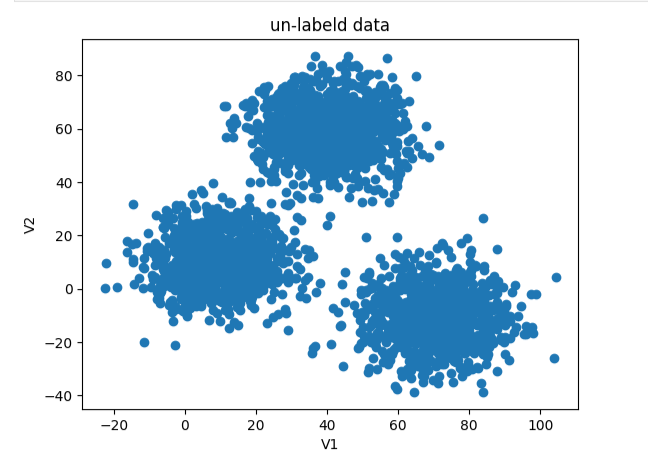
fig2 = plt.figure()
label0 = plt.scatter(x.loc[:,'V1'][y==0],x.loc[:,'V2'][y==0])
label1 = plt.scatter(x.loc[:,'V1'][y==1],x.loc[:,'V2'][y==1])
label2 = plt.scatter(x.loc[:,'V1'][y==2],x.loc[:,'V2'][y==2])
plt.title('un-labeld data')
plt.xlabel('V1')
plt.ylabel('V2')
plt.legend((label0,label1,label2),('label0','label1','label2'))
plt.show()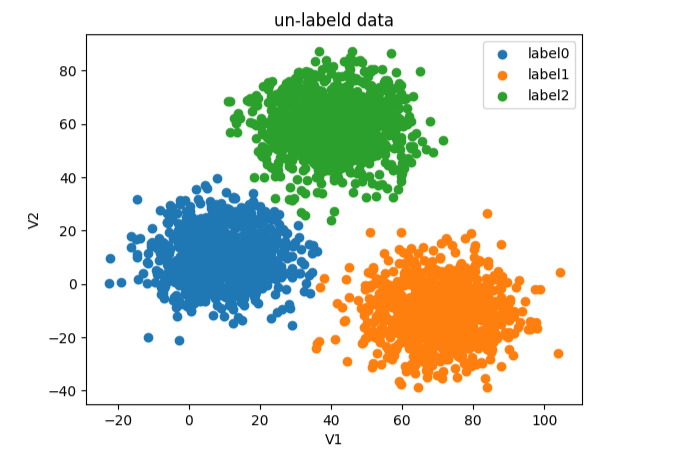
#查看x y维度
print(x.shape,y.shape)
#创建Kmeans模型
from sklearn.cluster import KMeans
KM = KMeans(n_clusters=3,random_state=0)
KM.fit(x)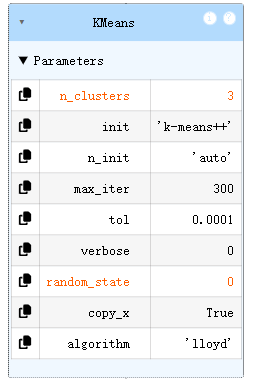
#聚类的中心点
centers = KM.cluster_centers_

fig3 = plt.figure()
label0 = plt.scatter(x.loc[:,'V1'][y==0],x.loc[:,'V2'][y==0])
label1 = plt.scatter(x.loc[:,'V1'][y==1],x.loc[:,'V2'][y==1])
label2 = plt.scatter(x.loc[:,'V1'][y==2],x.loc[:,'V2'][y==2])
plt.scatter(centers[:,0],centers[:,1])
plt.title('un-labeld data')
plt.xlabel('V1')
plt.ylabel('V2')
plt.legend((label0,label1,label2),('label0','label1','label2'))
plt.show()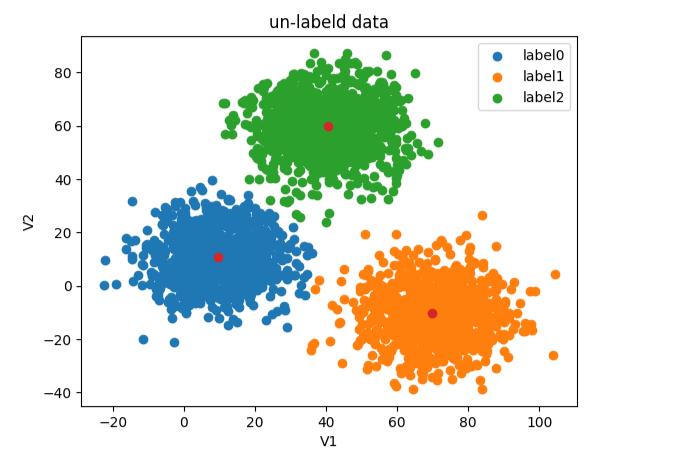
#测试新数据V1=80,V2=60
x_test = pd.DataFrame([[80,60]],columns=['V1','V2'])
y_predict_test = KM.predict(x_test)
print(y_predict_test)
#计算准确率
y_predict = KM.predict(x)
print(y_predict)
print(pd.Series.value_counts(y_predict),pd.Series.value_counts(y))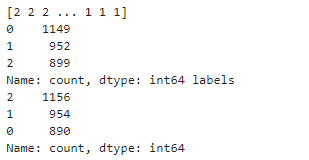
from sklearn.metrics import accuracy_score
accuracy = accuracy_score(y,y_predict)
print(accuracy)
#可视化数据
fig4 = plt.subplot(121)
label0 = plt.scatter(x.loc[:,'V1'][y_predict==0],x.loc[:,'V2'][y_predict==0])
label1 = plt.scatter(x.loc[:,'V1'][y_predict==1],x.loc[:,'V2'][y_predict==1])
label2 = plt.scatter(x.loc[:,'V1'][y_predict==2],x.loc[:,'V2'][y_predict==2])
plt.scatter(centers[:,0],centers[:,1])
plt.title('predict data')
plt.xlabel('V1')
plt.ylabel('V2')
plt.legend((label0,label1,label2),('label0','label1','label2'))

fig5 = plt.subplot(122)
label0 = plt.scatter(x.loc[:,'V1'][y==0],x.loc[:,'V2'][y==0])
label1 = plt.scatter(x.loc[:,'V1'][y==1],x.loc[:,'V2'][y==1])
label2 = plt.scatter(x.loc[:,'V1'][y==2],x.loc[:,'V2'][y==2])
plt.scatter(centers[:,0],centers[:,1])
plt.title('un-labeld data')
plt.xlabel('V1')
plt.ylabel('V2')
plt.legend((label0,label1,label2),('label0','label1','label2'))
plt.show()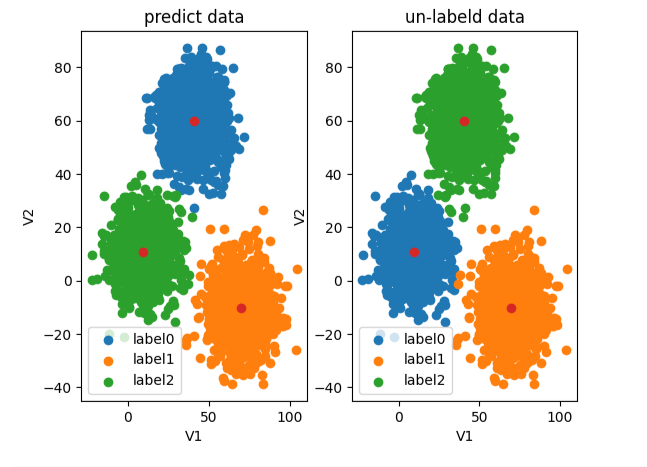
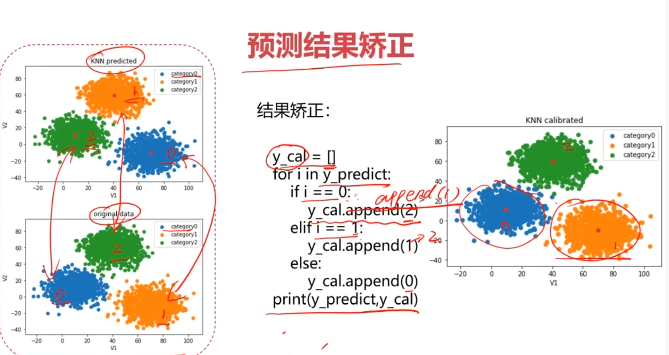
#校正结果
y_corrected = []
for i in y_predict:
    if i==0:
        y_corrected.append(2)
    elif i==1:
        y_corrected.append(1)
    else:
        y_corrected.append(0)

print(pd.Series.value_counts(y_corrected),pd.Series.value_counts(y))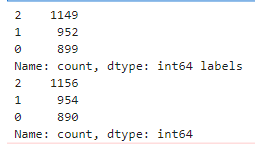
#打印准确率
print(accuracy_score(y,y_corrected))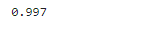
y_corrected = np.array(y_corrected)
print(type(y_corrected))

#可视化数据
fig6 = plt.subplot(121)
label0 = plt.scatter(x.loc[:,'V1'][y_corrected==0],x.loc[:,'V2'][y_corrected==0])
label1 = plt.scatter(x.loc[:,'V1'][y_corrected==1],x.loc[:,'V2'][y_corrected==1])
label2 = plt.scatter(x.loc[:,'V1'][y_corrected==2],x.loc[:,'V2'][y_corrected==2])
plt.scatter(centers[:,0],centers[:,1])
plt.title('corrected data')
plt.xlabel('V1')
plt.ylabel('V2')
plt.legend((label0,label1,label2),('label0','label1','label2'))

fig7 = plt.subplot(122)
label0 = plt.scatter(x.loc[:,'V1'][y==0],x.loc[:,'V2'][y==0])
label1 = plt.scatter(x.loc[:,'V1'][y==1],x.loc[:,'V2'][y==1])
label2 = plt.scatter(x.loc[:,'V1'][y==2],x.loc[:,'V2'][y==2])
plt.scatter(centers[:,0],centers[:,1])
plt.title('un-labeld data')
plt.xlabel('V1')
plt.ylabel('V2')
plt.legend((label0,label1,label2),('label0','label1','label2'))
plt.show()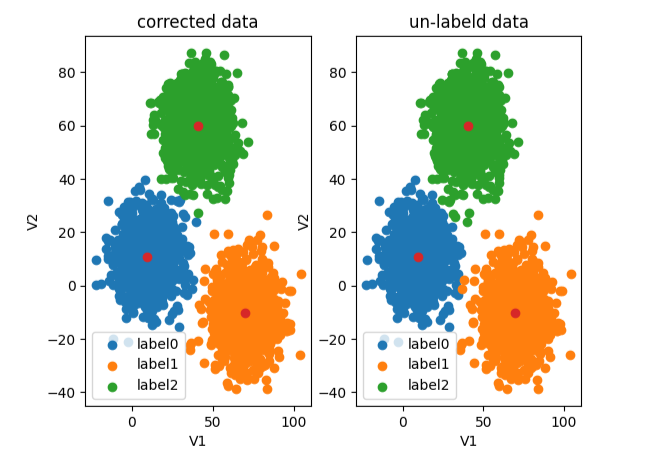
四、使用监督学习KNN算法
from sklearn.neighbors import KNeighborsClassifier
KNN = KNeighborsClassifier(n_neighbors=3)
KNN.fit(x,y)
#测试新数据V1=80,V2=60
x_test = pd.DataFrame([[80,60]],columns=['V1','V2'])
y_predict_test = KNN.predict(x_test)
print(y_predict_test)
#计算准确率
y_knn_predict = KNN.predict(x)
print(y_knn_predict)
print(pd.Series.value_counts(y_knn_predict),pd.Series.value_counts(y))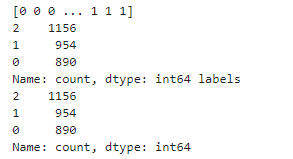
from sklearn.metrics import accuracy_score
accuracy = accuracy_score(y,y_knn_predict)
print(accuracy)
#可视化数据
fig8 = plt.subplot(121)
label0 = plt.scatter(x.loc[:,'V1'][y_knn_predict==0],x.loc[:,'V2'][y_knn_predict==0])
label1 = plt.scatter(x.loc[:,'V1'][y_knn_predict==1],x.loc[:,'V2'][y_knn_predict==1])
label2 = plt.scatter(x.loc[:,'V1'][y_knn_predict==2],x.loc[:,'V2'][y_knn_predict==2])
plt.scatter(centers[:,0],centers[:,1])
plt.title('y_knn_predict data')
plt.xlabel('V1')
plt.ylabel('V2')
plt.legend((label0,label1,label2),('label0','label1','label2'))

fig9 = plt.subplot(122)
label0 = plt.scatter(x.loc[:,'V1'][y==0],x.loc[:,'V2'][y==0])
label1 = plt.scatter(x.loc[:,'V1'][y==1],x.loc[:,'V2'][y==1])
label2 = plt.scatter(x.loc[:,'V1'][y==2],x.loc[:,'V2'][y==2])
plt.scatter(centers[:,0],centers[:,1])
plt.title('un-labeld data')
plt.xlabel('V1')
plt.ylabel('V2')
plt.legend((label0,label1,label2),('label0','label1','label2'))
plt.show()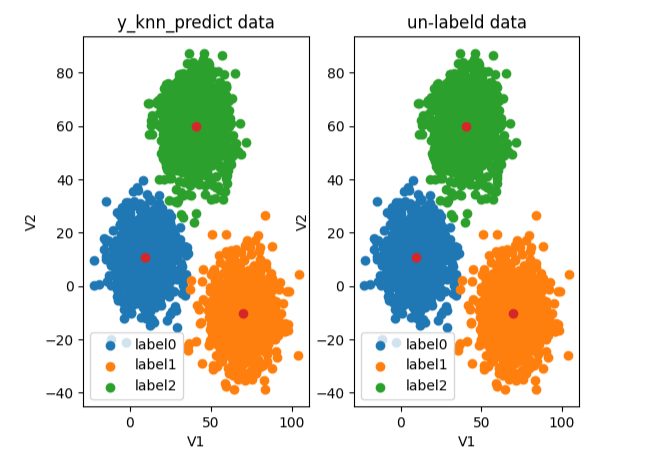
五、使用 Meanshift 算法
#使用 Meanshift 算法
from sklearn.cluster import MeanShift,estimate_bandwidth
#获取范围带宽、半径
bw = estimate_bandwidth(x,n_samples=500)
print(bw)
#创建模型,训练模型
ms = MeanShift(bandwidth=bw)
ms.fit(x)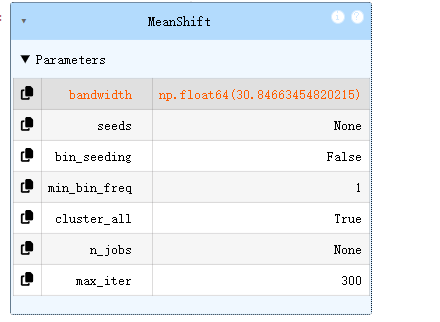
y_predict_meanshift = ms.predict(x)
print(pd.Series.value_counts(y_predict_meanshift),pd.Series.value_counts(y))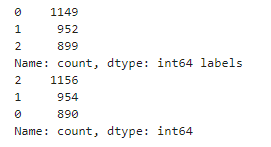
#可视化数据
fig10 = plt.subplot(121)
label0 = plt.scatter(x.loc[:,'V1'][y_predict_meanshift==0],x.loc[:,'V2'][y_predict_meanshift==0])
label1 = plt.scatter(x.loc[:,'V1'][y_predict_meanshift==1],x.loc[:,'V2'][y_predict_meanshift==1])
label2 = plt.scatter(x.loc[:,'V1'][y_predict_meanshift==2],x.loc[:,'V2'][y_predict_meanshift==2])
plt.scatter(centers[:,0],centers[:,1])
plt.title('y_predict_meanshift data')
plt.xlabel('V1')
plt.ylabel('V2')
plt.legend((label0,label1,label2),('label0','label1','label2'))

fig11 = plt.subplot(122)
label0 = plt.scatter(x.loc[:,'V1'][y==0],x.loc[:,'V2'][y==0])
label1 = plt.scatter(x.loc[:,'V1'][y==1],x.loc[:,'V2'][y==1])
label2 = plt.scatter(x.loc[:,'V1'][y==2],x.loc[:,'V2'][y==2])
plt.scatter(centers[:,0],centers[:,1])
plt.title('un-labeld data')
plt.xlabel('V1')
plt.ylabel('V2')
plt.legend((label0,label1,label2),('label0','label1','label2'))
plt.show()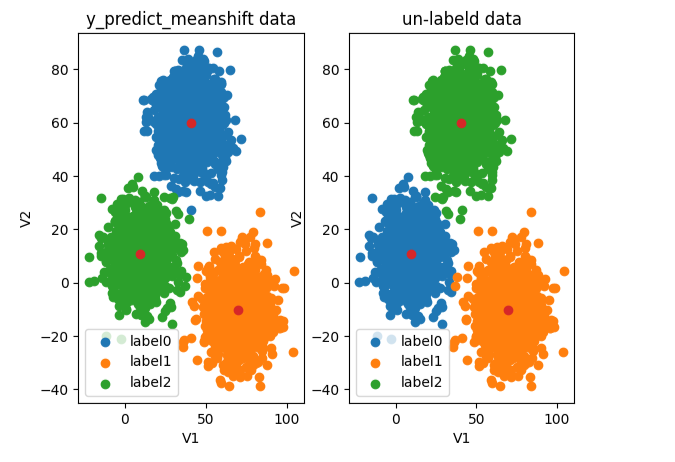
#校正结果
y_corrected = []
for i in y_predict_meanshift:
    if i==0:
        y_corrected.append(2)
    elif i==1:
        y_corrected.append(1)
    else:
        y_corrected.append(0)

print(pd.Series.value_counts(y_corrected),pd.Series.value_counts(y))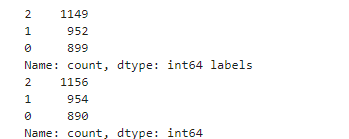
y_corrected = np.array(y_corrected)
print(type(y_corrected))
#可视化数据
fig12 = plt.subplot(121)
label0 = plt.scatter(x.loc[:,'V1'][y_corrected==0],x.loc[:,'V2'][y_corrected==0])
label1 = plt.scatter(x.loc[:,'V1'][y_corrected==1],x.loc[:,'V2'][y_corrected==1])
label2 = plt.scatter(x.loc[:,'V1'][y_corrected==2],x.loc[:,'V2'][y_corrected==2])
plt.scatter(centers[:,0],centers[:,1])
plt.title('corrected data')
plt.xlabel('V1')
plt.ylabel('V2')
plt.legend((label0,label1,label2),('label0','label1','label2'))

fig13 = plt.subplot(122)
label0 = plt.scatter(x.loc[:,'V1'][y==0],x.loc[:,'V2'][y==0])
label1 = plt.scatter(x.loc[:,'V1'][y==1],x.loc[:,'V2'][y==1])
label2 = plt.scatter(x.loc[:,'V1'][y==2],x.loc[:,'V2'][y==2])
plt.scatter(centers[:,0],centers[:,1])
plt.title('un-labeld data')
plt.xlabel('V1')
plt.ylabel('V2')
plt.legend((label0,label1,label2),('label0','label1','label2'))
plt.show()