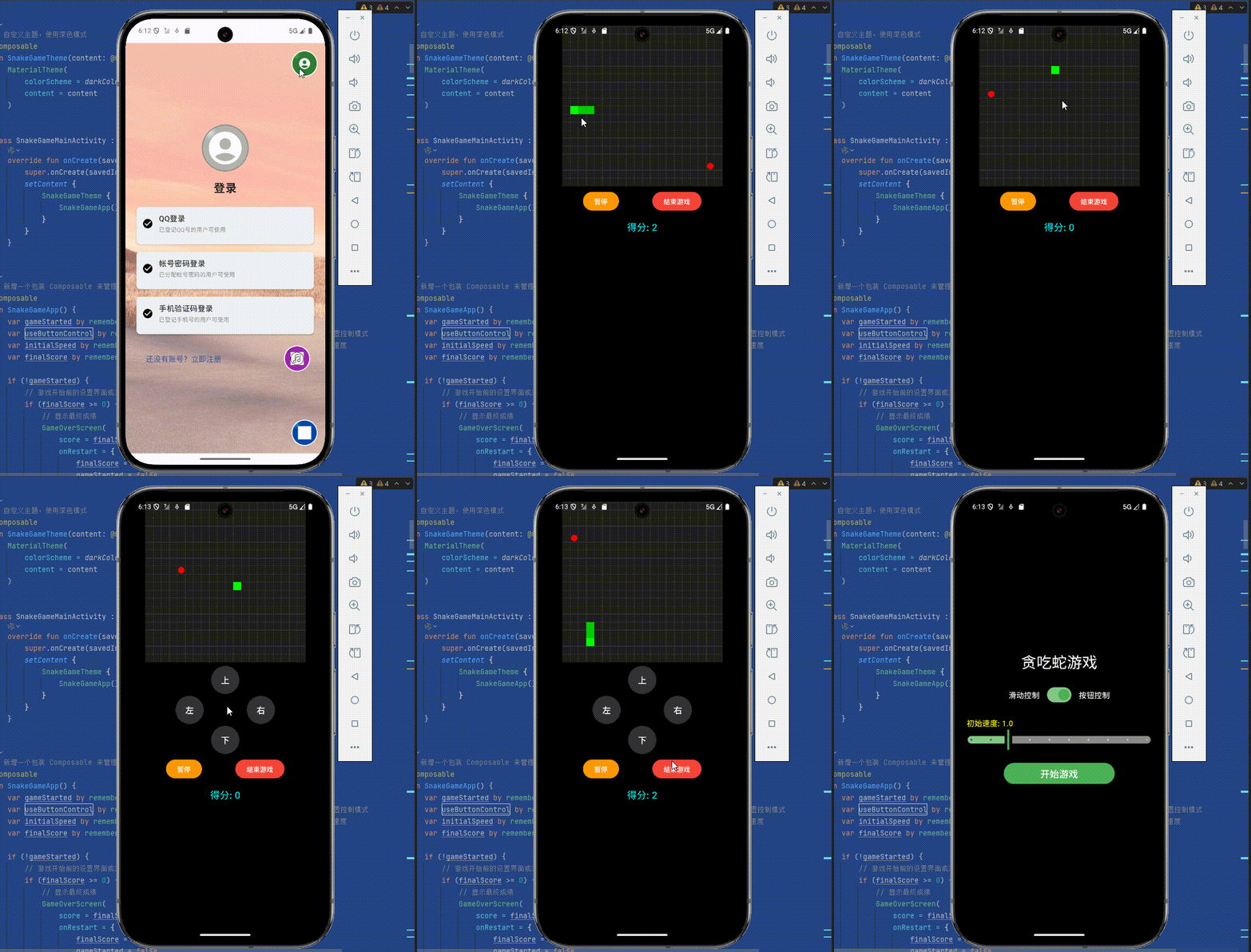
SnakeGameMainActivity代码如下:
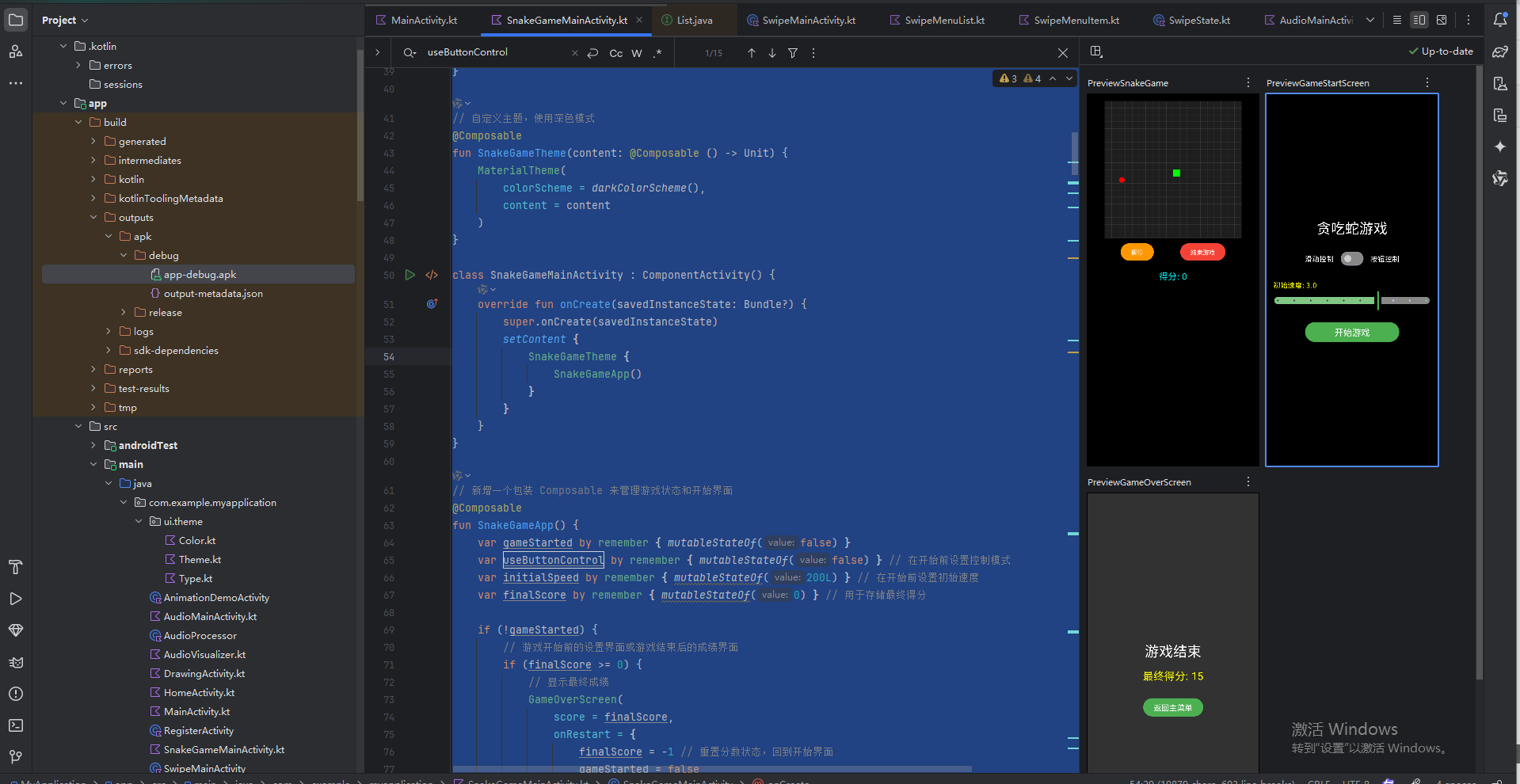
package com.example.myapplication
import android.os.Bundle
import androidx.activity.ComponentActivity
import androidx.activity.compose.setContent
import androidx.compose.foundation.Canvas
import androidx.compose.foundation.background
import androidx.compose.foundation.gestures.awaitFirstDown
import androidx.compose.foundation.gestures.waitForUpOrCancellation
import androidx.compose.foundation.layout.*
import androidx.compose.material3.*
import androidx.compose.runtime.*
import androidx.compose.ui.Alignment
import androidx.compose.ui.Modifier
import androidx.compose.ui.geometry.Offset
import androidx.compose.ui.graphics.Color
import androidx.compose.ui.input.pointer.pointerInput
import androidx.compose.ui.platform.LocalConfiguration
import androidx.compose.ui.platform.LocalDensity
import androidx.compose.ui.unit.dp
import androidx.compose.ui.unit.sp
import kotlinx.coroutines.*
import kotlin.math.abs
// 数据类定义游戏中的点
data class Point(val x: Int, val y: Int)
// 方向枚举
enum class Direction {
Up, Right, Down, Left
}
// 获取相反方向的辅助函数
fun getOppositeDirection(dir: Direction): Direction = when (dir) {
Direction.Up -> Direction.Down
Direction.Down -> Direction.Up
Direction.Left -> Direction.Right
Direction.Right -> Direction.Left
}
// 自定义主题,使用深色模式
@Composable
fun SnakeGameTheme(content: @Composable () -> Unit) {
MaterialTheme(
colorScheme = darkColorScheme(),
content = content
)
}
class SnakeGameMainActivity : ComponentActivity() {
override fun onCreate(savedInstanceState: Bundle?) {
super.onCreate(savedInstanceState)
setContent {
SnakeGameTheme {
SnakeGameApp()
}
}
}
}
// 新增一个包装 Composable 来管理游戏状态和开始界面
@Composable
fun SnakeGameApp() {
var gameStarted by remember { mutableStateOf(false) }
var useButtonControl by remember { mutableStateOf(false) } // 在开始前设置控制模式
var initialSpeed by remember { mutableStateOf(200L) } // 在开始前设置初始速度
var finalScore by remember { mutableStateOf(0) } // 用于存储最终得分
if (!gameStarted) {
// 游戏开始前的设置界面或游戏结束后的成绩界面
if (finalScore >= 0) {
// 显示最终成绩
GameOverScreen(
score = finalScore,
onRestart = {
finalScore = -1 // 重置分数状态,回到开始界面
gameStarted = false
}
)
} else {
// 显示开始界面
GameStartScreen(
useButtonControl = useButtonControl,
onControlModeChange = { useButtonControl = it },
initialSpeed = initialSpeed,
onSpeedChange = { initialSpeed = it },
onStartGame = { gameStarted = true }
)
}
} else {
// 游戏主界面
SnakeGame(
useButtonControl = useButtonControl,
initialSpeed = initialSpeed,
onGameEnd = { score -> // 接收游戏结束时的分数
finalScore = score
gameStarted = false // 触发显示 GameOverScreen
}
)
}
}
@Composable
fun GameStartScreen(
useButtonControl: Boolean,
onControlModeChange: (Boolean) -> Unit,
initialSpeed: Long,
onSpeedChange: (Long) -> Unit,
onStartGame: () -> Unit
) {
Box(
modifier = Modifier
.fillMaxSize()
.background(Color.Black)
.padding(16.dp),
contentAlignment = Alignment.Center
) {
Column(
horizontalAlignment = Alignment.CenterHorizontally,
verticalArrangement = Arrangement.spacedBy(24.dp)
) {
Text(
text = "贪吃蛇游戏",
color = Color.White,
fontSize = 32.sp
)
// 控制模式切换
Row(
verticalAlignment = Alignment.CenterVertically,
horizontalArrangement = Arrangement.spacedBy(16.dp)
) {
Text("滑动控制", color = Color.White)
Switch(
checked = useButtonControl,
onCheckedChange = onControlModeChange,
colors = SwitchDefaults.colors(
checkedThumbColor = Color(0xFF4CAF50),
checkedTrackColor = Color(0xFF81C784),
uncheckedThumbColor = Color.LightGray,
uncheckedTrackColor = Color.Gray
)
)
Text("按钮控制", color = Color.White)
}
// --- 速度控制 ---
Column(modifier = Modifier.fillMaxWidth()) {
// 速度值显示
Text(
text = "初始速度: ${String.format("%.1f", (500 - initialSpeed) / 100.0)}",
color = Color.Yellow,
fontSize = 16.sp,
modifier = Modifier.align(Alignment.Start)
)
// 滚动条
Slider(
value = (500 - initialSpeed).toFloat(),
onValueChange = { newValue ->
onSpeedChange((500 - newValue).toLong().coerceIn(50L, 500L))
},
valueRange = 0f..450f,
steps = 8, // 9个档位
modifier = Modifier.fillMaxWidth(),
colors = SliderDefaults.colors(
thumbColor = Color(0xFF4CAF50),
activeTrackColor = Color(0xFF81C784),
inactiveTrackColor = Color.Gray
)
)
}
// --- 速度控制结束 ---
Button(
onClick = onStartGame,
colors = ButtonDefaults.buttonColors(containerColor = Color(0xFF4CAF50)),
modifier = Modifier.fillMaxWidth(0.6f) // 按钮宽度为屏幕的60%
) {
Text("开始游戏", color = Color.White, fontSize = 20.sp)
}
}
}
}
// 新增:游戏结束后的成绩显示界面
@Composable
fun GameOverScreen(score: Int, onRestart: () -> Unit) {
Box(
modifier = Modifier
.fillMaxSize()
.background(Color.Black.copy(alpha = 0.8f)) // 半透明黑色背景
.padding(16.dp),
contentAlignment = Alignment.Center
) {
Column(
horizontalAlignment = Alignment.CenterHorizontally,
verticalArrangement = Arrangement.Center
) {
Text(
text = "游戏结束",
color = Color.White,
fontSize = 32.sp,
modifier = Modifier.padding(bottom = 16.dp)
)
Text(
text = "最终得分: $score",
color = Color.Yellow,
fontSize = 24.sp,
modifier = Modifier.padding(bottom = 32.dp)
)
Button(
onClick = onRestart,
colors = ButtonDefaults.buttonColors(containerColor = Color(0xFF4CAF50))
) {
Text("返回主菜单", color = Color.White, fontSize = 18.sp)
}
}
}
}
@Composable
fun SnakeGame(useButtonControl: Boolean, initialSpeed: Long, onGameEnd: (Int) -> Unit) {
// 游戏状态管理
var gameRunning by remember { mutableStateOf(true) }
var gamePaused by remember { mutableStateOf(false) }
var snake by remember { mutableStateOf(listOf(Point(10, 10))) }
var direction by remember { mutableStateOf(Direction.Right) }
var nextDirection by remember { mutableStateOf(Direction.Right) }
var food by remember { mutableStateOf(Point(5, 5)) }
var score by remember { mutableStateOf(0) }
// 新增功能状态
var speed by remember { mutableStateOf(initialSpeed) } // 使用传入的初始速度
var isDying by remember { mutableStateOf(false) } // 是否处于濒死状态
var dyingJob by remember { mutableStateOf<Job?>(null) } // 濒死状态的计时器
val gridSize = 20f // 游戏网格大小
val coroutineScope = rememberCoroutineScope()
val density = LocalDensity.current
val config = LocalConfiguration.current
// 计算游戏区域大小,适配屏幕
val screenWidth = config.screenWidthDp.dp
val screenHeight = config.screenHeightDp.dp
// 尝试为游戏区域分配更多空间,但不超过屏幕的一定比例
val gameAreaSize = (screenWidth * 0.8f).coerceAtMost(screenHeight * 0.6f).coerceAtMost(400.dp)
// 计算每个格子的像素大小
val blockSize by remember(gridSize, gameAreaSize) {
derivedStateOf {
with(density) { gameAreaSize.toPx() / gridSize }
}
}
// 生成食物,确保不在蛇身上
fun placeFood() {
while (true) {
val newFood = Point(
x = (0 until gridSize.toInt()).random(),
y = (0 until gridSize.toInt()).random()
)
if (newFood !in snake) {
food = newFood
return
}
}
}
// 移动蛇的逻辑
fun moveSnake() {
if (!gameRunning || gamePaused) return
direction = nextDirection
val head = snake.first()
val newHead = when (direction) {
Direction.Up -> Point(head.x, head.y - 1)
Direction.Right -> Point(head.x + 1, head.y)
Direction.Down -> Point(head.x, head.y + 1)
Direction.Left -> Point(head.x - 1, head.y)
}
// 检查撞墙
val isWallCollision = newHead.x < 0 || newHead.x >= gridSize.toInt() ||
newHead.y < 0 || newHead.y >= gridSize.toInt()
if (isWallCollision) {
if (!isDying) {
isDying = true
dyingJob = coroutineScope.launch {
delay(2000) // 2秒后确认死亡
if (isDying) {
gameRunning = false
onGameEnd(score) // 游戏结束,传递分数
}
}
}
return
} else {
if (isDying) {
isDying = false
dyingJob?.cancel()
dyingJob = null
}
}
// 检查撞到自己
if (newHead in snake) {
gameRunning = false
onGameEnd(score) // 游戏结束,传递分数
return
}
// 更新蛇身
val newSnake = mutableListOf(newHead)
newSnake.addAll(snake)
// 检查是否吃到食物
if (newHead == food) {
score++
placeFood()
} else {
newSnake.removeAt(newSnake.lastIndex)
}
snake = newSnake
}
// 游戏主循环
suspend fun startGameLoop() {
while (gameRunning) {
delay(speed)
moveSnake()
}
}
// 重新开始游戏
fun restartGame() {
dyingJob?.cancel()
dyingJob = null
isDying = false
gameRunning = true
gamePaused = false
snake = listOf(Point((gridSize / 2).toInt(), (gridSize / 2).toInt()))
direction = Direction.Right
nextDirection = Direction.Right
score = 0
placeFood()
}
// 切换暂停/继续
fun togglePause() {
if (gameRunning && !isDying) {
gamePaused = !gamePaused
}
}
// 结束游戏 - 修改为调用 onGameEnd 并传递当前分数
fun endGame() {
if (gameRunning) {
gameRunning = false
isDying = false
dyingJob?.cancel()
dyingJob = null
onGameEnd(score) // 主动结束游戏时,也传递分数
}
}
// 启动游戏循环
LaunchedEffect(gameRunning, gamePaused) {
if (gameRunning && !gamePaused) {
startGameLoop()
}
}
// 初始放置食物
LaunchedEffect(Unit) {
placeFood()
}
// 主UI布局 - 使用 Column 并设置最大高度为屏幕高度
Column(
modifier = Modifier
.fillMaxSize()
.background(Color.Black)
.padding(16.dp),
horizontalAlignment = Alignment.CenterHorizontally
) {
// 游戏画布 (本身不滚动)
Box(
modifier = Modifier
.size(gameAreaSize)
.background(Color(0xFF1E1E1E))
.pointerInput(useButtonControl) {
if (useButtonControl) return@pointerInput
awaitPointerEventScope {
while (true) {
val down = awaitFirstDown()
val start = down.position
val upEvent = waitForUpOrCancellation()
val end = upEvent?.position ?: start
val dx = end.x - start.x
val dy = end.y - start.y
val newDirection = when {
abs(dx) > abs(dy) -> {
if (dx > 50f) Direction.Right else if (dx < -50f) Direction.Left else null
}
else -> {
if (dy > 50f) Direction.Down else if (dy < -50f) Direction.Up else null
}
}
newDirection?.let {
if (it != getOppositeDirection(direction)) {
nextDirection = it
}
}
}
}
},
contentAlignment = Alignment.Center
) {
Canvas(modifier = Modifier.fillMaxSize()) {
// 绘制网格线
for (i in 0..gridSize.toInt()) {
val pos = i * blockSize
drawLine(
color = Color.Gray.copy(alpha = 0.2f),
start = Offset(pos, 0f),
end = Offset(pos, size.height),
strokeWidth = 1.dp.toPx()
)
drawLine(
color = Color.Gray.copy(alpha = 0.2f),
start = Offset(0f, pos),
end = Offset(size.width, pos),
strokeWidth = 1.dp.toPx()
)
}
// 绘制蛇身
snake.forEachIndexed { index, point ->
val color = if (index == 0) Color(0xFF00FF00) else Color(0xFF00CC00)
drawRect(
color = color,
topLeft = Offset(point.x * blockSize, point.y * blockSize),
size = androidx.compose.ui.geometry.Size(blockSize, blockSize)
)
}
// 绘制食物
drawCircle(
color = Color.Red,
radius = blockSize * 0.4f,
center = Offset(
x = food.x * blockSize + blockSize / 2,
y = food.y * blockSize + blockSize / 2
)
)
// 绘制暂停遮罩
if (gamePaused && gameRunning) {
drawRect(
color = Color.Gray.copy(alpha = 0.5f),
topLeft = Offset.Zero,
size = size
)
}
// 绘制濒死状态遮罩
if (isDying) {
drawRect(
color = Color.Red.copy(alpha = 0.3f),
topLeft = Offset.Zero,
size = size
)
}
}
}
// 方向控制按钮区域 - 仅在 useButtonControl 为 true 时显示
if (useButtonControl) {
Column(
modifier = Modifier.padding(top = 8.dp),
horizontalAlignment = Alignment.CenterHorizontally
) {
Button(
onClick = { if (nextDirection != Direction.Down) nextDirection = Direction.Up },
enabled = gameRunning && !gamePaused && !isDying,
colors = ButtonDefaults.buttonColors(containerColor = Color(0xFF333333)),
contentPadding = PaddingValues(12.dp),
modifier = Modifier.size(60.dp)
) {
Text("上", color = Color.White, fontSize = 18.sp)
}
Row(
modifier = Modifier.padding(vertical = 4.dp),
horizontalArrangement = Arrangement.spacedBy(16.dp)
) {
Button(
onClick = { if (nextDirection != Direction.Right) nextDirection = Direction.Left },
enabled = gameRunning && !gamePaused && !isDying,
colors = ButtonDefaults.buttonColors(containerColor = Color(0xFF333333)),
contentPadding = PaddingValues(12.dp),
modifier = Modifier.size(60.dp)
) {
Text("左", color = Color.White, fontSize = 18.sp)
}
Box(modifier = Modifier.size(60.dp))
Button(
onClick = { if (nextDirection != Direction.Left) nextDirection = Direction.Right },
enabled = gameRunning && !gamePaused && !isDying,
colors = ButtonDefaults.buttonColors(containerColor = Color(0xFF333333)),
contentPadding = PaddingValues(12.dp),
modifier = Modifier.size(60.dp)
) {
Text("右", color = Color.White, fontSize = 18.sp)
}
}
Button(
onClick = { if (nextDirection != Direction.Up) nextDirection = Direction.Down },
enabled = gameRunning && !gamePaused && !isDying,
colors = ButtonDefaults.buttonColors(containerColor = Color(0xFF333333)),
contentPadding = PaddingValues(12.dp),
modifier = Modifier.size(60.dp)
) {
Text("下", color = Color.White, fontSize = 18.sp)
}
}
}
// 底部控制按钮(暂停、结束)
Row(
modifier = Modifier
.fillMaxWidth()
.padding(vertical = 8.dp),
horizontalArrangement = Arrangement.SpaceEvenly
) {
Button(
onClick = { togglePause() },
enabled = gameRunning && !isDying,
colors = ButtonDefaults.buttonColors(
containerColor = if (gamePaused) Color(0xFF2196F3) else Color(0xFFFF9800)
)
) {
Text(if (gamePaused) "继续" else "暂停", color = Color.White)
}
Button(
onClick = { endGame() },
enabled = gameRunning,
colors = ButtonDefaults.buttonColors(containerColor = Color(0xFFF44336))
) {
Text("结束游戏", color = Color.White)
}
}
// 得分显示
Text("得分: $score", color = Color.Cyan, fontSize = 20.sp, modifier = Modifier.padding(top = 8.dp))
} // End of Column (无滚动的游戏界面内容)
// 注意:原先在这里的 if (!gameRunning) { ... } 游戏结束界面已被移除
// 现在由 SnakeGameApp 组件统一处理游戏结束状态和界面显示
}
// --- 预览 ---
@androidx.compose.ui.tooling.preview.Preview(showBackground = true)
@Composable
fun PreviewSnakeGame() {
SnakeGameTheme {
SnakeGame(useButtonControl = false, initialSpeed = 200L, onGameEnd = {})
}
}
@androidx.compose.ui.tooling.preview.Preview(showBackground = true)
@Composable
fun PreviewGameStartScreen() {
SnakeGameTheme {
GameStartScreen(
useButtonControl = false,
onControlModeChange = {},
initialSpeed = 200L,
onSpeedChange = {},
onStartGame = {}
)
}
}
@androidx.compose.ui.tooling.preview.Preview(showBackground = true)
@Composable
fun PreviewGameOverScreen() {
SnakeGameTheme {
GameOverScreen(score = 15) {}
}
}最终效果如下: