这是一个专为大模型应用设计 的Vue3 Markdown渲染组件,解决了我开发LLM产品时踩过的N多坑,目前已经在生产环境稳定使用,日均 uv有 10W+
为啥要做这个组件?🤔
前阵子开发企业级大模型对话产品,试了一圈现有组件后我 emo了:
-
自定义可交互式组件,无法实现
-
大模型返回的超长文本+流程图,重绘重排起来卡得像PPT
当我禁止获取缓存时,会发生下面的效果:页面图片抖动、闪动

- mermaid流程图、复杂公式这些LLM高频输出格式,支持得稀碎
忍无可忍之下,花了3个月死磕出这个组件------专注LLM场景的Markdown渲染解决方案,现在把它开源出来,希望能帮到同样踩坑的同学!
🌟 这组件到底牛在哪?
⚡️ 性能炸裂
别家组件渲染长文本时像在加载大型游戏?我们直接基于Markdown生成VNode,实现增量渲染
🔧 灵活到离谱:想用啥样式就用啥样式
插槽覆盖全场景自定义,举例几个高频用法:
- 自定义行内 vue组件 :通过
htmlInline插槽可捕获markdown中的行内HTML标签(如span),并基于标签属性(attrs)自定义交互逻辑,适用于实现引用标注、动态提示等功能。,完美解决DOM直接插入导致的不可进行交互的弊端

html
<template>
  <AgentMarkdown
    :content="content"
    :md-options="{
      breaks: true,
      html: true,
    }"
    :sanitize="true"
  >
    <template #htmlInline="{ tags, attrs }">
      <span v-if="tags === 'span' && attrs[0].type === 'quote'" class="quote-tag">{{
        attrs[0].title
      }}</span>
    </template>
  </AgentMarkdown>
</template>

<script setup lang="ts">
import { AgentMarkdown } from 'agent-markdown-vue';

const content = `
地铁 6 号线串联虎丘、拙政园、平江路等景点,建议优先使用<span data-type="quote" data-title="苏州市人民政府" data-content=""五一"假期,古城旅游交通出行攻略"> </span> 。苏州地铁 6 号线在苏州中心区域,连接了苏州中心、虎丘、拙政园、平江路等景点。
`;
</script>- 自定义块级 vue组件 :通过
htmlBlock插槽可处理块级HTML标签(如div),结合标签属性实现复杂的块级交互组件,例如带标题和元数据的自定义卡片。
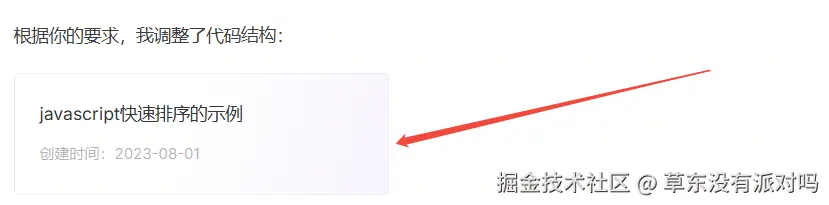
html
<template>
  <AgentMarkdown :content="content" :md-options="{ breaks: true, html: true }" :sanitize="true">
    <template #htmlBlock="{ tags, attrs }">
      <div v-if="tags === 'div' && attrs[0].type === 'code'" class="code-block">
        <div class="top">{{ attrs[0].title }}</div>
        <div class="bottom">创建时间:{{ attrs[0].time }}</div>
      </div>
    </template>
  </AgentMarkdown>
</template>

<script setup lang="ts">
import { AgentMarkdown } from 'agent-markdown-vue';
const content = `
根据你的要求,我调整了代码结构:
<div data-type="code" data-title="javascript快速排序的示例" data-time="2023-08-01" data-content="function quickSort(arr) {
  if (arr.length <= 1) {
    return arr;
  }
  const pivot = arr[0];
  const left = [];
  const right = [];
  for (let i = 1; i < arr.length; i++) {
    if (arr[i] < pivot) {
      left.push(arr[i]);
    } else {
      right.push(arr[i]);
    }
  }
  return [...quickSort(left), pivot, ...quickSort(right)];
}">  </div>
`;
</script>- 代码块:想换高亮风格?随便插!
html
<agent-markdown :content="md">
    <template #javascript="{ rawCode }">
        <MyHighlight :code="rawCode" theme="dark" />
    </template>
</agent-markdown>- mermaid流程图:自带平滑渲染效果(附核心代码)
html
<template #mermaid="{ rawCode }">
    <MyMermaid :content="rawCode" />
    <!-- 内置防抖+交替渲染,避免闪烁 -->
</template>- 图片:懒加载、预览、水印可根据自己的需求进行封装组件
html
<template #image="{ src, alt }">
    <MyImage :src="src" :alt="alt" lazy />
</template>
🛡️ 企业级安全:防XSS就像戴了金钟罩
用户输入的内容不敢直接渲染?开启sanitize: true就行:
-
基于dompurify自动过滤危险HTML
-
白名单机制严格限制允许的标签/属性
-
公式、代码块等特殊内容单独处理,安全不打折
🚀 5分钟上手教程
1. 安装
bash
# npm
npm install agent-markdown-vue --save-dev
# yarn
yarn add agent-markdown-vue --save-dev
# pnpm
pnpm add agent-markdown-vue --save-dev
2. 基础用法
html
<template>
    <agent-markdown
        :content="llmResponse"
        :sanitize="true"
        @link-click="handleLink"
    />
</template>
<script setup>
import { AgentMarkdown } from 'agent-markdown-vue'

// 大模型返回的markdown内容
const llmResponse = `
# 这是LLM生成的内容
- 支持**加粗**、*斜体*
- 代码块:
\`\`\`javascript
console.log('agent-markdown-vue')
\`\`\`
- 公式:$E=mc^2$
`
const handleLink = (e: Event, href: string, title: string) => { window.open(href, '_blank'); };
</script>
🌱 开源地址 & 贡献指南
👉 在线文档
👉 GitHub仓库 求个star🌟🌟🌟!
目前还在快速迭代中,欢迎大家:
-
提issue反馈bug/需求
-
提交PR参与开发(新手友好,有详细贡献指南)
-
用它开发项目后告诉我,我会收录到案例库~
最后说句掏心窝子的话:做这个组件时踩了无数坑,现在把解决方案开源出来,就是希望大家能少走弯路。如果它帮到了你,欢迎转发给更多有需要的同学,咱们一起让LLM应用开发更简单!💪