打开ios/App/App/Assets.xcassets/AppIcon.appiconset/Contents.json
{
"images": [
// iPhone 主屏幕图标(60pt,@2x和@3x)
{
"filename": "AppIcon-60@2x.png",
"idiom": "iphone",
"platform": "ios",
"size": "60x60",
"scale": "2x"
},
{
"filename": "AppIcon-60@3x.png",
"idiom": "iphone",
"platform": "ios",
"size": "60x60",
"scale": "3x"
},
// iPad 主屏幕图标(83.5pt,@2x)
{
"filename": "AppIcon-83.5@2x.png",
"idiom": "ipad",
"platform": "ios",
"size": "83.5x83.5",
"scale": "2x"
},
// 设置页图标(29pt,@2x和@3x)
{
"filename": "AppIcon-29@2x.png",
"idiom": "universal",
"platform": "ios",
"size": "29x29",
"scale": "2x"
},
{
"filename": "AppIcon-29@3x.png",
"idiom": "universal",
"platform": "ios",
"size": "29x29",
"scale": "3x"
},
// App Store 展示图标(1024x1024)
{
"filename": "AppIcon-512@2x.png",
"idiom": "universal",
"platform": "ios",
"size": "1024x1024",
"scale": "1x"
}
],
"info": {
"author": "xcode",
"version": 1
}
}也要导入相应尺寸的图片
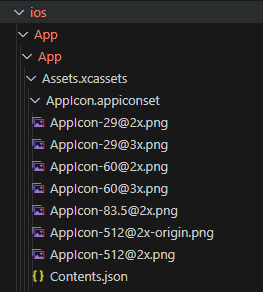
关键参数说明:
-
size:图标逻辑尺寸(单位 pt),如60x60表示 60pt,AppIcon-60@2x.png这个图片需要60 * 2=120px的,所以AppIcon-60@2x.png需要120px * 120px尺寸的;AppIcon-60@3x.png需要60 * 3 = 180px,也就是需要180px * 180px的。 -
scale:缩放倍数(1x/2x/3x),实际像素尺寸 = 逻辑尺寸 × 缩放倍数(如60x60@2x对应 120x120 像素) -
idiom:设备类型(iphone/ipad/universal通用)
配置后需注意:
-
确保每个
filename对应的图片文件已放入AppIcon.appiconset文件夹 -
运行
npx cap sync ios同步到原生项目 -
清理 Xcode 缓存后重新构建
这样就能适配不同设备的图标显示需求了。