文章目录
- [C# 压缩解压文件的常用方法](# 压缩解压文件的常用方法)
-
- [1. 使用 .NET 内置的 ZipFile 类](#1. 使用 .NET 内置的 ZipFile 类)
- [2. 使用 ZipArchive 进行灵活操作](#2. 使用 ZipArchive 进行灵活操作)
- [3. 使用 SharpZipLib 库](#3. 使用 SharpZipLib 库)
-
- [安装 SharpZipLib](#安装 SharpZipLib)
- 压缩多个文件和文件夹
- [使用 SharpZipLib 解压](#使用 SharpZipLib 解压)
- [4. 错误处理与最佳实践](#4. 错误处理与最佳实践)
- [5. 方法对比与选择](#5. 方法对比与选择)
- 总结
C# 压缩解压文件的常用方法
在C#中处理文件和文件夹的压缩与解压,我们可使用微软内置的 System.IO.Compression 命名空间,也可选择功能更丰富的第三方库如 SharpZipLib。下面我将分别介绍几种常见方法,并提供处理多文件夹和文件混合压缩的方案。
1. 使用 .NET 内置的 ZipFile 类
.NET Framework 4.5 及以上版本和 .NET Core/.NET 5+ 提供了 ZipFile 类,适用于简单的压缩和解压场景。
压缩单个文件夹
csharp
using System.IO.Compression;

public static void CompressDirectory(string sourceDirectoryName, string destinationArchiveFileName)
{
    ZipFile.CreateFromDirectory(sourceDirectoryName, destinationArchiveFileName, CompressionLevel.Optimal, false);
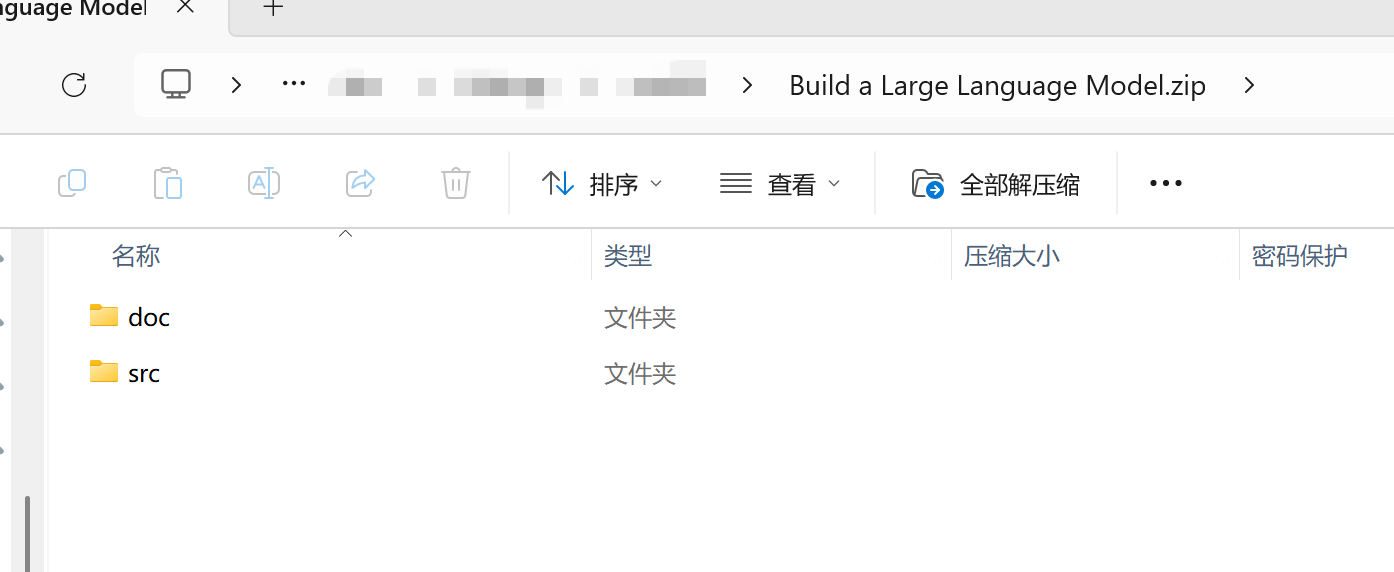
}值得注意的是,使用ZipFile创建压缩包,默认不会包含根目录。如果需要包含根目录,可以先将文件夹复制到一个临时目录,然后压缩该临时目录。
例如,我对一个名为"Build a Large Language Model"的目录进行压缩,它里面包含了"doc"和"src"两个目录,压缩后的效果如下图:
解压整个压缩包
csharp
public static void ExtractArchive(string sourceArchiveFileName, string destinationDirectoryName)
{
    ZipFile.ExtractToDirectory(sourceArchiveFileName, destinationDirectoryName);
}
压缩单个文件
压缩单个文件需要先创建临时目录,将文件复制进去后再压缩。
csharp
public static void CompressFile(string sourceFileName, string destinationArchiveFileName)
{
    string tempDir = Path.Combine(Path.GetTempPath(), Path.GetRandomFileName());
    Directory.CreateDirectory(tempDir);
    try
    {
        string destFile = Path.Combine(tempDir, Path.GetFileName(sourceFileName));
        File.Copy(sourceFileName, destFile);
        ZipFile.CreateFromDirectory(tempDir, destinationArchiveFileName, CompressionLevel.Optimal, false);
    }
    finally
    {
        Directory.Delete(tempDir, true);
    }
}
2. 使用 ZipArchive 进行灵活操作
ZipArchive 类提供了更精细的控制,适合混合压缩多个文件和文件夹。
压缩多个文件和文件夹
此方法递归地添加文件和文件夹,保持目录结构。
csharp
using System.IO.Compression;

        /// <summary>
        /// 压缩文件和文件夹到一个ZIP文件中
        /// </summary>
        /// <param name="zipPath">生成的压缩包路径</param>
        /// <param name="filesToZip">需要压缩的文件</param>
        /// <param name="foldersToZip">需要压缩的文件夹,默认没有</param>
        public static void CreateZipFile(string zipPath, string[]? filesToZip, string[]? foldersToZip = null,
            CompressionLevel compressionLevel = CompressionLevel.Optimal)
        {
            using (FileStream zipStream = new FileStream(zipPath, FileMode.Create))
            using (ZipArchive archive = new ZipArchive(zipStream, ZipArchiveMode.Create))
            {
                // 添加单个文件
                if (filesToZip != null)
                {
                    foreach (string file in filesToZip)
                    {
                        if (File.Exists(file))
                        {
                            string entryName = Path.GetFileName(file);
                            archive.CreateEntryFromFile(file, entryName);
                        }
                    }
                }

                // 添加文件夹(递归)
                if (foldersToZip != null)
                {
                    foreach (string folder in foldersToZip)
                    {
                        if (Directory.Exists(folder))
                        {
                            AddFolderToZip(archive, folder, Path.GetFileName(folder), compressionLevel);
                        }
                    }
                }
            }
        }

        /// <summary>
        /// 添加文件夹到ZIP归档中(递归)
        /// </summary>
        /// <param name="archive">ZIP压缩包</param>
        /// <param name="folderPath">文件夹路径</param>
        /// <param name="relativePath">相对路径</param>
        private static void AddFolderToZip(ZipArchive archive, string folderPath, string relativePath,
            CompressionLevel compressionLevel)
        {
            string[] files = Directory.GetFiles(folderPath);
            foreach (string file in files)
            {
                string entryName = Path.Combine(relativePath, Path.GetFileName(file));
                archive.CreateEntryFromFile(file, entryName);
            }

            string[] subfolders = Directory.GetDirectories(folderPath);
            foreach (string subfolder in subfolders)
            {
                string newRelativePath = Path.Combine(relativePath, Path.GetFileName(subfolder));
                AddFolderToZip(archive, subfolder, newRelativePath, compressionLevel);
            }
        }
解压(保留目录结构)
csharp
public static void ExtractZipFile(string zipPath, string extractPath)
{
    using (ZipArchive archive = ZipFile.OpenRead(zipPath))
    {
        foreach (ZipArchiveEntry entry in archive.Entries)
        {
            string fullPath = Path.Combine(extractPath, entry.FullName);
            string directory = Path.GetDirectoryName(fullPath);

            if (!Directory.Exists(directory))
                Directory.CreateDirectory(directory);

            if (!string.IsNullOrEmpty(entry.Name))
                entry.ExtractToFile(fullPath, overwrite: true);
        }
    }
}
3. 使用 SharpZipLib 库
对于更高级的需求(如加密、压缩级别控制、Unicode支持),可使用 SharpZipLib。
安装 SharpZipLib
通过 NuGet 包管理器安装:
shell
Install-Package SharpZipLib压缩多个文件和文件夹
csharp
using ICSharpCode.SharpZipLib.Zip;

public static void CreateZipWithSharpZipLib(string zipPath, string[] files, string[] folders, string password = null)
{
    using (ZipOutputStream zipStream = new ZipOutputStream(File.Create(zipPath)))
    {
        zipStream.SetLevel(9); // 压缩级别 (0-9)
        if (!string.IsNullOrEmpty(password))
            zipStream.Password = password;

        byte[] buffer = new byte[4096];

        // 添加文件
        foreach (string file in files)
        {
            if (File.Exists(file))
            {
                ZipEntry entry = new ZipEntry(Path.GetFileName(file));
                entry.DateTime = DateTime.Now;
                zipStream.PutNextEntry(entry);

                using (FileStream fs = File.OpenRead(file))
                {
                    int sourceBytes;
                    while ((sourceBytes = fs.Read(buffer, 0, buffer.Length)) > 0)
                    {
                        zipStream.Write(buffer, 0, sourceBytes);
                    }
                }
                zipStream.CloseEntry();
            }
        }

        // 添加文件夹
        foreach (string folder in folders)
        {
            if (Directory.Exists(folder))
            {
                AddFolderToSharpZip(zipStream, folder, "", buffer);
            }
        }
        zipStream.Finish();
    }
}

private static void AddFolderToSharpZip(ZipOutputStream zipStream, string folderPath, string relativePath, byte[] buffer)
{
    string[] files = Directory.GetFiles(folderPath);
    foreach (string file in files)
    {
        string entryName = Path.Combine(relativePath, Path.GetFileName(file));
        ZipEntry entry = new ZipEntry(entryName);
        entry.DateTime = DateTime.Now;
        zipStream.PutNextEntry(entry);

        using (FileStream fs = File.OpenRead(file))
        {
            int sourceBytes;
            while ((sourceBytes = fs.Read(buffer, 0, buffer.Length)) > 0)
            {
                zipStream.Write(buffer, 0, sourceBytes);
            }
        }
        zipStream.CloseEntry();
    }

    string[] subfolders = Directory.GetDirectories(folderPath);
    foreach (string subfolder in subfolders)
    {
        string newRelativePath = Path.Combine(relativePath, Path.GetFileName(subfolder));
        AddFolderToSharpZip(zipStream, subfolder, newRelativePath, buffer);
    }
}
使用 SharpZipLib 解压
csharp
public static void ExtractWithSharpZipLib(string zipPath, string extractPath, string password = null)
{
    using (ZipInputStream zipStream = new ZipInputStream(File.OpenRead(zipPath)))
    {
        zipStream.Password = password;
        ZipEntry entry;
        while ((entry = zipStream.GetNextEntry()) != null)
        {
            string fullPath = Path.Combine(extractPath, entry.Name);
            string directory = Path.GetDirectoryName(fullPath);

            if (!Directory.Exists(directory))
                Directory.CreateDirectory(directory);

            if (!string.IsNullOrEmpty(entry.Name))
            {
                using (FileStream streamWriter = File.Create(fullPath))
                {
                    byte[] data = new byte[4096];
                    int size;
                    while ((size = zipStream.Read(data, 0, data.Length)) > 0)
                    {
                        streamWriter.Write(data, 0, size);
                    }
                }
            }
        }
    }
}
4. 错误处理与最佳实践
进行压缩和解压操作时,务必添加错误处理。
csharp
try
{
    // 你的压缩或解压代码
}
catch (FileNotFoundException ex)
{
    Console.WriteLine($"文件未找到: {ex.Message}");
}
catch (DirectoryNotFoundException ex)
{
    Console.WriteLine($"目录未找到: {ex.Message}");
}
catch (IOException ex)
{
    Console.WriteLine($"IO错误: {ex.Message}");
}
catch (UnauthorizedAccessException ex)
{
    Console.WriteLine($"权限错误: {ex.Message}");
}
catch (Exception ex)
{
    Console.WriteLine($"未知错误: {ex.Message}");
}
5. 方法对比与选择
我们可以根据需求选择合适的方法:
| 方法特性 | ZipFile (内置) | ZipArchive (内置) | SharpZipLib (第三方) |
|---|---|---|---|
| 易用性 | 高 | 中 | 中 |
| 功能丰富度 | 基础 | 中等 | 高(加密、Unicode支持等) |
| 性能 | 良好 | 良好 | 良好 |
| 无需额外依赖 | 是 | 是 | 否 |
| 跨平台兼容性 | 是 | 是 | 是 |
| 推荐场景 | 简单压缩/解压 | 需精细控制 | 复杂需求(如加密) |
总结
在C#中实现zip压缩和解压,我们可根据需求选择:
- 简单场景 :使用内置的
ZipFile类(ZipFile.CreateFromDirectory和ZipFile.ExtractToDirectory)最方便。 - 需精细控制或多文件/文件夹混合 :使用
ZipArchive类逐项添加内容更灵活。 - 有高级需求(如加密、更高压缩比) :
SharpZipLib等第三方库功能更强大。
处理多文件和文件夹时,递归添加 是保持目录结构的关键。无论用哪种方法,都请注意添加适当的错误处理(如 try-catch 块)以确保程序健壮性。