文件操作
linux 一切皆文件
open,read,write,close 系统调用
man 1 命令 2 系统调用 3库函数
基础文件操作函数
open() 的打开模式
// 基本打开模式
O_RDONLY // 只读
O_WRONLY // 只写
O_RDWR // 读写
// 常用组合标志
O_CREAT // 文件不存在则创建
O_TRUNC // 如果文件存在,清空内容
O_APPEND // 追加模式(写到文件末尾)
// 示例
int fd1 = open("file.txt", O_RDONLY); // 只读打开
int fd2 = open("file.txt", O_WRONLY | O_CREAT, 0644); // 写方式,不存在则创建
int fd3 = open("file.txt", O_WRONLY | O_APPEND); // 追加写入
文件描述符(File Descriptor)概念
// 每个进程都有默认的三个文件描述符
int stdin_fd = 0; // 标准输入(键盘)
int stdout_fd = 1; // 标准输出(屏幕)
int stderr_fd = 2; // 标准错误(屏幕)
// 新打开的文件从3开始分配
int fd1 = open("file1.txt", O_RDONLY); // 可能是3
int fd2 = open("file2.txt", O_RDONLY); // 可能是4
open() - 打开文件
cpp
#include <fcntl.h>
#include <sys/stat.h>
int fd = open("test.txt", O_RDONLY);  // 只读方式打开
if (fd == -1) {
    perror("open failed");  // 输出错误信息
    return -1;
}
read() - 读取文件(n==0是唯一判断文件读到末尾的方式)
cpp
#include <unistd.h>
char buffer[100];
ssize_t n = read(fd, buffer, sizeof(buffer) - 1);  // 读取数据
if (n > 0) {
    buffer[n] = '\0';  // 添加字符串结束符
    printf("Read: %s\n", buffer);
}
write() - 写入文件
cpp
char *text = "Hello World!";
ssize_t n = write(fd, text, strlen(text));
if (n == -1) {
    perror("write failed");
}
close() - 关闭文件
close(fd); // 一定要关闭文件!
完整的文件拷贝示例
cpp
#include <stdio.h>
#include <stdlib.h>
#include <unistd.h>
#include <fcntl.h>
#include <string.h>
int main() {
    int src_fd, dst_fd;
    char buffer[1024];
    ssize_t n;
    // 1. 打开源文件(只读)
    src_fd = open("source.txt", O_RDONLY);
    if (src_fd == -1) {
        perror("Open source failed");
        return 1;
    }
    // 2. 创建目标文件(读写模式,不存在则创建)
    dst_fd = open("destination.txt", O_WRONLY | O_CREAT | O_TRUNC, 0644);
    if (dst_fd == -1) {
        perror("Open destination failed");
        close(src_fd);
        return 1;
    }
    // 3. 循环读取并写入
    while ((n = read(src_fd, buffer, sizeof(buffer))) > 0) {
        if (write(dst_fd, buffer, n) != n) {
            perror("Write failed");
            break;
        }
    }
    // 4. 关闭文件
    close(src_fd);
    close(dst_fd);
    printf("File copied successfully!\n");
    return 0;
}
错误处理很重要
cpp
int fd = open("nonexistent.txt", O_RDONLY);
if (fd == -1) {
    // 错误处理方式:
    perror("open");  // 输出:open: No such file or directory
    printf("Error code: %d\n", errno);  // 输出错误码
    return -1;
}
简单的文件创建和写入
cpp
#include <stdio.h>
#include <stdlib.h>
#include <unistd.h>
#include <fcntl.h>
#include <string.h>
int main() {
    // 创建并写入文件
    int fd = open("hello.txt", O_WRONLY | O_CREAT | O_TRUNC, 0644);
    if (fd == -1) {
        perror("open");
        return 1;
    }
    char *message = "Hello File IO!\nThis is a test.\n";
    write(fd, message, strlen(message));

    close(fd);
    printf("File written successfully!\n");

    // 读取刚才写的文件
    fd = open("hello.txt", O_RDONLY);
    if (fd == -1) {
        perror("open for read");
        return 1;
    }

    char buffer[256];
    ssize_t n = read(fd, buffer, sizeof(buffer) - 1);
    if (n > 0) {
        buffer[n] = '\0';
        printf("File content:\n%s", buffer);
    }

    close(fd);
    return 0;
}
编译和运行
编译 gcc -o file_test file_test.c # 运行 ./file_test # 查看生成的文件 cat hello.txt
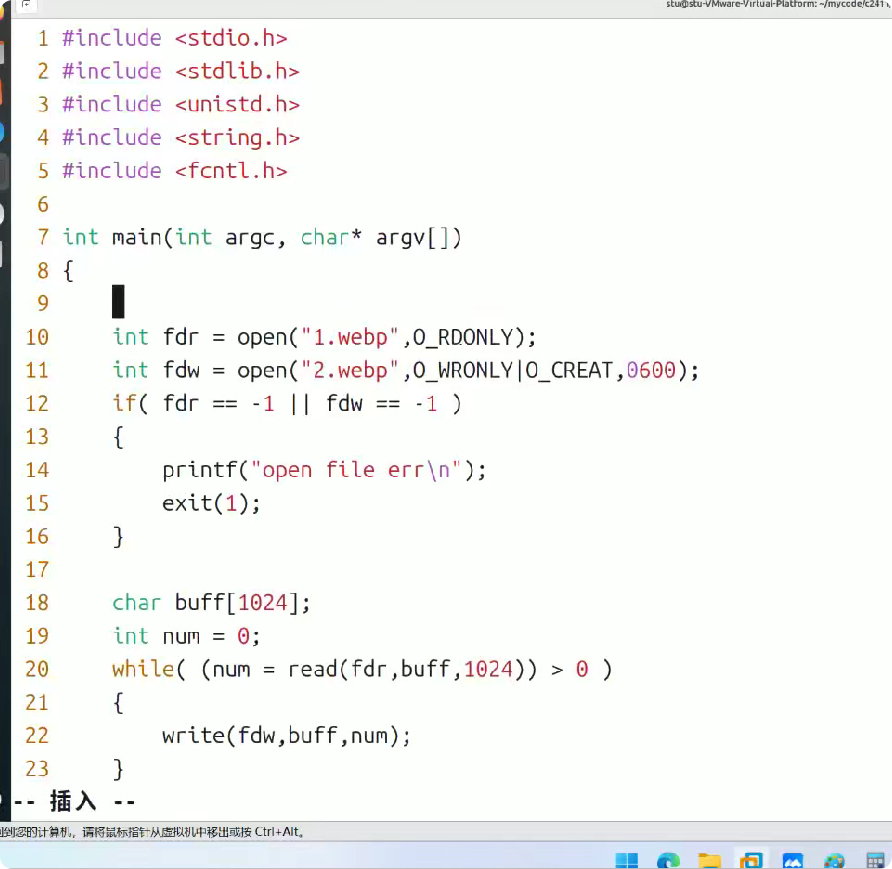
文件的复制("把 1.webp 的内容,完整复制到 2.webp 中",
(1)打开源文件和目标文件
cpp
int fdr = open("1.webp", O_RDONLY);
int fdw = open("2.webp", O_WRONLY | O_CREAT, 0600);
open("1.webp", O_RDONLY):以只读模式打开源文件 1.webp,返回的文件描述符 fdr 用于后续读取。
open("2.webp", O_WRONLY | O_CREAT, 0600):
O_WRONLY:以只写模式打开目标文件;
O_CREAT:如果 2.webp 不存在,则创建该文件;
0600:设置新文件的权限(所有者可读可写,组用户和其他用户无权限)。
(2)检查文件打开是否失败
cpp
if (fdr == -1 || fdw == -1) {
    printf("open file err\n");
    exit(1);
}
open 函数失败时会返回 -1(比如源文件不存在、权限不足等)。
若打开失败,打印错误信息并以非 0 状态码(exit(1))退出程序,表示执行失败。
(3)循环读写文件内容
cpp
char buff[1024];
int num = 0;
while ((num = read(fdr, buff, 1024)) > 0) {
    write(fdw, buff, num);
}
读操作:read(fdr, buff, 1024) 从源文件 fdr 中读取最多 1024 字节到缓冲区 buff,返回实际读取的字节数 num。
循环条件:当 num > 0 时,说明读到了有效数据(若 num == 0 表示文件读完,num < 0 表示读错误)。
写操作:write(fdw, buff, num) 把缓冲区中实际读取的 num 字节写入目标文件 fdw。
(4)关闭文件 & 正常退出
close(fdr)/close(fdw):关闭文件描述符,释放系统资源。
exit(0):以0 状态码退出程序,表示执行成功。