一、实验拓扑及描述
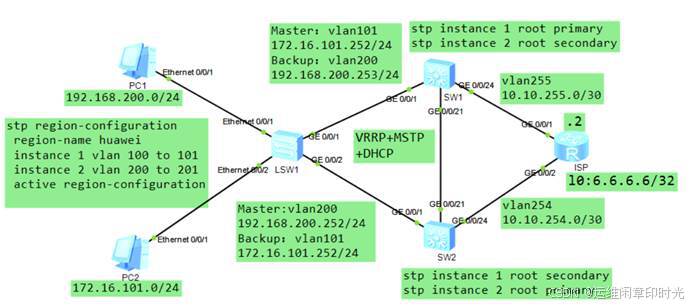
1、这是一个由三台交换机组成的倒三角型二层交换网络;网络中有4个VLAN:101、200;接口编号如拓扑图所示;LSW1为接入层交换机,SW1、SW2为汇聚层交换机;
2、VLAN101对应的网段为172.16.101.0/24; VLAN200对应的网段为192.168.200.0/24;各VLAN的网关均为.254的地址,该地址为VRRP组的虚拟地址;
3、SW1的vlanif101的接口实际IP地址分别为:172.16.101.252;SW1的vlanif200接口实际IP地址分别为:192.168.200.253;
4、SW2的vlanif100和vlanif101的接口实际IP地址分别为: 172.16.101.253;SW2的vlanif200的接口实际IP地址分别为: 192.168.200.252。
二、实验需求
1、由于网络中VLAN较多,并且存在二层环路因此使用MSTP实现环路避免,同时实现负载分担。要求vlan101的流量主走PC1-LSW1-SW1这一侧链路,vlan200的流量主走PC2-LSW1-SW2这一侧链路;
2、为了提高网络的网关层冗余能力,在SW1及SW2的vlanif101、 vlanif200、上部署VRRP,一共2组。
三、实现步骤及配置
接入LSW1的配置如下:
sysname LSW1
# 在LSW1上创建VLAN,并将接口加入相应的VLAN
vlan batch 101 200
# 配置HXSW的接口信息
interface Ethernet0/0/1
description to PC1
port link-type access
port default vlan 200
interface Ethernet0/0/2
description to PC2
port link-type access
port default vlan 101
interface GigabitEthernet0/0/1
description to SW1G0/0/0
port link-type trunk
undo port trunk allow-pass vlan 1
port trunk allow-pass vlan 101 200
interface GigabitEthernet0/0/2
description to SW2G0/0/0
port link-type trunk
undo port trunk allow-pass vlan 1
port trunk allow-pass vlan 101 200
# 配置MSTP,将vlan101映射到实例1,将vlan200映射到实例2
# 在LSW1上,MSTP实例1及实例2的优先级保持默认32768
stp enable
stp mode mstp
stp region-configuration
region-name huawei
instance 1 vlan 101
instance 2 vlan 200
active region-configuration
SW1 的配置如下:
sysname SW1
vlan batch 101 200 255
dhcp enable
interface GigabitEthernet0/0/1
port link-type trunk
undo port trunk allow-pass vlan 1
port trunk allow-pass vlan 101 200
interface GigabitEthernet0/0/21
port link-type trunk
undo port trunk allow-pass vlan 1
port trunk allow-pass vlan 101 200
interface GigabitEthernet0/0/24
description to ISPG0/0/1
port link-type access
port default vlan 255
# 配置MSTP,将vlan101映射到实例1,将vlan200映射到实例2
# 将SW1的MSTP设置为实例1的主根,实例2的次根
stp enable
stp mode mstp
stp region-configuration
region-name huawei
instance 1 vlan 101
instance 2 vlan 200
active region-configuration
stp instance 1 root primary
stp instance 2 root secondary
# 配置vlanif101、vlanif200,分别加入VRRP组101,200,
# 其中SW1为VRRP组101的Master,为组200的Backup
interface Vlanif101
ip address 172.16.101.252 255.255.255.0
vrrp vrid 101 virtual-ip 172.16.101.254
vrrp vrid 101 priority 120
vrrp vrid 101 track interface GigabitEthernet0/0/24 reduced 35
interface Vlanif200
ip address 192.168.200.253 255.255.255.0
vrrp vrid 200 virtual-ip 192.168.200.254
interface Vlanif255
ip address 10.10.255.1 255.255.255.252
# 配置DHCP
ip pool vlan101
gateway-list 172.16.101.254
network 172.16.101.0 mask 255.255.255.0
lease day 3 hour 12 minute 0
dns-list 8.8.8.8 114.114.114.114
quit
ip pool vlan200
gateway-list 192.168.200.254
network 192.168.200.0 mask 255.255.255.0
excluded-ip-address 192.168.200.230 192.168.200.253
lease day 3 hour 12 minute 0
dns-list 8.8.8.8 114.114.114.114
interface Vlanif101
dhcp select global
interface Vlanif200
dhcp select global
# 配置默认路由
ip route-static 0.0.0.0 0.0.0.0 10.10.255.2
SW2 的配置如下:
sysname SW2
vlan batch 101 200 254
interface GigabitEthernet0/0/1
port link-type trunk
undo port trunk allow-pass vlan 1
port trunk allow-pass vlan 101 200
interface GigabitEthernet0/0/21
port link-type trunk
undo port trunk allow-pass vlan 1
port trunk allow-pass vlan 101 200
interface GigabitEthernet0/0/24
description to ISPG0/0/1
port link-type access
port default vlan 254
# 配置MSTP,将vlan101映射到实例1,将vlan200映射到实例2
# 将SW1的MSTP设置为实例1的主根,实例2的次根
stp enable
stp mode mstp
stp region-configuration
region-name huawei
instance 1 vlan 101
instance 2 vlan 200
active region-configuration
stp instance 1 root secondary
stp instance 2 root primary
# 配置vlanif101、vlanif200,分别加入VRRP组101,200
# 其中SW1为VRRP组101的Backup,为组200的Master
interface Vlanif101
ip address 172.16.101.253 255.255.255.0
vrrp vrid 101 virtual-ip 172.16.101.254
vrrp vrid 101 track interface GigabitEthernet0/0/24 reduced 35
interface Vlanif200
ip address 192.168.200.252 255.255.255.0
vrrp vrid 200 virtual-ip 192.168.200.254
vrrp vrid 200 priority 120
vrrp vrid 200 track interface GigabitEthernet0/0/24 reduced 35
interface Vlanif254
ip address 10.10.254.1 255.255.255.252
# 配置DHCP
ip pool vlan101
gateway-list 172.16.101.254
network 172.16.101.0 mask 255.255.255.0
lease day 3 hour 12 minute 0
dns-list 8.8.8.8 114.114.114.114
quit
ip pool vlan200
gateway-list 192.168.200.254
network 192.168.200.0 mask 255.255.255.0
excluded-ip-address 192.168.200.230 192.168.200.253
lease day 3 hour 12 minute 0
dns-list 8.8.8.8 114.114.114.114
interface Vlanif101
dhcp select global
interface Vlanif200
dhcp select global
# 配置默认路由
ip route-static 0.0.0.0 0.0.0.0 10.10.254.2
ISP 路由器:
sysname ISP
interface GigabitEthernet0/0/1
ip address 10.10.255.2 255.255.255.252
interface GigabitEthernet0/0/2
ip address 10.10.254.2 255.255.255.252
interface LoopBack0
ip address 6.6.6.6 255.255.255.255
ip route-static 0.0.0.0 0.0.0.0 10.10.255.1
ip route-static 0.0.0.0 0.0.0.0 10.10.254.1
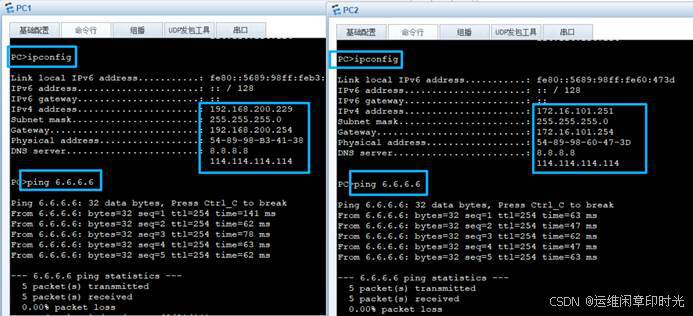
完成配置后,各VLAN的用户都能够ping通6.6.6.6:
在LSW1上看看:
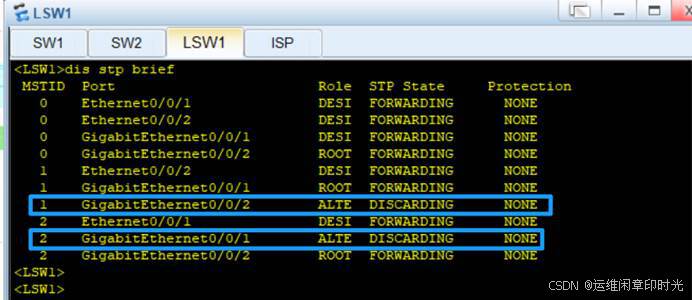
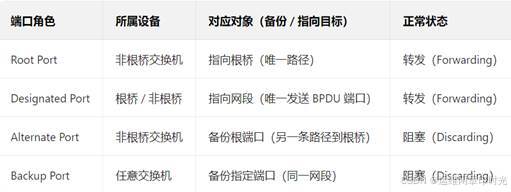
我们看到,MSTP实例1中被Block掉的端口是GE0/0/2口;MSTP实例2中被Block掉的端口是GE0/0/1,符合需求。再去SW1上看看VRRP组的状态:


查看dhc已经租用的IP
<SW1>dis ip pool name vlan101 used
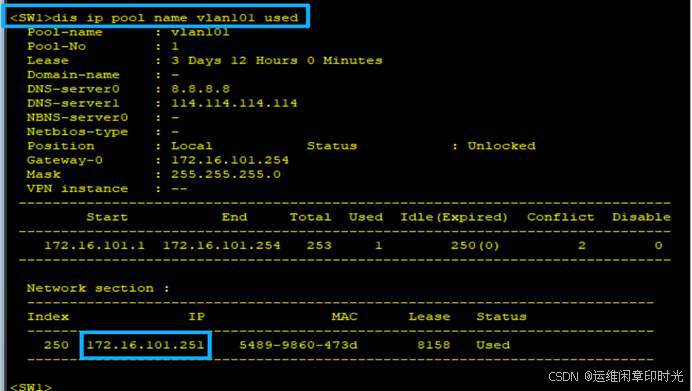
dis ip pool name vlan101 all \| conflict \| expired \| used
conflict:可以查看地址池中发生冲突的IPv4地址信息。
Expired:可以查看地址池中过期的IPv4地址信息。
Used:可以查看地址池中已使用的IPv4地址信息。