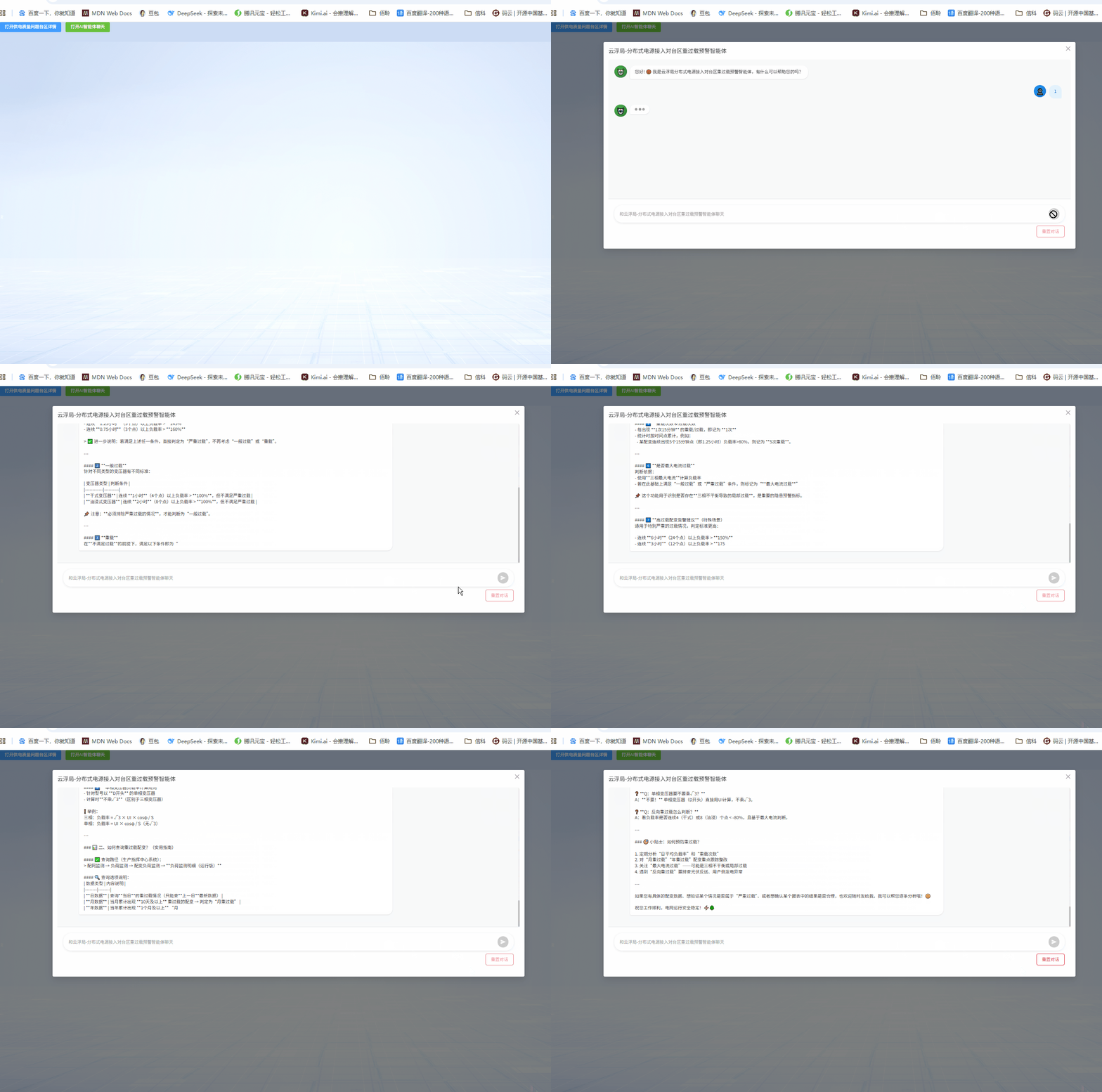
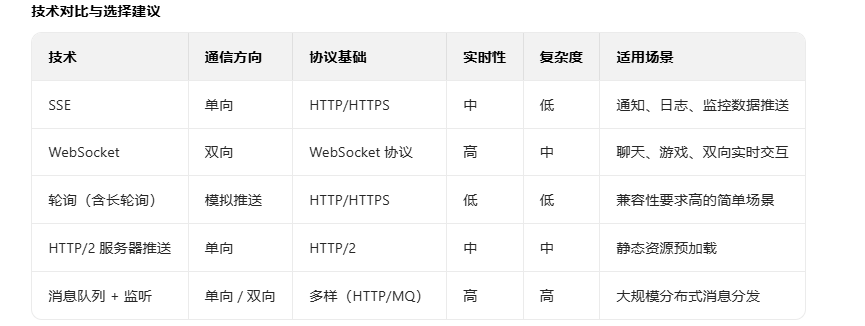
如果是get可以考虑用sse,我当前是post,采用的是post长轮询实现
javascript
   /**
       * 发送用户消息并与AI进行流式对话交互。
       * 该函数会创建一个机器人回复的消息对象,并将其推入消息列表中。
       * 随后通过fetch向后端发起聊天请求,支持SSE(Server-Sent Events)或普通JSON响应,
       * 并将返回的内容逐步追加到机器人的回复内容中,实现打字机效果。
       *
       * @param {string} message - 用户输入的原始消息内容
       */
代码实现
javascript
<template>
  <div class="chat-dialog">
    <!-- 聊天消息区域 -->
    <div class="chat-messages" ref="messagesContainer">
      <div
        v-for="(message, index) in messages"
        :key="index"
        :class="['message', message.type]"
      >
        <!-- 机器人头像 -->
        <div v-if="message.type === 'bot'" class="avatar bot-avatar">
          <div class="robot-icon">🤖</div>
        </div>

        <!-- 消息内容 -->
        <div class="message-content">
          <div
            class="message-bubble"
            :class="[
              message.type,
              {
                loading:
                  isLoading &&
                  message.type === 'bot' &&
                  !(message.content || message.displayContent)
              }
            ]"
          >
            <div
              v-if="
                isLoading &&
                message.type === 'bot' &&
                !(message.content || message.displayContent)
              "
              class="typing-indicator"
            >
              <span></span>
              <span></span>
              <span></span>
            </div>
            <div v-else>
              <div
                v-if="message.displayContent"
                v-text="message.displayContent"
              ></div>
              <div v-else v-html="formatMessage(message.content)"></div>
            </div>
          </div>
        </div>

        <!-- 用户头像 -->
        <div v-if="message.type === 'user'" class="avatar user-avatar">
          <div class="user-icon">👤</div>
        </div>
      </div>
    </div>

    <!-- 输入区域 -->
    <div class="chat-input-area">
      <div class="input-container">
        <input
          v-model="inputMessage"
          type="text"
          :placeholder="placeholderText"
          class="chat-input"
          @keyup.enter="sendMessage"
          :disabled="isLoading"
        />
        <button
          class="send-button"
          @click="sendMessage"
          :disabled="!inputMessage.trim() || isLoading"
        >
          <svg width="16" height="16" viewBox="0 0 24 24" fill="none">
            <path
              d="M2.01 21L23 12L2.01 3L2 10L17 12L2 14L2.01 21Z"
              fill="white"
            />
          </svg>
        </button>
      </div>
      <div class="chat-actions">
        <button
          class="reset-button"
          @click="resetConversation"
          :disabled="isLoading"
        >
          重置对话
        </button>
      </div>
    </div>
  </div>
</template>

<script>
import { generateSessionId, formatSSEMessage } from "@/utils/sseUtils";
import settings from "@/settings";

export default {
  name: "ChatDialog",
  props: {
    placeholderText: {
      type: String,
      default: "和云浮局-分布式电源接入对台区重过载预警智能体聊天"
    }
  },
  data() {
    return {
      messages: [],
      inputMessage: "",
      isLoading: false,
      conversationId: generateSessionId(),
      parentMessageId: null,
      currentAbortController: null,
      pollInterval: null,
      typingDelayMs: 10
    };
  },
  methods: {
    async sendMessage() {
      if (!this.inputMessage.trim() || this.isLoading) return;

      const userMessage = {
        type: "user",
        content: this.inputMessage.trim(),
        timestamp: new Date()
      };
      this.messages.push(userMessage);

      const currentMessage = this.inputMessage.trim();
      this.inputMessage = "";

      await this.$nextTick();
      this.scrollToBottom();

      this.isLoading = true;
      try {
        await this.sendChatWithPolling(currentMessage);
      } catch (error) {
        console.error("发送消息失败:", error);
        this.messages.push({
          type: "bot",
          content: "抱歉,我暂时无法回复您的消息,请稍后再试。",
          timestamp: new Date()
        });
      } finally {
        this.isLoading = false;
        await this.$nextTick();
        this.scrollToBottom();
      }
    },

    async sendChatWithPolling(message) {
      console.log("使用长轮询方式发送聊天请求:", message);

      /**
       * 发送用户消息并与AI进行流式对话交互。
       * 该函数会创建一个机器人回复的消息对象,并将其推入消息列表中。
       * 随后通过fetch向后端发起聊天请求,支持SSE(Server-Sent Events)或普通JSON响应,
       * 并将返回的内容逐步追加到机器人的回复内容中,实现打字机效果。
       *
       * @param {string} message - 用户输入的原始消息内容
       */
      const botMessage = {
        type: "bot",
        content: "",
        displayContent: "",
        timestamp: new Date()
      };
      this.messages.push(botMessage);

      try {
        // 生成当前消息ID并清理用户输入内容
        const currentMessageId = generateSessionId();
        const cleanMessage = message.trim();
        // 检查消息是否为空
        if (!cleanMessage) {
          botMessage.content = "消息内容不能为空";
          return;
        }

        // 构造请求数据
        const requestData = {
          response_mode: "streaming",
          conversation_id: this.conversationId,
          files: [],
          query: cleanMessage,
          inputs: {},
          parent_message_id: this.parentMessageId || currentMessageId
          // conversation_id: "ee87ad3c-bde6-4d74-88bf-ba74d99c0974",
          // query: "什么是"重过载"?",
          // parent_message_id: "2cc5088a-24f6-4d5f-b2b4-9a6f9e1b3ad4"
        };

        // 更新父级消息ID
        this.parentMessageId = currentMessageId;

        // 创建用于取消请求的控制器
        this.currentAbortController = new AbortController();
        const signal = this.currentAbortController.signal;

        let cursor = null;
        let finished = false;

        // 开始长轮询处理流式响应
        while (!finished) {
          const payload = { ...requestData, cursor };

          try {
            // 向AI接口发送POST请求
            const res = await fetch(settings.aiPrefix + "/chat", {
              method: "POST",
              headers: { "Content-Type": "application/json" },
              body: JSON.stringify(payload),
              signal
            });

            // 请求失败则抛出错误
            if (!res.ok) throw new Error(`HTTP ${res.status}`);

            // 获取响应类型与文本内容
            const contentType = res.headers.get("content-type") || "";
            const rawText = await res.text();

            let events = [];

            // 判断是SSE格式还是普通JSON格式
            if (
              contentType.includes("text/event-stream") ||
              rawText.startsWith("data:")
            ) {
              // 处理SSE事件流:按行分割并解析每条消息
              const lines = rawText.split(/\r?\n/);
              console.log("lines", lines);

              for (const line of lines) {
                if (!line || !line.startsWith("data:")) continue;
                const jsonStr = line.slice(5).trim();
                if (!jsonStr) continue;
                try {
                  events.push(JSON.parse(jsonStr));
                } catch (_) {}
              }
            } else {
              // 尝试作为单个JSON对象解析
              try {
                events = [JSON.parse(rawText)];
              } catch (_) {
                events = [];
              }
            }

            // 遍历所有事件并更新bot消息内容
            for (let i = 0; i < events.length; i += 1) {
              const evt = events[i];
              const answerVal =
                (evt && evt.data && evt.data.answer) || (evt && evt.answer);

              // console.log("处理事件:", evt);
              // console.log("提取的answerVal:", answerVal);

              if (typeof answerVal === "string" && answerVal) {
                // console.log("开始打字效果处理answerVal:", answerVal);
                await this.appendWithTyping(botMessage, answerVal);
              }

              // 更新游标和结束标志位(基于当前事件)
              cursor = (evt && (evt.cursor || evt.next_cursor)) || cursor;
              if (
                (evt && (evt.done || evt.is_end || evt.finished)) ||
                (evt && evt.event === "workflow_finished") ||
                (evt && evt.event === "done") ||
                (evt && evt.event === "error")
              ) {
                finished = true;
              }
            }

            // 触发视图更新并滚动到底部
            await this.$nextTick();
            this.scrollToBottom();

            // 若未完成且无新事件及游标,则短暂等待避免频繁请求
            if (!finished && events.length === 0 && !cursor) {
              await new Promise((r) => setTimeout(r, 200));
            }
          } catch (err) {
            // 中断请求时退出循环
            if (err && err.name === "AbortError") break;
            console.error("长轮询失败:", err);
            botMessage.content += "\n请求失败,请稍后重试。";
            break;
          }
        }
      } catch (error) {
        // 兜底异常处理
        console.error("发送消息失败:", error);
        botMessage.content += "\n\n抱歉,我暂时无法回复您的消息,请稍后再试。";
      }
    },

    resetConversation() {
      this.messages = [];
      this.conversationId = generateSessionId();
      this.parentMessageId = null;

      this.messages.push({
        type: "bot",
        content:
          "您好! 😊 我是云浮局分布式电源接入对台区重过载预警智能体,有什么可以帮助您的吗?",
        timestamp: new Date()
      });
    },

    formatMessage(content) {
      return formatSSEMessage(content);
    },

    scrollToBottom() {
      const el = this.$refs.messagesContainer;
      if (el) el.scrollTop = el.scrollHeight;
    },

    async appendWithTyping(botMessage, text) {
      if (!text) return;
      // console.log("开始打字效果,文本:", text);
      // 累积到真实内容(已预定义属性,直接赋值保持响应)
      botMessage.content = (botMessage.content || "") + text;
      // 按字符逐个展现
      for (let i = 0; i < text.length; i += 1) {
        botMessage.displayContent = (botMessage.displayContent || "") + text[i];

        // console.log("当前显示内容:", botMessage.displayContent);

        // 等待一小段时间,形成打字效果
        // eslint-disable-next-line no-await-in-loop
        await new Promise((r) => setTimeout(r, this.typingDelayMs));
        // eslint-disable-next-line no-await-in-loop
        await this.$nextTick();
        // 保险触发一次刷新,避免个别环境下不重绘
        if (this.$forceUpdate) this.$forceUpdate();
        this.scrollToBottom();
      }
    }
  },
  mounted() {
    this.messages.push({
      type: "bot",
      content:
        "您好! 😊 我是云浮局分布式电源接入对台区重过载预警智能体,有什么可以帮助您的吗?",
      timestamp: new Date()
    });
  },
  beforeDestroy() {
    if (this.currentAbortController) {
      this.currentAbortController.abort();
      this.currentAbortController = null;
    }
    if (this.pollInterval) {
      clearInterval(this.pollInterval);
      this.pollInterval = null;
    }
  }
};
</script>

<style scoped>
.chat-dialog {
  display: flex;
  flex-direction: column;
  height: 600px;
  background-color: #f8f9fa;
  border-radius: 8px;
  overflow: hidden;
}

.chat-messages {
  flex: 1;
  overflow-y: auto;
  padding: 20px;
  background-color: #f8f9fa;
}

.message {
  display: flex;
  margin-bottom: 20px;
  align-items: flex-start;
}

.message.user {
  flex-direction: row-reverse;
}

.message-content {
  max-width: 70%;
  margin: 0 10px;
}

.message-bubble {
  padding: 12px 16px;
  border-radius: 18px;
  word-wrap: break-word;
  line-height: 1.4;
  white-space: pre-wrap; /* 保留换行,便于打字中显示 */
}

.message-bubble.user {
  background-color: #e3f2fd;
  color: #1976d2;
  border-bottom-right-radius: 4px;
}

.message-bubble.bot {
  background-color: white;
  color: #333;
  border-bottom-left-radius: 4px;
  box-shadow: 0 1px 3px rgba(0, 0, 0, 0.1);
}

.avatar {
  width: 40px;
  height: 40px;
  border-radius: 50%;
  display: flex;
  align-items: center;
  justify-content: center;
  flex-shrink: 0;
}

.bot-avatar {
  background: linear-gradient(135deg, #4caf50, #2e7d32);
}

.user-avatar {
  background: linear-gradient(135deg, #2196f3, #1976d2);
}

.robot-icon,
.user-icon {
  font-size: 20px;
  color: white;
}

.chat-input-area {
  padding: 20px;
  background-color: white;
  border-top: 1px solid #e9ecef;
}

.chat-actions {
  margin-top: 10px;
  display: flex;
  justify-content: flex-end;
}

.reset-button {
  padding: 8px 16px;
  border: 1px solid #dc3545;
  border-radius: 6px;
  background-color: white;
  color: #dc3545;
  cursor: pointer;
  font-size: 14px;
  transition: all 0.2s;
}

.reset-button:hover:not(:disabled) {
  background-color: #dc3545;
  color: white;
}

.reset-button:disabled {
  opacity: 0.6;
  cursor: not-allowed;
}

.test-button {
  padding: 8px 16px;
  border: 1px solid #28a745;
  border-radius: 6px;
  background-color: white;
  color: #28a745;
  cursor: pointer;
  font-size: 14px;
  transition: all 0.2s;
  margin-left: 10px;
}

.test-button:hover:not(:disabled) {
  background-color: #28a745;
  color: white;
}

.test-button:disabled {
  opacity: 0.6;
  cursor: not-allowed;
}

.compare-button {
  padding: 8px 16px;
  border: 1px solid #ffc107;
  border-radius: 6px;
  background-color: white;
  color: #ffc107;
  cursor: pointer;
  font-size: 14px;
  transition: all 0.2s;
  margin-left: 10px;
}

.compare-button:hover:not(:disabled) {
  background-color: #ffc107;
  color: white;
}

.compare-button:disabled {
  opacity: 0.6;
  cursor: not-allowed;
}

.input-container {
  display: flex;
  align-items: center;
  background-color: white;
  border-radius: 25px;
  padding: 8px 16px;
  box-shadow: 0 2px 8px rgba(0, 0, 0, 0.1);
}

.chat-input {
  flex: 1;
  border: none;
  outline: none;
  padding: 12px 0;
  font-size: 14px;
  background: transparent;
}

.chat-input::placeholder {
  color: #999;
}

.send-button {
  width: 36px;
  height: 36px;
  border: none;
  border-radius: 50%;
  background: linear-gradient(135deg, #2196f3, #1976d2);
  color: white;
  cursor: pointer;
  display: flex;
  align-items: center;
  justify-content: center;
  transition: all 0.2s;
  box-shadow: 0 2px 4px rgba(33, 150, 243, 0.3);
}

.send-button:hover:not(:disabled) {
  background: linear-gradient(135deg, #1976d2, #1565c0);
  transform: translateY(-1px);
  box-shadow: 0 4px 8px rgba(33, 150, 243, 0.4);
}

.send-button:disabled {
  background: #ccc;
  cursor: not-allowed;
  transform: none;
  box-shadow: none;
}

/* 加载动画 */
.loading .typing-indicator {
  display: flex;
  align-items: center;
  gap: 4px;
}

.typing-indicator span {
  width: 8px;
  height: 8px;
  border-radius: 50%;
  background-color: #999;
  animation: typing 1.4s infinite ease-in-out;
}

.typing-indicator span:nth-child(1) {
  animation-delay: -0.32s;
}

.typing-indicator span:nth-child(2) {
  animation-delay: -0.16s;
}

@keyframes typing {
  0%,
  80%,
  100% {
    transform: scale(0.8);
    opacity: 0.5;
  }
  40% {
    transform: scale(1);
    opacity: 1;
  }
}

/* 滚动条样式 */
.chat-messages::-webkit-scrollbar {
  width: 6px;
}

.chat-messages::-webkit-scrollbar-track {
  background: #f1f1f1;
}

.chat-messages::-webkit-scrollbar-thumb {
  background: #c1c1c1;
  border-radius: 3px;
}

.chat-messages::-webkit-scrollbar-thumb:hover {
  background: #a8a8a8;
}

/* 消息内容样式优化 */
.message-bubble strong {
  font-weight: 600;
  color: #1976d2;
}

.message-bubble .emoji {
  font-size: 1.2em;
}

/* 响应式设计 */
@media (max-width: 768px) {
  .chat-dialog {
    height: 500px;
  }

  .message-content {
    max-width: 85%;
  }

  .chat-input-area {
    padding: 15px;
  }
}
</style>