查询
bash
[root@client mysql_3306]# bin/mysqladmin -uroot password '123' -p
Enter password:
mysqladmin: connect to server at 'localhost' failed
error: 'Access denied for user 'root'@'localhost' (using password: YES)'
[root@client mysql_3306]# bin/mysqladmin -uroot password '123' -p
Enter password:
mysqladmin: connect to server at 'localhost' failed
error: 'Access denied for user 'root'@'localhost' (using password: YES)'
[root@client mysql_3306]#
bash
Starting MySQL SUCCESS!
[root@client mysql_3306]# 2025-10-23T12:27:13.724548Z mysqld_safe A mysqld process already exists
s
bash: s: 未找到命令...
[root@client mysql_3306]# systemctl status mysqld
Unit mysqld.service could not be found.
[root@client mysql_3306]# ps -ef |grep mysqld
root      59664  45846  0 20:59 pts/2    00:00:00 grep --color=auto mysqld
root     108269      1  0 17:19 ?        00:00:00 /bin/sh /mysql_3306/bin/mysqld_safe --datadir=/mysql_3306/data --pid-file=/mysql_3306/data/client.backup.cn.pid
mysql    108354 108269  0 17:19 ?        00:00:13 /mysql_3306/bin/mysqld --basedir=/mysql_3306 --datadir=/mysql_3306/data --plugin-dir=/mysql_3306/lib/plugin --user=mysql --log-error=client.backup.cn.err --pid-file=/mysql_3306/data/client.backup.cn.pid
[root@client mysql_3306]#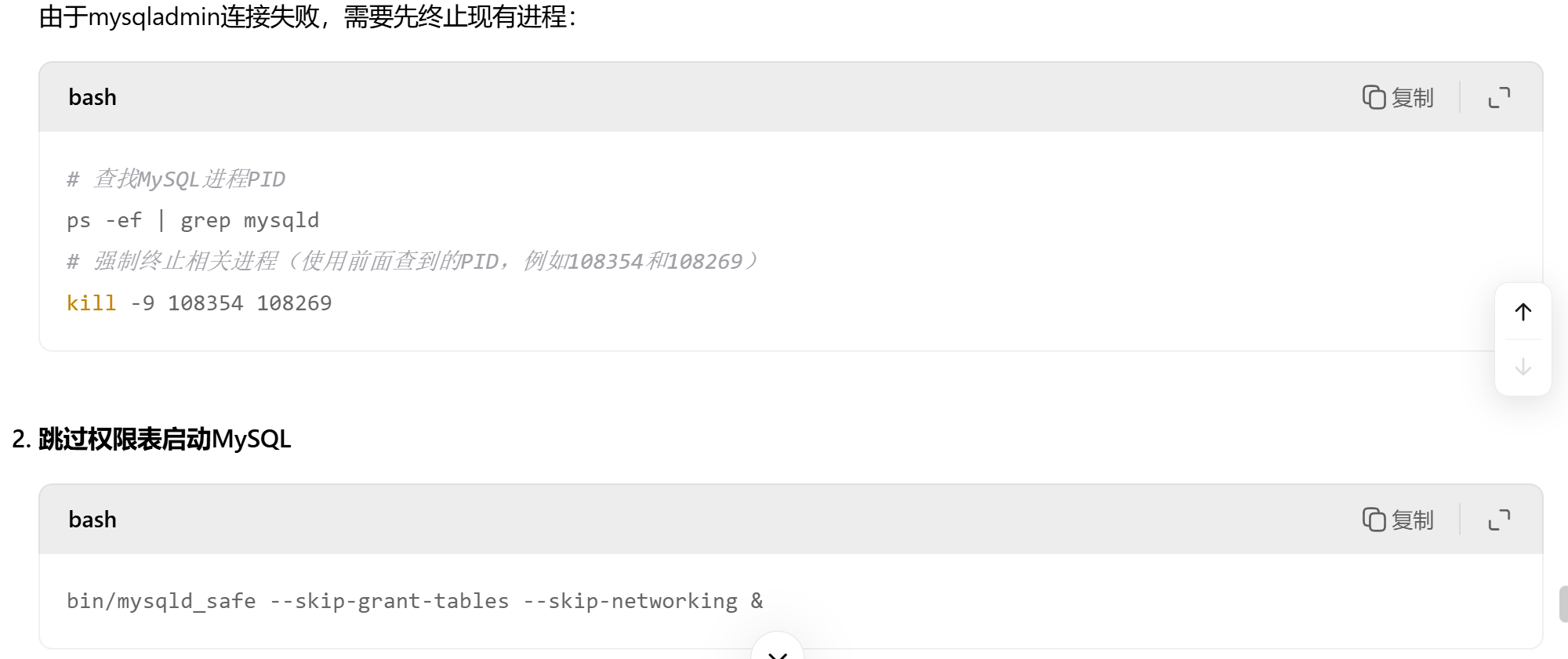
bash
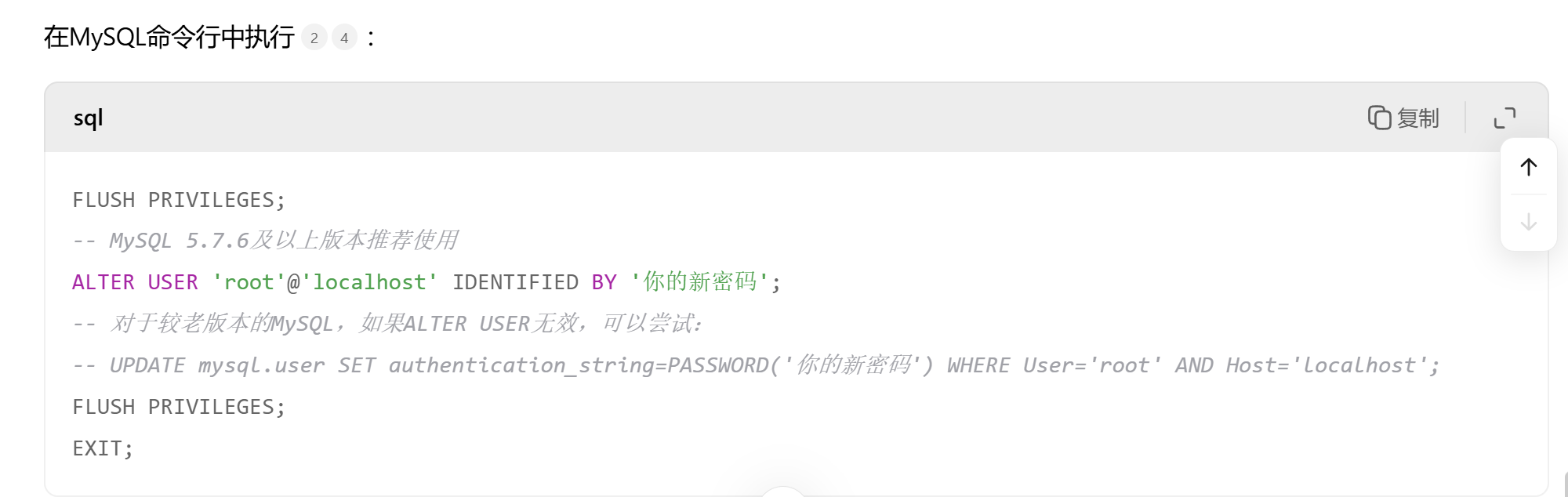
mysql> ALTER USER 'root'@'localhost' INENTIFIED BY '123';
ERROR 1064 (42000): You have an error in your SQL syntax; check the manual that corresponds to your MySQL server version for the right syntax to use near 'INENTIFIED BY '123'' at line 1
mysql>
bash
mysql> ALTER USER 'root'@'localhost' IDENTIFIED BY '123';
ERROR 1290 (HY000): The MySQL server is running with the --skip-grant-tables option so it cannot execute this statement
mysql>
bash
[root@client mysql_3306]# ps -ef |grep mysqld
root      63342  45846  0 21:09 pts/2    00:00:00 /bin/sh bin/mysqld_safe --skip-grant-tables --skip-networking
mysql     63436  63342  0 21:09 pts/2    00:00:00 /mysql_3306/bin/mysqld --basedir=/mysql_3306 --datadir=/mysql_3306/data --plugin-dir=/mysql_3306/lib/plugin --user=mysql --skip-grant-tables --skip-networking --log-error=client.backup.cn.err --pid-file=client.backup.cn.pid
root      67601  45846  0 21:20 pts/2    00:00:00 grep --color=auto mysqld
[root@client mysql_3306]# systemctl stop mysqld
Failed to stop mysqld.service: Unit mysqld.service not loaded.
[root@client mysql_3306]#
bash
[root@client ~]# mysql_secure_installation

Securing the MySQL server deployment.

Enter password for user root:

VALIDATE PASSWORD PLUGIN can be used to test passwords
and improve security. It checks the strength of password
and allows the users to set only those passwords which are
secure enough. Would you like to setup VALIDATE PASSWORD plugin?

Press y|Y for Yes, any other key for No: y

There are three levels of password validation policy:

LOW    Length >= 8
MEDIUM Length >= 8, numeric, mixed case, and special characters
STRONG Length >= 8, numeric, mixed case, special characters and dictionary                  file

Please enter 0 = LOW, 1 = MEDIUM and 2 = STRONG: y

Invalid option provided.

There are three levels of password validation policy:

LOW    Length >= 8
MEDIUM Length >= 8, numeric, mixed case, and special characters
STRONG Length >= 8, numeric, mixed case, special characters and dictionary                  file

Please enter 0 = LOW, 1 = MEDIUM and 2 = STRONG: y

Invalid option provided.

There are three levels of password validation policy:

LOW    Length >= 8
MEDIUM Length >= 8, numeric, mixed case, and special characters
STRONG Length >= 8, numeric, mixed case, special characters and dictionary                  file

Please enter 0 = LOW, 1 = MEDIUM and 2 = STRONG:

Invalid option provided.

There are three levels of password validation policy:

LOW    Length >= 8
MEDIUM Length >= 8, numeric, mixed case, and special characters
STRONG Length >= 8, numeric, mixed case, special characters and dictionary                  file

Please enter 0 = LOW, 1 = MEDIUM and 2 = STRONG: y

Invalid option provided.

There are three levels of password validation policy:

LOW    Length >= 8
MEDIUM Length >= 8, numeric, mixed case, and special characters
STRONG Length >= 8, numeric, mixed case, special characters and dictionary                  file

Please enter 0 = LOW, 1 = MEDIUM and 2 = STRONG: y

Invalid option provided.

There are three levels of password validation policy:

LOW    Length >= 8
MEDIUM Length >= 8, numeric, mixed case, and special characters
STRONG Length >= 8, numeric, mixed case, special characters and dictionary                  file

Please enter 0 = LOW, 1 = MEDIUM and 2 = STR
记录
bash
caozx26@192.168.235.200's password:
     ┌────────────────────────────────────────────────────────────────────┐
     │                        • MobaXterm 20.0 •                          │
     │            (SSH client, X-server and networking tools)             │
     │                                                                    │
     │ ➤ SSH session to caozx26@192.168.235.200                           │
     │   • SSH compression : ✘                                            │
     │   • SSH-browser     : ✔                                            │
     │   • X11-forwarding  : ✔  (remote display is forwarded through SSH) │
     │   • DISPLAY         : ✔  (automatically set on remote server)      │
     │                                                                    │
     │ ➤ For more info, ctrl+click on help or visit our website           │
     └────────────────────────────────────────────────────────────────────┘

Last login: Tue Oct 21 20:19:19 2025 from 192.168.235.1
[caozx26@client ~]$ bin/mysqladmin -uroot password '123' -p
-bash: bin/mysqladmin: 没有那个文件或目录
[caozx26@client ~]$ ls
1828.txt  2.txt   app1                inotify-tools-3.13.tar.gz                      模板  桌面
1837.txt  35.txt  a.txt               mysql-5.7.31-linux-glibc2.12-x86_64.tar(1).gz  视频
1.java    3.java  b.txt               mysql-boost-5.7.31.tar(1).gz                   图片
1.txt     4.java  file22.txt          sed.sh                                         文档
2041      5.java  ifcfg-ens33         smb.conf                                       下载
2.java    app     inotify-tools-3.13  公共                                           音乐
[caozx26@client ~]$ service mysql_3306 start
Starting MySQL./mysql_3306/bin/mysqld_safe: line 626: /mysql_3306/data/client.backup.cn.err: Permission denied
Logging to '/mysql_3306/data/client.backup.cn.err'.
/mysql_3306/bin/mysqld_safe: line 144: /mysql_3306/data/client.backup.cn.err: Permission denied
/mysql_3306/bin/mysqld_safe: line 198: /mysql_3306/data/client.backup.cn.err: Permission denied
/mysql_3306/bin/mysqld_safe: line 885: /mysql_3306/data/client.backup.cn.err: Permission denied
rm: cannot remove '/mysql_3306/data/client.backup.cn.pid.shutdown': Permission denied
/mysql_3306/bin/mysqld_safe: line 144: /mysql_3306/data/client.backup.cn.err: Permission denied
 ERROR! The server quit without updating PID file (/mysql_3306/data/client.backup.cn.pid).
[caozx26@client ~]$ sudo su
[sudo] caozx26 的密码:
[root@client caozx26]# service mysql_3306 start
Starting MySQL SUCCESS!
[root@client caozx26]# 2025-10-23T12:14:58.042613Z mysqld_safe A mysqld process already exists
^C
[root@client caozx26]# bin/mysqladmin -uroot password -uroot password '123' -p
bash: bin/mysqladmin: 没有那个文件或目录
[root@client caozx26]# cd /mysql_3306/
[root@client mysql_3306]# bin/mysqladmin -uroot password '123' -p
Enter password:
mysqladmin: connect to server at 'localhost' failed
error: 'Access denied for user 'root'@'localhost' (using password: YES)'
[root@client mysql_3306]# bin/mysqladmin -uroot password '123' -p
Enter password:
mysqladmin: connect to server at 'localhost' failed
error: 'Access denied for user 'root'@'localhost' (using password: YES)'
[root@client mysql_3306]# bin/mysqladmin -uroot password '123456' -p
Enter password:
mysqladmin: connect to server at 'localhost' failed
error: 'Access denied for user 'root'@'localhost' (using password: YES)'
[root@client mysql_3306]# exit
exit
[caozx26@client ~]$ su - root
密码:
su: 鉴定故障
[caozx26@client ~]$ su -
密码:
上一次登录:四 10月 23 20:14:49 CST 2025pts/2 上
最后一次失败的登录:四 10月 23 20:22:27 CST 2025pts/2 上
最有一次成功登录后有 1 次失败的登录尝试。
[root@client ~]# cd /mysql_3306/
[root@client mysql_3306]# ls
bin   docs     lib      man                                  README  support-files
data  include  LICENSE  mysql-5.7.31-linux-glibc2.12-x86_64  share
[root@client mysql_3306]# bin/mysqladmin -uroot password '123456' -p
Enter password:
mysqladmin: connect to server at 'localhost' failed
error: 'Access denied for user 'root'@'localhost' (using password: YES)'
[root@client mysql_3306]# service mysql_3306 start
Starting MySQL SUCCESS!
[root@client mysql_3306]# 2025-10-23T12:27:13.724548Z mysqld_safe A mysqld process already exists
s
bash: s: 未找到命令...
[root@client mysql_3306]# bin/mysqladmin -uroot password '123' -p
Enter password:
mysqladmin: connect to server at 'localhost' failed
error: 'Access denied for user 'root'@'localhost' (using password: YES)'
[root@client mysql_3306]# systemctl status mysql
Unit mysql.service could not be found.
[root@client mysql_3306]# systemct status mysqld
bash: systemct: 未找到命令...
[root@client mysql_3306]# systemctl status mysqld
Unit mysqld.service could not be found.
[root@client mysql_3306]# ps -ef |grep mysqld
root      59664  45846  0 20:59 pts/2    00:00:00 grep --color=auto mysqld
root     108269      1  0 17:19 ?        00:00:00 /bin/sh /mysql_3306/bin/mysqld_safe --datadir=/mysql_3306/data --pid-file=/mysql_3306/data/client.backup.cn.pid
mysql    108354 108269  0 17:19 ?        00:00:13 /mysql_3306/bin/mysqld --basedir=/mysql_3306 --datadir=/mysql_3306/data --plugin-dir=/mysql_3306/lib/plugin --user=mysql --log-error=client.backup.cn.err --pid-file=/mysql_3306/data/client.backup.cn.pid
[root@client mysql_3306]# bin/mysqladmin -u root -p version
Enter password:
mysqladmin: connect to server at 'localhost' failed
error: 'Access denied for user 'root'@'localhost' (using password: YES)'
[root@client mysql_3306]# bin/mysqladmin -u root -p version
Enter password:
mysqladmin: connect to server at 'localhost' failed
error: 'Access denied for user 'root'@'localhost' (using password: YES)'
[root@client mysql_3306]# bin/mysqladmin -u root -p version
Enter password:
mysqladmin: connect to server at 'localhost' failed
error: 'Access denied for user 'root'@'localhost' (using password: YES)'
[root@client mysql_3306]# bin/mysqladmin -u root -p version
Enter password:
mysqladmin: connect to server at 'localhost' failed
error: 'Access denied for user 'root'@'localhost' (using password: YES)'
[root@client mysql_3306]# mysql -uroot -p
bash: mysql: 未找到命令...
[root@client mysql_3306]# bin/mysqladmin -u root -p shutdown
Enter password:
mysqladmin: connect to server at 'localhost' failed
error: 'Access denied for user 'root'@'localhost' (using password: YES)'
[root@client mysql_3306]# bin/mysqladmin -u root -p shutdown
Enter password:
mysqladmin: connect to server at 'localhost' failed
error: 'Access denied for user 'root'@'localhost' (using password: YES)'
[root@client mysql_3306]# bin/mysqladmin -u root -p shutdown
Enter password:
mysqladmin: connect to server at 'localhost' failed
error: 'Access denied for user 'root'@'localhost' (using password: NO)'
[root@client mysql_3306]# kill -9 108534 108269
-bash: kill: (108534) - 没有那个进程
[root@client mysql_3306]# kill -9 108354 108269
-bash: kill: (108269) - 没有那个进程
[root@client mysql_3306]# ps -ef |grep mysqld
root      63019  45846  0 21:08 pts/2    00:00:00 grep --color=auto mysqld
[root@client mysql_3306]# bin/mysqld
2025-10-23T13:09:02.342907Z 0 [Warning] TIMESTAMP with implicit DEFAULT value is deprecated. Please use --explicit_defaults_for_timestamp server option (see documentation for more details).
2025-10-23T13:09:02.343100Z 0 [Note] --secure-file-priv is set to NULL. Operations related to importing and exporting data are disabled
2025-10-23T13:09:02.343147Z 0 [Note] bin/mysqld (mysqld 5.7.31) starting as process 63152 ...
2025-10-23T13:09:02.343239Z 0 [ERROR] Can't find error-message file '/usr/local/mysql/share/errmsg.sys'. Check error-message file location and 'lc-messages-dir' configuration directive.
2025-10-23T13:09:02.344547Z 0 [Warning] Can't create test file /usr/local/mysql/data/client.lower-test
2025-10-23T13:09:02.344578Z 0 [Warning] Can't create test file /usr/local/mysql/data/client.lower-test
2025-10-23T13:09:02.344606Z 0 [ERROR] Fatal error: Please read "Security" section of the manual to find out how to run mysqld as root!

2025-10-23T13:09:02.344644Z 0 [ERROR] Aborting

2025-10-23T13:09:02.344679Z 0 [Note] Binlog end
2025-10-23T13:09:02.344816Z 0 [Note]
[root@client mysql_3306]# bin/mysqld_safe --skip-grant-tables --skip-networking &
[1] 63342
[root@client mysql_3306]# 2025-10-23T13:09:31.587558Z mysqld_safe Logging to '/mysql_3306/data/client.backup.cn.err'.
2025-10-23T13:09:31.615758Z mysqld_safe Starting mysqld daemon with databases from /mysql_3306/data
bin/mysql -u root
Welcome to the MySQL monitor.  Commands end with ; or \g.
Your MySQL connection id is 2
Server version: 5.7.31 MySQL Community Server (GPL)

Copyright (c) 2000, 2020, Oracle and/or its affiliates. All rights reserved.

Oracle is a registered trademark of Oracle Corporation and/or its
affiliates. Other names may be trademarks of their respective
owners.

Type 'help;' or '\h' for help. Type '\c' to clear the current input statement.

mysql> ALTER USER 'root'@'localhost' INENTIFIED BY '123';
ERROR 1064 (42000): You have an error in your SQL syntax; check the manual that corresponds to your MySQL server version for the right syntax to use near 'INENTIFIED BY '123'' at line 1
mysql> ALTER USER 'root'@'localhost' IDENTIFIED BY '123'
    '> ;
    '> FLUSH PRIVILEGES
    '> EXIT;
    '> ^C
mysql> ALTER USER 'root'@'localhost' IDENTIFIED BY '123';
ERROR 1290 (HY000): The MySQL server is running with the --skip-grant-tables option so it cannot execute this statement
mysql> FLUSH PRIVILEGES
    -> ^C
mysql> FLUSH PRIVILEGES;
Query OK, 0 rows affected (0.01 sec)

mysql> ALTER USER 'root'@'localhost' IDENTIFIED BY '123';
Query OK, 0 rows affected (0.00 sec)

mysql> FLUSH PRIVILEGES
    -> ^C
mysql> FLUSH PRIVILEGES
    -> ;
Query OK, 0 rows affected (0.00 sec)

mysql> exit
Bye
[root@client mysql_3306]# service mysqld stop
Redirecting to /bin/systemctl stop mysqld.service
Failed to stop mysqld.service: Unit mysqld.service not loaded.
[root@client mysql_3306]# systemctl stop mysqld
Failed to stop mysqld.service: Unit mysqld.service not loaded.
[root@client mysql_3306]# ps -ef |grep mysqld
root      63342  45846  0 21:09 pts/2    00:00:00 /bin/sh bin/mysqld_safe --skip-grant-tables --skip-networking
mysql     63436  63342  0 21:09 pts/2    00:00:00 /mysql_3306/bin/mysqld --basedir=/mysql_3306 --datadir=/mysql_3306/data --plugin-dir=/mysql_3306/lib/plugin --user=mysql --skip-grant-tables --skip-networking --log-error=client.backup.cn.err --pid-file=client.backup.cn.pid
root      67601  45846  0 21:20 pts/2    00:00:00 grep --color=auto mysqld
[root@client mysql_3306]# systemctl stop mysqld
Failed to stop mysqld.service: Unit mysqld.service not loaded.
[root@client mysql_3306]# bin/mysqladmin -u root -p123 shutdown
mysqladmin: [Warning] Using a password on the command line interface can be insecure.
2025-10-23T13:26:55.795691Z mysqld_safe mysqld from pid file /mysql_3306/data/client.backup.cn.pid ended
[1]+  完成                  bin/mysqld_safe --skip-grant-tables --skip-networking
[root@client mysql_3306]# service mysql_3306 start
Starting MySQL. SUCCESS!
[root@client mysql_3306]# bin/mysqladmin -uroot password'123' -p
Enter password:
mysqladmin: Unknown command: 'password123'
[root@client mysql_3306]# bin/mysqladmin -uroot password '123' -p
Enter password:
mysqladmin: [Warning] Using a password on the command line interface can be insecure.
Warning: Since password will be sent to server in plain text, use ssl connection to ensure password safety.
[root@client mysql_3306]# bin/mysql -u root -p
Enter password:
ERROR 1045 (28000): Access denied for user 'root'@'localhost' (using password: YES)
[root@client mysql_3306]# bin/mysql -u root -p
Enter password:
Welcome to the MySQL monitor.  Commands end with ; or \g.
Your MySQL connection id is 5
Server version: 5.7.31 MySQL Community Server (GPL)

Copyright (c) 2000, 2020, Oracle and/or its affiliates. All rights reserved.

Oracle is a registered trademark of Oracle Corporation and/or its
affiliates. Other names may be trademarks of their respective
owners.

Type 'help;' or '\h' for help. Type '\c' to clear the current input statement.

mysql> set password='123';
Query OK, 0 rows affected (0.00 sec)

mysql> flush privileges
    -> ;
Query OK, 0 rows affected (0.00 sec)

mysql> exit'
    '> ;
    '> exit
    '> ;
    '> ^C
mysql> exit
Bye
[root@client mysql_3306]# echo 'export PATH=$PATH:/mysql_3306/bin'>>/etc/profile
[root@client mysql_3306]# source /etc/profile
[root@client mysql_3306]# cd ~
[root@client ~]# mysql -uroot -p
Enter password:
Welcome to the MySQL monitor.  Commands end with ; or \g.
Your MySQL connection id is 6
Server version: 5.7.31 MySQL Community Server (GPL)

Copyright (c) 2000, 2020, Oracle and/or its affiliates. All rights reserved.

Oracle is a registered trademark of Oracle Corporation and/or its
affiliates. Other names may be trademarks of their respective
owners.

Type 'help;' or '\h' for help. Type '\c' to clear the current input statement.

mysql> exit
Bye
[root@client ~]# vim /mysql_3306/my.cnf
[root@client ~]# cat /mysql_3306/my
my.cnf                               mysql-5.7.31-linux-glibc2.12-x86_64/
[root@client ~]# cat /mysql_3306/my.cnf
[mysqld]
basedir=/mysql_3306
datadir=/mysql_3306/data
socket=/tmp/mysql.sock
[root@client ~]# service mysql_3306 restart
Shutting down MySQL.. SUCCESS!
Starting MySQL. SUCCESS!
[root@client ~]# mysql_secure_installation

Securing the MySQL server deployment.

Enter password for user root:

VALIDATE PASSWORD PLUGIN can be used to test passwords
and improve security. It checks the strength of password
and allows the users to set only those passwords which are
secure enough. Would you like to setup VALIDATE PASSWORD plugin?

Press y|Y for Yes, any other key for No: y

There are three levels of password validation policy:

LOW    Length >= 8
MEDIUM Length >= 8, numeric, mixed case, and special characters
STRONG Length >= 8, numeric, mixed case, special characters and dictionary                  file

Please enter 0 = LOW, 1 = MEDIUM and 2 = STRONG: y

Invalid option provided.

There are three levels of password validation policy:

LOW    Length >= 8
MEDIUM Length >= 8, numeric, mixed case, and special characters
STRONG Length >= 8, numeric, mixed case, special characters and dictionary                  file

Please enter 0 = LOW, 1 = MEDIUM and 2 = STRONG: y

Invalid option provided.

There are three levels of password validation policy:

LOW    Length >= 8
MEDIUM Length >= 8, numeric, mixed case, and special characters
STRONG Length >= 8, numeric, mixed case, special characters and dictionary                  file

Please enter 0 = LOW, 1 = MEDIUM and 2 = STRONG:

Invalid option provided.

There are three levels of password validation policy:

LOW    Length >= 8
MEDIUM Length >= 8, numeric, mixed case, and special characters
STRONG Length >= 8, numeric, mixed case, special characters and dictionary                  file

Please enter 0 = LOW, 1 = MEDIUM and 2 = STRONG: y

Invalid option provided.

There are three levels of password validation policy:

LOW    Length >= 8
MEDIUM Length >= 8, numeric, mixed case, and special characters
STRONG Length >= 8, numeric, mixed case, special characters and dictionary                  file

Please enter 0 = LOW, 1 = MEDIUM and 2 = STRONG: y

Invalid option provided.

There are three levels of password validation policy:

LOW    Length >= 8
MEDIUM Length >= 8, numeric, mixed case, and special characters
STRONG Length >= 8, numeric, mixed case, special characters and dictionary                  file

Please enter 0 = LOW, 1 = MEDIUM and 2 = STRONG: 0
Using existing password for root.

Estimated strength of the password: 0
Change the password for root ? ((Press y|Y for Yes, any other key for No) : y

New password:

Re-enter new password:

Estimated strength of the password: 0
Do you wish to continue with the password provided?(Press y|Y for Yes, any other key for No) : y
 ... Failed! Error: Your password does not satisfy the current policy requirements

New password:

Re-enter new password:

Estimated strength of the password: 0
Do you wish to continue with the password provided?(Press y|Y for Yes, any other key for No) : s

New password:

Re-enter new password:

Estimated strength of the password: 0
Do you wish to continue with the password provided?(Press y|Y for Yes, any other key for No) : ^C
[root@client ~]# vim /mysql_3306/my.cnf
[root@client ~]#