颜色选择器
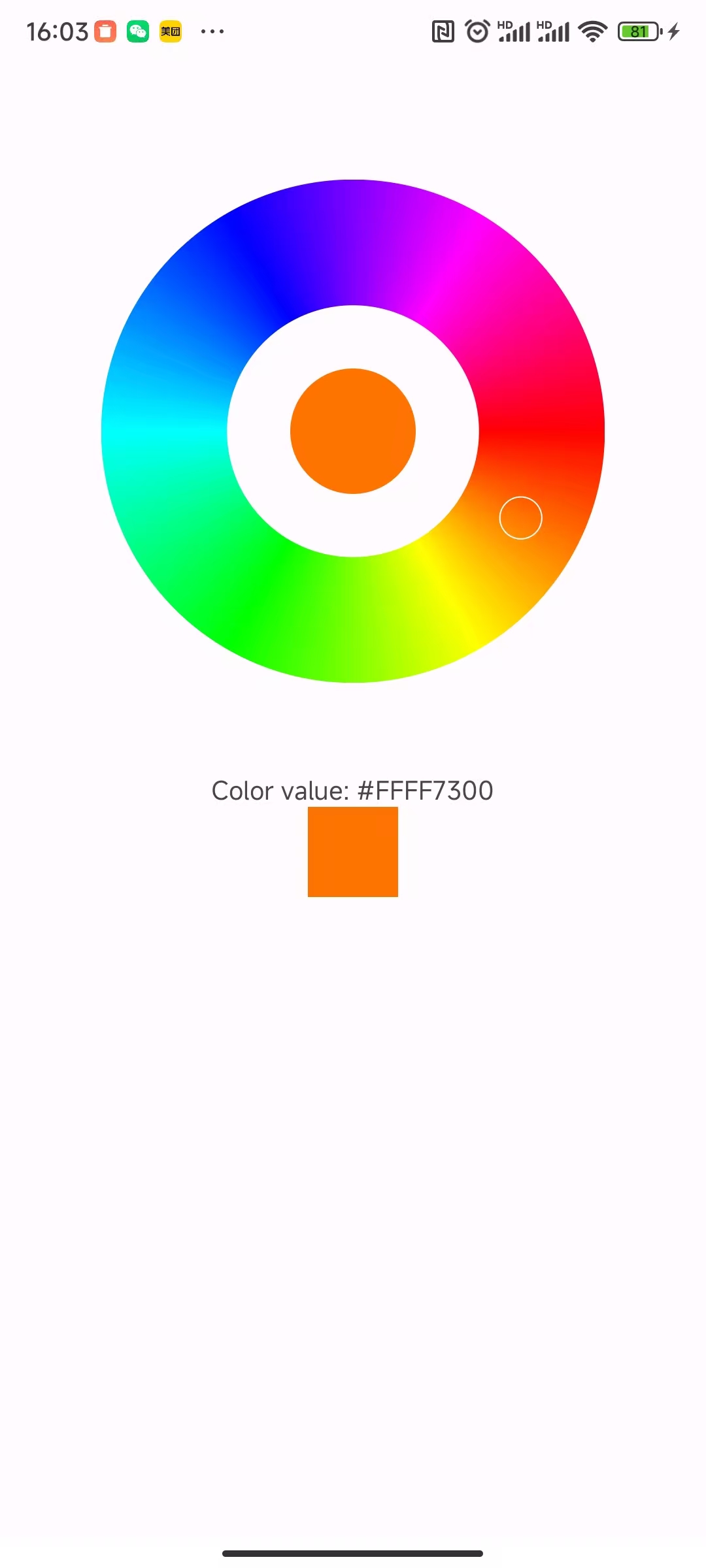
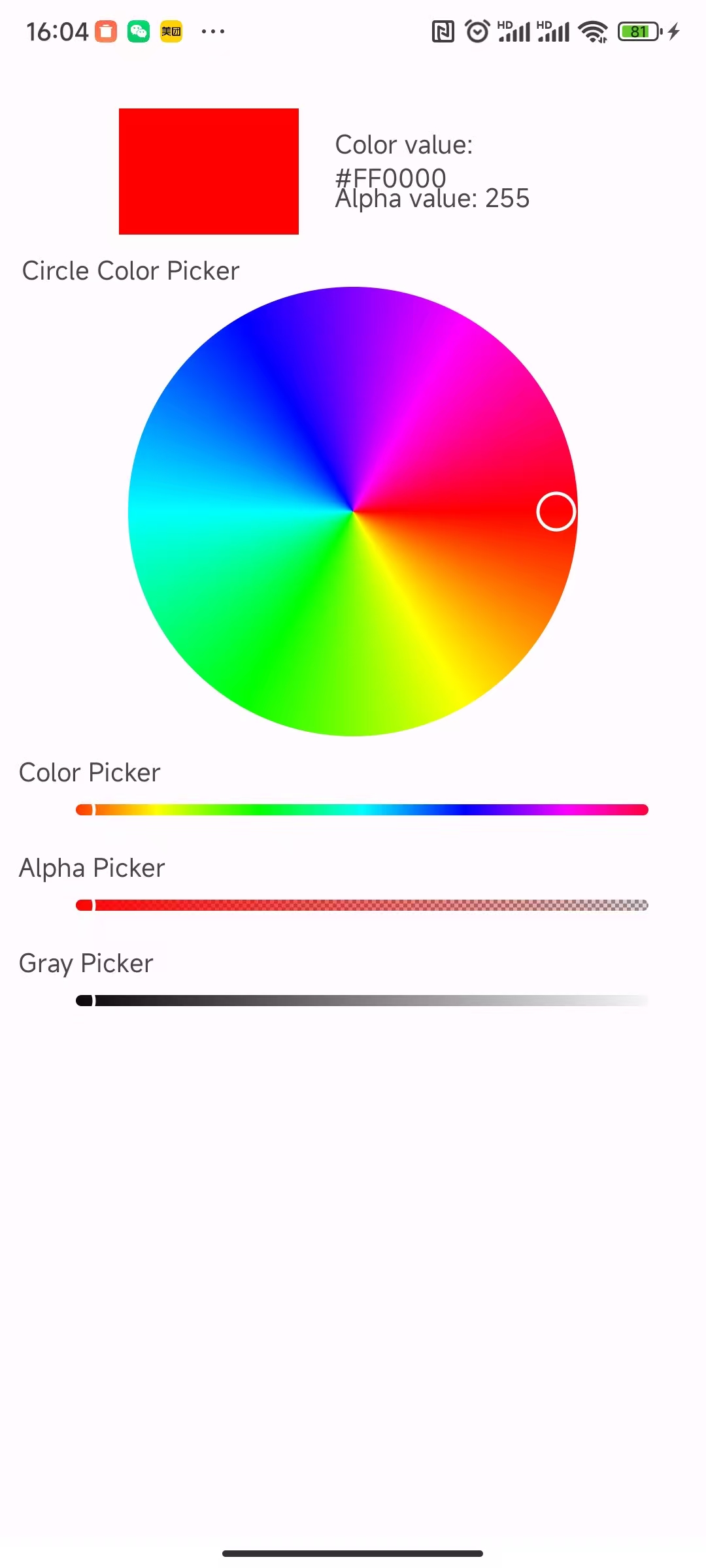
最近公司要做一个app控制灯的颜色的app。网上已经有很多选择器了。我这里整理了一下自己做的选择器,分圆形颜色选择器和环形颜色选择器。ColorWheelPicker和 CircleColorPicke
环形颜色选择器
package com.qiaotong.colorpicker.widget;
import android.content.Context;
import android.graphics.Canvas;
import android.graphics.Color;
import android.graphics.Paint;
import android.graphics.RectF;
import android.graphics.SweepGradient;
import android.util.AttributeSet;
import android.view.MotionEvent;
import android.view.View;

public class WheelColorPicker extends View {
    private Paint colorRingPaint;
    private Paint centerCirclePaint;
    private Paint selectorPaint;

    private float ringWidth;
    private int[] colors;
    private float selectorPosition;
    private OnColorChangedListener listener;

    public interface OnColorChangedListener {
        void onColorChanged(int color);
    }

    public WheelColorPicker(Context context) {
        super(context);
        init();
    }

    public WheelColorPicker(Context context, AttributeSet attrs) {
        super(context, attrs);
        init();
    }

    private void init() {
        // 初始化颜色环的颜色(HSV色相环)
        colors = new int[360];
        for (int i = 0; i < 360; i++) {
            colors[i] = Color.HSVToColor(new float[]{i, 1f, 1f});
        }

        // 颜色环画笔
        colorRingPaint = new Paint(Paint.ANTI_ALIAS_FLAG);
        colorRingPaint.setStyle(Paint.Style.STROKE);
        colorRingPaint.setStrokeCap(Paint.Cap.ROUND);

        // 中心圆画笔
        centerCirclePaint = new Paint(Paint.ANTI_ALIAS_FLAG);
        centerCirclePaint.setStyle(Paint.Style.FILL);
        centerCirclePaint.setColor(Color.RED); // 默认颜色

        // 选择器画笔
        selectorPaint = new Paint(Paint.ANTI_ALIAS_FLAG);
        selectorPaint.setStyle(Paint.Style.FILL);
        selectorPaint.setColor(Color.WHITE);
        selectorPaint.setStrokeWidth(2);
        selectorPaint.setStyle(Paint.Style.STROKE);

        ringWidth = dpToPx(20); // 环的宽度
        selectorPosition = 0; // 默认在0度位置
    }

    @Override
    protected void onDraw(Canvas canvas) {
        super.onDraw(canvas);

        int centerX = getWidth() / 2;
        int centerY = getHeight() / 2;
        ringWidth = (float) centerX /2;

        int radius = Math.min(centerX, centerY) - (int) (ringWidth / 2);

        // 绘制颜色环
        drawColorRing(canvas, centerX, centerY, radius);

        // 绘制中心圆
//        drawCenterCircle(canvas, centerX, centerY, (int)(radius - ringWidth));
        drawCenterCircle(canvas, centerX, centerY, radius/3);

        // 绘制选择器
        drawSelector(canvas, centerX, centerY, radius);
    }

    private void drawColorRing(Canvas canvas, int centerX, int centerY, int radius) {
        RectF rectF = new RectF(centerX - radius, centerY - radius,
                centerX + radius, centerY + radius);

        // 使用SweepGradient创建渐变色环
        SweepGradient sweepGradient = new SweepGradient(centerX, centerY, colors, null);
        colorRingPaint.setShader(sweepGradient);
        colorRingPaint.setStrokeWidth(ringWidth);

        canvas.drawArc(rectF, 0, 360, false, colorRingPaint);
    }

    private void drawCenterCircle(Canvas canvas, int centerX, int centerY, int radius) {
        canvas.drawCircle(centerX, centerY, radius, centerCirclePaint);
    }

    private void drawSelector(Canvas canvas, int centerX, int centerY, int radius) {
        float angle = (float) Math.toRadians(selectorPosition);
        float selectorX = centerX + (radius) * (float) Math.cos(angle);
        float selectorY = centerY + (radius) * (float) Math.sin(angle);

        canvas.drawCircle(selectorX, selectorY, ringWidth / 6, selectorPaint);
    }

    @Override
    public boolean onTouchEvent(MotionEvent event) {
        switch (event.getAction()) {
            case MotionEvent.ACTION_DOWN:
            case MotionEvent.ACTION_MOVE:
                updateColor(event.getX(), event.getY());
                return true;
        }
        return super.onTouchEvent(event);
    }

    private void updateColor(float x, float y) {
        int centerX = getWidth() / 2;
        int centerY = getHeight() / 2;

        // 计算触摸点相对于中心的角度
        double angle = Math.atan2(y - centerY, x - centerX);
        float degree = (float) Math.toDegrees(angle);
        if (degree < 0) {
            degree += 360;
        }

        selectorPosition = degree;

        // 更新中心圆颜色
        int selectedColor = getColorAtAngle(degree);
        centerCirclePaint.setColor(selectedColor);

        // 回调监听器
        if (listener != null) {
            listener.onColorChanged(selectedColor);
        }

        invalidate();
    }

    private int getColorAtAngle(float degree) {
        int index = (int) (degree * colors.length / 360) % colors.length;
        return colors[index];
    }

    public void setOnColorChangedListener(OnColorChangedListener listener) {
        this.listener = listener;
    }

    public int getSelectedColor() {
        return centerCirclePaint.getColor();
    }

    public void setSelectedColor(int color) {
        centerCirclePaint.setColor(color);
        invalidate();
    }

    private float dpToPx(float dp) {
        return dp * getResources().getDisplayMetrics().density;
    }
}
圆形颜色选择器
/*
 * Copyright (C) 2019 Cricin
 *
 * Licensed under the Apache License, Version 2.0 (the "License");
 * you may not use this file except in compliance with the License.
 * You may obtain a copy of the License at
 *
 *         http://www.apache.org/licenses/LICENSE-2.0
 *
 * Unless required by applicable law or agreed to in writing, software
 * distributed under the License is distributed on an "AS IS" BASIS,
 * WITHOUT WARRANTIES OR CONDITIONS OF ANY KIND, either express or implied.
 * See the License for the specific language governing permissions and
 * limitations under the License.
 */

package com.qiaotong.colorpicker.widget.colorpicker;

import android.annotation.SuppressLint;
import android.content.Context;
import android.content.res.TypedArray;
import android.graphics.Canvas;
import android.graphics.Color;
import android.graphics.Paint;
import android.graphics.SweepGradient;
import android.util.AttributeSet;
import android.view.MotionEvent;
import android.view.View;

import androidx.annotation.ColorInt;
import androidx.annotation.Nullable;

import com.qiaotong.colorpicker.R;


public class CircleColorPicker extends View {
  private static final int[] COLORS = {
    Color.RED, Color.YELLOW, Color.GREEN, Color.CYAN,
    Color.BLUE, Color.MAGENTA, Color.RED
  };

  private static final int DEFAULT_CIRCLE_RADIUS = 160;//dp

  private Paint mPaint;

  private ThumbDrawable mThumb;
  private int mThumbRadius;

  //first element is also the degree, X coordinate is left to right, Y coordinate is top to bottom
  private float[] mColorHSV = {0.0F, 1.0F, 1.0F};
  private OnValueChangeListener mListener;

  private int mRadius;//radius of circle
  private int mDistance;

  public CircleColorPicker(Context context) {
    this(context, null);
  }

  public CircleColorPicker(Context context, @Nullable AttributeSet attrs) {
    super(context, attrs);
    final int desiredRadius = (int) (context.getResources().getDisplayMetrics().density * DEFAULT_CIRCLE_RADIUS + 0.5);
    TypedArray a = context.obtainStyledAttributes(attrs, R.styleable.CircleColorPicker);
    mRadius = (int) a.getDimension(R.styleable.CircleColorPicker_radius, desiredRadius);
    a.recycle();
    mPaint = new Paint(Paint.ANTI_ALIAS_FLAG);
    mThumb = new ThumbDrawable(context);
    mThumbRadius = mThumb.getIntrinsicWidth() / 2;
  }

  @Override
  protected void onMeasure(int widthMeasureSpec, int heightMeasureSpec) {
    final int mySize = mThumbRadius * 2 + mRadius;
    setMeasuredDimension(resolveSize(mySize, widthMeasureSpec),
      resolveSize(mySize, heightMeasureSpec));
  }

  @Override
  protected void onDraw(Canvas canvas) {
    //draw gradient circle
    final int viewCenterX = getWidth() / 2;
    final int viewCenterY = getHeight() / 2;
   /// final int radius = Math.min(viewCenterX, viewCenterY) - 0*mThumbRadius;
    final int radius = Math.min(viewCenterX, viewCenterY) ;
    canvas.drawCircle(viewCenterX, viewCenterY, radius, mPaint);

    //draw thumb
    canvas.save();
    canvas.translate(viewCenterX, viewCenterY);
    final int len = mDistance;
    canvas.rotate(mColorHSV[0]);
    mThumb.setBounds(len - mThumbRadius, mThumbRadius, len + mThumbRadius, -mThumbRadius);
    mThumb.draw(canvas);
    canvas.restore();
  }

  @Override
  protected void onSizeChanged(int w, int h, int oldw, int oldh) {
    mRadius = Math.min(getWidth(), getHeight()) / 2 - mThumbRadius;
    SweepGradient sg = new SweepGradient(w / 2, h / 2, COLORS, null);
    mPaint.setShader(sg);
    mDistance = mRadius;
  }

  @Override
  protected void drawableStateChanged() {
    super.drawableStateChanged();
    if (mThumb.isStateful()) {
      boolean changed = mThumb.setState(getDrawableState());
      if (changed) {
        invalidate();
      }
    }
  }

  @SuppressLint("ClickableViewAccessibility")
  @Override
  public boolean onTouchEvent(MotionEvent event) {
    int action = event.getActionMasked();
    final int x = (int) event.getX();
    final int y = (int) event.getY();
    switch (action) {
      case MotionEvent.ACTION_DOWN:
        setPressed(true);
//        break;
      case MotionEvent.ACTION_MOVE:
        getParent().requestDisallowInterceptTouchEvent(true);
        mDistance = Math.min(mRadius, distance(x, y, getWidth() / 2, getHeight() / 2));
        mColorHSV[0] = calculateDegree(getWidth(), getHeight(), x, y);
        invalidate();
//        Log.i("gao","R = "+mColorHSV[0]+" G = "+mColorHSV[1]+" B = "+mColorHSV[2]);
        if (mListener != null) mListener.onValueChanged(this, Color.HSVToColor(mColorHSV));
        break;
      case MotionEvent.ACTION_UP:
      case MotionEvent.ACTION_CANCEL:
        setPressed(false);
        invalidate();
    }
    return true;
  }

  public void setOnValueChangeListener(OnValueChangeListener listener) {
    this.mListener = listener;
  }

  /**
   * Get color in this ColorPicker, note this color is opaque(alpha channel is 0xFF).
   */
  @ColorInt
  public int getColor() {
    return Color.HSVToColor(mColorHSV);
  }

  /**
   * Set a new color to this ColorPicker, note this color will be convert to
   * opaque if the color's alpha channel is not 0xFF
   */
  public void setColor(@ColorInt int color) {
    Color.colorToHSV(color, mColorHSV);
    mColorHSV[1] = 1F;
    mColorHSV[2] = 1F;
    invalidate();
  }

  private static int distance(int x0, int y0, int x1, int y1) {
    final int xLen = x0 - x1;
    final int yLen = y0 - y1;
    return (int) Math.sqrt(xLen * xLen + yLen * yLen);
  }

  private static float calculateDegree(int w, int h, int x, int y) {
    final int centerX = w / 2;
    final int centerY = h / 2;
    double theta = Math.atan2(x - centerX, y - centerY);
    float degree = (float) (Math.toDegrees(theta) - 90);
    if (degree > 0) degree = 360 - degree;
    return Math.abs(degree);
  }
}
需要资源的可以去下载:下载地址