使用编译器环境,

harmonyOs 5.1
代码如下:
Button("跳转到测试1")
        .onClick(()=>{
          router.pushUrl({
            url: "pages/test",
            params: { name: '鸿蒙ArkTS教程' } // 可携带参数

          })
            .then(() => {
              console.log('跳转成功')
            }).catch((err:Error) => {
            console.log('跳转失败:' + err.message)
          })
        })
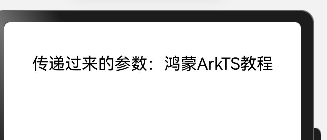
携带参数"鸿蒙ArkTS教程"到下一页面。
下一页面test.ets代码如下:
import router from '@ohos.router'

interface RouterParams {
  name?: string
}

@State private name: string = ''

  aboutToAppear() {
    // 🔹 接收参数
    // 🔹 接收参数(router 必须正确导入)
    const params: RouterParams = router.getParams() as RouterParams
    if (params && params.name) {
      this.name = params.name
    }
  }
在页面里的build加入:
Text(`传递过来的参数:${this.name}`)
        .fontSize(20)
        .fontColor(Color.Black)
完整代码如下:
import home from './daohanglan/home'  // 若在同一目录,用相对路径 './HomePage'
import router from '@ohos.router'

interface RouterParams {
  name?: string
}

@Entry
@Component
struct BottomNavExample {
  @State currentIndex: number = 0
  private tabs: string[] = ['首页', '购物车', '我的']
  @State private name: string = ''

  aboutToAppear() {
    // 🔹 接收参数
    // 🔹 接收参数(router 必须正确导入)
    const params: RouterParams = router.getParams() as RouterParams
    if (params && params.name) {
      this.name = params.name
    }
  }
  build() {
    Column() {
      Text(`传递过来的参数:${this.name}`)
        .fontSize(20)
        .fontColor(Color.Black)
      Column(){
        // 页面内容区域
        if (this.currentIndex === 0) {
          home()
        } else if (this.currentIndex === 1) {
          CartPage()
        } else {
          MinePage()
        }
      }
      .height('95%')

      // 底部导航栏
      Row({ space: 30 }) {
        ForEach(this.tabs, (tab:string, index) => {
          Column() {
            Text(tab)
              .fontSize(18)
              .fontColor(this.currentIndex === index ? Color.Blue : Color.Gray)
              .onClick(() => {
                this.currentIndex = index
              })
          }
          .width('33%')
          .alignItems(HorizontalAlign.Center)
        }, (tab:string) => tab)
      }
      .padding({ top: 12, bottom: 30 }) // ✅ 增加底部留白
      .border({ width: 5, color: '#ddd' })
      .justifyContent(FlexAlign.SpaceAround)
    }
    .height("100%")
    .justifyContent(FlexAlign.SpaceBetween)
  }
}
// ---------------- 子页面组件 ----------------
@Component
struct HomePage {
  build() {
    Column() {
      Text('🏠 这里是首页内容')
        .fontSize(22)
        .fontWeight(FontWeight.Bold)
    }

    .justifyContent(FlexAlign.Center)
    .alignItems(HorizontalAlign.Center)
  }
}

@Component
struct CartPage {
  build() {
    Column() {
      Text('🛒 购物车页面')
        .fontSize(22)
        .fontWeight(FontWeight.Bold)
    }

    .justifyContent(FlexAlign.Center)
    .alignItems(HorizontalAlign.Center)
  }
}

@Component
struct MinePage {
  build() {
    Column() {
      Text('👤 我的页面')
        .fontSize(22)
        .fontWeight(FontWeight.Bold)
    }

    .justifyContent(FlexAlign.Center)
    .alignItems(HorizontalAlign.Center)
  }
}
运行效果: