1.需要到百度语音开放平台申请下列参数:
appid: 百度语音开放平台申请的AppID
apikey: 百度语音开放平台申请的API Key
secretkey: 百度语音开放平台申请的Secret Key
2.把参数配置到项目里
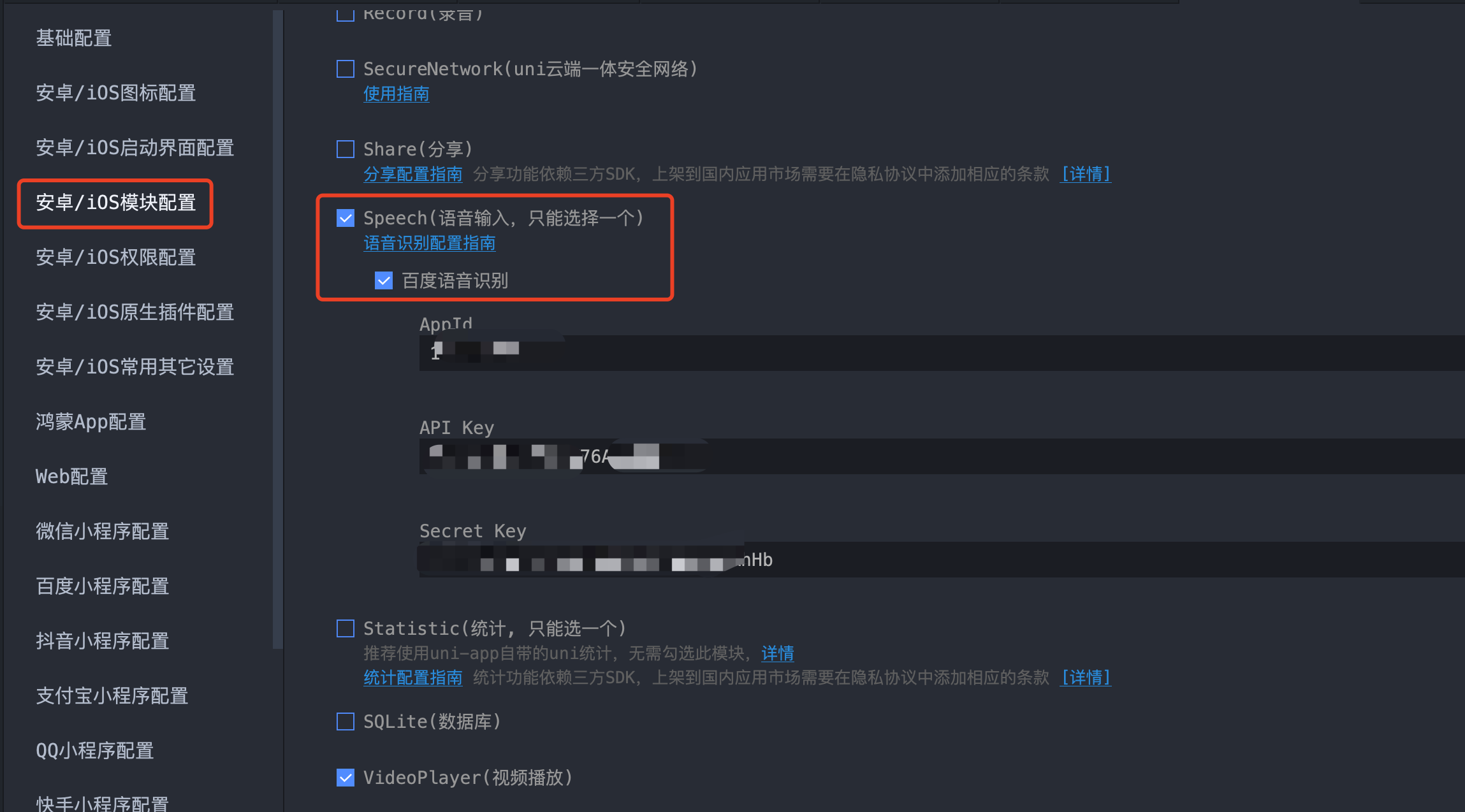
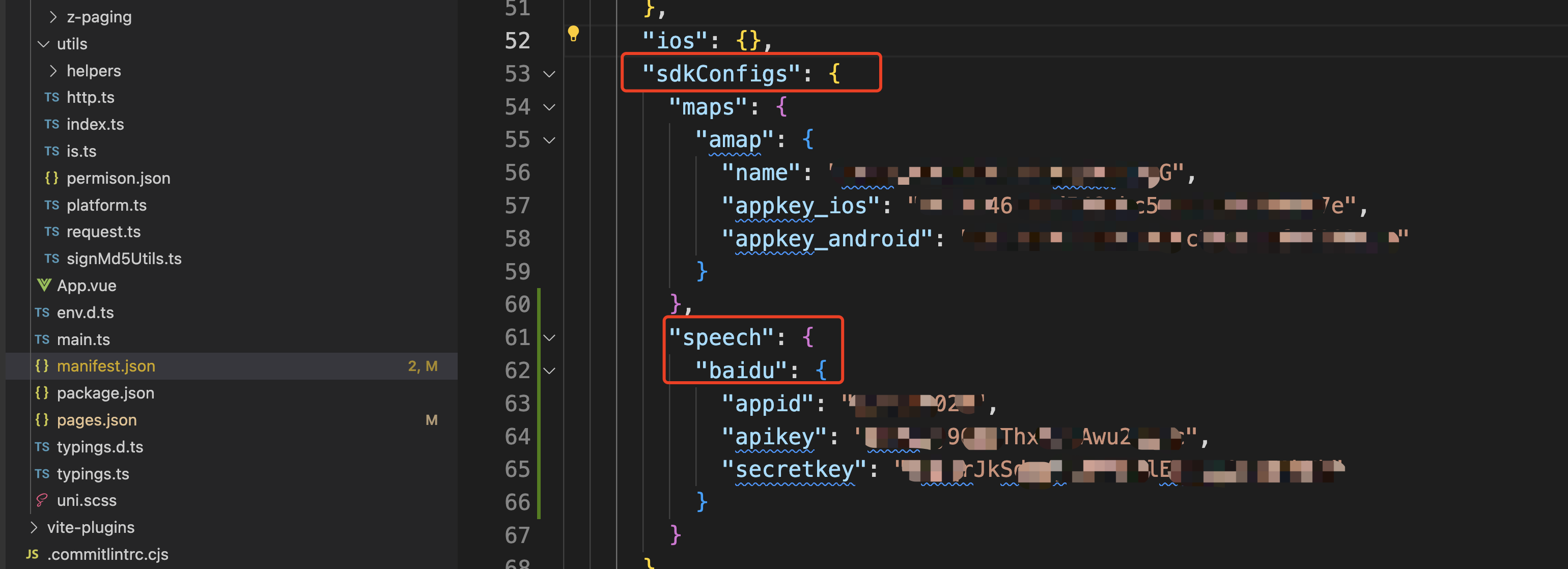
3.代码层面的使用
- 使用百度语音识别
javascript
	var options = {
		engine: 'baidu'
	};
	text.value = '';
	console.log('开始语音识别:');
	plus.speech.startRecognize(options, function(s){
		console.log(s);
		text.value += s;
	}, function(e){
		console.log('语音识别失败:'+JSON.stringify(e));
} );- 自定义语音识别界面
javascript
<template>
<view class="content">
<textarea class="result" placeholder="语音识别内容" :value="result"></textarea>
<view class="recogniz">
<view style="color: #0000CC;">
<text>{{title}}</text>
</view>
<view class="partial">
<text>{{partialResult}}</text>
</view>
<view class="volume" :style="{width:valueWidth}"></view>
</view>
<button type="default" @touchstart="startRecognize" @touchend="endRecognize">按下开始&松开结束</button>
</view>
</template>
<script>
export default {
data() {
return {
title: '未开始',
text: '',
partialResult: '...',
result: '',
valueWidth: '0px'
}
},
onLoad() {
// #ifdef APP-PLUS
// 监听语音识别事件
plus.speech.addEventListener('start', this.ontStart, false);
plus.speech.addEventListener('volumeChange', this.onVolumeChange, false);
plus.speech.addEventListener('recognizing', this.onRecognizing, false);
plus.speech.addEventListener('recognition', this.onRecognition, false);
plus.speech.addEventListener('end', this.onEnd, false);
// #endif
},
methods: {
ontStart() {
this.title = '...倾听中...';
this.text = '';
console.log('Event: start');
},
onVolumeChange(e) {
this.valueWidth = 100*e.volume+'px';
console.log('Event: volumeChange '+this.valueWidth);
},
onRecognizing(e) {
this.partialResult = e.partialResult;
console.log('Event: recognizing');
},
onRecognition(e) {
this.text += e.result;
this.text?(this.text+='\n'):this.text='';
this.result = this.text;
this.partialResult = e.result;
console.log('Event: recognition');
},
onEnd() {
if(!this.text||this.text==''){
plus.nativeUI.toast('没有识别到内容');
}
this.result = this.text;
this.title = '未开始';
this.valueWidth = '0px';
this.partialResult = '...';
},
startRecognize() {
console.log('startRecognize');
// #ifdef APP-PLUS
plus.speech.startRecognize({
engine: 'baidu',
lang: 'zh-cn',
'userInterface': false,
'continue': true
});
// #endif
},
endRecognize() {
console.log('endRecognize');
// #ifdef APP-PLUS
plus.speech.stopRecognize();
// #endif
}
}
}
</script>
<style>
.content {
display: flex;
flex-direction: column;
align-items: center;
justify-content: center;
}
.recogniz {
width: 200px;
height: 100px;
padding: 12px;
margin: 50px auto;
background-color: rgba(0,0,0,0.5);
border-radius: 16px;
text-align: center;
}
.partial {
width: 100%;
height: 40px;
margin-top: 16px;
font-size: 12px;
color: #FFFFFF;
}
.volume {
width: 10px;
height: 6px;
border-style:solid;
display:inline-block;
box-sizing:border-box;
border-width:1px;
border-color:#CCCCCC;
border-radius: 50%;
background-color: #00CC00;
}
.result {
color: #CCCCCC;
border: #00CCCC 1px solid;
margin: 25px auto;
padding: 6px;
width: 80%;
height: 100px;
}
</style>- 在我项目里使用时:我这是个ai对话页面。默认展示文字输入,点击图标可以切换成语音输入,输入完语音调用百度语音识别,并把文字展示到页面上。
javascript
<template>
    <view class="input-bar">
        <view class="input-wrapper">
            <!-- 文本输入模式 -->
            <template v-if="!isVoiceMode">
                <textarea v-model="msg" :focus="focus" class="chat-input" :adjust-position="false" placeholder="请输入内容"
                    :auto-height="true" :maxlength="-1" confirm-type="send" :hold-keyboard="true"
                    @touchstart="handleTouchStart" @touchmove.stop="handleTouchMove" @confirm="sendClick" />
            </template>

            <!-- 语音输入模式 -->
            <template v-else>
                <view class="voice-input" @touchstart.stop="startRecord" @touchend.stop="endRecord">
                    <text>{{ statusTitle }}</text>
                </view>
            </template>

            <!-- 模式切换按钮 -->
            <view v-if="isShowSendBtn" class="mode-switch send-btn" @click="sendClick">
                <image :src="sendIcon" class="send-icon" />
            </view>
            <view v-else class="mode-switch" :class="!isVoiceMode ? 'videoIcon' : 'switchIcon'" @click="toggleMode">
            </view>
        </view>

        <!-- 录音界面 -->
        <view v-if="showRecording" class="recording-overlay">
            <view class="text">松手发送,上移取消</view>
            <view class="recording-box">
                <view class="sound-waves">
                    <view class="wave" :class="'wave' + num" v-for="num in 25" :key="num"></view>
                </view>
            </view>
        </view>
    </view>
</template>

<script lang="ts" setup>
import { onLoad, onHide, onShow } from '@dcloudio/uni-app'
import { ref, computed, watch, nextTick } from 'vue'
import { useToast } from 'wot-design-uni'
import sendIcon from '@/static/send.png'
import { useUserStore } from '@/store/user'

const emit = defineEmits(['send'])
const toast = useToast()
const userStore = useUserStore()

// 状态变量
const msg = ref('')
const focus = ref(false)
const isVoiceMode = ref(false)
const isRecording = ref(false)
const isShowSendBtn = ref(false)
const showRecording = ref(false)
const statusTitle = ref('按住说话')

const canSend = computed(() => msg.value.trim().length > 0)

// 切换输入模式
const toggleMode = () => {
    try {
        isVoiceMode.value = !isVoiceMode.value
        console.log('切换模式', isVoiceMode.value)

        if (!isVoiceMode.value) {
            nextTick(() => {
                focus.value = true
            })
        } else {
            focus.value = false
        }
    } catch (e) {
        console.error('切换模式失败:', e)
    }
}

// 文本输入相关
const handleTouchStart = (e: TouchEvent) => {
    console.log('当前位置', e)
}

const handleTouchMove = (e: TouchEvent) => {
    e.stopPropagation()
}

const sendClick = () => {
    if (!canSend.value) return
    const data = msg.value
    emit('send', data)
    msg.value = ''
}

// 语音识别事件监听器
const onStart = () => {
    console.log('[录音] 识别已开始')
    statusTitle.value = '...倾听中...'
    isRecording.value = true
    msg.value = ''
}

const onRecognizing = (e) => {
    console.log('[录音] 实时识别:', e.partialResult)
    msg.value = e.partialResult
}

const onRecognition = (e) => {
    console.log('[录音] 识别结果:', e.result)
    msg.value = e.result
}

const onEnd = () => {
    console.log('[录音] 识别已结束', msg.value)
    isRecording.value = false
    statusTitle.value = '按住说话'

    // 发送识别的文本
    if (msg.value.trim()) {
        emit('send', msg.value)
        msg.value = ''
    } else {
        toast.warning('没有识别到内容')
    }
}

const onError = (e) => {
    console.error('[录音] 识别错误:', e)
    isRecording.value = false
    statusTitle.value = '按住说话'

    if (e.code === -10) {
        toast.error('语音识别被中断,请重试')
    } else {
        toast.error('语音识别失败,请重试')
    }
}

// 开始录音
const startRecord = () => {
    console.log('[录音] 开始语音识别')

    // #ifdef APP-PLUS
    if (!plus.speech) {
        toast.error('当前平台不支持语音识别')
        return
    }

    if (isRecording.value) {
        console.warn('[录音] 已经在识别中')
        return
    }

    try {
        const options = {
            engine: 'baidu',
            lang: 'zh-cn',
            userInterface: false,
            continue: true
        }

        plus.speech.startRecognize(options, (result) => {
            console.log('[录音] 识别回调:', result)
            msg.value = result
        }, (error) => {
            console.error('[录音] 语音识别失败:', JSON.stringify(error))
            onError(error)
        })
    } catch (e) {
        console.error('[录音] 启动语音识别失败', e)
        toast.error('启动语音识别失败')
    }
    // #endif

}

// 停止录音
const endRecord = () => {
    console.log('[录音] 松开手指,停止识别')

    // #ifdef APP-PLUS
    if (!plus.speech) return

    try {
        plus.speech.stopRecognize()
    } catch (e) {
        console.error('[录音] 停止识别失败', e)
        isRecording.value = false
        statusTitle.value = '按住说话'
    }
    // #endif
}

// 应用生命周期监听
onHide(() => {
    console.log('[录音] 应用进入后台,停止识别')
    // #ifdef APP-PLUS
    if (plus.speech && isRecording.value) {
        plus.speech.stopRecognize()
        isRecording.value = false
        statusTitle.value = '按住说话'
    }
    // #endif
})

onShow(() => {
    console.log('[录音] 应用返回前台')
})

// 初始化
onLoad(() => {
    console.log('[录音] 初始化')

    // #ifdef APP-PLUS
    if (!plus.speech) {
        console.error('[录音] 当前平台不支持语音识别功能')
        return
    }

    // 添加事件监听
    plus.speech.addEventListener('start', onStart, false)
    plus.speech.addEventListener('volumeChange', (e) => {
        // 可以在这里添加音量可视化
        // console.log('[录音] 音量变化:', e.volume)
    }, false)
    plus.speech.addEventListener('recognizing', onRecognizing, false)
    plus.speech.addEventListener('recognition', onRecognition, false)
    plus.speech.addEventListener('end', onEnd, false)
    plus.speech.addEventListener('error', onError, false)

    console.log('[录音] 事件监听器初始化完成')
    // #endif
})

// 监听状态变化
watch(
    () => msg.value,
    (newVal) => {
        isShowSendBtn.value = !isVoiceMode.value && newVal.trim().length > 0
    }
)

watch(
    () => isVoiceMode.value,
    () => {
        isShowSendBtn.value = !isVoiceMode.value && msg.value.trim().length > 0
    }
)

watch(
    () => isRecording.value,
    (newVal) => {
        showRecording.value = newVal
    }
)
</script>
<style lang="scss" scoped>
.input-bar {
    padding: 16upx;
    position: relative;
}

.input-wrapper {
    display: flex;
    align-items: center;
    background: #FFFFFF;
    min-height: 112upx;
    border-radius: 48upx;
    padding: 24upx;
    box-sizing: border-box;
    box-shadow: 28upx -38upx 80upx 8upx rgba(112, 144, 176, 0.08);

    .chat-input {
        flex: 1;
        width: 622upx;
        min-height: 40upx;
        max-height: 588upx;
        overflow-y: auto;
        line-height: 1.5;
        font-size: 28upx;
        -webkit-overflow-scrolling: touch;
        overscroll-behavior: contain;
        touch-action: pan-y;
    }

    .voice-input {
        flex: 1;
        width: 622upx;
        height: 64upx;
        display: flex;
        align-items: center;
        justify-content: center;
        font-size: 28upx;
        color: #333;
    }

    .mode-switch {
        width: 48upx;
        height: 48upx;
        margin-left: 20upx;
        flex-shrink: 0;
        display: flex;
        align-items: center;
        justify-content: center;
        background-size: cover;
        background-position: center;
        background-repeat: no-repeat;
    }

    .send-btn {
        background: linear-gradient(35deg, #00A6FF -13%, #004BFF 121%);
        border-radius: 12upx;

        .send-icon {
            width: 24upx;
            height: 24upx;
        }
    }

    .videoIcon {
        background-image: url('@/static/video.png');
    }

    .switchIcon {
        background-image: url('@/static/switch.png');
    }
}

.recording-overlay {
    position: absolute;
    left: 24upx;
    right: 24upx;
    bottom: 0;
    z-index: 10;

    .text {
        text-align: center;
        font-size: 24upx;
        font-weight: 500;
        color: rgba(0, 0, 0, 0.4);
        margin-bottom: 16upx;
    }

    .recording-box {
        display: flex;
        flex-direction: column;
        align-items: center;
        justify-content: center;
        height: 112upx;
        border-radius: 48upx;
        background: linear-gradient(35deg, #00A6FF -13%, #004BFF 121%);
        margin-bottom: 24upx;
    }

    .sound-waves {
        display: flex;
        align-items: center;
        justify-content: center;
        gap: 10upx;
        margin-bottom: 16upx;
    }

    .wave {
        width: 6upx;
        background-color: #FFFFFF;
        border-radius: 6upx;
        animation: wave-animation 1.2s ease-in-out infinite;
    }

    .wave1 {
        height: 20upx;
        animation-delay: 0s;
    }

    .wave2 {
        height: 30upx;
        animation-delay: 0.05s;
    }

    .wave3 {
        height: 40upx;
        animation-delay: 0.1s;
    }

    .wave4 {
        height: 30upx;
        animation-delay: 0.15s;
    }

    .wave5 {
        height: 20upx;
        animation-delay: 0.2s;
    }

    .wave6 {
        height: 25upx;
        animation-delay: 0.25s;
    }

    .wave7 {
        height: 35upx;
        animation-delay: 0.3s;
    }

    .wave8 {
        height: 40upx;
        animation-delay: 0.35s;
    }

    .wave9 {
        height: 35upx;
        animation-delay: 0.4s;
    }

    .wave10 {
        height: 25upx;
        animation-delay: 0.45s;
    }

    .wave11 {
        height: 20upx;
        animation-delay: 0.5s;
    }

    .wave12 {
        height: 30upx;
        animation-delay: 0.55s;
    }

    .wave13 {
        height: 40upx;
        animation-delay: 0.6s;
    }

    .wave14 {
        height: 30upx;
        animation-delay: 0.65s;
    }

    .wave15 {
        height: 20upx;
        animation-delay: 0.7s;
    }

    .wave16 {
        height: 25upx;
        animation-delay: 0.75s;
    }

    .wave17 {
        height: 35upx;
        animation-delay: 0.8s;
    }

    .wave18 {
        height: 40upx;
        animation-delay: 0.85s;
    }

    .wave19 {
        height: 35upx;
        animation-delay: 0.9s;
    }

    .wave20 {
        height: 25upx;
        animation-delay: 0.95s;
    }

    .wave21 {
        height: 20upx;
        animation-delay: 1.0s;
    }

    .wave22 {
        height: 30upx;
        animation-delay: 1.05s;
    }

    .wave23 {
        height: 40upx;
        animation-delay: 1.1s;
    }

    .wave24 {
        height: 30upx;
        animation-delay: 1.15s;
    }

    .wave25 {
        height: 20upx;
        animation-delay: 1.2s;
    }

    @keyframes wave-animation {

        0%,
        100% {
            transform: scaleY(0.6);
        }

        50% {
            transform: scaleY(1.2);
        }
    }


}
</style>