在最近的一次项目使用了 eslint 之前都是biomejs 主要是biomejs 在vue 上支持不太好 只能说我又喜欢上了,其实还是antful的原因,偶像啊
eslint(antful/eslint-config)
安装 配置
建议使用cli 进行配置 如果是之前的项目可以手动配置
css
pnpm dlx @antfu/eslint-config@latest然后根据自己的情况选择就行了,
贴一个我们项目的配置
eslint.config.js
import antfu from '@antfu/eslint-config'

export default antfu({
  formatters: {
    css: true, // 启用 CSS、LESS、SCSS 及 Vue <style> 块格式化
    html: true, // 启用 HTML 文件格式化
  },
  vue: true,
  unocss: true,
},
// import rules
{
  rules: {
    'perfectionist/sort-imports': [ // 配置导入排序
      'error',
      {
        customGroups: {
          type: {
            'vue-type': ['^vue$', '^vue-.+', '^@vue/.+'],
          },
          value: {
            vue: ['^vue$', '^vue-.+', '^@vue/.+'], // Vue 相关库
            components: ['^@/components/.+', '@/tmui/.+'], // 组件
            stores: ['^@/store/.+'], // 状态管理
            utils: ['^@/utils/.+'], // 工具函数
            constants: ['^@/constants/.+'], // 常量
            hooks: ['^@/hooks/.+'], // 自定义 hooks
            api: ['^@/service/.+'], // API 服务
          },
        },
        environment: 'node',
        groups: [
          // 类型导入
          ['external-type', 'builtin-type', 'type'],
          'vue-type',
          ['parent-type', 'sibling-type', 'index-type'],
          ['internal-type'],
          // 值导入
          'builtin',
          'vue',
          'external',
          'internal',
          // 内部模块
          'components',
          'stores',
          'utils',
          'constants',
          'hooks',
          'api',
          // 其他
          ['parent', 'sibling', 'index'],
          'side-effect',
          'side-effect-style',
          'style',
          'object',
          'unknown',
        ],
        internalPattern: ['^@/.+'], // 内部模块路径匹配
        newlinesBetween: 'always', // 导入组之间空行
        order: 'asc', // 升序排序
        type: 'natural', // 自然排序
      },
    ],
  },

}, {
  rules: {
    'n/prefer-global/process': 'off',
  },
})
集成
package.json
{
  "scripts": {
    "lint": "eslint",
    "lint:fix": "eslint --fix"
  }
}
unocss
项目中我们使用了unocss 和vite 如果你是按官网vite-plugin 进行配置的 有个坑点
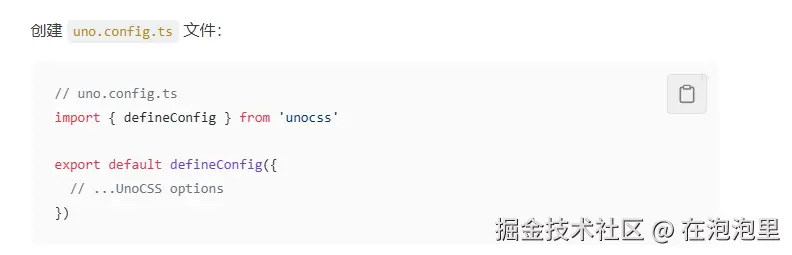
这样配置 unocss 的排序会不生效 要加入 presetWind3() 或者老版本的 presetUno()
uno.config.ts
import presetAttributify from '@unocss/preset-attributify'
import presetWind3 from '@unocss/preset-wind3'
import { defineConfig } from 'unocss'

export default defineConfig({
  presets: [
    presetWind3(),
    presetAttributify(),
  ],
})
presetAttributify() 就是可以像标签属性一样书写 unocss
提交校验-@commitlint/cli和@commitlint/config-conventional
安装
pnpm add @commitlint/cli @commitlint/config-conventional -D
根据项目的配置在项目根目录下新建commitlint 配置文件
配置
commitlint.config.js
commitlint.config.js
export default { extends: ['@commitlint/config-conventional'] }触发工具-leftHook
安装
pnpm add lefthook -D
配置
执行 lefthook install
package.json script中增加 prepare
json
"scripts": {
    "prepare": "lefthook install"
}
会有一个lefthook.yaml 配置文件
lefthook 有很多钩子 我们项目中只有提交前 和对提交规范的校验 使用的是angluar 的校验规则
left.yaml
pre-commit:
  commands:
    check:
      glob: "*.{js,ts,cjs,mjs,d.cts,d.mts,jsx,tsx,json,jsonc,vue}"
      run: npx @biomejs/biome check --write --no-errors-on-unmatched --files-ignore-unknown=true --colors=off  --diagnostic-level=warn {staged_files}
      stage_fixed: true

commit-msg:
  commands:
    "lint commit message":
      run: npx commitlint --edit {1}
vscode 配置
antful/eslint-config 自动生成的配置 十分好用
.vscode/setting.json
  "prettier.enable": false,
  "editor.formatOnSave": false,

  // Auto fix
  "editor.codeActionsOnSave": {
    "source.fixAll.eslint": "explicit",
    "source.organizeImports": "never"
  },

  // Silent the stylistic rules in you IDE, but still auto fix them
  "eslint.rules.customizations": [
    { "rule": "style/*", "severity": "off", "fixable": true },
    { "rule": "format/*", "severity": "off", "fixable": true },
    { "rule": "*-indent", "severity": "off", "fixable": true },
    { "rule": "*-spacing", "severity": "off", "fixable": true },
    { "rule": "*-spaces", "severity": "off", "fixable": true },
    { "rule": "*-order", "severity": "off", "fixable": true },
    { "rule": "*-dangle", "severity": "off", "fixable": true },
    { "rule": "*-newline", "severity": "off", "fixable": true },
    { "rule": "*quotes", "severity": "off", "fixable": true },
    { "rule": "*semi", "severity": "off", "fixable": true }
  ],

  // Enable eslint for all supported languages
  "eslint.validate": [
    "javascript",
    "javascriptreact",
    "typescript",
    "typescriptreact",
    "vue",
    "html",
    "markdown",
    "json",
    "json5",
    "jsonc",
    "yaml",
    "toml",
    "xml",
    "gql",
    "graphql",
    "astro",
    "svelte",
    "css",
    "less",
    "scss",
    "pcss",
    "postcss"
  ],