问到了前后端通信中一个常被初学者混淆 的重点------
为什么 fetch('/api/show', { headers: { 'Accept': 'text/plain' } }),而不是
headers: { 'Content-Type': 'application/json' }。
🧩 一句话结论
👉 因为你的接口:
@GetMapping("/show")
public String action() {
    return "Hello Spring Boot!";
}
是一个 GET 请求,且返回纯文本(text/plain) ,
所以前端只需要告诉服务器「我能接受纯文本响应」(Accept),
而不需要告诉服务器「我发的是 JSON 数据」(Content-Type)。
📘 详细解释
① Accept:表示客户端期望接收的数据格式
在你的 fetch 请求中:
headers: {
  'Accept': 'text/plain'
}
意思是:
"我(浏览器)希望服务器返回纯文本(text/plain)。"
而你的 Spring Boot 接口:
@GetMapping("/show")
public String action() {
    return "Hello Spring Boot!";
}
默认就是返回一个 text/plain 类型的响应。
👉 所以这两个是匹配的。
② Content-Type:表示客户端发送的数据格式
Content-Type 只在你**有请求体(body)**时才有意义。
例如:
fetch('/api/register', {
  method: 'POST',
  headers: { 'Content-Type': 'application/json' },
  body: JSON.stringify({ username: 'Tom', password: '123456' })
})
这时你告诉后端:
"我发给你的内容是 JSON 格式,请按 JSON 来解析。"
Spring Boot 中的 @RequestBody User user 就是用来解析这种 JSON 请求的。
✅ 结论总结
| 请求类型 | 是否需要请求体 | 用什么 header | 说明 |
|---|---|---|---|
GET /api/show |
❌ 无请求体 | 'Accept': 'text/plain' |
告诉后端希望拿到纯文本 |
POST /api/register |
✅ 有请求体(JSON) | 'Content-Type': 'application/json' |
告诉后端发送的是 JSON |
🔧 实际建议
其实即便你不写:
headers: { 'Accept': 'text/plain' }浏览器默认也会发送 Accept: */*,Spring Boot 仍然能正确返回 "Hello Spring Boot!"。
关于接口的get到html文件代码如下:
<!doctype html>
<html lang="zh-CN">
<head>
    <meta charset="utf-8" />
    <meta name="viewport" content="width=device-width,initial-scale=1" />
    <title>Show API Demo</title>
    <style>
        body {
            font-family: "Segoe UI", Roboto, "Helvetica Neue", Arial, sans-serif;
            display: flex;
            min-height: 100vh;
            align-items: center;
            justify-content: center;
            background: #f6f8fa;
            margin: 0;
        }
        .card {
            background: #fff;
            padding: 24px;
            border-radius: 12px;
            box-shadow: 0 6px 24px rgba(0,0,0,0.08);
            width: 360px;
            text-align: center;
        }
        h1 { margin: 0 0 12px; font-size: 20px; }
        #result {
            margin: 16px 0;
            padding: 12px;
            border-radius: 8px;
            background: #f0f4ff;
            min-height: 36px;
            display: flex;
            align-items: center;
            justify-content: center;
            color: #1a1a1a;
        }
        button {
            padding: 8px 14px;
            border-radius: 8px;
            border: none;
            cursor: pointer;
            background: #2b82ff;
            color: #fff;
            font-weight: 600;
        }
        .hint { margin-top: 10px; color: #666; font-size: 13px; }
    </style>
</head>
<body>
<div class="card">
    <h1>调用后端接口 /api/show</h1>

    <div id="result">正在加载...</div>

    <div>
        <button id="refreshBtn">刷新</button>
    </div>

    <div class="hint">注意:如果后端与此页面不在同一域或端口,请开启 CORS。</div>
</div>

<script>
    const resultEl = document.getElementById('result');
    const btn = document.getElementById('refreshBtn');

    async function fetchShow() {
        resultEl.textContent = '加载中...';
        try {
            // 如果你的控制器映射在 /api 下,请使用 /api/show
            const resp = await fetch('/api/show', {
                method: 'GET',
                headers: {
                    'Accept': 'text/plain'
                }
            });

            if (!resp.ok) {
                resultEl.textContent = `请求失败:${resp.status} ${resp.statusText}`;
                return;
            }

            // 接口返回的是字符串,所以用 text()
            const text = await resp.text();
            resultEl.textContent = text;
        } catch (err) {
            console.error(err);
            resultEl.textContent = '网络错误,无法连接到后端。检查服务器是否运行或 CORS 是否已开启。';
        }
    }

    // 页面加载时自动请求一次
    window.addEventListener('load', fetchShow);
    btn.addEventListener('click', fetchShow);
</script>
</body>
</html>
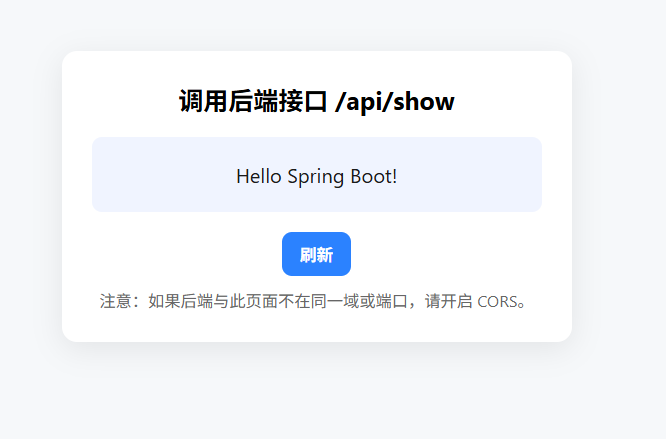
效果图如下: