练习内容:配置dns主从服务,要求从服务器能够定时从主服务器同步数据。
主服务器: 192.168.92.132
从服务器: 192.168.92.133
基础配置 软件安装以及网卡设置,以下为从服务器代码。
[root@localhost ~]# setenforce 0
[root@localhost ~]# systemctl stop firewalld.service
[root@localhost ~]# mount /dev/sr0 /mnt
mount: /mnt: WARNING: source write-protected, mounted read-only.
[root@localhost ~]# dnf install -y bind
Updating Subscription Management repositories.
Unable to read consumer identity

This system is not registered with an entitlement server. You can use "rhc" or "subscription-manager" to register.

BaseOS                                                                          2.7 MB/s | 2.7 kB     00:00
App                                                                             3.1 MB/s | 3.2 kB     00:00
Dependencies resolved.
================================================================================================================
 Package                       Architecture       Version                           Repository             Size
================================================================================================================
Installing:
 bind                          x86_64             32:9.16.23-24.el9_5               AppStream             509 k
Installing dependencies:
 bind-dnssec-doc               noarch             32:9.16.23-24.el9_5               AppStream              49 k
 python3-bind                  noarch             32:9.16.23-24.el9_5               AppStream              72 k
 python3-ply                   noarch             3.11-14.el9                       BaseOS                111 k
Installing weak dependencies:
 bind-dnssec-utils             x86_64             32:9.16.23-24.el9_5               AppStream             122 k

Transaction Summary
================================================================================================================
Install  5 Packages

Total size: 862 k
Installed size: 2.5 M
Downloading Packages:
Running transaction check
Transaction check succeeded.
Running transaction test
Transaction test succeeded.
Running transaction
  Preparing        :                                                                                        1/1
  Installing       : bind-dnssec-doc-32:9.16.23-24.el9_5.noarch                                             1/5
  Installing       : python3-ply-3.11-14.el9.noarch                                                         2/5
  Installing       : python3-bind-32:9.16.23-24.el9_5.noarch                                                3/5
  Installing       : bind-dnssec-utils-32:9.16.23-24.el9_5.x86_64                                           4/5
  Running scriptlet: bind-32:9.16.23-24.el9_5.x86_64                                                        5/5
  Installing       : bind-32:9.16.23-24.el9_5.x86_64                                                        5/5
  Running scriptlet: bind-32:9.16.23-24.el9_5.x86_64                                                        5/5
  Verifying        : python3-ply-3.11-14.el9.noarch                                                         1/5
  Verifying        : bind-32:9.16.23-24.el9_5.x86_64                                                        2/5
  Verifying        : bind-dnssec-doc-32:9.16.23-24.el9_5.noarch                                             3/5
  Verifying        : bind-dnssec-utils-32:9.16.23-24.el9_5.x86_64                                           4/5
  Verifying        : python3-bind-32:9.16.23-24.el9_5.noarch                                                5/5
Installed products updated.

Installed:
  bind-32:9.16.23-24.el9_5.x86_64                         bind-dnssec-doc-32:9.16.23-24.el9_5.noarch
  bind-dnssec-utils-32:9.16.23-24.el9_5.x86_64            python3-bind-32:9.16.23-24.el9_5.noarch
  python3-ply-3.11-14.el9.noarch

Complete!
[root@localhost ~]# nmcli connection modify ens160 ipv4.method manual ipv4.addresses 192.168.92.133/24 ipv4.gateway 192.168.92.2 ipv4.dns 192.168.92.133
[root@localhost ~]# nmcli c reload
[root@localhost ~]# nmcli c up ens160
Connection successfully activated (D-Bus active path: /org/freedesktop/NetworkManager/ActiveConnection/3)
编辑主服务器配置,从服务器同理
[root@alpha ~]# vim /etc/named.conf

options {
        listen-on port 53 { any; };
        listen-on-v6 port 53 { ::1; };
        directory       "/var/named";
        dump-file       "/var/named/data/cache_dump.db";
        statistics-file "/var/named/data/named_stats.txt";
        memstatistics-file "/var/named/data/named_mem_stats.txt";
        secroots-file   "/var/named/data/named.secroots";
        recursing-file  "/var/named/data/named.recursing";
        allow-query     { any; };

[root@alpha ~]# vim /etc/named.rfc1912.zones
  zone "openlab.com" IN {
        type master;
        file "openlab.com.zone";
        allow-transfer { 192.168.92.133; };
};
zone "92.168.192.in-addr.arpa" IN {
        type master;
        file "192.168.92.arpa";
        allow-transfer { 192.168.92.133; };
};
主服务端正反向解析
[root@alpha ~]# cd /var/named
[root@alpha named]# cp -a named.localhost openlab.com.zone
[root@alpha named]# vim openlab.com.zone
$TTL 1D
@       IN SOA  ns.openlab.com. admin.openlab.com. (
                                        0       ; serial
                                        1D      ; refresh
                                        1H      ; retry
                                        1W      ; expire
                                        3H )    ; minimum
        NS      ns.openlab.com.
        NS      slave.openlab.com.
ns      IN      A       192.168.92.132
www     IN      A       192.168.92.132
bbs     IN      A       192.168.92.132
ftp     IN      CNAME   www
slave   IN      A       192.168.92.133

[root@alpha named]# cp -a named.loopback 192.168.92.arpa
[root@alpha named]# vim /var/named/192.168.92.arpa
$TTL 1D
@       IN SOA  ns.openlab.com admin.openlab.com. (
                                        0       ; serial
                                        1D      ; refresh
                                        1H      ; retry
                                        1W      ; expire
                                        3H )    ; minimum
        NS      ns.openlab.com.
        NS      slave.openlab.com.
130     IN      PTR     ns.openlab.com.
130     IN      PTR     www.openlab.com.
130     IN      PTR     bbs.openlab.com.
130     IN      PTR     ftp.openlab.com.
131     IN      PTR     slave.openlab.com.
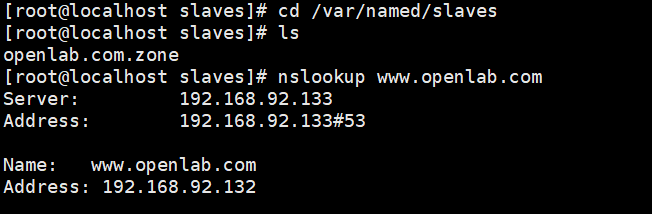
结果测试