文章的目的为了记录使用Objective-C 进行IOS app 开发学习的经历。本职为嵌入式软件开发,公司安排开发app,临时学习,完成app的开发。开发流程和要点有些记忆模糊,赶紧记录,防止忘记。
相关链接:
开源 Objective-C IOS 应用开发(一)macOS 的使用
开源 Objective-C IOS 应用开发(二)Xcode安装
开源 Objective-C IOS 应用开发(三)第一个iPhone的APP
开源 Objective-C IOS 应用开发(四)Xcode工程文件结构
开源 Objective-C IOS 应用开发(五)iOS操作(action)和输出口(Outlet)
推荐链接:
开源 Arkts 鸿蒙应用 开发(一)工程文件分析-CSDN博客
开源 Arkts 鸿蒙应用 开发(二)封装库.har制作和应用-CSDN博客
开源 Arkts 鸿蒙应用 开发(三)Arkts的介绍-CSDN博客
开源 Arkts 鸿蒙应用 开发(四)布局和常用控件-CSDN博客
开源 Arkts 鸿蒙应用 开发(五)控件组成和复杂控件-CSDN博客
开源 Arkts 鸿蒙应用 开发(六)数据持久--文件和首选项存储-CSDN博客
开源 Arkts 鸿蒙应用 开发(七)数据持久--sqlite关系数据库-CSDN博客
开源 Arkts 鸿蒙应用 开发(八)多媒体--相册和相机-CSDN博客
开源 Arkts 鸿蒙应用 开发(九)通讯--tcp客户端-CSDN博客
开源 Arkts 鸿蒙应用 开发(十)通讯--Http-CSDN博客
开源 Arkts 鸿蒙应用 开发(十一)证书和包名修改-CSDN博客
开源 Arkts 鸿蒙应用 开发(十二)传感器的使用-CSDN博客
开源 Arkts 鸿蒙应用 开发(十三)音频--MP3播放_arkts avplayer播放音频 mp3-CSDN博客
开源 Arkts 鸿蒙应用 开发(十四)线程--任务池(taskpool)-CSDN博客
开源 Arkts 鸿蒙应用 开发(十五)自定义绘图控件--仪表盘-CSDN博客
开源 Arkts 鸿蒙应用 开发(十六)自定义绘图控件--波形图-CSDN博客
开源 Arkts 鸿蒙应用 开发(十七)通讯--http多文件下载-CSDN博客
开源 Arkts 鸿蒙应用 开发(十八)通讯--Ble低功耗蓝牙服务器-CSDN博客
推荐链接:
开源 java android app 开发(一)开发环境的搭建-CSDN博客
开源 java android app 开发(二)工程文件结构-CSDN博客
开源 java android app 开发(三)GUI界面布局和常用组件-CSDN博客
开源 java android app 开发(四)GUI界面重要组件-CSDN博客
开源 java android app 开发(五)文件和数据库存储-CSDN博客
开源 java android app 开发(六)多媒体使用-CSDN博客
开源 java android app 开发(七)通讯之Tcp和Http-CSDN博客
开源 java android app 开发(八)通讯之Mqtt和Ble-CSDN博客
开源 java android app 开发(九)后台之线程和服务-CSDN博客
开源 java android app 开发(十)广播机制-CSDN博客
开源 java android app 开发(十一)调试、发布-CSDN博客
开源 java android app 开发(十二)封库.aar-CSDN博客
本章内容主要使用Objective-C语言进行tableview控件的开发和演示。
目录:
1.手机演示
2.所有源码
3.源码分析
一、手机演示
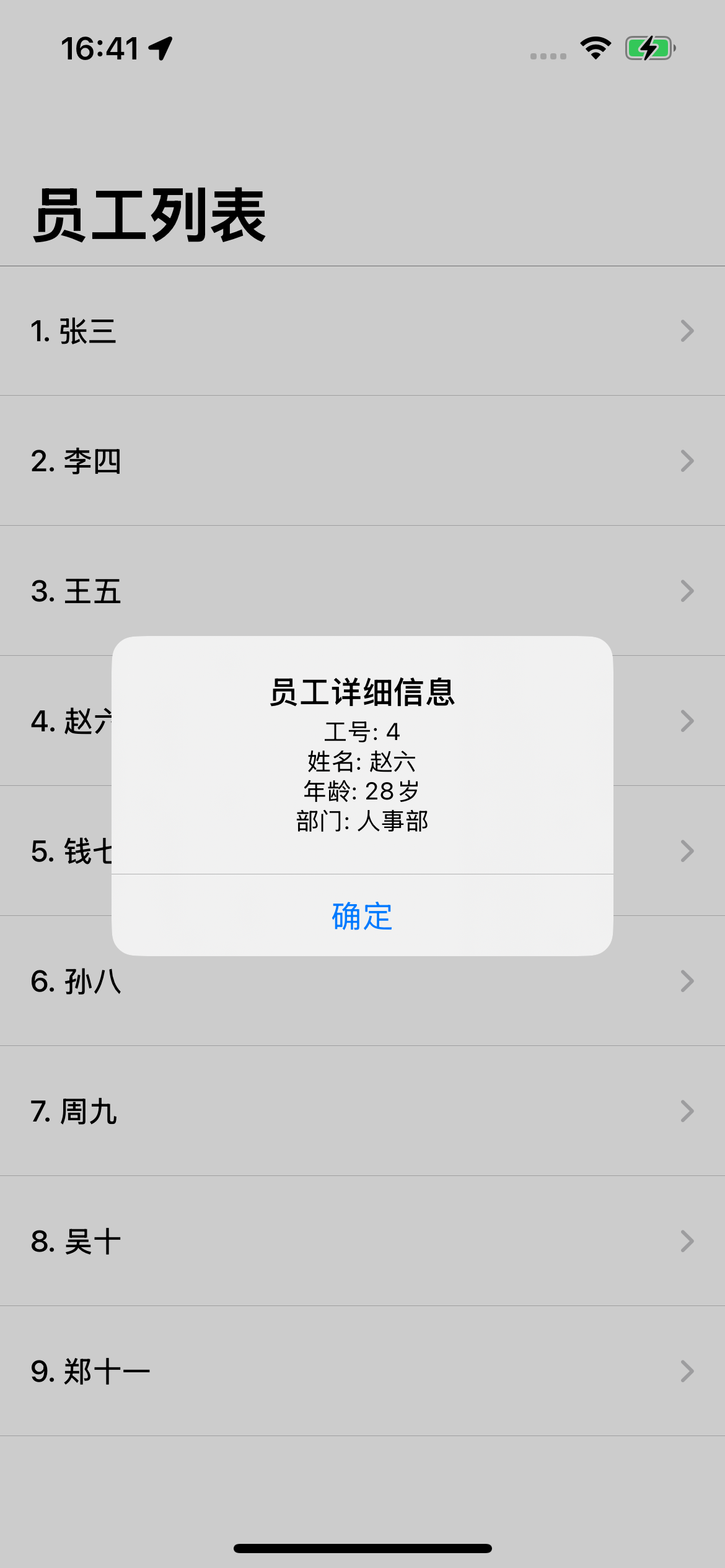
二、所有源码
所需添加和修改文件
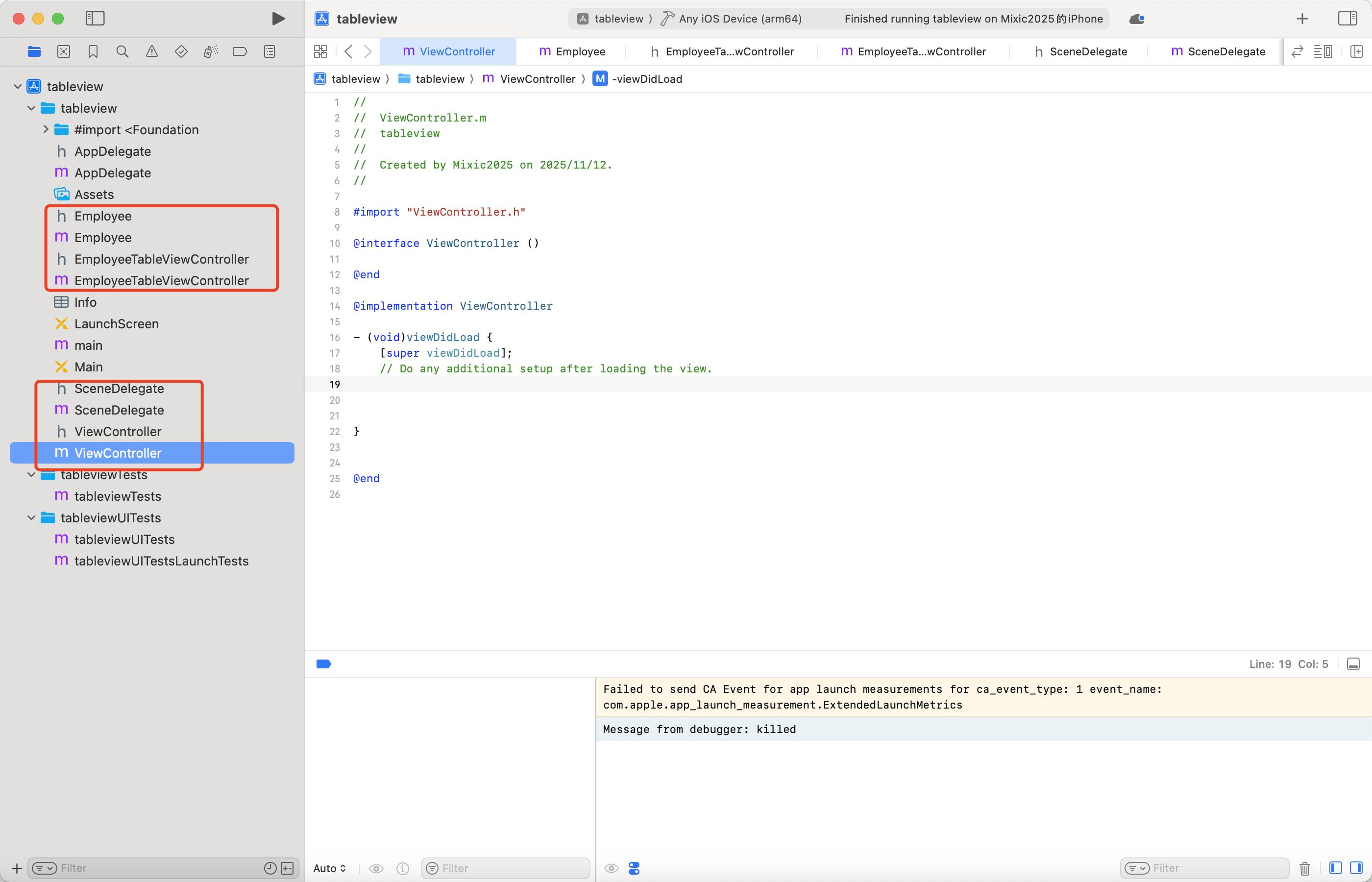
Employee.h文件代码
//
//  Employee.h
//  tableview
//
//
//
#import <Foundation/Foundation.h>

@interface Employee : NSObject

@property (nonatomic, assign) NSInteger employeeId;
@property (nonatomic, copy) NSString *name;
@property (nonatomic, assign) NSInteger age;
@property (nonatomic, copy) NSString *department;

- (instancetype)initWithId:(NSInteger)employeeId name:(NSString *)name age:(NSInteger)age department:(NSString *)department;

@end
Employee.m文件源码
//
//  Employee.m
//  tableview
//
//
//
#import "Employee.h"

@implementation Employee

- (instancetype)initWithId:(NSInteger)employeeId name:(NSString *)name age:(NSInteger)age department:(NSString *)department {
    self = [super init];
    if (self) {
        _employeeId = employeeId;
        _name = [name copy];
        _age = age;
        _department = [department copy];
    }
    return self;
}

@end
EmployeeTableViewController.h文件源码
//
//  EmployeeTableViewController.h
//  tableview
//
//
//
#import <UIKit/UIKit.h>

@interface EmployeeTableViewController : UIViewController <UITableViewDataSource, UITableViewDelegate>

@end
EmployeeTableViewController.m文件源码
#import "EmployeeTableViewController.h"
#import "Employee.h"

@interface EmployeeTableViewController ()

@property (nonatomic, strong) UITableView *tableView;
@property (nonatomic, strong) NSArray<Employee *> *employees;

@end

@implementation EmployeeTableViewController

- (void)viewDidLoad {
    [super viewDidLoad];

    [self setupUI];
    [self setupData];
    [self setupTableView];
}

- (void)setupUI {
    self.title = @"员工列表";
    self.view.backgroundColor = [UIColor systemBackgroundColor];
}

- (void)setupData {
    // 创建9个员工数据
    NSMutableArray *employeesArray = [NSMutableArray array];

    NSArray *names = @[@"张三", @"李四", @"王五", @"赵六", @"钱七", @"孙八", @"周九", @"吴十", @"郑十一"];
    NSArray *departments = @[@"技术部", @"销售部", @"市场部", @"人事部", @"财务部", @"研发部", @"运营部", @"产品部", @"客服部"];

    for (int i = 0; i < 9; i++) {
        Employee *employee = [[Employee alloc] initWithId:i + 1
                                                    name:names[i]
                                                     age:25 + i
                                              department:departments[i]];
        [employeesArray addObject:employee];
    }

    self.employees = [employeesArray copy];
}

- (void)setupTableView {
    // 创建 TableView
    self.tableView = [[UITableView alloc] initWithFrame:self.view.bounds style:UITableViewStylePlain];
    self.tableView.autoresizingMask = UIViewAutoresizingFlexibleWidth | UIViewAutoresizingFlexibleHeight;
    self.tableView.dataSource = self;
    self.tableView.delegate = self;

    // 设置 TableView 属性
    self.tableView.rowHeight = 70;
    self.tableView.separatorInset = UIEdgeInsetsZero;

    // 注册单元格
    [self.tableView registerClass:[UITableViewCell class] forCellReuseIdentifier:@"EmployeeCell"];

    [self.view addSubview:self.tableView];
}

#pragma mark - UITableViewDataSource

- (NSInteger)tableView:(UITableView *)tableView numberOfRowsInSection:(NSInteger)section {
    return self.employees.count;
}

- (UITableViewCell *)tableView:(UITableView *)tableView cellForRowAtIndexPath:(NSIndexPath *)indexPath {
    UITableViewCell *cell = [tableView dequeueReusableCellWithIdentifier:@"EmployeeCell" forIndexPath:indexPath];

    Employee *employee = self.employees[indexPath.row];

    // 配置单元格内容
    cell.textLabel.text = [NSString stringWithFormat:@"%ld. %@", (long)employee.employeeId, employee.name];
    cell.detailTextLabel.text = [NSString stringWithFormat:@"年龄: %ld岁 | 部门: %@", (long)employee.age, employee.department];

    // 设置样式
    cell.textLabel.font = [UIFont systemFontOfSize:16 weight:UIFontWeightMedium];
    cell.detailTextLabel.font = [UIFont systemFontOfSize:14];
    cell.detailTextLabel.textColor = [UIColor grayColor];

    // 添加右侧箭头
    cell.accessoryType = UITableViewCellAccessoryDisclosureIndicator;

    return cell;
}

#pragma mark - UITableViewDelegate

- (void)tableView:(UITableView *)tableView didSelectRowAtIndexPath:(NSIndexPath *)indexPath {
    [tableView deselectRowAtIndexPath:indexPath animated:YES];

    Employee *employee = self.employees[indexPath.row];

    // 创建弹窗显示详细信息
    UIAlertController *alert = [UIAlertController alertControllerWithTitle:@"员工详细信息"
                                                                   message:[NSString stringWithFormat:@"工号: %ld\n姓名: %@\n年龄: %ld岁\n部门: %@",
                                                                            (long)employee.employeeId,
                                                                            employee.name,
                                                                            (long)employee.age,
                                                                            employee.department]
                                                            preferredStyle:UIAlertControllerStyleAlert];

    UIAlertAction *okAction = [UIAlertAction actionWithTitle:@"确定" style:UIAlertActionStyleDefault handler:nil];
    [alert addAction:okAction];

    [self presentViewController:alert animated:YES completion:nil];
}

// 设置行高
- (CGFloat)tableView:(UITableView *)tableView heightForRowAtIndexPath:(NSIndexPath *)indexPath {
    return 70.0;
}

@end
SceneDelegate.h文件源码
#import <UIKit/UIKit.h>

@interface SceneDelegate : UIResponder <UIWindowSceneDelegate>

// 需要保留 window 属性,否则会被释放
@property (strong, nonatomic) UIWindow *window;

@end
SceneDelegate.m文件
#import "SceneDelegate.h"
#import "EmployeeTableViewController.h"

@implementation SceneDelegate

- (void)scene:(UIScene *)scene willConnectToSession:(UISceneSession *)session options:(UISceneConnectionOptions *)connectionOptions {

    // 确保是 UIWindowScene 类型
    if (![scene isKindOfClass:[UIWindowScene class]]) return;

    UIWindowScene *windowScene = (UIWindowScene *)scene;

    // 创建窗口并保存到属性
    self.window = [[UIWindow alloc] initWithWindowScene:windowScene];
    self.window.frame = windowScene.coordinateSpace.bounds;

    // 创建员工表格控制器
    EmployeeTableViewController *employeeVC = [[EmployeeTableViewController alloc] init];

    // 创建导航控制器
    UINavigationController *navController = [[UINavigationController alloc] initWithRootViewController:employeeVC];

    // 配置导航栏
    if (@available(iOS 13.0, *)) {
        UINavigationBarAppearance *appearance = [[UINavigationBarAppearance alloc] init];
        [appearance configureWithOpaqueBackground];
        appearance.backgroundColor = [UIColor systemBackgroundColor];
        navController.navigationBar.standardAppearance = appearance;
        navController.navigationBar.scrollEdgeAppearance = appearance;
    }

    // 设置大标题
    navController.navigationBar.prefersLargeTitles = YES;

    // 设置根控制器并显示窗口
    self.window.rootViewController = navController;
    self.window.backgroundColor = [UIColor systemBackgroundColor];
    [self.window makeKeyAndVisible];
}

@end
ViewController.h文件源码
//
//  ViewController.h
//  tableview
//
//
//

#import <UIKit/UIKit.h>

@interface ViewController : UIViewController


@end
ViewController.m文件源码
//
//  ViewController.m
//  tableview
//
//
//

#import "ViewController.h"

@interface ViewController ()

@end

@implementation ViewController

- (void)viewDidLoad {
    [super viewDidLoad];
    // Do any additional setup after loading the view.


}


@end
三、源码分析
- Employee 数据模型类
Employee.h
objc
// 定义属性
@property (nonatomic, assign) NSInteger employeeId; // 员工ID
@property (nonatomic, copy) NSString *name; // 姓名
@property (nonatomic, assign) NSInteger age; // 年龄
@property (nonatomic, copy) NSString *department; // 部门
// 初始化方法
- (instancetype)initWithId:(NSInteger)employeeId name:(NSString *)name age:(NSInteger)age department:(NSString *)department;
Employee.m
objc
// 初始化函数实现
- (instancetype)initWithId:(NSInteger)employeeId name:(NSString *)name age:(NSInteger)age department:(NSString *)department {
self = super init;
if (self) {
_employeeId = employeeId; // 设置员工ID
_name = name copy; // 拷贝姓名(确保线程安全)
_age = age; // 设置年龄
_department = department copy; // 拷贝部门
}
return self;
}
- EmployeeTableViewController 主控制器
初始化相关函数
objc
// 视图加载完成时调用
- (void)viewDidLoad {
super viewDidLoad;
self setupUI; // 设置界面
self setupData; // 初始化数据
self setupTableView; // 设置表格视图
}
// 设置界面外观
- (void)setupUI {
self.title = @"员工列表"; // 设置导航栏标题
self.view.backgroundColor = UIColor systemBackgroundColor; // 设置背景色
}
// 初始化员工数据
- (void)setupData {
NSMutableArray *employeesArray = NSMutableArray array;
NSArray *names = @@"张三", @"李四", @"王五", ...; // 姓名数组
NSArray *departments = @@"技术部", @"销售部", @"市场部", ...; // 部门数组
// 循环创建9个员工对象
for (int i = 0; i < 9; i++) {
Employee *employee = \[Employee alloc initWithId:i + 1
name:namesi
age:25 + i // 年龄递增
department:departmentsi];
employeesArray addObject:employee;
}
self.employees = employeesArray copy; // 转换为不可变数组
}
// 设置表格视图
- (void)setupTableView {
self.tableView = \[UITableView alloc initWithFrame:self.view.bounds style:UITableViewStylePlain];
self.tableView.autoresizingMask = UIViewAutoresizingFlexibleWidth | UIViewAutoresizingFlexibleHeight;
self.tableView.dataSource = self; // 设置数据源
self.tableView.delegate = self; // 设置代理
self.tableView.rowHeight = 70; // 设置行高
self.tableView.separatorInset = UIEdgeInsetsZero; // 设置分隔线
self.tableView registerClass:\[UITableViewCell class forCellReuseIdentifier:@"EmployeeCell"];
self.view addSubview:self.tableView; // 添加到视图
}
UITableViewDataSource 协议函数
objc
// 返回表格行数
- (NSInteger)tableView:(UITableView *)tableView numberOfRowsInSection:(NSInteger)section {
return self.employees.count; // 返回员工数量
}
// 配置表格单元格
- (UITableViewCell *)tableView:(UITableView *)tableView cellForRowAtIndexPath:(NSIndexPath *)indexPath {
// 复用单元格
UITableViewCell *cell = tableView dequeueReusableCellWithIdentifier:@"EmployeeCell" forIndexPath:indexPath;
Employee *employee = self.employeesindexPath.row;
// 设置主标题和副标题
cell.textLabel.text = NSString stringWithFormat:@"%ld. %@", (long)employee.employeeId, employee.name;
cell.detailTextLabel.text = NSString stringWithFormat:@"年龄: %ld岁 \| 部门: %@", (long)employee.age, employee.department;
// 设置字体样式
cell.textLabel.font = UIFont systemFontOfSize:16 weight:UIFontWeightMedium;
cell.detailTextLabel.font = UIFont systemFontOfSize:14;
cell.detailTextLabel.textColor = UIColor grayColor;
cell.accessoryType = UITableViewCellAccessoryDisclosureIndicator; // 右侧箭头
return cell;
}
UITableViewDelegate 协议函数
objc
// 处理行点击事件
- (void)tableView:(UITableView *)tableView didSelectRowAtIndexPath:(NSIndexPath *)indexPath {
tableView deselectRowAtIndexPath:indexPath animated:YES; // 取消选中状态
Employee *employee = self.employeesindexPath.row;
// 创建详情弹窗
UIAlertController *alert = [UIAlertController alertControllerWithTitle:@"员工详细信息"
message:[NSString stringWithFormat:@"工号: %ld\n姓名: %@\n年龄: %ld岁\n部门: %@",
(long)employee.employeeId,
(long)employee.age,
employee.department]
preferredStyle:UIAlertControllerStyleAlert];
UIAlertAction *okAction = UIAlertAction actionWithTitle:@"确定" style:UIAlertActionStyleDefault handler:nil;
alert addAction:okAction;
self presentViewController:alert animated:YES completion:nil; // 显示弹窗
}
// 设置行高
- (CGFloat)tableView:(UITableView *)tableView heightForRowAtIndexPath:(NSIndexPath *)indexPath {
return 70.0; // 固定行高
}
- SceneDelegate 场景代理
objc
// 场景连接时调用
- (void)scene:(UIScene *)scene willConnectToSession:(UISceneSession *)session options:(UISceneConnectionOptions *)connectionOptions {
if (!scene isKindOfClass:\[UIWindowScene class]) return;
UIWindowScene *windowScene = (UIWindowScene *)scene;
// 创建窗口
self.window = \[UIWindow alloc initWithWindowScene:windowScene];
self.window.frame = windowScene.coordinateSpace.bounds;
// 创建员工列表控制器和导航控制器
EmployeeTableViewController *employeeVC = \[EmployeeTableViewController alloc init];
UINavigationController *navController = \[UINavigationController alloc initWithRootViewController:employeeVC];
// 配置导航栏外观
if (@available(iOS 13.0, *)) {
UINavigationBarAppearance *appearance = \[UINavigationBarAppearance alloc init];
appearance configureWithOpaqueBackground;
appearance.backgroundColor = UIColor systemBackgroundColor;
navController.navigationBar.standardAppearance = appearance;
navController.navigationBar.scrollEdgeAppearance = appearance;
}
navController.navigationBar.prefersLargeTitles = YES; // 启用大标题
// 设置根控制器并显示窗口
self.window.rootViewController = navController;
self.window.backgroundColor = UIColor systemBackgroundColor;
self.window makeKeyAndVisible;
}
代码结构总结
-
数据层:Employee 类负责封装员工数据
-
表示层:EmployeeTableViewController 负责界面显示和用户交互
-
应用层:SceneDelegate 负责应用启动和窗口管理
-
架构模式:采用 MVC 模式,数据、视图、控制器分离