前言
在 Flutter 混合开发中,原生端(Android/iOS)与 Flutter 端的通信是一个核心话题。本文以 Android 分享功能为例,介绍从简单实现到生产级优化的完整过程。
方案对比
方案一:使用第三方包
示例:share_handler 包
dart
SharedMedia? _sharedMedia;

Future<void> _initShareHandler() async {
  // 监听热启动(App在前台/后台)
  handler.sharedMediaStream.listen((SharedMedia media) {
    _handleSharedData(media);
  });

  // 处理冷启动(App被分享唤醒)
  final media = await handler.getInitialSharedMedia();
  if (media != null) {
    _handleSharedData(media);
  }
}优点:
- 开箱即用,无需编写原生代码
- 跨平台支持(iOS + Android)
缺点:
- 无法自定义原生端逻辑
- 功能受限于包的实现
方案二:MethodChannel 自定义通信
适合需要精细控制原生逻辑的场景。
核心概念
1. MethodChannel 通信机制
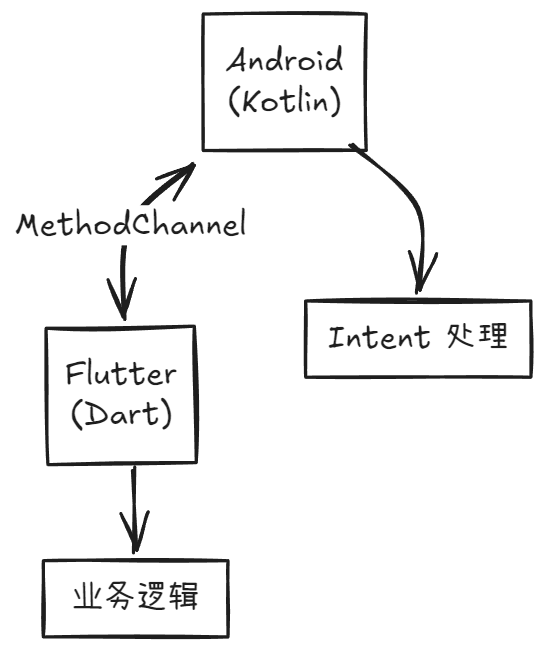
关键要素:
- Channel Name:通信的唯一标识,两端必须一致
- Method Name:具体调用的方法名
- Arguments:传递的数据(Map/List/基本类型)
- Result Callback:处理返回值
2. Flutter Engine 生命周期
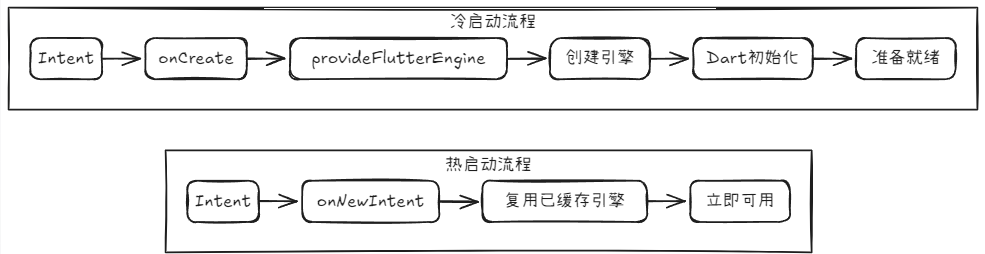
核心问题:如何判断引擎何时真正准备好?
前置配置
配置 AndroidManifest.xml
首先,你需要声明一个新的 Activity 作为分享入口。我们不使用 MainActivity,而是创建一个专用的 ShareActivity。
打开 android/app/src/main/AndroidManifest.xml,在 <application> 标签内添加:
xml
<activity
    android:name=".ShareActivity"
    android:theme="@style/Theme.Flutter.Transparent"
    android:launchMode="singleTask"
    android:exported="true">

    <intent-filter>
        <action android:name="android.intent.action.SEND" />
        <category android:name="android.intent.category.DEFAULT" />
        <data android:mimeType="text/*" />
    </intent-filter>

    </activity>
关键点解释:
-
android:name=".ShareActivity": 指向我们即将创建的ShareActivity.kt类。 -
android:theme="@style/Theme.Flutter.Transparent": 使用透明主题,即使用于后台处理,也能避免启动时出现白屏/黑屏闪烁,体验更佳。 -
android:launchMode="singleTask": 这是实现鲁棒性的第一步 。它确保ShareActivity在任务栈中只有一个实例。 -
<intent-filter>: 声明此 Activity 可以响应ACTION_SEND动作和text/*(纯文本) 类型的数据。
你还可以添加其他的配置,全部如下:
xml
<!-- 透明分享接收 Activity - 单一 FlutterActivity 架构 -->
<activity
    android:name=".ShareActivity"
    android:theme="@style/Theme.Transparent"
    android:exported="true"
    android:launchMode="singleTask"
    android:taskAffinity=""
    android:excludeFromRecents="true"
    android:configChanges="orientation|keyboardHidden|keyboard|screenSize|locale|layoutDirection|fontScale|screenLayout|density|uiMode"
    android:hardwareAccelerated="true"
    android:windowSoftInputMode="adjustResize">
    <intent-filter>
    <!-- 接收单个分享项目 -->
        <action android:name="android.intent.action.SEND" />
        <category android:name="android.intent.category.DEFAULT" />
        <!-- 支持的MIME类型 -->
        <data android:mimeType="text/*" />
        <data android:mimeType="image/*" />
        <data android:mimeType="video/*" />
        <data android:mimeType="application/*" />
    </intent-filter>
    <intent-filter>
    <!-- 接收多个分享项目 -->
        <action android:name="android.intent.action.SEND_MULTIPLE" />
        <category android:name="android.intent.category.DEFAULT" />
        <!-- 支持的MIME类型 -->
        <data android:mimeType="text/*" />
        <data android:mimeType="image/*" />
        <data android:mimeType="video/*" />
        <data android:mimeType="application/*" />
    </intent-filter>
</activity>
步骤 2: 理解 Activity 生命周期 (鲁棒性的关键)
launchMode="singleTask" 决定了 ShareActivity 如何被启动,这直接关系到我们必须覆盖哪些方法:
-
冷启动 (Cold Start):
-
场景: 你的 App 进程完全未运行。
-
触发 : 用户分享,系统创建新进程和
ShareActivity实例。 -
调用 :
onCreate(savedInstanceState: Bundle?)
-
-
热启动 (Hot Start):
-
场景: 你的 App 已经在后台运行(之前分享过,或打开过主 App)。
-
触发: 用户再次分享。
-
调用 :
onNewIntent(intent: Intent)(系统不会创建新实例,而是复用现有实例,并通过此方法传入新的Intent)。
-
常见的陷阱 :如果只在
onCreate中处理intent,这会导致所有热启动 的分享都被忽略,造成"第二次分享失灵"的 Bug。
基础实现
Android 端核心代码
1. 定义通信常量
kotlin
class ShareActivity : FlutterActivity() {
    companion object {
	    // 通道标识
        private const val CHANNEL = "com.doublez.pocketmind/share"
        // 引擎缓存 ID
        private const val ENGINE_ID = "share_engine"
    }

    private var methodChannel: MethodChannel? = null
}
2. 初始化引擎和通道
kotlin
override fun onCreate(savedInstanceState: Bundle?) {
    super.onCreate(savedInstanceState)

    initFlutterBackgroundEngine()

    // ⚠️ 问题:延迟处理是为了等待引擎,但不可靠,详见后面的
    Handler(Looper.getMainLooper()).postDelayed({
        handleShareIntent(intent)
    }, 300)
}

private fun initFlutterBackgroundEngine() {
    // 尝试复用缓存引擎
    flutterEngine = FlutterEngineCache.getInstance().get(ENGINE_ID)

    if (flutterEngine == null) {
        // 冷启动:创建新引擎
        flutterEngine = FlutterEngine(this).apply {
            dartExecutor.executeDartEntrypoint(
                DartExecutor.DartEntrypoint.createDefault()
            )
        }
        FlutterEngineCache.getInstance().put(ENGINE_ID, flutterEngine)
    }

    // 创建 MethodChannel
    // 这里会导致无论冷热启动,都重新创建 MethodChannel,旧监听器丢失,消息无法接收,博主遇到这个坑,单独放这边提醒读者
    flutterEngine?.dartExecutor?.binaryMessenger?.let { messenger ->
        methodChannel = MethodChannel(messenger, CHANNEL)
    }
}
3. 解析并发送数据
kotlin
private fun handleShareIntent(intent: Intent?) {
    val action = intent?.action
    val type = intent?.type

    when {
        action == Intent.ACTION_SEND && type?.startsWith("text/") == true -> {
            val text = intent.getStringExtra(Intent.EXTRA_TEXT) ?: return
            val title = intent.getStringExtra(Intent.EXTRA_SUBJECT) ?: "分享内容"
            sendToFlutter(title, text)
        }
    }
}

private fun sendToFlutter(title: String, content: String) {
    val data = mapOf(
        "title" to title,
        "content" to content,
        "timestamp" to System.currentTimeMillis()
    )

    methodChannel?.invokeMethod("saveAndSync", data, object : MethodChannel.Result {
        override fun success(result: Any?) {
            Log.d(TAG, "✅ 成功")
        }
        override fun error(code: String, message: String?, details: Any?) {
            Log.e(TAG, "❌ 失败: $message")
        }
        override fun notImplemented() {
            Log.w(TAG, "⚠️ 方法未实现")
        }
    })
}
Flutter 端核心代码
dart
void main() async {
  WidgetsFlutterBinding.ensureInitialized();
  ShareBackgroundService.initialize(); // 初始化通信服务
  runApp(const MyApp());
}

class ShareBackgroundService {
  static const MethodChannel _channel = MethodChannel(
    'com.doublez.pocketmind/share', // 与 Android 端一致
  );

  static void initialize() {
    _channel.setMethodCallHandler(_handleMethodCall);
  }

  static Future<dynamic> _handleMethodCall(MethodCall call) async {
    switch (call.method) {
      case 'saveAndSync': // 匹配 Android 端的方法名
        return await _processSh areData(call.arguments);
      default:
        throw PlatformException(code: 'UNKNOWN_METHOD');
    }
  }

  static Future<Map<String, dynamic>> _processShareData(dynamic args) async {
    final data = args as Map;
    final title = data['title'] as String;
    final content = data['content'] as String;

    // 处理业务逻辑...

    return {'success': true};
  }
}
Version 1.0 存在的问题
| 问题 | 表现 | 原因 |
|---|---|---|
| 时序问题 | 数据偶尔丢失 | 固定延迟 300ms 无法保证引擎就绪 |
| 冷热启动混淆 | 热启动时重复初始化 | 未区分引擎状态 |
| 生命周期错乱 | onNewIntent 未处理 |
只在 onCreate 处理数据 |
优化实现
核心优化:双向握手机制
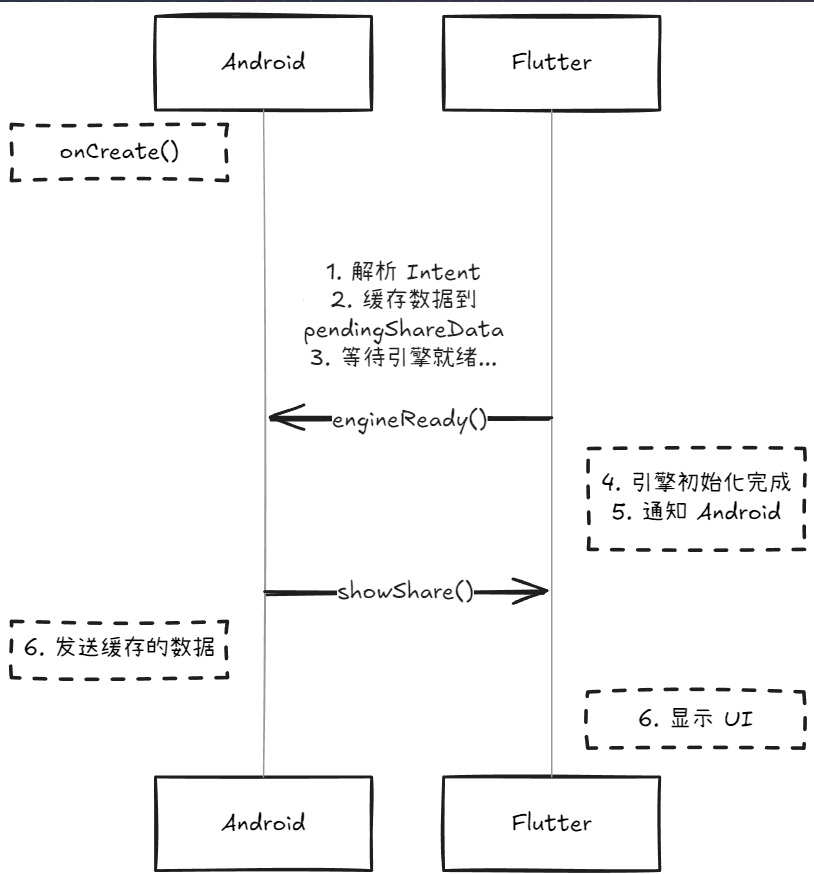
Android 端优化代码
1. 状态管理
kotlin
class ShareActivity : FlutterActivity() {
    private var methodChannel: MethodChannel? = null
    private var pendingShareData: ShareData? = null // 待处理数据队列
    private var isEngineReady = false              // 引擎状态标志

    data class ShareData(val title: String, val content: String)
}
2. 生命周期处理
kotlin
override fun onCreate(savedInstanceState: Bundle?) {
    super.onCreate(savedInstanceState)

    // 1. 解析并缓存数据(不立即发送)
    val shareData = parseShareIntent(intent)
    if (shareData != null) {
        pendingShareData = shareData

        // 2. 如果是热启动,引擎可能已就绪
        if (isEngineReady && methodChannel != null) {
            notifyDartToShowShare(shareData)
            // 发送的数据置为null,防止下次干扰
            pendingShareData = null
        }
    }
}

override fun onNewIntent(intent: Intent) {
    super.onNewIntent(intent)
    // 处理热启动
    val shareData = parseShareIntent(intent)
    if (shareData != null) {
        pendingShareData = shareData

        if (isEngineReady) {
            notifyDartToShowShare(shareData)
            pendingShareData = null
        }
    }
}
3. 引擎初始化与通道设置
kotlin
override fun provideFlutterEngine(context: Context): FlutterEngine? {
    var engine = FlutterEngineCache.getInstance().get(ENGINE_ID)
    val isHotStart = engine != null

    if (engine == null) {
        // 冷启动:创建引擎
        val flutterLoader = FlutterInjector.instance().flutterLoader()
        //确保 FlutterLoader 已初始化
        if (!flutterLoader.initialized()) {
            flutterLoader.startInitialization(applicationContext)
            flutterLoader.ensureInitializationComplete(context, null)
        }

        engine = FlutterEngine(this).apply {
            dartExecutor.executeDartEntrypoint(
                DartExecutor.DartEntrypoint(
                    flutterLoader.findAppBundlePath(),
                    "main_share" // 可选:独立入口
                )
            )
        }
        FlutterEngineCache.getInstance().put(ENGINE_ID, engine)
    } else {
        // 热启动:引擎已就绪
        isEngineReady = true
    }

    setupMethodChannel(engine)
    return engine
}

private fun setupMethodChannel(engine: FlutterEngine) {
    engine.dartExecutor.binaryMessenger.let { messenger ->
        methodChannel = MethodChannel(messenger, CHANNEL)

        // ⚡ 关键:监听 Flutter 端的就绪信号
        methodChannel?.setMethodCallHandler { call, result ->
            when (call.method) {
                "engineReady" -> {
                    isEngineReady = true
                    result.success(null)

                    // 处理待发送的数据
                    pendingShareData?.let { data ->
                        notifyDartToShowShare(data)
                        pendingShareData = null
                    }
                }
                else -> result.notImplemented()
            }
        }

        // 热启动场景:立即处理
        if (isEngineReady) {
            pendingShareData?.let { data ->
                notifyDartToShowShare(data)
                pendingShareData = null
            }
        }
    }
}
4. 发送数据
kotlin
private fun notifyDartToShowShare(data: ShareData) {
    val payload = mapOf(
        "title" to data.title,
        "content" to data.content,
        "timestamp" to System.currentTimeMillis()
    )

    methodChannel?.invokeMethod("showShare", payload, object : MethodChannel.Result {
        override fun success(result: Any?) {
            Log.d(TAG, "✅ Flutter 已接收数据")
        }
        override fun error(code: String, msg: String?, details: Any?) {
            Log.e(TAG, "❌ 错误: $msg")
        }
        override fun notImplemented() {
            Log.w(TAG, "⚠️ 方法未实现")
        }
    })
}
Flutter 端优化代码
dart
class _MyShareAppState extends State<MyShareApp> {
  static const _channel = MethodChannel('com.example.notebook/share');

  @override
  void initState() {
    super.initState();
    _channel.setMethodCallHandler(_handleMethodCall);

    // ⚡ 关键:渲染完成后通知原生端
    WidgetsBinding.instance.addPostFrameCallback((_) {
      _notifyEngineReady();
    });
  }

  Future<void> _notifyEngineReady() async {
    try {
      await _channel.invokeMethod('engineReady');
      print("✅ 已通知 Android:引擎就绪");
    } catch (e) {
      print("❌ 通知失败: $e");
    }
  }

  Future<dynamic> _handleMethodCall(MethodCall call) async {
    switch (call.method) {
      case 'showShare':
        final args = call.arguments as Map;
        // 处理分享数据...
        return "Success";

      default:
        throw PlatformException(code: 'UNKNOWN_METHOD');
    }
  }
}
最佳实践总结
1. 通道设计原则
| 原则 | 说明 | 示例 |
|---|---|---|
| 唯一性 | Channel Name 全局唯一 | com.company.app/feature |
| 语义化 | Method Name 清晰表意 | showShare vs method1 |
| 版本兼容 | 支持多版本协议 | 在参数中添加 version 字段 |
2. 数据传递规范
kotlin
// ✅ 推荐:使用结构化数据
val data = mapOf(
    "type" to "text",
    "payload" to mapOf(
        "title" to title,
        "content" to content
    ),
    "metadata" to mapOf(
        "timestamp" to System.currentTimeMillis(),
        "source" to packageName
    )
)

// ❌ 避免:直接传递复杂对象
methodChannel.invokeMethod("share", customObject) // 可能会序列化失败
3. 错误处理策略
dart
Future<T> safeInvoke<T>(
  String method,
  dynamic arguments,
) async {
  try {
    return await _channel.invokeMethod<T>(method, arguments);
  } on PlatformException catch (e) {
    // 处理原生端抛出的错误
    log.error('Platform error: ${e.code} - ${e.message}');
    rethrow;
  } catch (e) {
    // 处理其他错误
    log.error('Unknown error: $e');
    rethrow;
  }
}
4. 生命周期同步
| 场景 | Android 端 | Flutter 端 |
|---|---|---|
| 冷启动 | 缓存数据 → 等待就绪信号 | 初始化完成 → 发送就绪信号 |
| 热启动 | 检查引擎状态 → 立即发送 | 复用已有实例 |
5. 性能优化建议
kotlin
// 1. 引擎预热(在 Application 中)
class MyApp : Application() {
    override fun onCreate() {
        super.onCreate()
        FlutterInjector.instance().flutterLoader()
            .startInitialization(this)
    }
}

// 2. 引擎复用
FlutterEngineCache.getInstance().put(ENGINE_ID, engine)

// 3. 避免阻塞主线程
Handler(Looper.getMainLooper()).post {
    methodChannel?.invokeMethod(...)
}
更近一步
极端情况下的数据丢失怎么办?
使用
pendingData+isEngineReady双重保险机制。
安卓端代码:
kotlin
class ChannelHealthMonitor(
    private val methodChannel: MethodChannel,
    private val onHealthChanged: (Boolean) -> Unit
) {
    private var isHealthy = false
    private val handler = Handler(Looper.getMainLooper())
    private val checkInterval = 5000L // 5 秒检查一次

    private val healthCheckRunnable = object : Runnable {
        override fun run() {
            checkHealth()
            handler.postDelayed(this, checkInterval)
        }
    }

    fun start() {
        Log.d(TAG, "开始健康检查")
        handler.post(healthCheckRunnable)
    }

    fun stop() {
        Log.d(TAG, "停止健康检查")
        handler.removeCallbacks(healthCheckRunnable)
    }

    private fun checkHealth() {
        val startTime = System.currentTimeMillis()

        methodChannel.invokeMethod("ping", null, object : MethodChannel.Result {
            override fun success(result: Any?) {
                val latency = System.currentTimeMillis() - startTime
                val healthy = latency < 1000 // 延迟小于 1 秒视为健康

                if (isHealthy != healthy) {
                    isHealthy = healthy
                    onHealthChanged(healthy)
                    Log.d(TAG, if (healthy) "✅ 通道健康" else "❌ 通道异常")
                }
            }

            override fun error(code: String, message: String?, details: Any?) {
                if (isHealthy) {
                    isHealthy = false
                    onHealthChanged(false)
                    Log.e(TAG, "❌ 通道错误: $message")
                }
            }

            override fun notImplemented() {
                if (isHealthy) {
                    isHealthy = false
                    onHealthChanged(false)
                    Log.w(TAG, "⚠️ ping 方法未实现")
                }
            }
        })
    }

    companion object {
        private const val TAG = "ChannelHealthMonitor"
    }
}

// 在 ShareActivity 中使用
class ShareActivity : FlutterActivity() {
    private var healthMonitor: ChannelHealthMonitor? = null

    private fun setupMethodChannel(engine: FlutterEngine) {
        // ... 创建 methodChannel ...

        // 启动健康检查
        healthMonitor = ChannelHealthMonitor(methodChannel!!) { isHealthy ->
            if (!isHealthy) {
                // 通道异常,尝试恢复
                Log.w(TAG, "检测到通道异常,尝试重新初始化")
                recreateChannel(engine)
            }
        }
        healthMonitor?.start()
    }

    private fun recreateChannel(engine: FlutterEngine) {
        methodChannel = MethodChannel(engine.dartExecutor.binaryMessenger, CHANNEL)
        // 重新设置监听器...
    }

    override fun onDestroy() {
        super.onDestroy()
        healthMonitor?.stop()
    }
}
flutter端代码(不重试版本):
dart
class ChannelHealthService {
  static const _channel = MethodChannel('com.example.notebook/share');
  static Timer? _heartbeatTimer;
  static int _pingCount = 0;
  static int _failCount = 0;

  // 启动健康监控
  static void startMonitoring() {
    // 响应 Android 的 ping
    _channel.setMethodCallHandler((call) async {
      if (call.method == 'ping') {
        _pingCount++;
        print('[$_pingCount] 收到 ping,通道健康');
        return 'pong'; // 返回响应
      }
    });

    // 主动发送心跳
    _heartbeatTimer = Timer.periodic(const Duration(seconds: 10), (_) {
      _sendHeartbeat();
    });
  }

  static Future<void> _sendHeartbeat() async {
    try {
      final result = await _channel.invokeMethod('heartbeat');
      _failCount = 0;
      print('✅ 心跳成功: $result');
    } catch (e) {
      _failCount++;
      print('❌ 心跳失败 ($_failCount): $e');

      if (_failCount >= 3) {
        print('⚠️ 连续失败 3 次,通道可能断开');
        _onChannelDisconnected();
      }
    }
  }

  static void _onChannelDisconnected() {
    // 尝试恢复连接
    print('尝试恢复通道连接...');

    // 重新初始化
    _channel.setMethodCallHandler(null);
    Future.delayed(const Duration(seconds: 1), () {
      startMonitoring();
    });
  }

  static void stopMonitoring() {
    _heartbeatTimer?.cancel();
    _heartbeatTimer = null;
  }
}

// 在 main.dart 中启动
void main() {
  WidgetsFlutterBinding.ensureInitialized();
  ChannelHealthService.startMonitoring();
  runApp(const MyApp());
}
flutter端重试版本
dart
class SmartChannelHealthChecker {
  final MethodChannel channel;
  final Duration timeout;
  final int maxRetries;

  SmartChannelHealthChecker({
    required this.channel,
    this.timeout = const Duration(seconds: 3),
    this.maxRetries = 3,
  });

  Future<HealthStatus> checkHealth() async {
    int attempts = 0;

    while (attempts < maxRetries) {
      try {
        final stopwatch = Stopwatch()..start();

        await channel
            .invokeMethod('ping')
            .timeout(timeout);

        stopwatch.stop();

        return HealthStatus(
          isHealthy: true,
          latency: stopwatch.elapsedMilliseconds,
          attempts: attempts + 1,
        );
      } catch (e) {
        attempts++;

        if (attempts >= maxRetries) {
          return HealthStatus(
            isHealthy: false,
            error: e.toString(),
            attempts: attempts,
          );
        }

        // 指数退避
        await Future.delayed(Duration(milliseconds: 100 * attempts));
      }
    }

    return HealthStatus(isHealthy: false, attempts: attempts);
  }
}

class HealthStatus {
  final bool isHealthy;
  final int? latency;
  final String? error;
  final int attempts;

  HealthStatus({
    required this.isHealthy,
    this.latency,
    this.error,
    required this.attempts,
  });

  @override
  String toString() {
    if (isHealthy) {
      return '✅ 健康 (延迟: ${latency}ms, 尝试: $attempts)';
    } else {
      return '❌ 异常 (错误: $error, 尝试: $attempts)';
    }
  }
}

// 使用示例
Future<void> performHealthCheck() async {
  final checker = SmartChannelHealthChecker(
    channel: _channel,
    timeout: const Duration(seconds: 2),
    maxRetries: 3,
  );

  final status = await checker.checkHealth();
  print(status);

  if (!status.isHealthy) {
    // 触发恢复机制
    await _attemptReconnection();
  }
}
通过本文的优化方案,我们实现了:
✅ 可靠的时序控制 :双向握手机制
✅ 完整的生命周期管理 :支持冷/热启动
✅ 健壮的错误处理 :多层级异常捕获
✅ 高性能:引擎复用 + 预热
核心思想:不要假设时序,通过显式信号量进行同步状态。