相关阅读:
Vanna实现Text2SQL:https://core815.blog.csdn.net/article/details/155195612
LangChain实现Text2SQL:https://core815.blog.csdn.net/article/details/155105220
1.代码实现(Text2SQL)
python
## 使用Qwen-coder,对保险客户数据表进行SQL查询
import json
import os
import dashscope
from dashscope.api_entities.dashscope_response import Role
import time
import pandas as pd
import re

# 从环境变量获取 dashscope 的 API Key
api_key = os.environ.get('DASHSCOPE_API_KEY')
dashscope.api_key = api_key


# 封装模型响应函数
def get_response(messages):
    response = dashscope.Generation.call(
        model='qwen-coder-plus',
        messages=messages,
        result_format='message'  # 将输出设置为message形式
    )
    return response


# 从模型响应中提取SQL代码
def get_sql_code(response):
    # 查找```sql和```之间的内容
    pattern = r'```sql(.*?)```'
    match = re.search(pattern, response.output.choices[0].message.content, re.DOTALL)
    if match:
        return match.group(1).strip()
    else:
        # 如果没有找到```sql标记,尝试查找任何```之间的内容
        pattern = r'```(.*?)```'
        match = re.search(pattern, response.output.choices[0].message.content, re.DOTALL)
        if match:
            return match.group(1).strip()
        else:
            # 如果没有找到任何代码块,返回整个响应
            return response.output.choices[0].message.content


# 得到sql
def get_sql(query):
    start_time = time.time()
    sys_prompt = """我正在编写SQL,以下是数据库中的数据表和字段,请思考:哪些数据表和字段是该SQL需要的,然后编写对应的SQL,如果有多个查询语句,请尝试合并为一个。编写SQL请采用```sql
    """
    user_prompt = f"""-- language: SQL
### Question: {query}
### Input: {create_sql}
### Response:
Here is the SQL query I have generated to answer the question `{query}`:
```sql
"""

    messages = [
        {"role": "system", "content": sys_prompt},
        {"role": "user", "content": user_prompt}
    ]

    response = get_response(messages)
    return response


######## 需要人工设置 ########
save_file = f'sql_result_qwen_coder.xlsx'
qa_file = 'qa_list.txt'  # QA测试题
sql_file = './create_sql.txt'  # SQL数据表

# 读取 SQL数据表
with open(sql_file, 'r', encoding='utf-8') as file:
    create_sql = file.read()
# 读取 SQL问题列表
with open(qa_file, 'r', encoding='utf-8') as file:
    qa_list = file.read()
qa_list = qa_list.split('=====')

# 保存SQL结果
sql_list = []
markdown_list = []
time_list = []
for qa in qa_list:
    query = qa
    query = query.replace('\n', '')
    print("\n")
    print("分隔符-----------------------------------------------\n")
    print(query)
    start_time = time.time()
    # 请求生成sql
    #content, prompt_len = get_sql(query)
    response = get_sql(query)
    use_time = round(time.time()-start_time, 2)
    time_list.append(use_time)
    print('SQL生成时间:', use_time)
    print('response=', response.output.choices[0].message.content)
    # 提取生成的SQL
    sql = get_sql_code(response)
    print('SQL: {}'.format(sql))
    sql_list.append(sql)

result = pd.DataFrame(columns=['QA', 'SQL', 'time'])
result['QA'] = qa_list
result['SQL'] = sql_list
result['time'] = time_list
result.to_excel(save_file, index=False)
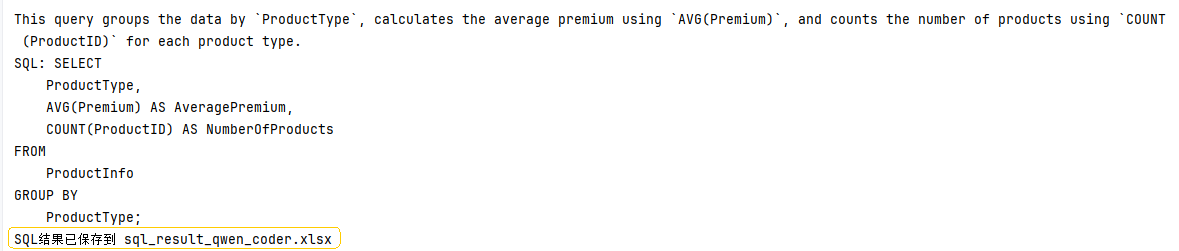
print(f'SQL结果已保存到 {save_file}')
效果:
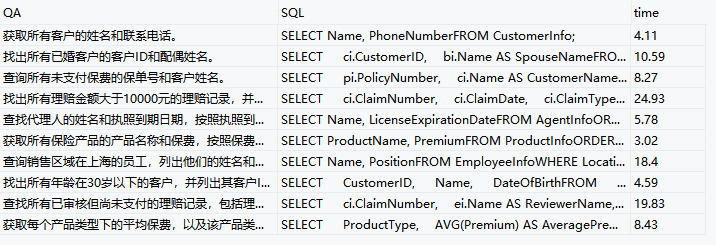
2.评价生成的SQL
python
# 对大模型SQL结果进行评测
import pandas as pd
from sqlalchemy import create_engine, text
from sqlalchemy.orm import sessionmaker
import traceback


def get_db_engine(database, host="localhost", user="root",
                  password="a123456", port=3306):
    """创建数据库连接引擎"""
    connection_str = f'mysql+mysqlconnector://{user}:{password}@{host}:{port}/{database}'
    engine = create_engine(connection_str)
    return engine


def get_db_session(engine):
    """创建数据库会话"""
    Session = sessionmaker(bind=engine)
    session = Session()
    return session


def get_markdown_result(session, sql):
    """
    执行SQL并返回markdown格式的结果
    返回值:
    - isok: 'Yes'表示执行成功,'No'表示执行失败
    - result: 成功时返回markdown表格,失败时返回错误信息
    """
    try:
        # 执行SQL查询
        result = session.execute(text(sql))

        # 获取列名
        columns = result.keys()

        # 获取所有数据
        rows = result.fetchall()

        if not rows:
            return 'Yes', '查询结果为空'

        # 构建markdown表格
        markdown = '| ' + ' | '.join(columns) + ' |\n'
        markdown += '| ' + ' | '.join(['---' for _ in columns]) + ' |\n'

        # 添加数据行
        for row in rows:
            markdown += '| ' + ' | '.join(str(cell) for cell in row) + ' |\n'

        return 'Yes', markdown

    except Exception as e:
        error_msg = str(e)
        traceback_msg = traceback.format_exc()
        return 'No', f'SQL执行错误: {error_msg}'
    finally:
        session.close()


filename = './sql_result_qwen_coder.xlsx'

# 获取数据库句柄
engine = get_db_engine(database="life_insurance")

# 读取待评测文件
df = pd.read_excel(filename)

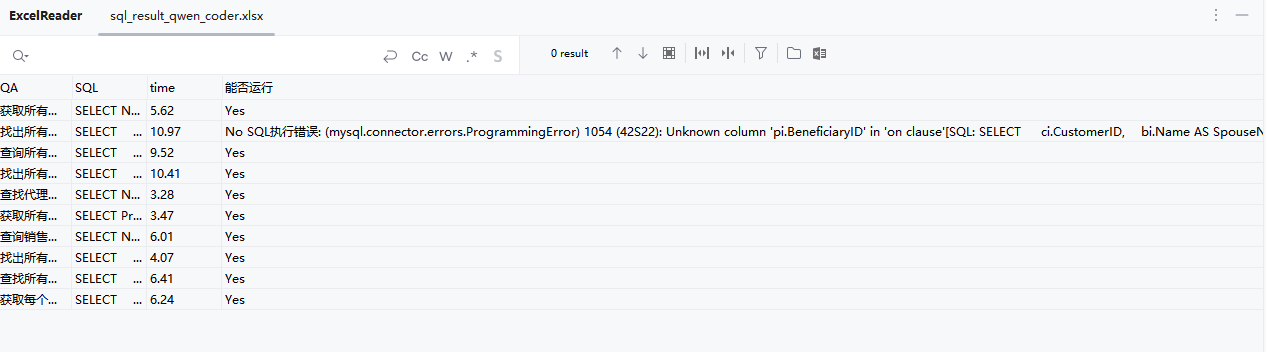
df['能否运行'] = 0
markdown_list = []
for index, row in df.iterrows():
    sql = row['SQL']
    print(sql)
    session = get_db_session(engine)
    if str(sql) == 'nan':
        df.loc[index, '能否运行'] = 'No 没有找到SQL'
        continue

    # 如果有多个sql,只执行第一个
    sqls = sql.split(';')
    sql = sqls[0]
    isok, markdown_table = get_markdown_result(session, sql)
    markdown_list.append(markdown_table)
    if isok == 'Yes':
        df.loc[index, '能否运行'] = 'Yes'
    else:
        df.loc[index, '能否运行'] = 'No ' + markdown_table

df.to_excel(filename, index=False)
df
效果:
3.相关资源
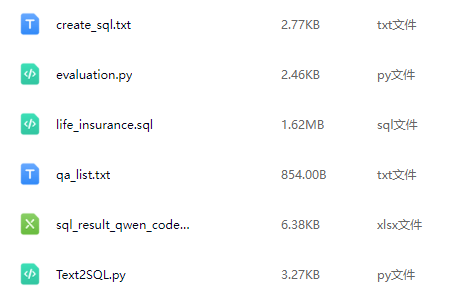
百度网盘:https://pan.baidu.com/s/1GpIkMpVZ9XuxKuH4ctQ_yA?pwd=yb8d