文章目录
介绍
目的
- 数据传输:一个进程需要将它的数据发送给另一个进程
- 资源共享:多个进程之间共享同样的资源
- 通知事件:一个进程需要向另一个或另一组进程发送消息,通知发生了某种事件
- 进程控制:有些进程希望完全控制另一个进程的执行,此时控制进程希望能够拦截另一个进程的所有陷入和异常,并能够及时知道它的状态改变
进程间通信发展
- 管道
- System V 进程间通信
- POSIX 进程间通信
进程间通信分类
-
管道
- 匿名管道
- 命名管道
-
System V IPC
- System V 消息队列
- 共享内存
- 信号量
- 互斥量
- 条件变量
- 读写锁
管道
- 管道是Unix中的一种进程间通信的形式
- 将从一个进程连接到另一个进程的一个数据流称为一个"管道"
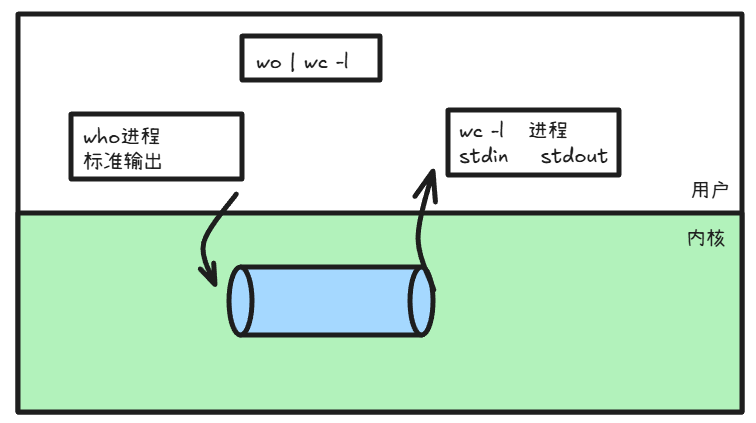
匿名管道
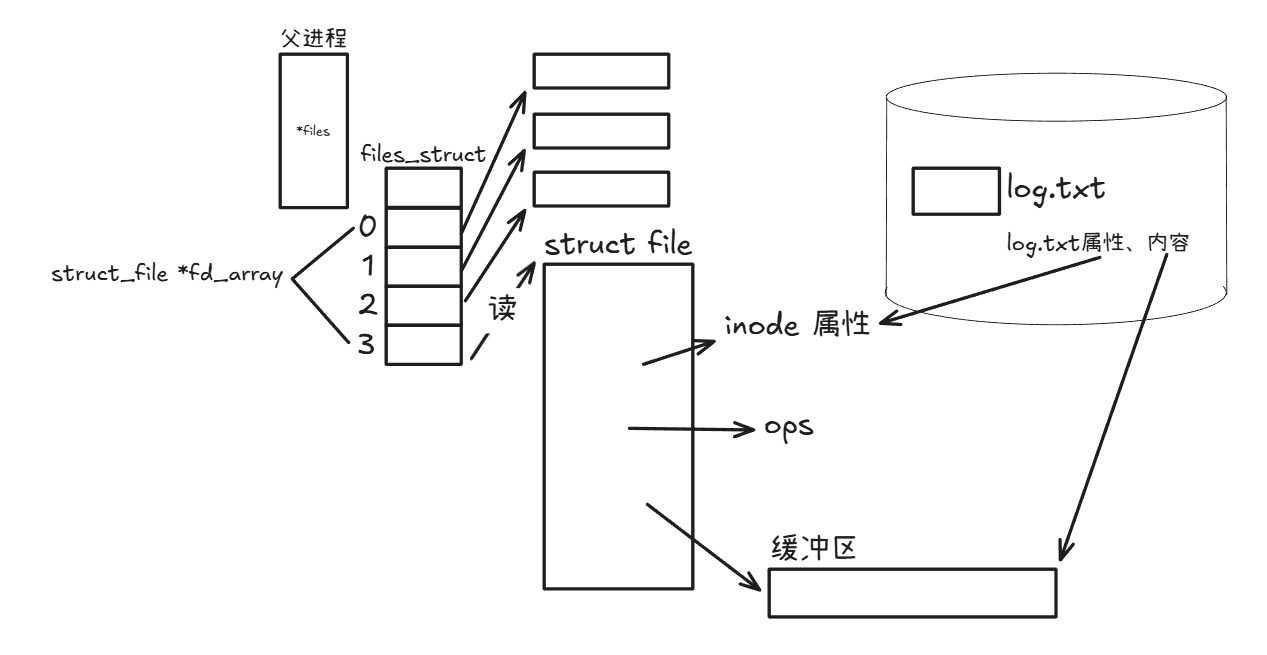
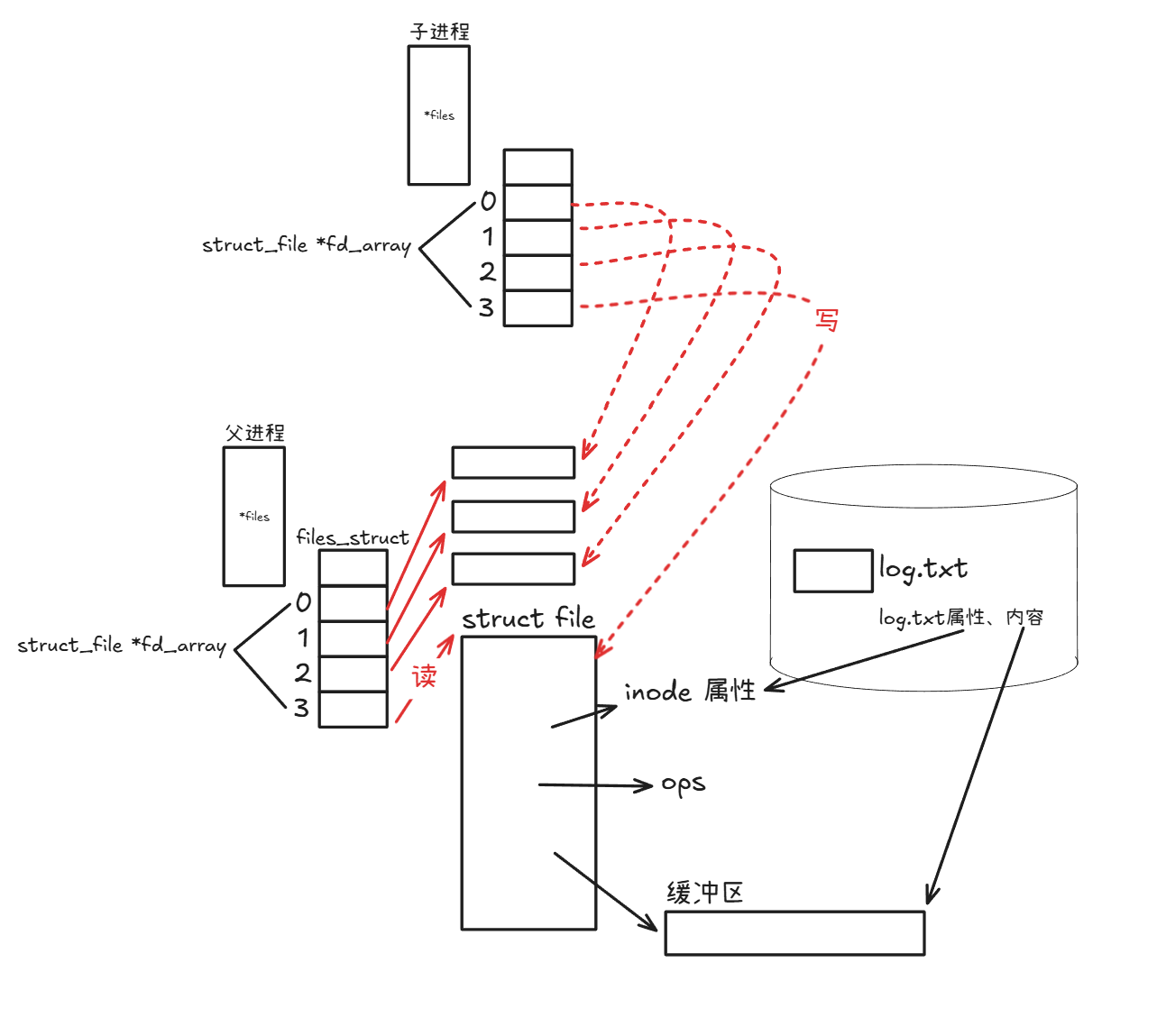
文件描述符角度理解父、子进程间管道原理
- 创建父进程并且以读打开文件
-
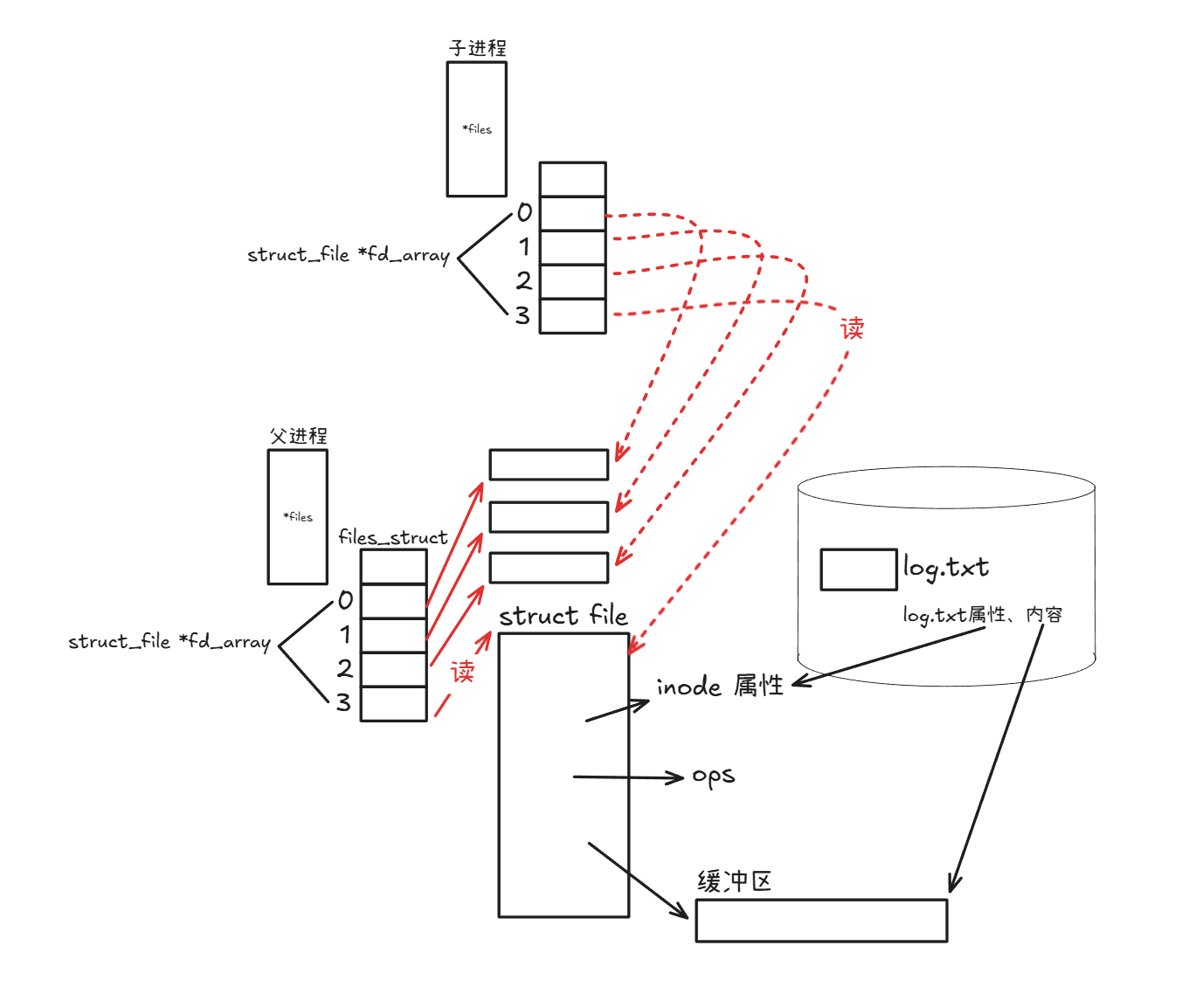
创建子进程,那么子进程就会继承父进程数据
-
子进程关闭以读打开文件,并且重新以写打开文件
-
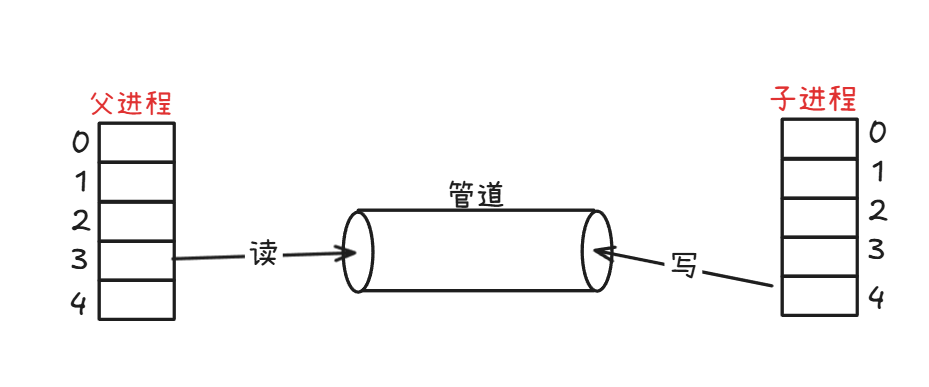
由于子进程以写打开文件,父进程以读打开文件,那么子进程在文件中写的信息,在父进程中就能直接读取
-
管道是以类似以上方法实现的,即管道的使用和文件一一致
测试管道读写
cpp
#include <unistd.h>
#include <iostream>
#include <cstdlib>
#include <cstdio>
#include <cerrno>
#include <cstring>


#define ERR_EXIT(m) \
do \
{\
    perror(m);\
    exit(EXIT_FAILURE);\
}while(0)

int main(int argc,char *argv[])
{
    int pipefd[2];
    if(pipe(pipefd) == -1)
    {
        ERR_EXIT("pipe error");
    }

    pid_t pid;
    pid = fork();
    if(pid == -1)
    {
        ERR_EXIT("fork_error");
    }
    if(pid == 0)//子进程
    {
        close(pipefd[0]);//关闭读端
        write(pipefd[1],"hello",5);//向管道写入数据
        close(pipefd[1]);//关闭写端
        exit(EXIT_SUCCESS);
    }
    //父进程
    close(pipefd[1]);//关闭写端
    char buf[10] = {0};//缓冲区
    read(pipefd[0],buf,10);//从管道读取数据
    std::cout << "buf = " << buf << std::endl;
    return 0;
}
创建进程池处理任务
Channel.hpp
cpp
#pragma once
#include <iostream>
#include <string>
#include <unistd.h>

class Channel
{
public:
    Channel(int wfd, pid_t who)
        : _wfd(wfd),
          _who(who)
    {
        _name = "Channel-" + std::to_string(_wfd) + "-" + std::to_string(_wfd);
    }

    std::string Name()
    {
        return _name;
    }

    // 写
    void Send(int cmd)
    {
        write(_wfd, &cmd, sizeof(cmd));
    }

    // 关闭文件描述符
    void Close()
    {
        close(_wfd);
    }

    pid_t Id()
    {
        return _who;
    }

    int wFd()
    {
        return _wfd;
    }

    ~Channel() {}

private:
    int _wfd;          // 文件描述符
    std::string _name; // 格式化进程名
    pid_t _who;        // 进程pid
};
ProcessPool.hpp
cpp
#pragma once
#include <iostream>
#include <functional>
#include <vector>
#include "Channel.hpp"
#include "Task.hpp"
#include <sys/wait.h>

using work_t = std::function<void()>;

// 进程状态枚举
enum
{
    OK = 0,
    UsageError,
    PipeError,
    ForkError,
};

class ProcessPool
{
public:
    ProcessPool(int processnum, work_t work)
        : _processnum(processnum),
          _work(work)
    {
    }

    void DebugPrint()
    {
        for (auto &channel : _channels)
        {
            std::cout << channel.Name() << std::endl;
        }
    }

    // 初始化线进程池
    int InitProcessPool()
    {
        // 创建指定个数进程
        for (int i = 0; i < _processnum; i++)
        {
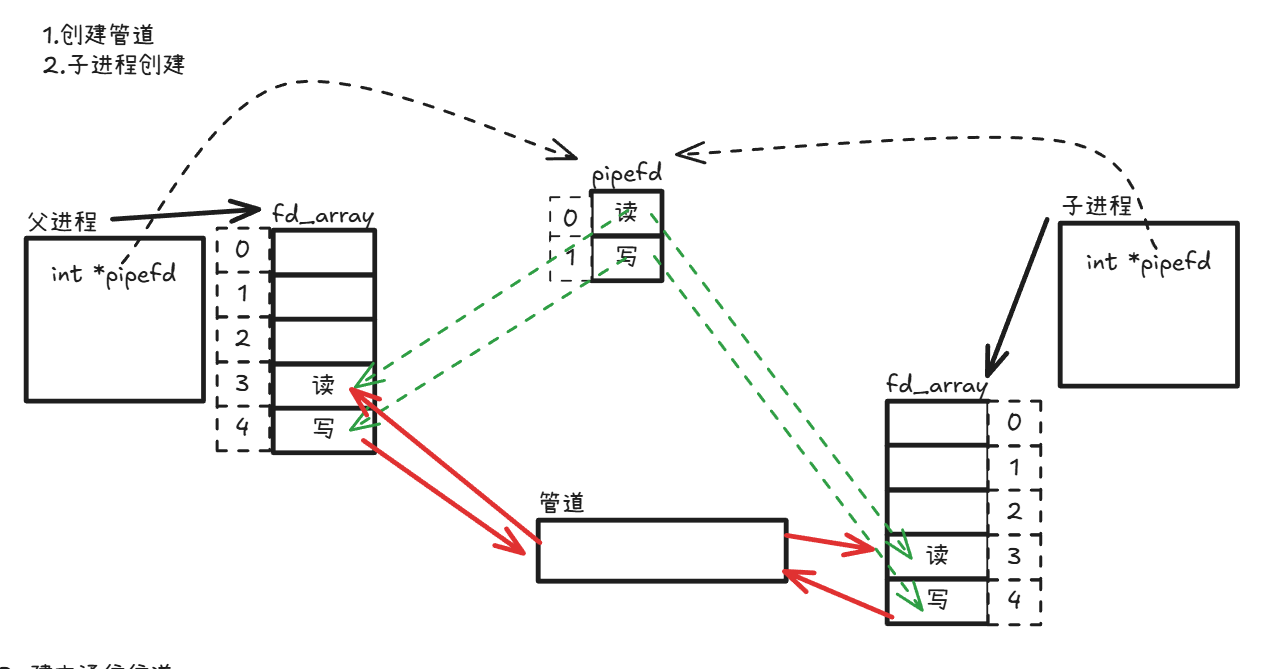
            // 1.先有管道
            int pipefd[2] = {0};
            int n = pipe(pipefd); // 创建管道
            if (n < 0)
            {
                return PipeError;
            }

            // 2.创建子进程
            pid_t id = fork();
            if (id < 0)
            {
                return ForkError;
            }

            // 3.建立通信信道
            if (id == 0) // 子进程
            {
                // 关闭历史wfd
                std::cout << getpid() << ",child close history fd:";
                for (auto &channel : _channels)
                {
                    std::cout << channel.wFd() << " ";
                    channel.Close();
                }

                std::cout << "over" << std::endl;

                close(pipefd[1]); // 关闭写端
                // 更新文件描符的指向
                std::cout << "debug: " << pipefd[0] << std::endl; //
                dup2(pipefd[0], 0);
                // 任务执行
                _work();
                exit(0);
            }
            // 父进程执行
            close(pipefd[0]);                      // 关闭读端
            _channels.emplace_back(pipefd[1], id); // 插入一个子进程
        }

        return OK;
    }

    void DispatchTask()
    {
        int who = 0;
        // 派发任务
        int num = 20;
        while (num--)
        {
            /* code */
            // 选择一个任务
            int task = tm.SelectTask();
            // 选择一个子进程
            Channel &curr = _channels[who++];
            who %= _channels.size(); // 防止越界
            std::cout << "######################" << std::endl;
            std::cout << "send " << task << " to " << curr.Name() << ", 任务还剩 : " << num << std::endl;
            std::cout << "######################" << std::endl;
            // 派发任务
            curr.Send(task);
            sleep(1);
        }
    }

    void CleanProcessPool()
    {
        for (auto &channel : _channels)
        {
            channel.Close();
            // 进程回收
            pid_t rid = waitpid(channel.Id(), nullptr, 0);
            if (rid > 0)
            {
                std::cout << "child" << rid << "wait...success" << std::endl;
            }
        }
    }

private:
    std::vector<Channel> _channels;
    int _processnum; // 指定个数进程
    work_t _work;    // 任务
};
Task.hpp
cpp
#pragma once
#include <iostream>
#include <string>
#include <functional>
#include <vector>
#include <unistd.h>
#include <sys/types.h>

using task_t = std::function<void()>;

class TaskManger
{
public:
    TaskManger()
    {
        srand(time(nullptr));
        _tasks.push_back([]()
                         { std::cout << "sub process[" << getpid() << " ] 执⾏访问数据库的任务\n " << std::endl; });
        _tasks.push_back([]()
                         { std::cout << "sub process[" << getpid() << " ] 执⾏url解析\n"
                                     << std::endl; });
        _tasks.push_back([]()
                         { std::cout << "sub process[" << getpid() << " ] 执⾏加密任务\n"
                                     << std::endl; });
        _tasks.push_back([]()
                         { std::cout << "sub process[" << getpid() << " ] 执⾏数据持久化任务\n " << std::endl; });
    }

    // 随机任务选取
    int SelectTask()
    {
        return rand() % _tasks.size();
    }

    // 任务执行
    void Excute(unsigned long number)
    {
        if (number > _tasks.size() || number < 0)
            return;
        _tasks[number]();
    }

    ~TaskManger()
    {
    }

private:
    std::vector<task_t> _tasks;
};

TaskManger tm;

void Worker()
{
    while (true)
    {
        int cmd = 0;
        // 读管道
        int n = read(0, &cmd, sizeof(cmd));
        if (n == sizeof(cmd)) // 执行任务
        {
            tm.Excute(cmd);
        }
        else if (n == 0)
        {
            std::cout << "pid: " << getpid() << " quit..." << std::endl;
            break;
        }
        else
        {
        }
    }
}
main.cc
cpp
#include "ProcessPool.hpp"
#include "Task.hpp"
void Usage(std::string proc)
{
    std::cout << "Usage: " << proc << " process-num" << std::endl;
}
// 我们⾃⼰就是master
int main(int argc, char *argv[])
{
    if (argc != 2)
    {
        Usage(argv[0]);
        return UsageError;
    }
    int num = std::stoi(argv[1]);
    ProcessPool *pp = new ProcessPool(num, Worker);
    // 1. 初始化进程池
    pp->InitProcessPool();
    // 2. 派发任务
    pp->DispatchTask();
    // 3. 退出进程池
    pp->CleanProcessPool();
    delete pp;
    return 0;
}
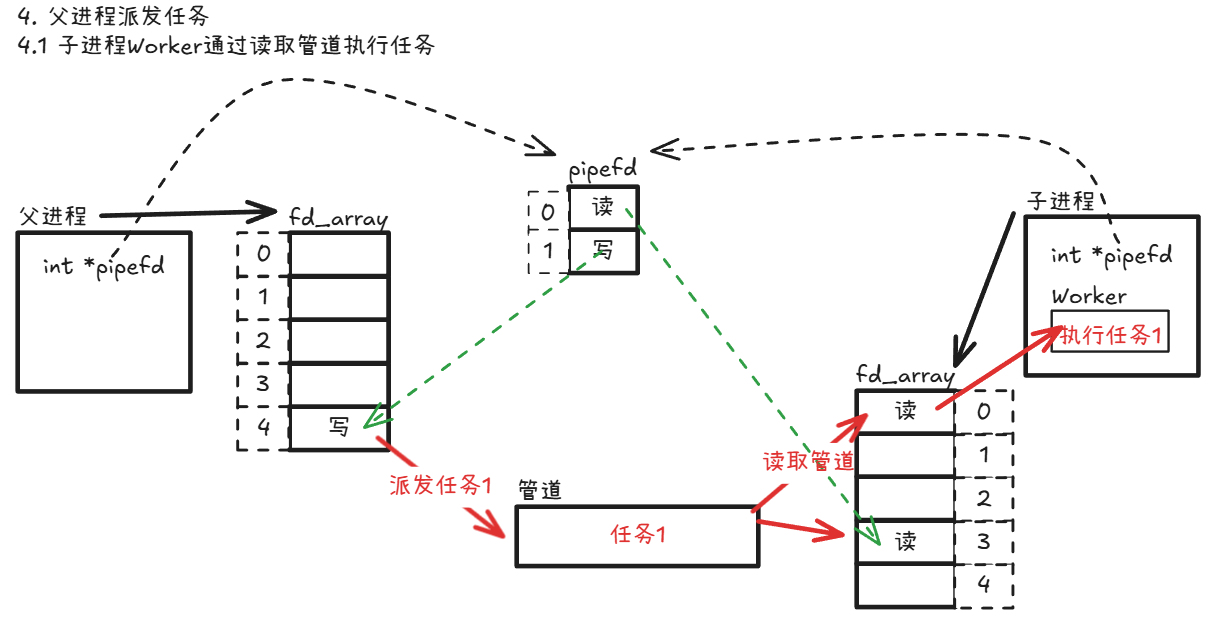
进程池单进程创建及执行任务:
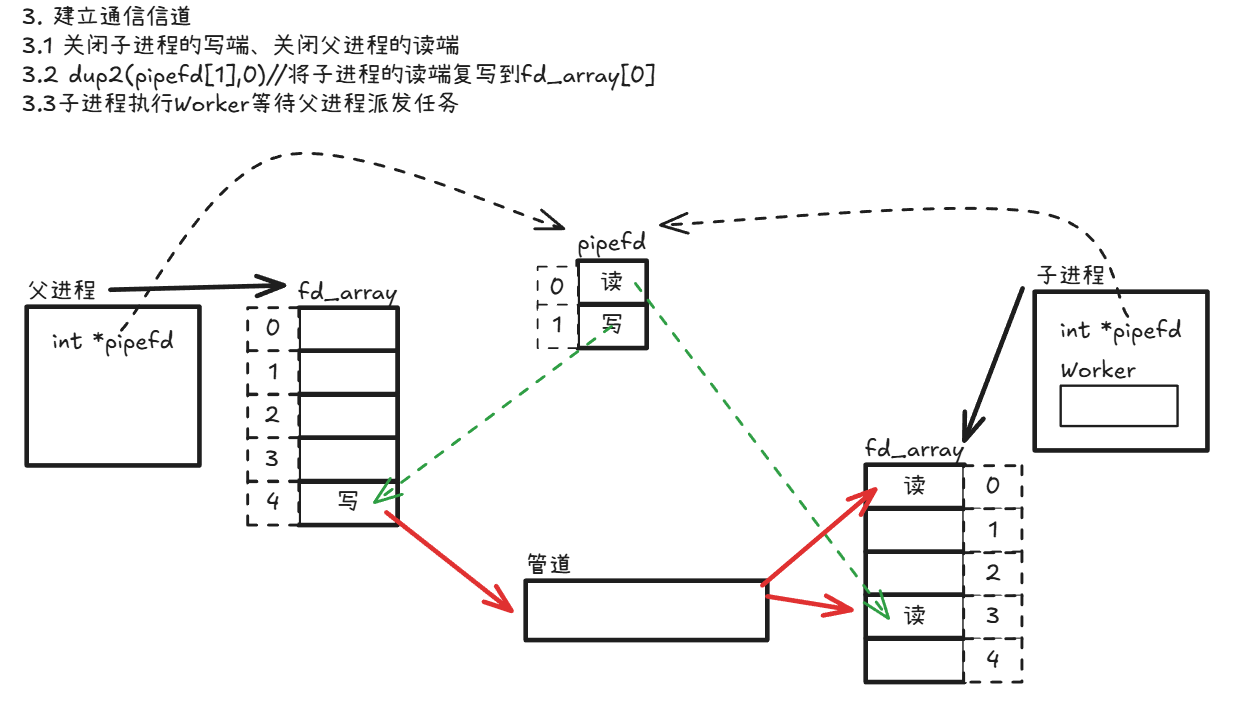
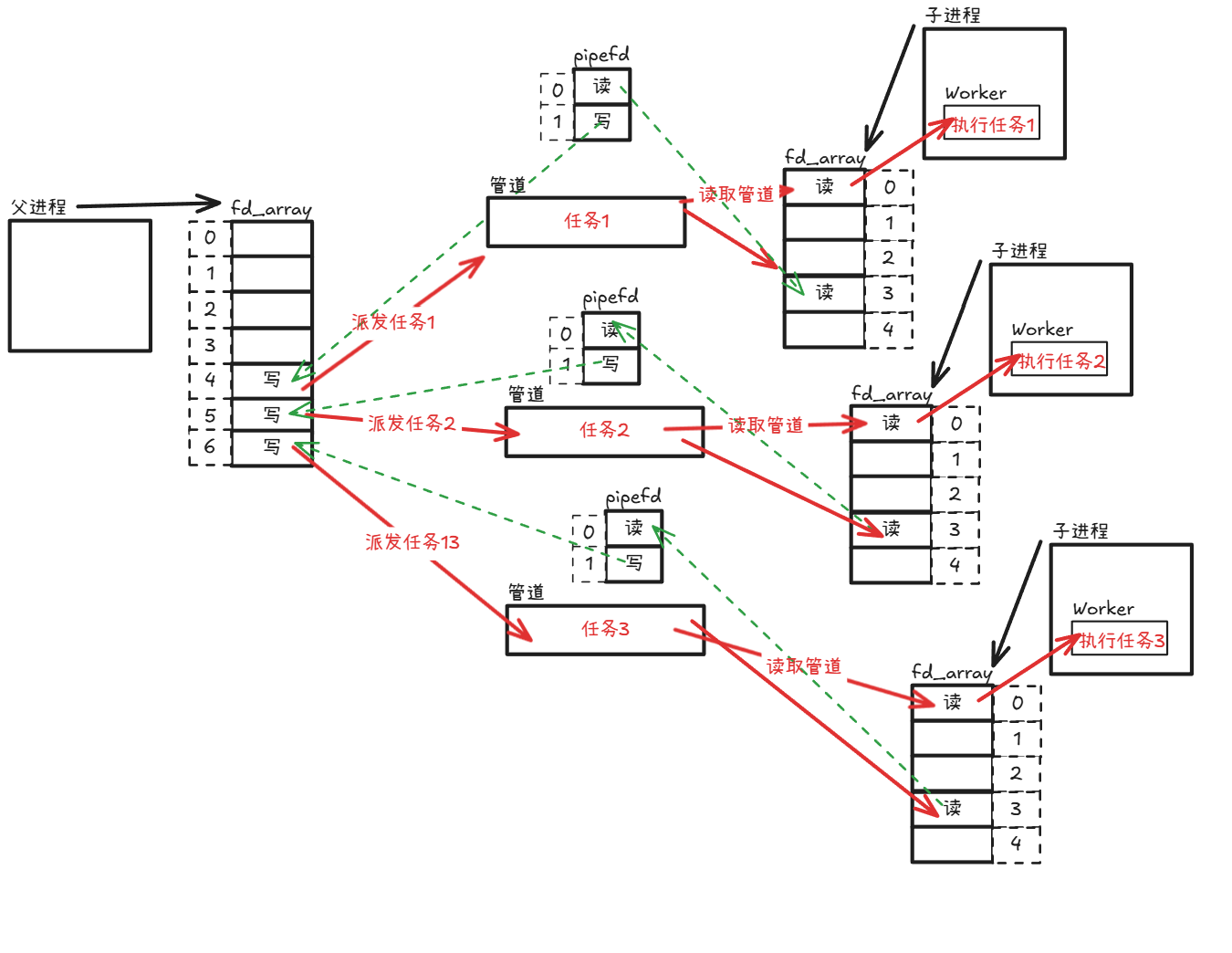
进程池多进程创建及执行任务
管道读写规则
- 当没有数据可读时
- O_NONBLOCK disable:read调用阻塞,即进程暂停执行,一直等到有数据来到为止。
- O_NONBLOCK enable: read调用返回-1, errno值为EAGAIN。
- 当管道满时
- O_NONBLOCKdisable: write调用阻塞,直到有进程读走数据
- O_NONBLOCK enable:调用返回-1,errno值为EAGAIN
- 如果所有管道写端对应的文件描述符被关闭,则read返回0
- 如果所有管道读端对应的文件描述符被关闭,则write操作会产生信号SIGPIPE,进而可能导致write进程退出
- 当要写入的数据量不大于PIPE_BUF时,linux将保证写入的原子性。
- 当要写入的数据量大于PIPE_BUF时,linux将不再保证写入的原子性。
管道特点
- 只能用于具有共同祖先的进程(具有亲缘关系的进程)之间进行通信;通常,一个管道由一个进程创建,然后该进程调用fork,此后父、子进程之间就可应用该管道。
- 管道提供流式服务
- 一般而言,进程退出,管道释放,所以管道的生命周期随进程
- 一般而言,内核会对管道操作进行同步与互斥
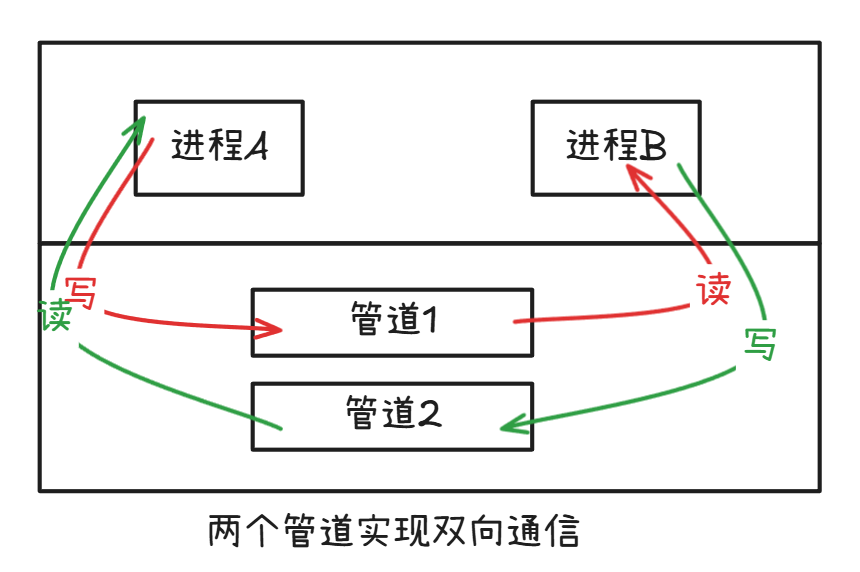
- 管道是半双工的,数据只能向一个方向流动;需要双方通信时,需要建立起两个管道
进程读走数据
- O_NONBLOCK enable:调用返回-1,errno值为EAGAIN
- 如果所有管道写端对应的文件描述符被关闭,则read返回0
- 如果所有管道读端对应的文件描述符被关闭,则write操作会产生信号SIGPIPE,进而可能导致write进程退出
- 当要写入的数据量不大于PIPE_BUF时,linux将保证写入的原子性。
- 当要写入的数据量大于PIPE_BUF时,linux将不再保证写入的原子性。
管道特点
- 只能用于具有共同祖先的进程(具有亲缘关系的进程)之间进行通信;通常,一个管道由一个进程创建,然后该进程调用fork,此后父、子进程之间就可应用该管道。
- 管道提供流式服务
- 一般而言,进程退出,管道释放,所以管道的生命周期随进程
- 一般而言,内核会对管道操作进行同步与互斥
- 管道是半双工的,数据只能向一个方向流动;需要双方通信时,需要建立起两个管道