项目简介
MinerU是一款将PDF转化为机器可读格式的工具(如markdown、json),可以很方便地抽取为任意格式。 MinerU诞生于书生-浦语的预训练过程中,我们将会集中精力解决科技文献中的符号转化问题,希望在大模型时代为科技发展做出贡献。 相比国内外知名商用产品MinerU还很年轻,如果遇到问题或者结果不及预期请到issue提交问题,同时附上相关PDF。
主要功能
- 删除页眉、页脚、脚注、页码等元素,确保语义连贯
- 输出符合人类阅读顺序的文本,适用于单栏、多栏及复杂排版
- 保留原文档的结构,包括标题、段落、列表等
- 提取图像、图片描述、表格、表格标题及脚注
- 自动识别并转换文档中的公式为LaTeX格式
- 自动识别并转换文档中的表格为HTML格式
- 自动检测扫描版PDF和乱码PDF,并启用OCR功能
- OCR支持109种语言的检测与识别
- 支持多种输出格式,如多模态与NLP的Markdown、按阅读顺序排序的JSON、含有丰富信息的中间格式等
- 支持多种可视化结果,包括layout可视化、span可视化等,便于高效确认输出效果与质检
- 支持纯CPU环境运行,并支持 GPU(CUDA)/NPU(CANN)/MPS 加速
- 兼容Windows、Linux和Mac平台
快速开始
本地部署
安装前必看------软硬件环境支持说明
为了确保项目的稳定性和可靠性,我们在开发过程中仅对特定的软硬件环境进行优化和测试。这样当用户在推荐的系统配置上部署和运行项目时,能够获得最佳的性能表现和最少的兼容性问题。
通过集中资源和精力于主线环境,我们团队能够更高效地解决潜在的BUG,及时开发新功能。
在非主线环境中,由于硬件、软件配置的多样性,以及第三方依赖项的兼容性问题,我们无法100%保证项目的完全可用性。因此,对于希望在非推荐环境中使用本项目的用户,我们建议先仔细阅读文档以及FAQ,大多数问题已经在FAQ中有对应的解决方案,除此之外我们鼓励社区反馈问题,以便我们能够逐步扩大支持范围。
| 解析后端 | pipeline (精度1 82+) | vlm (精度1 90+) |||||
| 解析后端 | pipeline (精度1 82+) | transformers | mlx-engine | vllm-engine / vllm-async-engine | lmdeploy-engine | http-client |
| 后端特性 | 速度快, 无幻觉 | 兼容性好, 速度较慢 | 比transformers快 | 速度快, 兼容vllm生态 | 速度快, 兼容lmdeploy生态 | 适用于OpenAI兼容服务器6 |
| 操作系统 | Linux2 / Windows / macOS || macOS3 | Linux2 / Windows4 | Linux2 / Windows5 | 不限 |
| CPU推理支持 | ✅ || ❌ ||| 不需要 |
| GPU要求 | Volta及以后架构, 6G显存以上或Apple Silicon || Apple Silicon | Volta及以后架构, 8G显存以上 || 不需要 |
| 内存要求 | 最低16GB以上, 推荐32GB以上 ||||| 8GB |
| 磁盘空间要求 | 20GB以上, 推荐使用SSD ||||| 2GB |
| python版本 | 3.10-3.137 |
|---|
1 精度指标为OmniDocBench (v1.5)的End-to-End Evaluation Overall分数,基于MinerU最新版本测试
2 Linux仅支持2019年及以后发行版
3 MLX需macOS 13.5及以上版本支持,推荐14.0以上版本使用
4 Windows vLLM通过WSL2(适用于 Linux 的 Windows 子系统)实现支持
5 Windows LMDeploy只能使用turbomind后端,速度比pytorch后端稍慢,如对速度有要求建议通过WSL2运行
6 兼容OpenAI API的服务器,如通过vLLM/SGLang/LMDeploy等推理框架部署的本地模型服务器或远程模型服务
7 Windows + LMDeploy 由于关键依赖ray未能在windows平台支持Python 3.13,故仅支持至3.10~3.12版本
安装mineru
使用pip或uv安装MinerU
pip install --upgrade pip -i https://mirrors.aliyun.com/pypi/simple
pip install uv -i https://mirrors.aliyun.com/pypi/simple
uv pip install -U "mineru[core]" -i https://mirrors.aliyun.com/pypi/simple
通过源码安装MinerU
git clone https://github.com/opendatalab/MinerU.git
cd MinerU
uv pip install -e .[core] -i https://mirrors.aliyun.com/pypi/simple
使用docker部署Mineru
MinerU提供了便捷的docker部署方式,这有助于快速搭建环境并解决一些棘手的环境兼容问题。
shell
docker run -d \
--name mineru \
-v /app/docker_v/mineru:/app/ecr/mineru \
-p 30022:30000 -p 30023:7860 -p 30024:8000 \
--entrypoint "" \
docker.m.daocloud.io/vllm/vllm-openai:v0.10.1.1 \
/bin/bash -c "tail -f /dev/null"

# 容器内,下载依赖环境
apt-get update && \
apt-get install -y \
    fonts-noto-core \
    fonts-noto-cjk \
    fontconfig \
    libgl1 && \
fc-cache -fv && \
apt-get clean && \
rm -rf /var/lib/apt/lists/*

# 下载 mineru 的python 包
python3 -m pip install -U 'mineru[core]' -i https://mirrors.aliyun.com/pypi/simple --break-system-packages && \
python3 -m pip cache purge

# 启动mineru
    # 下载模型from modelscope
    mineru-models-download --help
    mineru-models-download -s modelscope -m all

    export MINERU_MODEL_SOURCE=local  # 配置使用本地模型

    # 默认使用pipeline后端解析
    mineru -p <input_path> -o <output_path>
    mineru -p 'data/中国银行2022年报(A股).pdf' -o results/

    # 通过 fastapi 接口调用
    mineru-api --host 0.0.0.0 --port 8000

    # 使用 pipeline/vlm-transformers/vlm-http-client 后端【可视化后端】
    mineru-gradio --server-name 0.0.0.0 --server-port 7860
快速使用
快速配置模型源
MinerU默认使用huggingface作为模型源,若用户网络无法访问huggingface,可以通过环境变量便捷地切换模型源为modelscope:
export MINERU_MODEL_SOURCE=modelscope有关模型源配置和自定义本地模型路径的更多信息,请参考文档中模型源
通过命令行快速使用
MinerU内置了命令行工具,用户可以通过命令行快速使用MinerU进行PDF解析:
shell
# 默认使用pipeline后端解析
mineru -p <input_path> -o <output_path>
<input_path>:本地 PDF/图片 文件或目录<output_path>:输出目录更多关于输出文件的信息,请参考输出文件格式
命令行工具会在Linux和macOS系统自动尝试cuda/mps加速。Windows用户如需使用cuda加速, 请前往 Pytorch官网 选择适合自己cuda版本的命令安装支持加速的torch和torchvision。
shell
# 或指定vlm后端解析
mineru -p <input_path> -o <output_path> -b vlm-transformers
vlm后端另外支持
vllm/lmdeploy加速,与transformers后端相比,推理速度可大幅提升。可以在扩展模块安装指南中查看支持vllm/lmdeploy加速的扩展包安装方法。
如果需要通过自定义参数调整解析选项,您也可以在文档中查看更详细的命令行进阶优化参数
通过api、webui、http-client/server进阶使用
通过python api直接调用
python
# Copyright (c) Opendatalab. All rights reserved.
import copy
import json
import os
from pathlib import Path

from loguru import logger

from mineru.cli.common import convert_pdf_bytes_to_bytes_by_pypdfium2, prepare_env, read_fn
from mineru.data.data_reader_writer import FileBasedDataWriter
from mineru.utils.draw_bbox import draw_layout_bbox, draw_span_bbox
from mineru.utils.enum_class import MakeMode
from mineru.backend.vlm.vlm_analyze import doc_analyze as vlm_doc_analyze
from mineru.backend.pipeline.pipeline_analyze import doc_analyze as pipeline_doc_analyze
from mineru.backend.pipeline.pipeline_middle_json_mkcontent import union_make as pipeline_union_make
from mineru.backend.pipeline.model_json_to_middle_json import result_to_middle_json as pipeline_result_to_middle_json
from mineru.backend.vlm.vlm_middle_json_mkcontent import union_make as vlm_union_make
from mineru.utils.guess_suffix_or_lang import guess_suffix_by_path


def do_parse(
    output_dir,  # Output directory for storing parsing results
    pdf_file_names: list[str],  # List of PDF file names to be parsed
    pdf_bytes_list: list[bytes],  # List of PDF bytes to be parsed
    p_lang_list: list[str],  # List of languages for each PDF, default is 'ch' (Chinese)
    backend="pipeline",  # The backend for parsing PDF, default is 'pipeline'
    parse_method="auto",  # The method for parsing PDF, default is 'auto'
    formula_enable=True,  # Enable formula parsing
    table_enable=True,  # Enable table parsing
    server_url=None,  # Server URL for vlm-http-client backend
    f_draw_layout_bbox=True,  # Whether to draw layout bounding boxes
    f_draw_span_bbox=True,  # Whether to draw span bounding boxes
    f_dump_md=True,  # Whether to dump markdown files
    f_dump_middle_json=True,  # Whether to dump middle JSON files
    f_dump_model_output=True,  # Whether to dump model output files
    f_dump_orig_pdf=True,  # Whether to dump original PDF files
    f_dump_content_list=True,  # Whether to dump content list files
    f_make_md_mode=MakeMode.MM_MD,  # The mode for making markdown content, default is MM_MD
    start_page_id=0,  # Start page ID for parsing, default is 0
    end_page_id=None,  # End page ID for parsing, default is None (parse all pages until the end of the document)
):

    if backend == "pipeline":
        for idx, pdf_bytes in enumerate(pdf_bytes_list):
            new_pdf_bytes = convert_pdf_bytes_to_bytes_by_pypdfium2(pdf_bytes, start_page_id, end_page_id)
            pdf_bytes_list[idx] = new_pdf_bytes

        infer_results, all_image_lists, all_pdf_docs, lang_list, ocr_enabled_list = pipeline_doc_analyze(pdf_bytes_list, p_lang_list, parse_method=parse_method, formula_enable=formula_enable,table_enable=table_enable)

        for idx, model_list in enumerate(infer_results):
            model_json = copy.deepcopy(model_list)
            pdf_file_name = pdf_file_names[idx]
            local_image_dir, local_md_dir = prepare_env(output_dir, pdf_file_name, parse_method)
            image_writer, md_writer = FileBasedDataWriter(local_image_dir), FileBasedDataWriter(local_md_dir)

            images_list = all_image_lists[idx]
            pdf_doc = all_pdf_docs[idx]
            _lang = lang_list[idx]
            _ocr_enable = ocr_enabled_list[idx]
            middle_json = pipeline_result_to_middle_json(model_list, images_list, pdf_doc, image_writer, _lang, _ocr_enable, formula_enable)

            pdf_info = middle_json["pdf_info"]

            pdf_bytes = pdf_bytes_list[idx]
            _process_output(
                pdf_info, pdf_bytes, pdf_file_name, local_md_dir, local_image_dir,
                md_writer, f_draw_layout_bbox, f_draw_span_bbox, f_dump_orig_pdf,
                f_dump_md, f_dump_content_list, f_dump_middle_json, f_dump_model_output,
                f_make_md_mode, middle_json, model_json, is_pipeline=True
            )
    else:
        if backend.startswith("vlm-"):
            backend = backend[4:]

        f_draw_span_bbox = False
        parse_method = "vlm"
        for idx, pdf_bytes in enumerate(pdf_bytes_list):
            pdf_file_name = pdf_file_names[idx]
            pdf_bytes = convert_pdf_bytes_to_bytes_by_pypdfium2(pdf_bytes, start_page_id, end_page_id)
            local_image_dir, local_md_dir = prepare_env(output_dir, pdf_file_name, parse_method)
            image_writer, md_writer = FileBasedDataWriter(local_image_dir), FileBasedDataWriter(local_md_dir)
            middle_json, infer_result = vlm_doc_analyze(pdf_bytes, image_writer=image_writer, backend=backend, server_url=server_url)

            pdf_info = middle_json["pdf_info"]

            _process_output(
                pdf_info, pdf_bytes, pdf_file_name, local_md_dir, local_image_dir,
                md_writer, f_draw_layout_bbox, f_draw_span_bbox, f_dump_orig_pdf,
                f_dump_md, f_dump_content_list, f_dump_middle_json, f_dump_model_output,
                f_make_md_mode, middle_json, infer_result, is_pipeline=False
            )


def _process_output(
        pdf_info,
        pdf_bytes,
        pdf_file_name,
        local_md_dir,
        local_image_dir,
        md_writer,
        f_draw_layout_bbox,
        f_draw_span_bbox,
        f_dump_orig_pdf,
        f_dump_md,
        f_dump_content_list,
        f_dump_middle_json,
        f_dump_model_output,
        f_make_md_mode,
        middle_json,
        model_output=None,
        is_pipeline=True
):
    """处理输出文件"""
    if f_draw_layout_bbox:
        draw_layout_bbox(pdf_info, pdf_bytes, local_md_dir, f"{pdf_file_name}_layout.pdf")

    if f_draw_span_bbox:
        draw_span_bbox(pdf_info, pdf_bytes, local_md_dir, f"{pdf_file_name}_span.pdf")

    if f_dump_orig_pdf:
        md_writer.write(
            f"{pdf_file_name}_origin.pdf",
            pdf_bytes,
        )

    image_dir = str(os.path.basename(local_image_dir))

    if f_dump_md:
        make_func = pipeline_union_make if is_pipeline else vlm_union_make
        md_content_str = make_func(pdf_info, f_make_md_mode, image_dir)
        md_writer.write_string(
            f"{pdf_file_name}.md",
            md_content_str,
        )

    if f_dump_content_list:
        make_func = pipeline_union_make if is_pipeline else vlm_union_make
        content_list = make_func(pdf_info, MakeMode.CONTENT_LIST, image_dir)
        md_writer.write_string(
            f"{pdf_file_name}_content_list.json",
            json.dumps(content_list, ensure_ascii=False, indent=4),
        )

    if f_dump_middle_json:
        md_writer.write_string(
            f"{pdf_file_name}_middle.json",
            json.dumps(middle_json, ensure_ascii=False, indent=4),
        )

    if f_dump_model_output:
        md_writer.write_string(
            f"{pdf_file_name}_model.json",
            json.dumps(model_output, ensure_ascii=False, indent=4),
        )

    logger.info(f"local output dir is {local_md_dir}")


def parse_doc(
        path_list: list[Path],
        output_dir,
        lang="ch",
        backend="pipeline",
        method="auto",
        server_url=None,
        start_page_id=0,
        end_page_id=None
):
    """
        Parameter description:
        path_list: List of document paths to be parsed, can be PDF or image files.
        output_dir: Output directory for storing parsing results.
        lang: Language option, default is 'ch', optional values include['ch', 'ch_server', 'ch_lite', 'en', 'korean', 'japan', 'chinese_cht', 'ta', 'te', 'ka']。
            Input the languages in the pdf (if known) to improve OCR accuracy.  Optional.
            Adapted only for the case where the backend is set to "pipeline"
        backend: the backend for parsing pdf:
            pipeline: More general.
            vlm-transformers: More general.
            vlm-vllm-engine: Faster(engine).
            vlm-http-client: Faster(client).
            without method specified, pipeline will be used by default.
        method: the method for parsing pdf:
            auto: Automatically determine the method based on the file type.
            txt: Use text extraction method.
            ocr: Use OCR method for image-based PDFs.
            Without method specified, 'auto' will be used by default.
            Adapted only for the case where the backend is set to "pipeline".
        server_url: When the backend is `http-client`, you need to specify the server_url, for example:`http://127.0.0.1:30000`
        start_page_id: Start page ID for parsing, default is 0
        end_page_id: End page ID for parsing, default is None (parse all pages until the end of the document)
    """
    try:
        file_name_list = []
        pdf_bytes_list = []
        lang_list = []
        for path in path_list:
            file_name = str(Path(path).stem)
            pdf_bytes = read_fn(path)
            file_name_list.append(file_name)
            pdf_bytes_list.append(pdf_bytes)
            lang_list.append(lang)
        do_parse(
            output_dir=output_dir,
            pdf_file_names=file_name_list,
            pdf_bytes_list=pdf_bytes_list,
            p_lang_list=lang_list,
            backend=backend,
            parse_method=method,
            server_url=server_url,
            start_page_id=start_page_id,
            end_page_id=end_page_id
        )
    except Exception as e:
        logger.exception(e)


if __name__ == '__main__':
    # args
    __dir__ = os.path.dirname(os.path.abspath(__file__))
    pdf_files_dir = os.path.join(__dir__, "pdfs")
    output_dir = os.path.join(__dir__, "output")
    pdf_suffixes = ["pdf"]
    image_suffixes = ["png", "jpeg", "jp2", "webp", "gif", "bmp", "jpg"]

    doc_path_list = []
    for doc_path in Path(pdf_files_dir).glob('*'):
        if guess_suffix_by_path(doc_path) in pdf_suffixes + image_suffixes:
            doc_path_list.append(doc_path)

    """如果您由于网络问题无法下载模型,可以设置环境变量MINERU_MODEL_SOURCE为modelscope使用免代理仓库下载模型"""
    # os.environ['MINERU_MODEL_SOURCE'] = "modelscope"

    """Use pipeline mode if your environment does not support VLM"""
    parse_doc(doc_path_list, output_dir, backend="pipeline")

    """To enable VLM mode, change the backend to 'vlm-xxx'"""
    # parse_doc(doc_path_list, output_dir, backend="vlm-transformers")  # more general.
    # parse_doc(doc_path_list, output_dir, backend="vlm-mlx-engine")  # faster than transformers in macOS 13.5+.
    # parse_doc(doc_path_list, output_dir, backend="vlm-vllm-engine")  # faster(vllm-engine).
    # parse_doc(doc_path_list, output_dir, backend="vlm-lmdeploy-engine")  # faster(lmdeploy-engine).
    # parse_doc(doc_path_list, output_dir, backend="vlm-http-client", server_url="http://127.0.0.1:30000")  # faster(client).
通过fast api方式调用
python
mineru-api --host 0.0.0.0 --port 8000在浏览器中访问
http://127.0.0.1:8000/docs查看API文档。
启动gradio webui 可视化前端
shell
# 使用 pipeline/vlm-transformers/vlm-http-client 后端
mineru-gradio --server-name 0.0.0.0 --server-port 7860
# 或使用 vlm-vllm-engine/pipeline 后端(需安装vllm环境)
mineru-gradio --server-name 0.0.0.0 --server-port 7860 --enable-vllm-engine true
# 或使用 vlm-lmdeploy-engine/pipeline 后端(需安装lmdeploy环境)
mineru-gradio --server-name 0.0.0.0 --server-port 7860 --enable-lmdeploy-engine true
- 在浏览器中访问
http://127.0.0.1:7860使用 Gradio WebUI。
使用http-client/server方式调用
shell
# 启动openai兼容服务器(需要安装vllm或lmdeploy环境)
mineru-openai-server
# 或指定vllm为推理引擎(需要安装vllm环境)
mineru-openai-server --engine vllm --port 30000
# 或指定lmdeploy为推理引擎(需要安装lmdeploy环境)
mineru-openai-server --engine lmdeploy --server-port 30000
在另一个终端中通过http client连接vllm server(只需cpu与网络,不需要vllm环境)
shell
mineru -p <input_path> -o <output_path> -b vlm-http-client -u http://127.0.0.1:30000基于配置文件扩展 MinerU 功能
MinerU 现已实现开箱即用,但也支持通过配置文件扩展功能。您可通过编辑用户目录下的 mineru.json 文件,添加自定义配置。
mineru.json文件会在您使用内置模型下载命令mineru-models-download时自动生成,也可以通过将配置模板文件复制到用户目录下并重命名为mineru.json来创建。
以下是一些可用的配置选项:
-
latex-delimiter-config:- 用于配置 LaTeX 公式的分隔符
- 默认为
$符号,可根据需要修改为其他符号或字符串。
-
llm-aided-config:-
用于配置 LLM 辅助标题分级的相关参数,兼容所有支持
openai协议的 LLM 模型 -
默认使用
阿里云百炼的qwen3-next-80b-a3b-instruct模型 -
您需要自行配置 API 密钥并将
enable设置为true来启用此功能 -
如果您的api供应商不支持
enable_thinking参数,请手动将该参数删除
-
例如,在您的配置文件中,
llm-aided-config部分可能如下所示:
"llm-aided-config": { "api_key": "your_api_key", "base_url": "https://dashscope.aliyuncs.com/compatible-mode/v1", "model": "qwen3-next-80b-a3b-instruct", "enable_thinking": false, "enable": false } -
要移除
enable_thinking参数,只需删除包含
"enable_thinking": false的那一行,结果如下:
"llm-aided-config": {
   "api_key": "your_api_key",
   "base_url": "https://dashscope.aliyuncs.com/compatible-mode/v1",
   "model": "qwen3-next-80b-a3b-instruct",
   "enable": false
}
-
-
-
models-dir:- 用于指定本地模型存储目录,请为
pipeline和vlm后端分别指定模型目录, - 指定目录后您可通过配置环境变量
export MINERU_MODEL_SOURCE=local来使用本地模型。
- 用于指定本地模型存储目录,请为
模型源
MinerU使用 HuggingFace 和 ModelScope 作为模型仓库,用户可以根据需要切换模型源或使用本地模型。
HuggingFace是默认的模型源,在全球范围内提供了优异的加载速度和极高稳定性。ModelScope是中国大陆地区用户的最佳选择,提供了无缝兼容的SDK模块,适用于无法访问HuggingFace的用户。
模型源的切换方法
通过命令行参数切换
目前仅mineru命令行工具支持通过命令行参数切换模型源,其他命令行工具如mineru-api、mineru-gradio等暂不支持。
mineru -p <input_path> -o <output_path> --source modelscope通过环境变量切换
在任何情况下可以通过设置环境变量来切换模型源,这适用于所有命令行工具和API调用。
export MINERU_MODEL_SOURCE=modelscope或
import os
os.environ["MINERU_MODEL_SOURCE"] = "modelscope"
通过环境变量设置的模型源会在当前终端会话中生效,直到终端关闭或环境变量被修改。且优先级高于命令行参数,如同时设置了命令行参数和环境变量,命令行参数将被忽略。
使用本地模型
下载模型到本地
mineru-models-download --help
- 下载完成后,模型路径会在当前终端窗口输出,并自动写入用户目录下的
mineru.json。- 您也可以通过将配置模板文件复制到用户目录下并重命名为
mineru.json来创建配置文件。- 模型下载到本地后,您可以自由移动模型文件夹到其他位置,同时需要在
mineru.json中更新模型路径。- 如您将模型文件夹部署到其他服务器上,请确保将
mineru.json文件一同移动到新设备的用户目录中并正确配置模型路径。- 如您需要更新模型文件,可以再次运行
mineru-models-download命令,模型更新暂不支持自定义路径,如您没有移动本地模型文件夹,模型文件会增量更新;如您移动了模型文件夹,模型文件会重新下载到默认位置并更新mineru.json。
使用本地模型进行解析
mineru -p <input_path> -o <output_path> --source local或通过环境变量启用:
export MINERU_MODEL_SOURCE=local
mineru -p <input_path> -o <output_path>
命令行工具
查看帮助信息
mineru --help
shell
mineru --help
Usage: mineru [OPTIONS]

Options:
  -v, --version                   显示版本并退出
  -p, --path PATH                 输入文件路径或目录(必填)
  -o, --output PATH               输出目录(必填)
  -m, --method [auto|txt|ocr]     解析方法:auto(默认)、txt、ocr(仅用于 pipeline 后端)
  -b, --backend [pipeline|vlm-transformers|vlm-vllm-engine|vlm-lmdeploy-engine|vlm-http-client]
                                  解析后端(默认为 pipeline)
  -l, --lang [ch|ch_server|ch_lite|en|korean|japan|chinese_cht|ta|te|ka|th|el|latin|arabic|east_slavic|cyrillic|devanagari]
                                  指定文档语言(可提升 OCR 准确率,仅用于 pipeline 后端)
  -u, --url TEXT                  当使用 http-client 时,需指定服务地址
  -s, --start INTEGER             开始解析的页码(从 0 开始)
  -e, --end INTEGER               结束解析的页码(从 0 开始)
  -f, --formula BOOLEAN           是否启用公式解析(默认开启)
  -t, --table BOOLEAN             是否启用表格解析(默认开启)
  -d, --device TEXT               推理设备(如 cpu/cuda/cuda:0/npu/mps,仅 pipeline 后端)
  --vram INTEGER                  单进程最大 GPU 显存占用(GB)(仅 pipeline 后端)
  --source [huggingface|modelscope|local]
                                  模型来源,默认 huggingface
  --help                          显示帮助信息
mineru-api --help
shell
mineru-api --help
Usage: mineru-api [OPTIONS]

Options:
  --host TEXT     服务器主机地址(默认:127.0.0.1)
  --port INTEGER  服务器端口(默认:8000)
  --reload        启用自动重载(开发模式)
  --help          显示此帮助信息并退出
mineru-gradio --help
shell
mineru-gradio --help
Usage: mineru-gradio [OPTIONS]

Options:
  --enable-example BOOLEAN        启用示例文件输入(需要将示例文件放置在当前
                                  执行命令目录下的 `example` 文件夹中)
  --enable-vllm-engine BOOLEAN  启用 vllm 引擎后端以提高处理速度
  --enable-api BOOLEAN            启用 Gradio API 以提供应用程序服务
  --max-convert-pages INTEGER     设置从 PDF 转换为 Markdown 的最大页数
  --server-name TEXT              设置 Gradio 应用程序的服务器主机名
  --server-port INTEGER           设置 Gradio 应用程序的服务器端口
  --latex-delimiters-type [a|b|all]
                                  设置在 Markdown 渲染中使用的 LaTeX 分隔符类型
                                  ('a' 表示 '$' 类型,'b' 表示 '()[]' 类型,
                                  'all' 表示两种类型都使用)
  --help                          显示此帮助信息并退出
环境变量说明
MinerU命令行工具的某些参数存在相同功能的环境变量配置,通常环境变量配置的优先级高于命令行参数,且在所有命令行工具中都生效。 以下是常用的环境变量及其说明:
MINERU_DEVICE_MODE:- 用于指定推理设备
- 支持
cpu/cuda/cuda:0/npu/mps等设备类型 - 仅对
pipeline后端生效。
MINERU_VIRTUAL_VRAM_SIZE:- 用于指定单进程最大 GPU 显存占用(GB)
- 仅对
pipeline后端生效。
MINERU_MODEL_SOURCE:- 用于指定模型来源
- 支持
huggingface/modelscope/local - 默认为
huggingface可通过环境变量切换为modelscope或使用本地模型。
MINERU_TOOLS_CONFIG_JSON:- 用于指定配置文件路径
- 默认为用户目录下的
mineru.json,可通过环境变量指定其他配置文件路径。
MINERU_FORMULA_ENABLE:- 用于启用公式解析
- 默认为
true,可通过环境变量设置为false来禁用公式解析。
MINERU_FORMULA_CH_SUPPORT:- 用于启用中文公式解析优化(实验性功能)
- 默认为
false,可通过环境变量设置为true来启用中文公式解析优化。 - 仅对
pipeline后端生效。
MINERU_TABLE_ENABLE:- 用于启用表格解析
- 默认为
true,可通过环境变量设置为false来禁用表格解析。
MINERU_TABLE_MERGE_ENABLE:- 用于启用表格合并功能
- 默认为
true,可通过环境变量设置为false来禁用表格合并功能。
MINERU_PDF_RENDER_TIMEOUT:- 用于设置将PDF渲染为图片的超时时间(秒)
- 默认为
300秒,可通过环境变量设置为其他值以调整渲染图片的超时时间。
MINERU_INTRA_OP_NUM_THREADS:- 用于设置onnx模型的intra_op线程数,影响单个算子的计算速度
- 默认为
-1(自动选择),可通过环境变量设置为其他值以调整线程数。
MINERU_INTER_OP_NUM_THREADS:- 用于设置onnx模型的inter_op线程数,影响多个算子的并行执行
- 默认为
-1(自动选择),可通过环境变量设置为其他值以调整线程数。
命令行进阶参数
推理引擎参数透传
vllm 加速参数优化
如果您已经可以正常使用vllm对vlm模型进行加速推理,但仍然希望进一步提升推理速度,可以尝试以下参数:
- 如果您有超过多张显卡,可以使用vllm的多卡并行模式来增加吞吐量:
--data-parallel-size 2
所有vllm/lmdeploy官方支持的参数都可用通过命令行参数传递给 MinerU,包括以下命令:mineru、mineru-openai-server、mineru-gradio、mineru-api
- 如果您想了解更多有关
vllm的参数使用方法,请参考 vllm官方文档 - 如果您想了解更多有关
lmdeploy的参数使用方法,请参考 lmdeploy官方文档
GPU 设备选择与配置
CUDA_VISIBLE_DEVICES 基本用法
-
任何情况下,您都可以通过在命令行的开头添加
CUDA_VISIBLE_DEVICES环境变量来指定可见的 GPU 设备:
CUDA_VISIBLE_DEVICES=1 mineru -p <input_path> -o <output_path> -
这种指定方式对所有的命令行调用都有效,包括
mineru、mineru-openai-server、mineru-gradio和mineru-api,且对pipeline、vlm后端均适用。
常见设备配置示例
以下是一些常见的 CUDA_VISIBLE_DEVICES 设置示例:
CUDA_VISIBLE_DEVICES=1  # Only device 1 will be seen
CUDA_VISIBLE_DEVICES=0,1  # Devices 0 and 1 will be visible
CUDA_VISIBLE_DEVICES="0,1"  # Same as above, quotation marks are optional
CUDA_VISIBLE_DEVICES=0,2,3  # Devices 0, 2, 3 will be visible; device 1 is masked
CUDA_VISIBLE_DEVICES=""  # No GPU will be visible
实际应用场景
以下是一些可能的使用场景:
-
如果您有多张显卡,需要指定卡0和卡1,并使用多卡并行来启动
openai-server,可以使用以下命令:CUDA_VISIBLE_DEVICES=0,1 mineru-openai-server --engine vllm --port 30000 --data-parallel-size 2 -
如果您有多张显卡,需要在卡0和卡1上启动两个
fastapi服务,并分别监听不同的端口,可以使用以下命令:# 在终端1中 CUDA_VISIBLE_DEVICES=0 mineru-api --host 127.0.0.1 --port 8000 # 在终端2中 CUDA_VISIBLE_DEVICES=1 mineru-api --host 127.0.0.1 --port 8001
MinerU 输出文件说明
概览
mineru 命令执行后,除了输出主要的 markdown 文件外,还会生成多个辅助文件用于调试、质检和进一步处理。这些文件包括:
- 可视化调试文件:帮助用户直观了解文档解析过程和结果
- 结构化数据文件:包含详细的解析数据,可用于二次开发
下面将详细介绍每个文件的作用和格式。
可视化调试文件
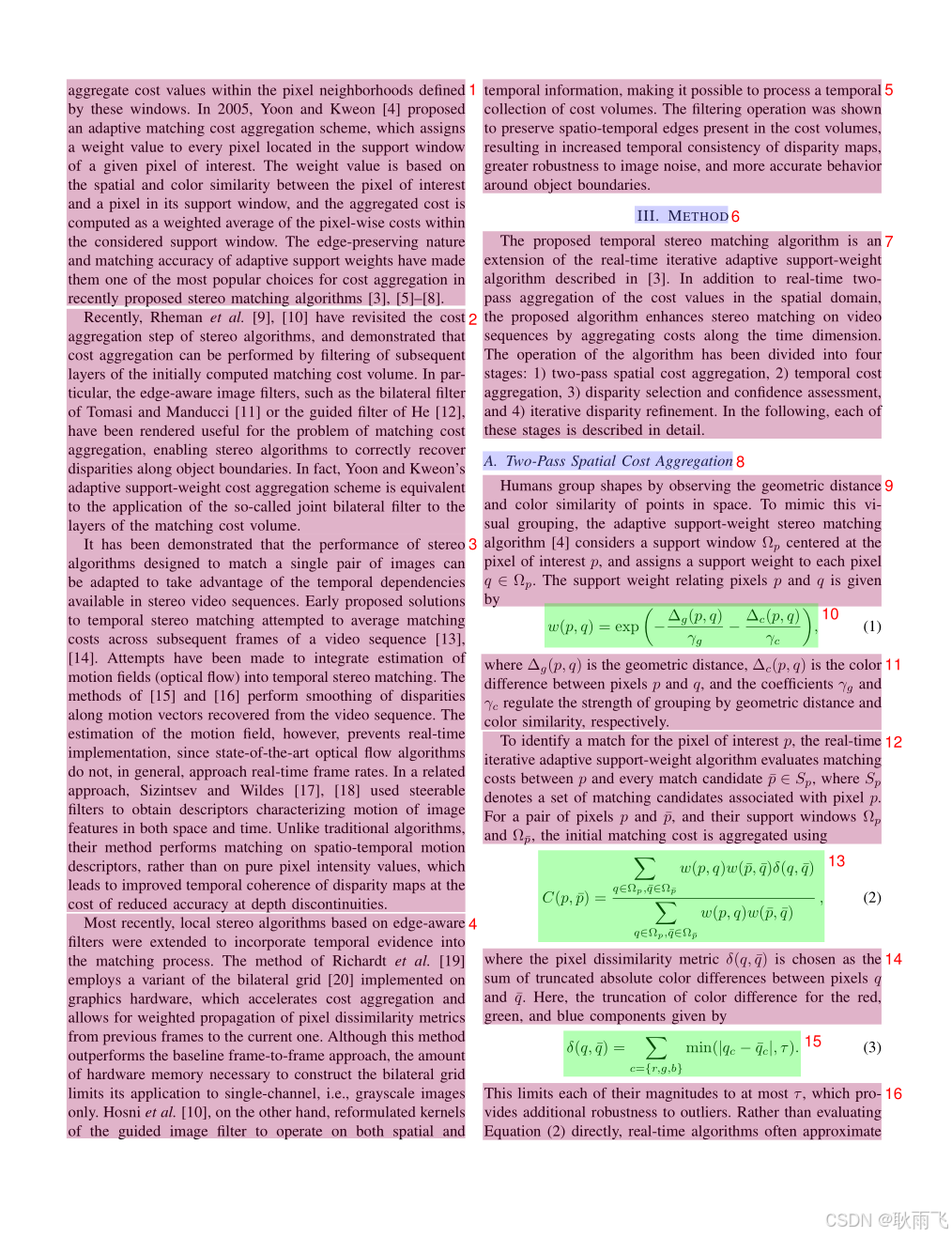
布局分析文件 (layout.pdf)
文件命名格式 :{原文件名}_layout.pdf
功能说明:
- 可视化展示每一页的布局分析结果
- 每个检测框右上角的数字表示阅读顺序
- 使用不同背景色块区分不同类型的内容块
使用场景:
- 检查布局分析是否正确
- 确认阅读顺序是否合理
- 调试布局相关问题
文本片段文件 (spans.pdf)
Note
仅适用于 pipeline 后端
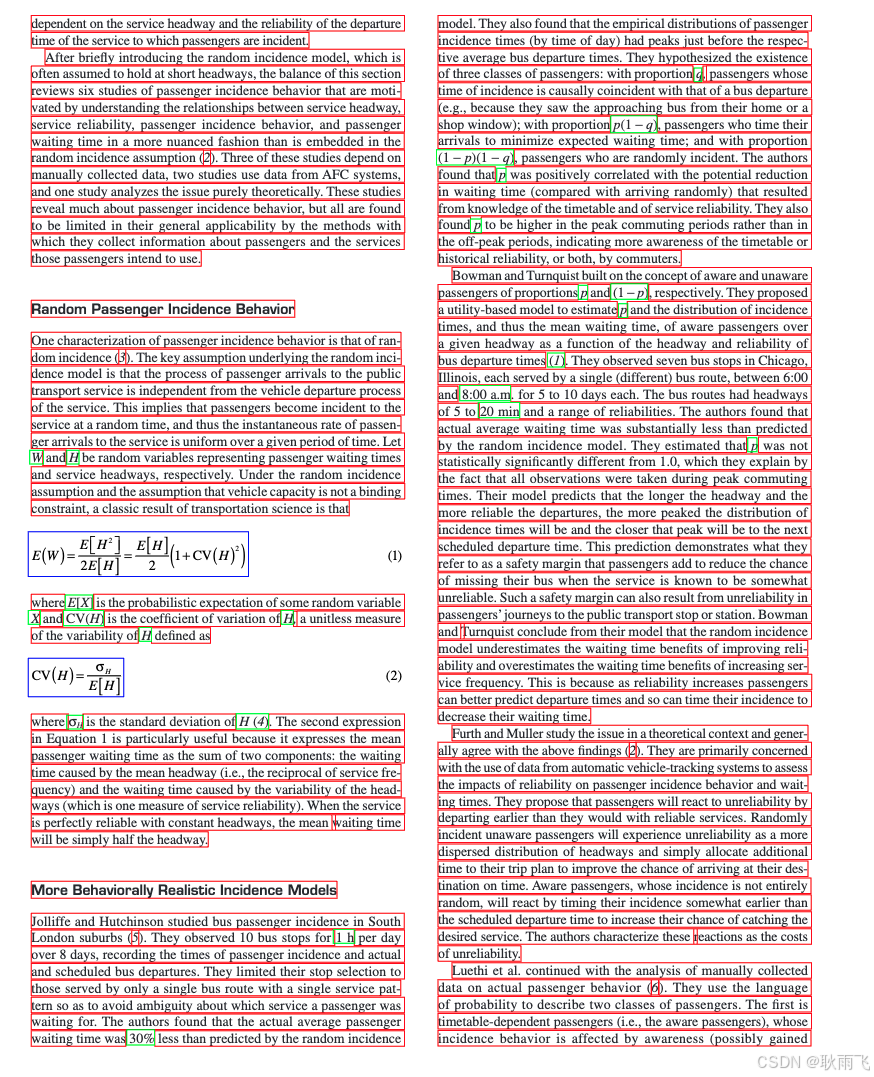
文件命名格式 :{原文件名}_spans.pdf
功能说明:
- 根据 span 类型使用不同颜色线框标注页面内容
- 用于质量检查和问题排查
使用场景:
- 快速排查文本丢失问题
- 检查行内公式识别情况
- 验证文本分割准确性
结构化数据文件
Important
2.5版本vlm后端的输出存在较大变化,与pipeline版本存在不兼容情况,如需基于结构化输出进行二次开发,请仔细阅读本文档内容。
pipeline 后端 输出结果
模型推理结果 (model.json)
文件命名格式 :{原文件名}_model.json
数据结构定义
from pydantic import BaseModel, Field
from enum import IntEnum

class CategoryType(IntEnum):
    """内容类别枚举"""
    title = 0               # 标题
    plain_text = 1          # 文本
    abandon = 2             # 包括页眉页脚页码和页面注释
    figure = 3              # 图片
    figure_caption = 4      # 图片描述
    table = 5               # 表格
    table_caption = 6       # 表格描述
    table_footnote = 7      # 表格注释
    isolate_formula = 8     # 行间公式
    formula_caption = 9     # 行间公式的标号
    embedding = 13          # 行内公式
    isolated = 14           # 行间公式
    text = 15               # OCR 识别结果

class PageInfo(BaseModel):
    """页面信息"""
    page_no: int = Field(description="页码序号,第一页的序号是 0", ge=0)
    height: int = Field(description="页面高度", gt=0)
    width: int = Field(description="页面宽度", ge=0)

class ObjectInferenceResult(BaseModel):
    """对象识别结果"""
    category_id: CategoryType = Field(description="类别", ge=0)
    poly: list[float] = Field(description="四边形坐标,格式为 [x0,y0,x1,y1,x2,y2,x3,y3]")
    score: float = Field(description="推理结果的置信度")
    latex: str | None = Field(description="LaTeX 解析结果", default=None)
    html: str | None = Field(description="HTML 解析结果", default=None)

class PageInferenceResults(BaseModel):
    """页面推理结果"""
    layout_dets: list[ObjectInferenceResult] = Field(description="页面识别结果")
    page_info: PageInfo = Field(description="页面元信息")

# 完整的推理结果
inference_result: list[PageInferenceResults] = []
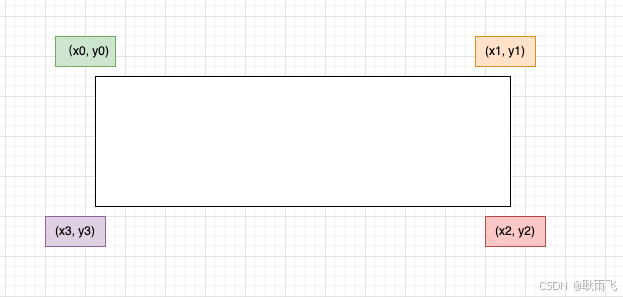
坐标系统说明
poly` 坐标格式:`[x0, y0, x1, y1, x2, y2, x3, y3]- 分别表示左上、右上、右下、左下四点的坐标
- 坐标原点在页面左上角
示例数据
[
    {
        "layout_dets": [
            {
                "category_id": 2,
                "poly": [
                    99.1906967163086,
                    100.3119125366211,
                    730.3707885742188,
                    100.3119125366211,
                    730.3707885742188,
                    245.81326293945312,
                    99.1906967163086,
                    245.81326293945312
                ],
                "score": 0.9999997615814209
            }
        ],
        "page_info": {
            "page_no": 0,
            "height": 2339,
            "width": 1654
        }
    },
    {
        "layout_dets": [
            {
                "category_id": 5,
                "poly": [
                    99.13092803955078,
                    2210.680419921875,
                    497.3183898925781,
                    2210.680419921875,
                    497.3183898925781,
                    2264.78076171875,
                    99.13092803955078,
                    2264.78076171875
                ],
                "score": 0.9999997019767761
            }
        ],
        "page_info": {
            "page_no": 1,
            "height": 2339,
            "width": 1654
        }
    }
]
中间处理结果 (middle.json)
文件命名格式 :{原文件名}_middle.json
顶层结构
| 字段名 | 类型 | 说明 |
|---|---|---|
pdf_info |
list[dict] |
每一页的解析结果数组 |
_backend |
string |
解析模式:pipeline 或 vlm |
_version_name |
string |
MinerU 版本号 |
页面信息结构 (PDF_INFO)
| 字段名 | 说明 |
|---|---|
preproc_blocks |
PDF 预处理后的未分段中间结果 |
page_idx |
页码,从 0 开始 |
page_size |
页面的宽度和高度 [width, height] |
images |
图片块信息列表 |
tables |
表格块信息列表 |
interline_equations |
行间公式块信息列表 |
discarded_blocks |
需要丢弃的块信息 |
para_blocks |
分段后的内容块结果 |
块结构层次
一级块 (table | image)
└── 二级块
    └── 行 (line)
        └── 片段 (span)
一级块字段
| 字段名 | 说明 |
|---|---|
type |
块类型:table 或 image |
bbox |
块的矩形框坐标 [x0, y0, x1, y1] |
blocks |
包含的二级块列表 |
二级块字段
| 字段名 | 说明 |
|---|---|
type |
块类型(详见下表) |
bbox |
块的矩形框坐标 |
lines |
包含的行信息列表 |
二级块类型
| 类型 | 说明 |
|---|---|
image_body |
图像本体 |
image_caption |
图像描述文本 |
image_footnote |
图像脚注 |
table_body |
表格本体 |
table_caption |
表格描述文本 |
table_footnote |
表格脚注 |
text |
文本块 |
title |
标题块 |
index |
目录块 |
list |
列表块 |
interline_equation |
行间公式块 |
行和片段结构
行 (line) 字段 : - bbox:行的矩形框坐标 - spans:包含的片段列表
片段 (span) 字段 : - bbox:片段的矩形框坐标 - type:片段类型(image、table、text、inline_equation、interline_equation) - content | img_path:文本内容或图片路径
示例数据
{
    "pdf_info": [
        {
            "preproc_blocks": [
                {
                    "type": "text",
                    "bbox": [
                        52,
                        61.956024169921875,
                        294,
                        82.99800872802734
                    ],
                    "lines": [
                        {
                            "bbox": [
                                52,
                                61.956024169921875,
                                294,
                                72.0000228881836
                            ],
                            "spans": [
                                {
                                    "bbox": [
                                        54.0,
                                        61.956024169921875,
                                        296.2261657714844,
                                        72.0000228881836
                                    ],
                                    "content": "dependent on the service headway and the reliability of the departure ",
                                    "type": "text",
                                    "score": 1.0
                                }
                            ]
                        }
                    ]
                }
            ],
            "layout_bboxes": [
                {
                    "layout_bbox": [
                        52,
                        61,
                        294,
                        731
                    ],
                    "layout_label": "V",
                    "sub_layout": []
                }
            ],
            "page_idx": 0,
            "page_size": [
                612.0,
                792.0
            ],
            "_layout_tree": [],
            "images": [],
            "tables": [],
            "interline_equations": [],
            "discarded_blocks": [],
            "para_blocks": [
                {
                    "type": "text",
                    "bbox": [
                        52,
                        61.956024169921875,
                        294,
                        82.99800872802734
                    ],
                    "lines": [
                        {
                            "bbox": [
                                52,
                                61.956024169921875,
                                294,
                                72.0000228881836
                            ],
                            "spans": [
                                {
                                    "bbox": [
                                        54.0,
                                        61.956024169921875,
                                        296.2261657714844,
                                        72.0000228881836
                                    ],
                                    "content": "dependent on the service headway and the reliability of the departure ",
                                    "type": "text",
                                    "score": 1.0
                                }
                            ]
                        }
                    ]
                }
            ]
        }
    ],
    "_backend": "pipeline",
    "_version_name": "0.6.1"
}
内容列表 (content_list.json)
文件命名格式 :{原文件名}_content_list.json
功能说明
这是一个简化版的 middle.json,按阅读顺序平铺存储所有可读内容块,去除了复杂的布局信息,便于后续处理。
内容类型
| 类型 | 说明 |
|---|---|
image |
图片 |
table |
表格 |
text |
文本/标题 |
equation |
行间公式 |
文本层级标识
通过 text_level 字段区分文本层级:
- 无
text_level或text_level: 0:正文文本 text_level: 1:一级标题text_level: 2:二级标题- 以此类推...
通用字段
- 所有内容块都包含
page_idx字段,表示所在页码(从 0 开始)。 - 所有内容块都包含
bbox字段,表示内容块的边界框坐标[x0, y0, x1, y1]映射在0-1000范围内的结果。
示例数据
[
        {
        "type": "text",
        "text": "The response of flow duration curves to afforestation ",
        "text_level": 1,
        "bbox": [
            62,
            480,
            946,
            904
        ],
        "page_idx": 0
    },
    {
        "type": "image",
        "img_path": "images/a8ecda1c69b27e4f79fce1589175a9d721cbdc1cf78b4cc06a015f3746f6b9d8.jpg",
        "image_caption": [
            "Fig. 1. Annual flow duration curves of daily flows from Pine Creek, Australia, 1989--2000. "
        ],
        "image_footnote": [],
        "bbox": [
            62,
            480,
            946,
            904
        ],
        "page_idx": 1
    },
    {
        "type": "equation",
        "img_path": "images/181ea56ef185060d04bf4e274685f3e072e922e7b839f093d482c29bf89b71e8.jpg",
        "text": "$$\nQ _ { \\% } = f ( P ) + g ( T )\n$$",
        "text_format": "latex",
        "bbox": [
            62,
            480,
            946,
            904
        ],
        "page_idx": 2
    },
    {
        "type": "table",
        "img_path": "images/e3cb413394a475e555807ffdad913435940ec637873d673ee1b039e3bc3496d0.jpg",
        "table_caption": [
            "Table 2 Significance of the rainfall and time terms "
        ],
        "table_footnote": [
            "indicates that the rainfall term was significant at the $5 \\%$ level, $T$ indicates that the time term was significant at the $5 \\%$ level, \\* represents significance at the $10 \\%$ level, and na denotes too few data points for meaningful analysis. "
        ],
        "table_body": "<html><body><table><tr><td rowspan=\"2\">Site</td><td colspan=\"10\">Percentile</td></tr><tr><td>10</td><td>20</td><td>30</td><td>40</td><td>50</td><td>60</td><td>70</td><td>80</td><td>90</td><td>100</td></tr><tr><td>Traralgon Ck</td><td>P</td><td>P,*</td><td>P</td><td>P</td><td>P,</td><td>P,</td><td>P,</td><td>P,</td><td>P</td><td>P</td></tr><tr><td>Redhill</td><td>P,T</td><td>P,T</td><td>,*</td><td>**</td><td>P.T</td><td>P,*</td><td>P*</td><td>P*</td><td>*</td><td>,*</td></tr><tr><td>Pine Ck</td><td></td><td>P,T</td><td>P,T</td><td>P,T</td><td>P,T</td><td>T</td><td>T</td><td>T</td><td>na</td><td>na</td></tr><tr><td>Stewarts Ck 5</td><td>P,T</td><td>P,T</td><td>P,T</td><td>P,T</td><td>P.T</td><td>P.T</td><td>P,T</td><td>na</td><td>na</td><td>na</td></tr><tr><td>Glendhu 2</td><td>P</td><td>P,T</td><td>P,*</td><td>P,T</td><td>P.T</td><td>P,ns</td><td>P,T</td><td>P,T</td><td>P,T</td><td>P,T</td></tr><tr><td>Cathedral Peak 2</td><td>P,T</td><td>P,T</td><td>P,T</td><td>P,T</td><td>P,T</td><td>*,T</td><td>P,T</td><td>P,T</td><td>P,T</td><td>T</td></tr><tr><td>Cathedral Peak 3</td><td>P.T</td><td>P.T</td><td>P,T</td><td>P,T</td><td>P,T</td><td>T</td><td>P,T</td><td>P,T</td><td>P,T</td><td>T</td></tr><tr><td>Lambrechtsbos A</td><td>P,T</td><td>P</td><td>P</td><td>P,T</td><td>*,T</td><td>*,T</td><td>*,T</td><td>*,T</td><td>*,T</td><td>T</td></tr><tr><td>Lambrechtsbos B</td><td>P,T</td><td>P,T</td><td>P,T</td><td>P,T</td><td>P,T</td><td>P,T</td><td>P,T</td><td>P,T</td><td>T</td><td>T</td></tr><tr><td>Biesievlei</td><td>P,T</td><td>P.T</td><td>P,T</td><td>P,T</td><td>*,T</td><td>*,T</td><td>T</td><td>T</td><td>P,T</td><td>P,T</td></tr></table></body></html>",
        "bbox": [
            62,
            480,
            946,
            904
        ],
        "page_idx": 5
    }
]
VLM 后端 输出结果
模型推理结果 (model.json)
文件命名格式 :{原文件名}_model.json
文件格式说明
- 该文件为 VLM 模型的原始输出结果,包含两层嵌套list,外层表示页面,内层表示该页的内容块
- 每个内容块都是一个dict,包含
type、bbox、angle、content字段
支持的内容类型
{
    "text": "文本",
    "title": "标题",
    "equation": "行间公式",
    "image": "图片",
    "image_caption": "图片描述",
    "image_footnote": "图片脚注",
    "table": "表格",
    "table_caption": "表格描述",
    "table_footnote": "表格脚注",
    "phonetic": "拼音",
    "code": "代码块",
    "code_caption": "代码描述",
    "ref_text": "参考文献",
    "algorithm": "算法块",
    "list": "列表",
    "header": "页眉",
    "footer": "页脚",
    "page_number": "页码",
    "aside_text": "装订线旁注",
    "page_footnote": "页面脚注"
}
坐标系统说明
bbox` 坐标格式:`[x0, y0, x1, y1]- 分别表示左上、右下两点的坐标
- 坐标原点在页面左上角
- 坐标为相对于原始页面尺寸的百分比,范围在0-1之间
示例数据
[
    [
        {
            "type": "header",
            "bbox": [
                0.077,
                0.095,
                0.18,
                0.181
            ],
            "angle": 0,
            "score": null,
            "block_tags": null,
            "content": "ELSEVIER",
            "format": null,
            "content_tags": null
        },
        {
            "type": "title",
            "bbox": [
                0.157,
                0.228,
                0.833,
                0.253
            ],
            "angle": 0,
            "score": null,
            "block_tags": null,
            "content": "The response of flow duration curves to afforestation",
            "format": null,
            "content_tags": null
        }
    ]
]
中间处理结果 (middle.json)
文件命名格式 :{原文件名}_middle.json
文件格式说明
vlm 后端的 middle.json 文件结构与 pipeline 后端类似,但存在以下差异:
- list变成二级block,增加
sub_type字段区分list类型:text(文本类型)ref_text(引用类型)
- 增加code类型block,code类型包含两种"sub_type":
- 分别是
code和algorithm - 至少有
code_body, 可选code_caption
- 分别是
discarded_blocks内元素type增加以下类型:header(页眉)footer(页脚)page_number(页码)aside_text(装订线文本)page_footnote(脚注)
- 所有block增加
angle字段,用来表示旋转角度,0,90,180,270
示例数据
-
list block 示例
{ "bbox": [ 174, 155, 818, 333 ], "type": "list", "angle": 0, "index": 11, "blocks": [ { "bbox": [ 174, 157, 311, 175 ], "type": "text", "angle": 0, "lines": [ { "bbox": [ 174, 157, 311, 175 ], "spans": [ { "bbox": [ 174, 157, 311, 175 ], "type": "text", "content": "H.1 Introduction" } ] } ], "index": 3 }, { "bbox": [ 175, 182, 464, 229 ], "type": "text", "angle": 0, "lines": [ { "bbox": [ 175, 182, 464, 229 ], "spans": [ { "bbox": [ 175, 182, 464, 229 ], "type": "text", "content": "H.2 Example: Divide by Zero without Exception Handling" } ] } ], "index": 4 } ], "sub_type": "text" } -
code block 示例
{
    "type": "code",
    "bbox": [
        114,
        780,
        885,
        1231
    ],
    "blocks": [
        {
            "bbox": [
                114,
                780,
                885,
                1231
            ],
            "lines": [
                {
                    "bbox": [
                        114,
                        780,
                        885,
                        1231
                    ],
                    "spans": [
                        {
                            "bbox": [
                                114,
                                780,
                                885,
                                1231
                            ],
                            "type": "text",
                            "content": "1 // Fig. H.1: DivideByZeroNoExceptionHandling.java  \n2 // Integer division without exception handling.  \n3 import java.util.Scanner;  \n4  \n5 public class DivideByZeroNoExceptionHandling  \n6 {  \n7 // demonstrates throwing an exception when a divide-by-zero occurs  \n8 public static int quotient( int numerator, int denominator )  \n9 {  \n10 return numerator / denominator; // possible division by zero  \n11 } // end method quotient  \n12  \n13 public static void main(String[] args)  \n14 {  \n15 Scanner scanner = new Scanner(System.in); // scanner for input  \n16  \n17 System.out.print(\"Please enter an integer numerator: \");  \n18 int numerator = scanner.nextInt();  \n19 System.out.print(\"Please enter an integer denominator: \");  \n20 int denominator = scanner.nextInt();  \n21"
                        }
                    ]
                }
            ],
            "index": 17,
            "angle": 0,
            "type": "code_body"
        },
        {
            "bbox": [
                867,
                160,
                1280,
                189
            ],
            "lines": [
                {
                    "bbox": [
                        867,
                        160,
                        1280,
                        189
                    ],
                    "spans": [
                        {
                            "bbox": [
                                867,
                                160,
                                1280,
                                189
                            ],
                            "type": "text",
                            "content": "Algorithm 1 Modules for MCTSteg"
                        }
                    ]
                }
            ],
            "index": 19,
            "angle": 0,
            "type": "code_caption"
        }
    ],
    "index": 17,
    "sub_type": "code"
}
内容列表 (content_list.json)
文件命名格式 :{原文件名}_content_list.json
文件格式说明
vlm 后端的 content_list.json 文件结构与 pipeline 后端类似,伴随本次middle.json的变化,做了以下调整:
- 新增
code类型,code类型包含两种"sub_type":- 分别是
code和algorithm - 至少有
code_body, 可选code_caption
- 分别是
- 新增
list类型,list类型包含两种"sub_type":textref_text
- 增加所有所有
discarded_blocks的输出内容headerfooterpage_numberaside_textpage_footnote
示例数据
-
code 类型 content
{ "type": "code", "sub_type": "algorithm", "code_caption": [ "Algorithm 1 Modules for MCTSteg" ], "code_body": "1: function GETCOORDINATE(d) \n2: $x \\gets d / l$ , $y \\gets d$ mod $l$ \n3: return $(x, y)$ \n4: end function \n5: function BESTCHILD(v) \n6: $C \\gets$ child set of $v$ \n7: $v' \\gets \\arg \\max_{c \\in C} \\mathrm{UCTScore}(c)$ \n8: $v'.n \\gets v'.n + 1$ \n9: return $v'$ \n10: end function \n11: function BACK PROPAGATE(v) \n12: Calculate $R$ using Equation 11 \n13: while $v$ is not a root node do \n14: $v.r \\gets v.r + R$ , $v \\gets v.p$ \n15: end while \n16: end function \n17: function RANDOMSEARCH(v) \n18: while $v$ is not a leaf node do \n19: Randomly select an untried action $a \\in A(v)$ \n20: Create a new node $v'$ \n21: $(x, y) \\gets \\mathrm{GETCOORDINATE}(v'.d)$ \n22: $v'.p \\gets v$ , $v'.d \\gets v.d + 1$ , $v'.\\Gamma \\gets v.\\Gamma$ \n23: $v'.\\gamma_{x,y} \\gets a$ \n24: if $a = -1$ then \n25: $v.lc \\gets v'$ \n26: else if $a = 0$ then \n27: $v.mc \\gets v'$ \n28: else \n29: $v.rc \\gets v'$ \n30: end if \n31: $v \\gets v'$ \n32: end while \n33: return $v$ \n34: end function \n35: function SEARCH(v) \n36: while $v$ is fully expanded do \n37: $v \\gets$ BESTCHILD(v) \n38: end while \n39: if $v$ is not a leaf node then \n40: $v \\gets$ RANDOMSEARCH(v) \n41: end if \n42: return $v$ \n43: end function", "bbox": [ 510, 87, 881, 740 ], "page_idx": 0 } -
list 类型 content
{ "type": "list", "sub_type": "text", "list_items": [ "H.1 Introduction", "H.2 Example: Divide by Zero without Exception Handling", "H.3 Example: Divide by Zero with Exception Handling", "H.4 Summary" ], "bbox": [ 174, 155, 818, 333 ], "page_idx": 0 } -
discarded 类型 content
[{
    "type": "header",
    "text": "Journal of Hydrology 310 (2005) 253-265",
    "bbox": [
        363,
        164,
        623,
        177
    ],
    "page_idx": 0
},
{
    "type": "page_footnote",
    "text": "* Corresponding author. Address: Forest Science Centre, Department of Sustainability and Environment, P.O. Box 137, Heidelberg, Vic. 3084, Australia. Tel.: +61 3 9450 8719; fax: +61 3 9450 8644.",
    "bbox": [
        71,
        815,
        915,
        841
    ],
    "page_idx": 0
}]
总结
以上文件为 MinerU 的完整输出结果,用户可根据需要选择合适的文件进行后续处理:
- 模型输出 (使用原始输出):
- model.json
- 调试和验证 (使用可视化文件):
- layout.pdf
- spans.pdf
- 内容提取 (使用简化文件):
- *.md
- content_list.json
- 二次开发 (使用结构化文件):
- middle.json