打开输入文件并进行基本的信息探测
cpp
 // 1. 打开输入文件
    if ((ret = avformat_open_input(&fmt_ctx, argv[1], NULL, NULL)) < 0) {
        fprintf(stderr, "Could not open input file: %s\n", av_err2str(ret));
        return 1;
    }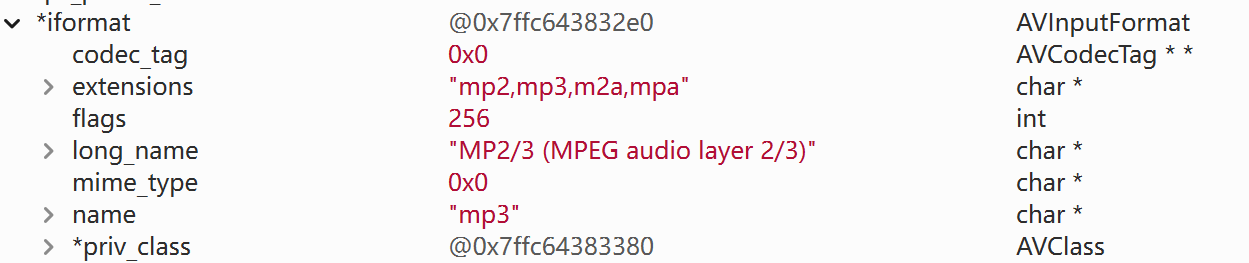
可以看到进行了基本的初始化,并把fmt_ctx进行内存分配
查找对应的音频流信息
cpp
// 2. 查找流信息
    if ((ret = avformat_find_stream_info(fmt_ctx, NULL)) < 0) {
        fprintf(stderr, "Could not find stream information: %s\n", av_err2str(ret));
        avformat_close_input(&fmt_ctx);
        return 1;
    }

    // 3. 查找音频流
    for (int i = 0; i < fmt_ctx->nb_streams; i++) {
        if (fmt_ctx->streams[i]->codecpar->codec_type == AVMEDIA_TYPE_AUDIO) {
            audio_stream_index = i;
            break;
        }
    }

    if (audio_stream_index == -1) {
        fprintf(stderr, "Could not find audio stream\n");
        avformat_close_input(&fmt_ctx);
        return 1;
    }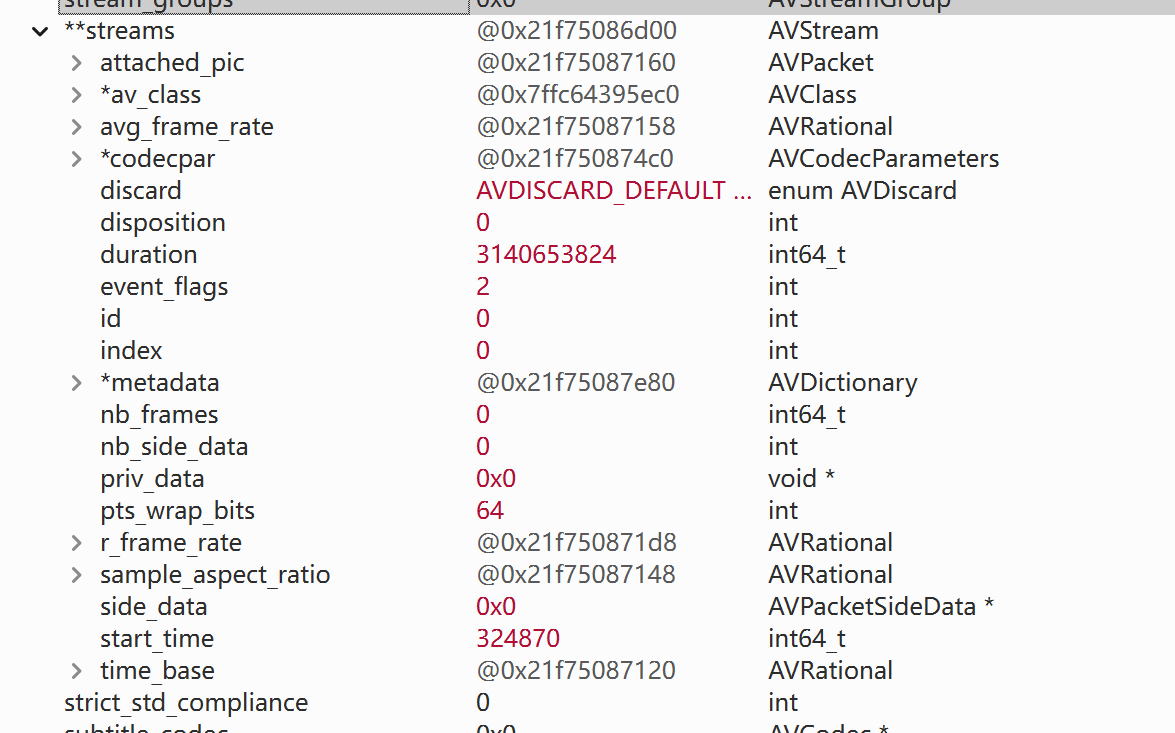
可以看到对应流信息通过avformat_find_stream_info 被放到了fmt_ctx里
然后遍历查找或者 用av_find_best_stream()这个接口进行查找对应的编码器
创建编码器上下文并通过fmt_ctx对应的parameter进行设置参数,然后打开编码器(编码器与上下文进行绑定)
cpp
// 4. 获取解码器
    AVCodecParameters *codecpar = fmt_ctx->streams[audio_stream_index]->codecpar;
    codec = avcodec_find_decoder(codecpar->codec_id);
    if (!codec) {
        fprintf(stderr, "Failed to find codec\n");
        avformat_close_input(&fmt_ctx);
        return 1;
    }

    // 5. 创建解码器上下文
    codec_ctx = avcodec_alloc_context3(codec);
    if (!codec_ctx) {
        fprintf(stderr, "Could not allocate codec context\n");
        avformat_close_input(&fmt_ctx);
        return 1;
    }

    // 6. 复制参数到解码器上下文
    if ((ret = avcodec_parameters_to_context(codec_ctx, codecpar)) < 0) {
        fprintf(stderr, "Failed to copy codec parameters: %s\n", av_err2str(ret));
        avcodec_free_context(&codec_ctx);
        avformat_close_input(&fmt_ctx);
        return 1;
    }

    // 7. 打开解码器
    if ((ret = avcodec_open2(codec_ctx, codec, NULL)) < 0) {
        fprintf(stderr, "Failed to open codec: %s\n", av_err2str(ret));
        avcodec_free_context(&codec_ctx);
        avformat_close_input(&fmt_ctx);
        return 1;
    }
如何理解这里的context上下文这个概念呢? 对于codec 可以理解成一个 算法工具包, 但是光有算法不行啊,还需要有对应 数据 以及 配置(如何进行特定处理) ,所以这个时候就需要有context 来 进行 不同场景的不同 处理配置。
解复用mp3文件,拿到一帧压缩数据,再发给解码器,进行解码,然后取出数据进行存储
cpp
while (av_read_frame(fmt_ctx, pkt) >= 0) {
        // 只处理音频流
        if (pkt->stream_index == audio_stream_index) {
            // 发送包到解码器
            ret = avcodec_send_packet(codec_ctx, pkt);
            if (ret < 0) {
                fprintf(stderr, "Error sending packet: %s\n", av_err2str(ret));
                break;
            }

            // 接收所有可用的帧
            while (ret >= 0) {
                ret = avcodec_receive_frame(codec_ctx, frame);
                // 这里代表的是 EAGAGIN --- 数据不够进行解码,还需要更多的数据,AVERROR_EOF读到文件末尾了
                if (ret == AVERROR(EAGAIN) || ret == AVERROR_EOF) {
                    break;
                } else if (ret < 0) {
                    fprintf(stderr, "Error receiving frame: %s\n", av_err2str(ret));
                    break;
                }

                // 计算PCM数据大小
                int data_size = av_get_bytes_per_sample(codec_ctx->sample_fmt);
                if (data_size <= 0) {
                    fprintf(stderr, "Invalid data size\n");
                    continue;
                }

                // 写入PCM数据
                if (av_sample_fmt_is_planar(codec_ctx->sample_fmt)) {
                    // 平面格式
                    for (int i = 0; i < frame->nb_samples; i++) {
                        for (int ch = 0; ch < codec_ctx->ch_layout.nb_channels; ch++) {
                            fwrite(frame->data[ch] + data_size * i, 1, data_size, outfile);
                        }
                    }
                } else {
                    // 交错格式
                    int unpadded_linesize = frame->nb_samples * data_size * codec_ctx->ch_layout.nb_channels;
                    fwrite(frame->data[0], 1, unpadded_linesize, outfile);
                }

                av_frame_unref(frame);
            }
        }
        av_packet_unref(pkt);
    }
这里讲一下什么是平面格式,以及 什么是交错格式,以及PCM数据在文件中是存储的
L代表左声道的一个采样点数据
R代表右声道的一个采样点数据
平面格式:
data0 = L0 L1 L2 L3
data1 = R0 R1 R2 R3
交错格式:
data0= L0 R0 L1 R1 L2 R2 L3 R3
一句话总结 平面格式就是把不同声道的数据分开存储
交错格式就是把不同声道数据放在一起存储
对于文件中一般都是以交错格式存储
即文件中L0 R0 L1 R1 L2 R2 L3 R3
然后如果要播放PCM数据可以使用Audacity
注意一定要选对 采样格式 采样率 等参数 不然会大概率是杂音
因为PCM格式存储的数据,没有对应的参数,无法进行解析,需要手动进行解析
完整代码
cpp
#include <stdio.h>
#include <stdlib.h>
#include <libavformat/avformat.h>
#include <libavcodec/avcodec.h>
#include <libavutil/opt.h>
#include <libavutil/channel_layout.h>
#include <libavutil/samplefmt.h>

int main(int argc, char *argv[]) {
    AVFormatContext *fmt_ctx = NULL;
    AVCodecContext *codec_ctx = NULL;
    const AVCodec *codec = NULL;
    AVPacket *pkt = NULL;
    AVFrame *frame = NULL;
    FILE *outfile = NULL;
    int audio_stream_index = -1;
    int ret;

    if (argc != 3) {
        fprintf(stderr, "Usage: %s <input.mp3> <output.pcm>\n", argv[0]);
        return 1;
    }

    // 1. 打开输入文件
    if ((ret = avformat_open_input(&fmt_ctx, argv[1], NULL, NULL)) < 0) {
        fprintf(stderr, "Could not open input file: %s\n", av_err2str(ret));
        return 1;
    }

    // 2. 查找流信息
    if ((ret = avformat_find_stream_info(fmt_ctx, NULL)) < 0) {
        fprintf(stderr, "Could not find stream information: %s\n", av_err2str(ret));
        avformat_close_input(&fmt_ctx);
        return 1;
    }

    // 3. 查找音频流
    for (int i = 0; i < fmt_ctx->nb_streams; i++) {
        if (fmt_ctx->streams[i]->codecpar->codec_type == AVMEDIA_TYPE_AUDIO) {
            audio_stream_index = i;
            break;
        }
    }

    if (audio_stream_index == -1) {
        fprintf(stderr, "Could not find audio stream\n");
        avformat_close_input(&fmt_ctx);
        return 1;
    }

    // 4. 获取解码器
    AVCodecParameters *codecpar = fmt_ctx->streams[audio_stream_index]->codecpar;
    codec = avcodec_find_decoder(codecpar->codec_id);
    if (!codec) {
        fprintf(stderr, "Failed to find codec\n");
        avformat_close_input(&fmt_ctx);
        return 1;
    }

    // 5. 创建解码器上下文
    codec_ctx = avcodec_alloc_context3(codec);
    if (!codec_ctx) {
        fprintf(stderr, "Could not allocate codec context\n");
        avformat_close_input(&fmt_ctx);
        return 1;
    }

    // 6. 复制参数到解码器上下文
    if ((ret = avcodec_parameters_to_context(codec_ctx, codecpar)) < 0) {
        fprintf(stderr, "Failed to copy codec parameters: %s\n", av_err2str(ret));
        avcodec_free_context(&codec_ctx);
        avformat_close_input(&fmt_ctx);
        return 1;
    }

    // 7. 打开解码器
    if ((ret = avcodec_open2(codec_ctx, codec, NULL)) < 0) {
        fprintf(stderr, "Failed to open codec: %s\n", av_err2str(ret));
        avcodec_free_context(&codec_ctx);
        avformat_close_input(&fmt_ctx);
        return 1;
    }
    fprintf(stderr, "Decoder output sample format: %s\n", av_get_sample_fmt_name(codec_ctx->sample_fmt));
    // 8. 打开输出文件
    outfile = fopen(argv[2], "wb");
    if (!outfile) {
        fprintf(stderr, "Could not open output file\n");
        avcodec_free_context(&codec_ctx);
        avformat_close_input(&fmt_ctx);
        return 1;
    }

    // 9. 分配帧和包
    pkt = av_packet_alloc();
    frame = av_frame_alloc();
    if (!pkt || !frame) {
        fprintf(stderr, "Failed to allocate packet or frame\n");
        goto cleanup;
    }

    fprintf(stderr, "Codec: %s, sample_fmt: %s, channels: %d, sample_rate: %d\n",
            codec->name,
            av_get_sample_fmt_name(codec_ctx->sample_fmt),
            codec_ctx->ch_layout.nb_channels,
            codec_ctx->sample_rate);

    // 10. 读取并解码所有帧
    while (av_read_frame(fmt_ctx, pkt) >= 0) {
        // 只处理音频流
        if (pkt->stream_index == audio_stream_index) {
            // 发送包到解码器
            ret = avcodec_send_packet(codec_ctx, pkt);
            if (ret < 0) {
                fprintf(stderr, "Error sending packet: %s\n", av_err2str(ret));
                break;
            }

            // 接收所有可用的帧
            while (ret >= 0) {
                ret = avcodec_receive_frame(codec_ctx, frame);
                if (ret == AVERROR(EAGAIN) || ret == AVERROR_EOF) {
                    break;
                } else if (ret < 0) {
                    fprintf(stderr, "Error receiving frame: %s\n", av_err2str(ret));
                    break;
                }

                // 计算PCM数据大小
                int data_size = av_get_bytes_per_sample(codec_ctx->sample_fmt);
                if (data_size <= 0) {
                    fprintf(stderr, "Invalid data size\n");
                    continue;
                }

                // 写入PCM数据
                if (av_sample_fmt_is_planar(codec_ctx->sample_fmt)) {
                    // 平面格式
                    for (int i = 0; i < frame->nb_samples; i++) {
                        for (int ch = 0; ch < codec_ctx->ch_layout.nb_channels; ch++) {
                            fwrite(frame->data[ch] + data_size * i, 1, data_size, outfile);
                        }
                    }
                } else {
                    // 交错格式
                    int unpadded_linesize = frame->nb_samples * data_size * codec_ctx->ch_layout.nb_channels;
                    fwrite(frame->data[0], 1, unpadded_linesize, outfile);
                }

                av_frame_unref(frame);
            }
        }
        av_packet_unref(pkt);
    }

    // 11. 冲刷解码器
    pkt->data = NULL;
    pkt->size = 0;
    avcodec_send_packet(codec_ctx, pkt);

    while (1) {
        ret = avcodec_receive_frame(codec_ctx, frame);
        if (ret == AVERROR_EOF) {
            break;
        } else if (ret < 0) {
            fprintf(stderr, "Error receiving frame during flush: %s\n", av_err2str(ret));
            break;
        }

        // 写入剩余帧...
        int data_size = av_get_bytes_per_sample(codec_ctx->sample_fmt);
        if (data_size > 0) {
            if (av_sample_fmt_is_planar(codec_ctx->sample_fmt)) {
                for (int i = 0; i < frame->nb_samples; i++) {
                    for (int ch = 0; ch < codec_ctx->ch_layout.nb_channels; ch++) {
                        fwrite(frame->data[ch] + data_size * i, 1, data_size, outfile);
                    }
                }
            } else {
                int unpadded_linesize = frame->nb_samples * data_size * codec_ctx->ch_layout.nb_channels;
                fwrite(frame->data[0], 1, unpadded_linesize, outfile);
            }
        }
        av_frame_unref(frame);
    }

    fprintf(stderr, "Decoding completed successfully\n");

cleanup:
    if (outfile) fclose(outfile);
    if (frame) av_frame_free(&frame);
    if (pkt) av_packet_free(&pkt);
    if (codec_ctx) avcodec_free_context(&codec_ctx);
    if (fmt_ctx) avformat_close_input(&fmt_ctx);

    return 0;
}