【ESP32-S3-CAM】加载FLASH分区报错
-
- 背景
- 报错信息
- 分区信息简述
- 常用命令
-
- 检查芯片详细信息
- 擦除所有的flash数据
- 读取flashid或者mac地址
- 读取flash中所有的内容
- 读取引导程序区域
- 读取分区表区域
- 读取应用区域
- 验证表区域
- 检查魔数
- 写分区表区域
- 分析flash区内容
- 深度读取flash分区信息
- 手动生成分区表
- [检查 Bootloader 烧录情况](#检查 Bootloader 烧录情况)
背景
板子玩着玩着就突然报错了,看着是和分区相关的,搜索了资料未发现太多,自己先研究研究,记录一下
报错信息
ESP-ROM:esp32s3-20210327
Build:Mar 27 2021
rst:0x3 (RTC_SW_SYS_RST),boot:0x8 (SPI_FAST_FLASH_BOOT)
Saved PC:0x403cce4d
SPIWP:0xee
mode:DIO, clock div:1
load:0x3fce2810,len:0x103c
load:0x403c8700,len:0x4
load:0x403c8704,len:0xaf4
load:0x403cb700,len:0x2e28
entry 0x403c889c
E (31) flash_parts: partition 0 invalid magic number 0x502a
E (32) boot: Failed to verify partition table
E (32) boot: load partition table error!
ESP-ROM:esp32s3-20210327
Build:Mar 27 2021
rst:0x3 (RTC_SW_SYS_RST),boot:0x8 (SPI_FAST_FLASH_BOOT)
Saved PC:0x403cce4d
SPIWP:0xee
分区信息简述
首选项-详细输出信息-选择编译
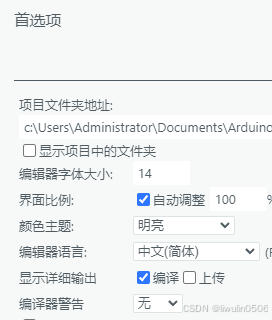
编译上传打印
python
Global variables use 20384 bytes (6%) of dynamic memory, leaving 307296 bytes for local variables. Maximum is 327680 bytes.
esptool.py v4.8.1
Serial port COM3:
Connecting.........
Connected to ESP32-S3 on COM3:
Chip type:          ESP32-S3 (QFN56) (revision v0.2)
Features:           Wi-Fi, BT 5 (LE), Dual Core + LP Core, 240MHz, Embedded PSRAM 8MB (AP_3v3)
Crystal frequency:  40MHz
MAC:                dc:b4:d9:21:cd:6c

Uploading stub flasher...
Running stub flasher...
Stub flasher running.

Configuring flash size...
Flash will be erased from 0x00000000 to 0x00004fff...
Flash will be erased from 0x00008000 to 0x00008fff...
Flash will be erased from 0x0000e000 to 0x0000ffff...
Flash will be erased from 0x00010000 to 0x00056fff...
Compressed 18880 bytes to 12214...

Writing at 0x00000000 [                              ]   0.0% 0/12214 bytes...

Writing at 0x000049c0 [==============================] 100.0% 12214/12214 bytes...
Wrote 18880 bytes (12214 compressed) at 0x00000000 in 1.4 seconds (105.7 kbit/s).
Hash of data verified.
Compressed 3072 bytes to 137...

Writing at 0x00008000 [                              ]   0.0% 0/137 bytes...

Writing at 0x00008c00 [==============================] 100.0% 137/137 bytes...
Wrote 3072 bytes (137 compressed) at 0x00008000 in 0.1 seconds (418.2 kbit/s).
Hash of data verified.
Compressed 8192 bytes to 47...

Writing at 0x0000e000 [                              ]   0.0% 0/47 bytes...

Writing at 0x00010000 [==============================] 100.0% 47/47 bytes...
Wrote 8192 bytes (47 compressed) at 0x0000e000 in 0.1 seconds (736.0 kbit/s).
Hash of data verified.
Compressed 290432 bytes to 154174...

Writing at 0x00010000 [                              ]   0.0% 0/154174 bytes...

Writing at 0x0001b8f4 [==>                           ]  10.6% 16384/154174 bytes...

Writing at 0x00027a3d [=====>                        ]  21.3% 32768/154174 bytes...

Writing at 0x0002d4ff [========>                     ]  31.9% 49152/154174 bytes...

Writing at 0x000335ac [===========>                  ]  42.5% 65536/154174 bytes...

Writing at 0x00038bff [==============>               ]  53.1% 81920/154174 bytes...

Writing at 0x0003e5a5 [==================>           ]  63.8% 98304/154174 bytes...

Writing at 0x00043e59 [=====================>        ]  74.4% 114688/154174 bytes...

Writing at 0x0004d374 [========================>     ]  85.0% 131072/154174 bytes...

Writing at 0x0005456d [===========================>  ]  95.6% 147456/154174 bytes...

Writing at 0x00056e80 [==============================] 100.0% 154174/154174 bytes...
Wrote 290432 bytes (154174 compressed) at 0x00010000 in 14.3 seconds (162.0 kbit/s).
Hash of data verified.
根据擦除范围,计算各个分区的大小:
分区大小计算
- Bootloader 分区
- 范围 :
0x00000000到0x00004fff - 大小 :
0x4fff - 0x0000 + 1 = 0x5000 = 20480 字节 = 20KB
- 分区表分区
- 范围 :
0x00008000到0x00008fff - 大小 :
0x8fff - 0x8000 + 1 = 0x1000 = 4096 字节 = 4KB
- 其他系统分区
- 范围 :
0x0000e000到0x0000ffff - 大小 :
0xffff - 0xe000 + 1 = 0x2000 = 8192 字节 = 8KB - 用途 : 可能是
boot_app0或其他系统数据
- 应用程序分区
- 范围 :
0x00010000到0x00056fff - 大小 :
0x56fff - 0x10000 + 1 = 0x47000 = 290816 字节 ≈ 284KB - 实际程序: 压缩后 12214 字节
布局总结
| 分区名称 | 起始地址 | 结束地址 | 大小 | 用途 |
|---|---|---|---|---|
| Bootloader | 0x00000000 | 0x00004FFF | 20KB | 二级引导程序 |
| (未使用) | 0x00005000 | 0x00007FFF | 12KB | 保留区域 |
| 分区表 | 0x00008000 | 0x00008FFF | 4KB | 分区表数据 |
| (未使用) | 0x00009000 | 0x0000DFFF | 20KB | 保留区域 |
| 系统数据 | 0x0000E000 | 0x0000FFFF | 8KB | boot_app0 等 |
| 应用程序 | 0x00010000 | 0x00056FFF | 284KB | 用户程序 |
| 剩余空间 | 0x00057000 | 0x01000000 | ~15MB | 未分配 |
常用命令
检查芯片详细信息
esptool --chip esp32s3 --port COM3 flash_id
esptool.py v4.10.0
Serial port COM3
Connecting.........
Chip is ESP32-S3 (QFN56) (revision v0.2)
Features: WiFi, BLE, Embedded PSRAM 8MB (AP_3v3)
Crystal is 40MHz
MAC: dc:b4:d9:21:cd:6c
Uploading stub...
Running stub...
Stub running...
Manufacturer: 68
Device: 4018
Detected flash size: 16MB
Flash type set in eFuse: quad (4 data lines)
Flash voltage set by eFuse to 3.3V
Hard resetting via RTS pin...
擦除所有的flash数据
esptool --chip esp32s3 --port COM3 erase_flash
读取flashid或者mac地址
esptool --chip esp32s3 --port COM3 flash_id
esptool --chip esp32s3 --port COM3 read_mac
读取flash中所有的内容
esptool --chip esp32s3 --port COM3 read_flash 0x0 0x20000 full_diagnostic.bin
读取引导程序区域
读取引导程序区内容生成bootloader.bin
esptool --chip esp32s3 --port COM3 read_flash 0x0 0x1000 bootloader.bin
读取分区表区域
读取指定flash区内容生成partitions.bin
esptool --chip esp32s3 --port COM3 read_flash 0x8000 0x1000 partitions.bin
读取应用区域
读取内容生成app.bin
esptool --chip esp32s3 --port COM3 read_flash 0x10000 0x1000 app.bin
验证表区域
验证指定flash区内容生成partitions.bin
esptool --chip esp32s3 --port COM3 verify_flash 0x8000 partitions.bin
检查魔数
先生成验证的bin文件:
esptool.py --chip esp32s3 --port COM3 read_flash 0x8000 0x1000 verify_partitions.bin
然后再检查魔数
python -c "import struct; data=open('verify_partitions.bin','rb').read(); print(f'魔数: 0x{struct.unpack("<H", data0:2)0:04x}')"
写分区表区域
把partitions.bin写进指定flash区
esptool --chip esp32s3 --port COM3 write_flash 0x8000 partitions.bin
以指定模式和频率写入指定分区
esptool --chip esp32s3 --port COM3 write_flash --flash_mode dio --flash_freq 40m --flash_size 16MB 0x8000 fixed_partitions_no_bits.bin
分析flash区内容
python windows_diagnose.py
python
import subprocess
import struct
import os

def run_esptool(cmd_args):
    """运行 esptool 命令"""
    cmd = ["esptool"] + cmd_args
    print(f"执行: {' '.join(cmd)}")
    result = subprocess.run(cmd, capture_output=True, text=True)
    if result.returncode != 0:
        print(f"错误: {result.stderr}")
    else:
        print(f"成功: {result.stdout}")
    return result.returncode

def analyze_flash_windows():
    """Windows 下的完整诊断"""

    print("=== ESP32-S3 Flash 诊断 (Windows) ===\n")

    # 1. 读取 Flash 内容
    print("步骤1: 读取 Flash 内容...")
    if run_esptool(["--chip", "esp32s3", "--port", "COM3", "read_flash", "0x0", "0x20000", "flash_dump.bin"]) != 0:
        print("读取 Flash 失败")
        return

    # 2. 分析文件
    print("\n步骤2: 分析 Flash 内容...")
    with open('flash_dump.bin', 'rb') as f:
        data = f.read()

    print(f"Flash 转储大小: {len(data)} 字节")

    # 搜索分区表魔数
    magic_positions = []
    for i in range(len(data) - 1):
        if data[i] == 0xaa and data[i + 1] == 0x50:
            magic_positions.append(i)

    print(f"\n找到 {len(magic_positions)} 个分区表魔数:")
    for pos in magic_positions:
        print(f"  偏移 0x{pos:08x}: 魔数 0x50aa")

        # 显示分区表前64字节
        start = pos
        end = min(len(data), pos + 64)
        print(f"    数据: {data[start:end].hex()}")

        # 尝试解析分区表
        try:
            if pos + 32 <= len(data):
                name = data[pos+2:pos+18].split(b'\x00')[0].decode('ascii', errors='ignore')
                print(f"    分区名: {name}")
        except:
            pass

    # 检查常见位置
    print("\n常见分区表位置检查:")
    common_offsets = [0x8000, 0x9000, 0x10000]
    for offset in common_offsets:
        if offset + 2 < len(data):
            magic = struct.unpack('<H', data[offset:offset+2])[0]
            status = "✅ 正确" if magic == 0x50aa else "❌ 错误"
            print(f"  偏移 0x{offset:04x}: 魔数 0x{magic:04x} {status}")

def create_simple_partition():
    """创建最简单的分区表"""
    print("\n=== 创建简单的分区表 ===")

    # 最基本的分区表: nvs + factory app
    partitions = [
        ("nvs",      0x01, 0x02, 0x9000,  0x5000),
        ("factory",  0x00, 0x00, 0x10000, 0x100000),
    ]

    data = b''
    data += b'\xaa\x50'  # 魔数
    data += b'\x02\x00'  # 版本
    data += struct.pack('<H', len(partitions))  # 条目数
    data += b'\xfe\xff'  # 保留

    for name, ptype, subtype, offset, size in partitions:
        # 名称 (16字节)
        name_enc = name.encode('ascii').ljust(16, b'\x00')
        data += name_enc

        # 类型和子类型
        data += struct.pack('<BB', ptype, subtype)
        data += b'\x00\x00'  # 保留
        data += struct.pack('<II', offset, size)
        data += b'\x00\x00\x00\x00'  # 标志

    # 填充
    data = data.ljust(0x1000, b'\xff')

    with open('simple_partitions.bin', 'wb') as f:
        f.write(data)

    print("简单分区表创建完成: simple_partitions.bin")

if __name__ == "__main__":
    analyze_flash_windows()
    #create_simple_partition()
    #create_simple_partition()

    print("\n=== 修复建议 ===")
    print("1. 如果找到了正确的魔数位置,使用该偏移地址烧录")
    print("2. 运行: esptool --chip esp32s3 --port COM3 write_flash <偏移> simple_partitions.bin")
    print("3. 常见偏移: 0x8000, 0x9000, 0x10000")
输出
PS F:\迅雷下载\新建文件夹> python windows_diagnose.py
=== ESP32-S3 Flash 诊断 (Windows) ===

步骤1: 读取 Flash 内容...
执行: esptool --chip esp32s3 --port COM3 read_flash 0x0 0x20000 flash_dump.bin
成功: esptool.py v4.10.0
Serial port COM3
Connecting.....
Chip is ESP32-S3 (QFN56) (revision v0.2)
Features: WiFi, BLE, Embedded PSRAM 8MB (AP_3v3)
Crystal is 40MHz
MAC: dc:b4:d9:21:cd:6c
Uploading stub...
Running stub...
Stub running...
Configuring flash size...
131072 (100 %)
131072 (100 %)
Read 131072 bytes at 0x00000000 in 11.6 seconds (90.2 kbit/s)...
Hard resetting via RTS pin...


步骤2: 分析 Flash 内容...
Flash 转储大小: 131072 字节

找到 6 个分区表魔数:
  偏移 0x00001e34: 魔数 0x50aa
    数据: aa500000ebeb00005c1c0040681c0040741c004000500c6068160040ffffffbdffffffc3001403184c400c600c28ce3fa0400c6078180040901800406c180040
    分区名:
  偏移 0x00008000: 魔数 0x50aa
    数据: aa50010200900000005000006e76730000000000000000000000000000000000aa50010000e00000002000006f74616461746100000000000000000000000000
    分区名:
  偏移 0x00008020: 魔数 0x50aa
    数据: aa50010000e00000002000006f74616461746100000000000000000000000000aa50001000000100000030006170703000000000000000000000000000000000
    分区名:
  偏移 0x00008040: 魔数 0x50aa
    数据: aa50001000000100000030006170703000000000000000000000000000000000aa5001820000310000000e007370696666730000000000000000000000000000
    分区名:
  偏移 0x00008060: 魔数 0x50aa
    数据: aa5001820000310000000e007370696666730000000000000000000000000000aa50010300003f0000000100636f726564756d70000000000000000000000000
    分区名:
  偏移 0x00008080: 魔数 0x50aa
    数据: aa50010300003f0000000100636f726564756d70000000000000000000000000ebebffffffffffffffffffffffffffff98f492a471b542a1572d58e33e614dc8
    分区名:

常见分区表位置检查:
  偏移 0x8000: 魔数 0x50aa ✅ 正确
  偏移 0x9000: 魔数 0x6952 ❌ 错误
  偏移 0x10000: 魔数 0x06e9 ❌ 错误

=== 修复建议 ===
1. 如果找到了正确的魔数位置,使用该偏移地址烧录
2. 运行: esptool --chip esp32s3 --port COM3 write_flash <偏移> simple_partitions.bin
3. 常见偏移: 0x8000, 0x9000, 0x10000
深度读取flash分区信息
deep_analyze.py
import subprocess
import struct

def deep_analyze():
    print("=== 深度分析 Flash 内容 ===")

    # 读取整个 bootloader 和分区表区域
    subprocess.run([
        "esptool.py", "--chip", "esp32s3", "--port", "COM3",
        "read_flash", "0x0", "0x20000", "deep_analysis.bin"
    ])

    with open('deep_analysis.bin', 'rb') as f:
        data = f.read()

    print("Flash 内容分析:")

    # 检查关键区域
    key_offsets = [
        (0x0, "Bootloader 开始"),
        (0x7000, "Bootloader 结束"),
        (0x8000, "分区表位置"),
        (0x8000 + 0x2, "分区表魔数"),
        (0x10000, "应用程序开始"),
    ]

    for offset, desc in key_offsets:
        if offset < len(data):
            bytes_data = data[offset:offset+8]
            hex_str = ' '.join(f'{b:02x}' for b in bytes_data)
            print(f"  0x{offset:04x} ({desc}): {hex_str}")

    # 特别检查分区表魔数
    partition_magic = struct.unpack('<H', data[0x8000:0x8002])[0]
    print(f"\n分区表魔数: 0x{partition_magic:04x}")

    # 检查是否整个分区表区域都被正确写入
    print("\n分区表区域数据:")
    for i in range(0, 0x100, 16):
        offset = 0x8000 + i
        if offset + 16 <= len(data):
            hex_str = ' '.join(f'{b:02x}' for b in data[offset:offset+16])
            print(f"  0x{offset:04x}: {hex_str}")

deep_analyze()
输出
PS F:\迅雷下载\新建文件夹> python deep_analyze.py
=== 深度分析 Flash 内容 ===
esptool.py v4.10.0
Serial port COM3
Connecting.....
Chip is ESP32-S3 (QFN56) (revision v0.2)
Features: WiFi, BLE, Embedded PSRAM 8MB (AP_3v3)
Crystal is 40MHz
MAC: dc:b4:d9:21:cd:6c
Uploading stub...
Running stub...
Stub running...
Configuring flash size...
131072 (100 %)
131072 (100 %)
Read 131072 bytes at 0x00000000 in 11.6 seconds (90.2 kbit/s)...
Hard resetting via RTS pin...
Flash 内容分析:
  0x0000 (Bootloader 开始): e9 04 02 4f 9c 88 3c 40
  0x7000 (Bootloader 结束): 65 72 5f 66 73 28 22 2f
  0x8000 (分区表位置): aa 50 01 02 00 90 00 00
  0x8002 (分区表魔数): 01 02 00 90 00 00 00 50
  0x10000 (应用程序开始): e9 06 02 4f d0 65 37 40

分区表魔数: 0x50aa

分区表区域数据:
  0x8000: aa 50 01 02 00 90 00 00 00 50 00 00 6e 76 73 00
  0x8010: 00 00 00 00 00 00 00 00 00 00 00 00 00 00 00 00
  0x8020: aa 50 01 00 00 e0 00 00 00 20 00 00 6f 74 61 64
  0x8030: 61 74 61 00 00 00 00 00 00 00 00 00 00 00 00 00
  0x8040: aa 50 00 10 00 00 01 00 00 00 30 00 61 70 70 30
  0x8050: 00 00 00 00 00 00 00 00 00 00 00 00 00 00 00 00
  0x8060: aa 50 01 82 00 00 31 00 00 00 0e 00 73 70 69 66
  0x8070: 66 73 00 00 00 00 00 00 00 00 00 00 00 00 00 00
  0x8080: aa 50 01 03 00 00 3f 00 00 00 01 00 63 6f 72 65
  0x8090: 64 75 6d 70 00 00 00 00 00 00 00 00 00 00 00 00
  0x80a0: eb eb ff ff ff ff ff ff ff ff ff ff ff ff ff ff
  0x80b0: 98 f4 92 a4 71 b5 42 a1 57 2d 58 e3 3e 61 4d c8
  0x80c0: ff ff ff ff ff ff ff ff ff ff ff ff ff ff ff ff
  0x80d0: ff ff ff ff ff ff ff ff ff ff ff ff ff ff ff ff
  0x80e0: ff ff ff ff ff ff ff ff ff ff ff ff ff ff ff ff
  0x80f0: ff ff ff ff ff ff ff ff ff ff ff ff ff ff ff ff
手动生成分区表
python
import struct

def create_simple_partitions():
    """创建最简单的分区表"""

    # 基本分区表结构
    partitions = [
        # name, type, subtype, offset, size
        ("nvs",      0x01, 0x02, 0x9000,   0x6000),
        ("phy_init", 0x01, 0x01, 0xf000,   0x1000),
        ("factory",  0x00, 0x00, 0x10000,  0x300000),  # 3MB app
        ("spiffs",   0x01, 0x82, 0x310000, 0x100000),  # 1MB SPIFFS
    ]

    data = bytearray()

    # 分区表头
    data.extend(b'\xaa\x50')  # 魔数 - 特别注意字节顺序
    data.extend(b'\x02\x00')  # 版本
    data.extend(struct.pack('<H', len(partitions)))  # 条目数
    data.extend(b'\xfe\xff')  # 保留

    # 分区条目
    for name, ptype, subtype, offset, size in partitions:
        # 名称 (16字节)
        name_enc = name.encode('ascii').ljust(16, b'\x00')
        data.extend(name_enc)

        # 类型和子类型
        data.extend(struct.pack('<BB', ptype, subtype))
        data.extend(b'\x00\x00')  # 保留
        data.extend(struct.pack('<II', offset, size))
        data.extend(b'\x00\x00\x00\x00')  # 标志

    # 填充到 0x1000 字节
    while len(data) < 0x1000:
        data.append(0xff)

    # 验证魔数
    magic = struct.unpack('<H', data[0:2])[0]
    print(f"创建的分区表魔数: 0x{magic:04x}")

    with open('simple_manual_partitions.bin', 'wb') as f:
        f.write(data)

    print("手动创建的分区表已保存: simple_manual_partitions.bin")

create_simple_partitions()
检查 Bootloader 烧录情况
check_bootloader.py
python
import subprocess
import struct

def check_bootloader():
    print("=== 检查 Bootloader 烧录情况 ===")

    # 读取 bootloader 区域
    subprocess.run([
        "esptool.py", "--chip", "esp32s3", "--port", "COM3",
        "read_flash", "0x0", "0x7000", "bootloader_check.bin"
    ])

    with open('bootloader_check.bin', 'rb') as f:
        data = f.read()

    print("Bootloader 区域分析:")

    # 检查前几个字节(应该是跳转指令)
    first_bytes = data[0:16]
    hex_str = ' '.join(f'{b:02x}' for b in first_bytes)
    print(f"前16字节: {hex_str}")

    # 检查是否有有效的 bootloader 签名
    if data[0] == 0xe9 and data[1] == 0x06:  # 典型的 ESP32 bootloader 签名
        print("✅ 检测到有效的 Bootloader")
    else:
        print("❌ Bootloader 可能未正确烧录")

    # 检查分区表区域
    partition_magic = struct.unpack('<H', data[0x8000:0x8002])[0] if len(data) > 0x8002 else 0
    print(f"分区表魔数: 0x{partition_magic:04x}")

check_bootloader()
输出
python
PS F:\迅雷下载\新建文件夹> python .\check_bootloader.py
=== 检查 Bootloader 烧录情况 ===
esptool.py v4.10.0
Serial port COM3
Connecting.....
Chip is ESP32-S3 (QFN56) (revision v0.2)
Features: WiFi, BLE, Embedded PSRAM 8MB (AP_3v3)
Crystal is 40MHz
MAC: dc:b4:d9:21:cd:6c
Uploading stub...
Running stub...
Stub running...
Configuring flash size...
28672 (100 %)
28672 (100 %)
Read 28672 bytes at 0x00000000 in 2.6 seconds (89.1 kbit/s)...
Hard resetting via RTS pin...
Bootloader 区域分析:
前16字节: e9 04 02 4f 9c 88 3c 40 ee 00 00 00 09 00 00 00
❌ Bootloader 可能未正确烧录
分区表魔数: 0x0000