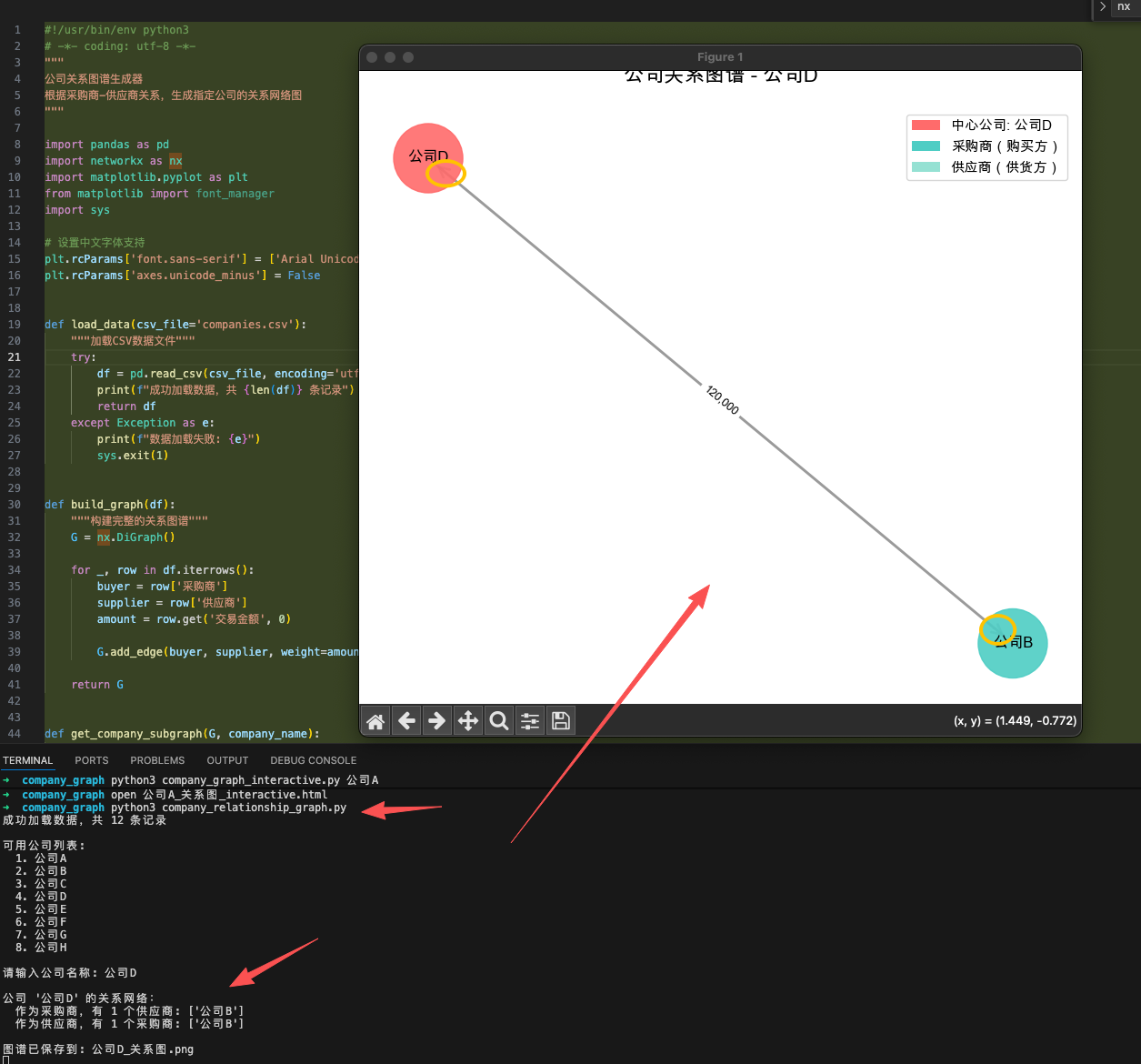
首先吐槽csdn的商业化方向,搞得好多文章都要付费阅读。没想到还真有人开了这类功能。AI pairing programming 不香吗!
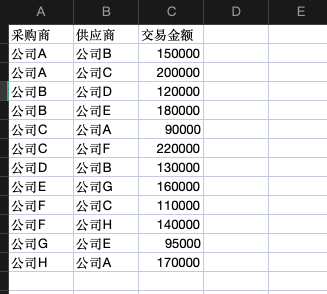
就以上这类关系数据的雏形代码如下,
python
#!/usr/bin/env python3
# -*- coding: utf-8 -*-
"""
公司关系图谱生成器
根据采购商-供应商关系,生成指定公司的关系网络图
"""

import pandas as pd
import networkx as nx
import matplotlib.pyplot as plt
from matplotlib import font_manager
import sys

# 设置中文字体支持
plt.rcParams['font.sans-serif'] = ['Arial Unicode MS', 'SimHei', 'STHeiti', 'DejaVu Sans']
plt.rcParams['axes.unicode_minus'] = False


def load_data(csv_file='companies.csv'):
    """加载CSV数据文件"""
    try:
        df = pd.read_csv(csv_file, encoding='utf-8')
        print(f"成功加载数据,共 {len(df)} 条记录")
        return df
    except Exception as e:
        print(f"数据加载失败: {e}")
        sys.exit(1)


def build_graph(df):
    """构建完整的关系图谱"""
    G = nx.DiGraph()

    for _, row in df.iterrows():
        buyer = row['采购商']
        supplier = row['供应商']
        amount = row.get('交易金额', 0)

        G.add_edge(buyer, supplier, weight=amount)

    return G


def get_company_subgraph(G, company_name):
    """
    获取指定公司的子图
    - 作为采购商:连线到供应商(出边)
    - 作为供应商:连线到采购商(入边)
    """
    if company_name not in G.nodes():
        print(f"错误:公司 '{company_name}' 不在数据中")
        return None

    # 获取相关节点
    suppliers = list(G.successors(company_name))  # 该公司的供应商(出边)
    buyers = list(G.predecessors(company_name))   # 该公司的采购商(入边)

    # 构建子图
    nodes = [company_name] + suppliers + buyers
    subG = G.subgraph(nodes).copy()

    print(f"\n公司 '{company_name}' 的关系网络:")
    print(f"  作为采购商,有 {len(suppliers)} 个供应商: {suppliers}")
    print(f"  作为供应商,有 {len(buyers)} 个采购商: {buyers}")

    return subG, suppliers, buyers


def visualize_graph(subG, company_name, suppliers, buyers, output_file=None):
    """可视化关系图谱"""
    fig, ax = plt.subplots(figsize=(14, 10))

    # 布局:中心公司在中央,采购商在左边,供应商在右边
    pos = {}
    pos[company_name] = (0, 0)  # 中心公司

    # 采购商在左侧(这些公司采购了中心公司的产品)
    for i, buyer in enumerate(buyers):
        pos[buyer] = (-2, (i - len(buyers)/2) * 1.5)

    # 供应商在右侧(中心公司从这些公司采购)
    for i, supplier in enumerate(suppliers):
        pos[supplier] = (2, (i - len(suppliers)/2) * 1.5)

    # 节点颜色
    node_colors = []
    for node in subG.nodes():
        if node == company_name:
            node_colors.append('#FF6B6B')  # 中心公司:红色
        elif node in buyers:
            node_colors.append('#4ECDC4')  # 采购商:青色
        else:
            node_colors.append('#95E1D3')  # 供应商:绿色

    # 绘制节点
    nx.draw_networkx_nodes(subG, pos, node_color=node_colors,
                           node_size=3000, alpha=0.9, ax=ax)

    # 绘制边(箭头)
    nx.draw_networkx_edges(subG, pos, edge_color='#888888',
                           arrows=True, arrowsize=20,
                           arrowstyle='->', width=2, alpha=0.6, ax=ax)

    # 绘制标签
    nx.draw_networkx_labels(subG, pos, font_size=12,
                           font_weight='bold', ax=ax)

    # 添加边权重标签(交易金额)
    edge_labels = nx.get_edge_attributes(subG, 'weight')
    edge_labels = {k: f'{v:,.0f}' for k, v in edge_labels.items()}
    nx.draw_networkx_edge_labels(subG, pos, edge_labels,
                                 font_size=9, ax=ax)

    # 图例
    from matplotlib.patches import Patch
    legend_elements = [
        Patch(facecolor='#FF6B6B', label=f'中心公司: {company_name}'),
        Patch(facecolor='#4ECDC4', label='采购商(购买方)'),
        Patch(facecolor='#95E1D3', label='供应商(供货方)')
    ]
    ax.legend(handles=legend_elements, loc='upper right', fontsize=11)

    ax.set_title(f'公司关系图谱 - {company_name}', fontsize=16, fontweight='bold', pad=20)
    ax.axis('off')
    plt.tight_layout()

    if output_file:
        plt.savefig(output_file, dpi=300, bbox_inches='tight')
        print(f"\n图谱已保存到: {output_file}")

    plt.show()


def main():
    """主函数"""
    # 加载数据
    df = load_data('companies.csv')

    # 构建图谱
    G = build_graph(df)

    # 获取输入
    if len(sys.argv) > 1:
        company_name = sys.argv[1]
    else:
        print("\n可用公司列表:")
        companies = sorted(set(df['采购商'].tolist() + df['供应商'].tolist()))
        for i, company in enumerate(companies, 1):
            print(f"  {i}. {company}")

        company_name = input("\n请输入公司名称: ").strip()

    # 生成子图
    result = get_company_subgraph(G, company_name)
    if result is None:
        return

    subG, suppliers, buyers = result

    # 可视化
    output_file = f"{company_name}_关系图.png"
    visualize_graph(subG, company_name, suppliers, buyers, output_file)


if __name__ == '__main__':
    main()
最后,特别鸣谢copilot,节省我的时间。