系列文章目录
spring security+jwt安全方案
文章目录
前言
前面我们已经通过使用springboot框架获得了管理数据的基本能力,但是一个系统不和或缺的功能是安全登录。
这里我们以springsecurity+jwt方案实现登录以及权限控制。
一、springsecurity+jwt方案
提示:这里是对该方案的原理简介
一个安全的系统是需要对请求身份进行认证的。
但是http协议是无状态的,所以需要对每次的请求进行校验。
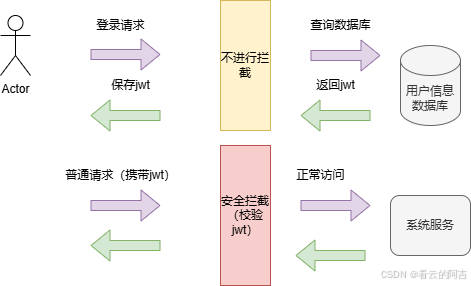
以下是jwt方案流程图,我们以现实生活为例。当我们被一个学校录取,我们在开学的时候需要提供身份证(类比账号密码),学校就会发放一个学生证(类比jwt令牌),这样我们每次进学校带学生证就行了(每次使用系统带jwt就行了)

二、权限控制RBAC
提示:这里是对登录的细化,即权限功能
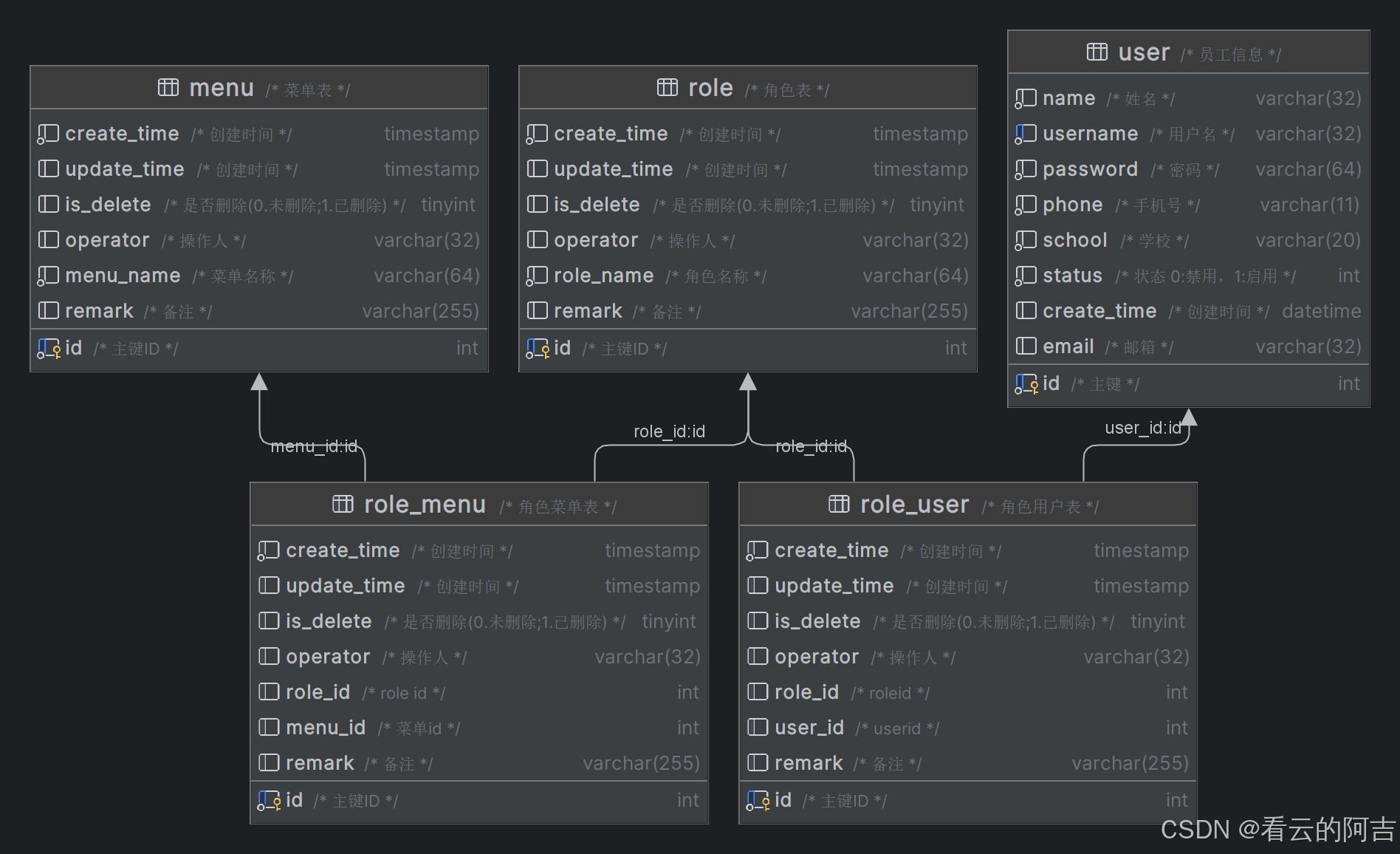
登录系统的人并不只是一个人,以下为RBAC的数据库设计图。
我们依然以现实世界为例,一个教务系统,有很多用户(user);其中有两种身份(role):老师和学生;老师和学生拥有不一样的功能(menu),老师可以改卷子打分等等。
三、实现
我们以该图为例,该流程即为需要实现的。
1.RBAC数据库实现
这里请自行搜索RBAC的sql代码
2.拦截器实现
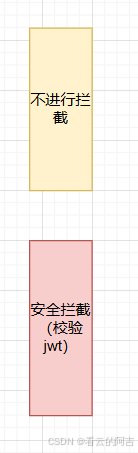
给系统套上一层拦截功能即是security实现的功能,这里先实现接口放行
在maven添加以下依赖后:
        <dependency>
            <groupId>org.springframework.boot</groupId>
            <artifactId>spring-boot-starter-security</artifactId>
        </dependency>
系统会自动生成一个登录页面,我们需要做的就是给登录接口放行,其他接口拦截的配置
参考以下配置
package com.nie.sportserver.config;

import com.nie.sportserver.Interceptor.JwtTokenAdminInterceptor;
import com.nie.sportserver.exception.MyAccessDeniedHandler;
import com.nie.sportserver.exception.MyAuthenticationEntryPoint;
import org.springframework.beans.factory.annotation.Autowired;
import org.springframework.context.annotation.Bean;
import org.springframework.context.annotation.Configuration;
import org.springframework.security.authentication.AuthenticationManager;
import org.springframework.security.config.annotation.method.configuration.EnableGlobalMethodSecurity;
import org.springframework.security.config.annotation.web.builders.HttpSecurity;
import org.springframework.security.config.annotation.web.configuration.WebSecurityConfigurerAdapter;
import org.springframework.security.config.http.SessionCreationPolicy;
import org.springframework.security.crypto.bcrypt.BCryptPasswordEncoder;
import org.springframework.security.crypto.password.PasswordEncoder;
import org.springframework.security.web.authentication.UsernamePasswordAuthenticationFilter;
import org.springframework.web.cors.CorsConfiguration;

import org.springframework.web.cors.UrlBasedCorsConfigurationSource;
import org.springframework.web.filter.CorsFilter;

import java.time.Duration;
import java.util.Arrays;

@Configuration
@EnableGlobalMethodSecurity(prePostEnabled = true)
public class SecurityConfig extends WebSecurityConfigurerAdapter {
    @Autowired
    MyAccessDeniedHandler myAccessDeniedHandler;
    @Autowired
    MyAuthenticationEntryPoint myAuthenticationEntryPoint;
    @Autowired
    JwtTokenAdminInterceptor jwtTokenAdminInterceptor;
    //加密算法
    @Bean
    public PasswordEncoder passwordEncoder(){
        return new BCryptPasswordEncoder();
    }

    //security配置跨域
    @Bean
    public CorsFilter corsFilter() {
        UrlBasedCorsConfigurationSource source = new UrlBasedCorsConfigurationSource();

        CorsConfiguration corsConfiguration = new CorsConfiguration();
        corsConfiguration.addAllowedOriginPattern("*");
        corsConfiguration.addAllowedHeader("*");
        corsConfiguration.addAllowedMethod("*");
        corsConfiguration.setAllowCredentials(true);
        source.registerCorsConfiguration("/**", corsConfiguration);
        return new CorsFilter(source);
    }

    //配置安全拦截
    @Override
    protected void configure(HttpSecurity http) throws Exception {
        http.cors().and().csrf().disable()//关闭csrf
                .sessionManagement().sessionCreationPolicy(SessionCreationPolicy.STATELESS)
                //不通过Session获取Securitycontext
                .and()//配置异常处理
                .exceptionHandling()
                .authenticationEntryPoint(myAuthenticationEntryPoint)
                .accessDeniedHandler(myAccessDeniedHandler)
                .and()
                .authorizeRequests()
                //接口匿名访问
                .antMatchers("/doc.html",
                        "/favicon.ico",
                        "/v2/api-docs",
                        "/swagger-resources/**",
                        "/webjars/**","/user/login").anonymous()//携带token了就无法访问了
                .anyRequest().authenticated();
        http.addFilterBefore(jwtTokenAdminInterceptor, UsernamePasswordAuthenticationFilter.class);
    }

    //暴露认证方法变为bean对象
    @Bean
    @Override
    public AuthenticationManager authenticationManagerBean() throws Exception {
        return super.authenticationManagerBean();
    }
}
关键在于以下代码
                .antMatchers("/doc.html",
                        "/favicon.ico",
                        "/v2/api-docs",
                        "/swagger-resources/**",
                        "/webjars/**","/user/login").anonymous()
3.登录接口实现
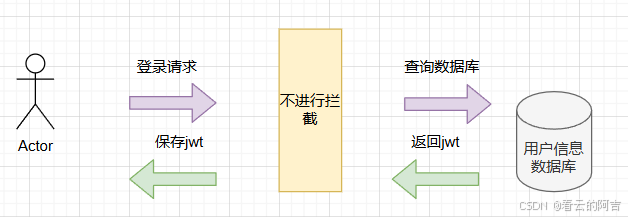
由于之前已经实现了放行,我们只需要完成查询数据库,并且将数据生成jwt即可
在上面的配置中,我们已经把认证方法暴露为bean对象,我们实现该方法即可
    //暴露认证方法变为bean对象
    @Bean
    @Override
    public AuthenticationManager authenticationManagerBean() throws Exception {
        return super.authenticationManagerBean();
    }
示例如下
package com.nie.sportserver.service.impl;


import com.nie.sportpojo.entity.LoginUser;

import com.nie.sportpojo.entity.User;
import com.nie.sportserver.mapper.LoginMapper;
import com.nie.sportserver.mapper.UserMapper;
import org.springframework.beans.factory.annotation.Autowired;
import org.springframework.security.core.userdetails.UserDetails;
import org.springframework.security.core.userdetails.UserDetailsService;
import org.springframework.security.core.userdetails.UsernameNotFoundException;
import org.springframework.stereotype.Service;

import java.util.ArrayList;
import java.util.Arrays;
import java.util.List;

@Service
public class UserDetailServiceImpl implements UserDetailsService {
    @Autowired
    private LoginMapper loginMapper;
    @Autowired
    private UserMapper userMapper;
    @Override
    public UserDetails loadUserByUsername(String username) throws UsernameNotFoundException {
        //查询用户信息
        User user = loginMapper.getByUserName(username);

        //把数据封装为UserDetail返回
        //todo 查询对应的权限信息
        List<String> list = new ArrayList<>(userMapper.selectPermsByUserId(user.getId()));
        LoginUser loginUser = new LoginUser(user,list);
        return loginUser;
    }
}
4.拦截器实现
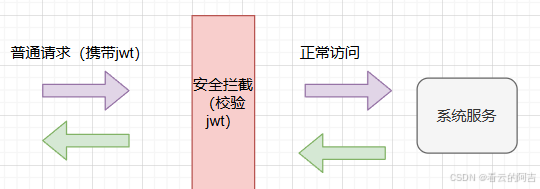
在前面的配置中,我们已经将普通请求拦截了,并且使用拦截器
    @Autowired
    JwtTokenAdminInterceptor jwtTokenAdminInterceptor;
这里来实现拦截器
package com.nie.sportserver.Interceptor;


import com.nie.sportcommon.utills.JwtUtil;
import com.nie.sportpojo.entity.LoginUser;

import com.nie.sportpojo.entity.User;
import com.nie.sportserver.mapper.LoginMapper;
import com.nie.sportserver.mapper.UserMapper;
import com.nie.sportserver.properties.JwtProperties;
import io.jsonwebtoken.Claims;
import lombok.extern.slf4j.Slf4j;
import org.springframework.beans.factory.annotation.Autowired;
import org.springframework.security.authentication.UsernamePasswordAuthenticationToken;
import org.springframework.security.core.context.SecurityContextHolder;
import org.springframework.stereotype.Component;
import org.springframework.util.StringUtils;
import org.springframework.web.filter.OncePerRequestFilter;

import javax.servlet.FilterChain;
import javax.servlet.ServletException;
import javax.servlet.http.HttpServletRequest;
import javax.servlet.http.HttpServletResponse;
import java.io.IOException;
import java.util.ArrayList;
import java.util.Arrays;
import java.util.List;

@Component
@Slf4j
public class JwtTokenAdminInterceptor extends OncePerRequestFilter {
    @Autowired
    private JwtProperties jwtProperties;
    @Autowired
    private LoginMapper loginMapper;
    @Autowired
    private UserMapper userMapper;

    @Override
    protected void doFilterInternal(HttpServletRequest request, HttpServletResponse response, FilterChain filterChain) throws ServletException, IOException {
        String requestURI = request.getRequestURI();
        //从请求头中获取令牌
        String token = request.getHeader(jwtProperties.getAdminTokenName());
        if (!StringUtils.hasText((token))) {
            filterChain.doFilter(request, response);
            return;
        }
        //校验令牌
        Long userId;
        try {
            log.info("jwt校验{}", token);
            //token解析
            Claims claims = JwtUtil.parseJWT(jwtProperties.getAdminSecretKey(), token);
            userId = Long.valueOf(claims.get("userId").toString());
            log.info("当前用户id:{}", userId);
        } catch (Exception ex) {
            throw new RuntimeException("token非法");
        }
        User user = loginMapper.getByUserId(userId);
        List<String> list = new ArrayList<>(userMapper.selectPermsByUserId(user.getId()));
        LoginUser loginUser = new LoginUser(user,list);
        UsernamePasswordAuthenticationToken usernamePasswordAuthenticationToken = new UsernamePasswordAuthenticationToken(loginUser,null,loginUser.getAuthorities());
        SecurityContextHolder.getContext().setAuthentication(usernamePasswordAuthenticationToken);
        //放行
        filterChain.doFilter(request, response);
    }
}
其他工具类
jwt依赖
        <dependency>
            <groupId>io.jsonwebtoken</groupId>
            <artifactId>jjwt</artifactId>
            <version>0.9.1</version>
        </dependency>
jwt工具类
package com.nie.sportcommon.utills;

import io.jsonwebtoken.Claims;
import io.jsonwebtoken.JwtBuilder;
import io.jsonwebtoken.Jwts;
import io.jsonwebtoken.SignatureAlgorithm;

import java.nio.charset.StandardCharsets;
import java.util.Date;
import java.util.Map;

public class JwtUtil {
    /**
     * 生成jwt
     * 使用Hs256算法, 私匙使用固定秘钥
     *
     * @param secretKey jwt秘钥
     * @param ttlMillis jwt过期时间(毫秒)
     * @param claims    设置的信息
     * @return
     */
    public static String createJWT(String secretKey, long ttlMillis, Map<String, Object> claims) {
        // 指定签名的时候使用的签名算法,也就是header那部分
        SignatureAlgorithm signatureAlgorithm = SignatureAlgorithm.HS256;

        // 生成JWT的时间
        long expMillis = System.currentTimeMillis() + ttlMillis;
        Date exp = new Date(expMillis);

        // 设置jwt的body
        JwtBuilder builder = Jwts.builder()
                // 如果有私有声明,一定要先设置这个自己创建的私有的声明,这个是给builder的claim赋值,一旦写在标准的声明赋值之后,就是覆盖了那些标准的声明的
                .setClaims(claims)
                // 设置签名使用的签名算法和签名使用的秘钥
                .signWith(signatureAlgorithm, secretKey.getBytes(StandardCharsets.UTF_8))
                // 设置过期时间
                .setExpiration(exp);

        return builder.compact();
    }

    /**
     * Token解密
     *
     * @param secretKey jwt秘钥 此秘钥一定要保留好在服务端, 不能暴露出去, 否则sign就可以被伪造, 如果对接多个客户端建议改造成多个
     * @param token     加密后的token
     * @return
     */
    public static Claims parseJWT(String secretKey, String token) {
        // 得到DefaultJwtParser
        Claims claims = Jwts.parser()
                // 设置签名的秘钥
                .setSigningKey(secretKey.getBytes(StandardCharsets.UTF_8))
                // 设置需要解析的jwt
                .parseClaimsJws(token).getBody();
        return claims;
    }

}
权限
权限认证使用 @PreAuthorize("hasAuthority('')")注解
总结
本文对jwt登录校验,权限管理的原理简单描述,并且提供了实现方案