最近煮波遇到了一个问题,就是需要在地图上展示一个公司的位置。如果在国内这会是很简单实现的,但是是在海外呢?各种坑!!!!!某歌、mapbox地图就需要你绑卡。注册起来非常麻烦。
那还有解决办法吗?有的兄弟,包有的。
这里的解决思路就是用前端库 leaflet + 免绑卡的瓦片源就能解决了。
这里给个简单demo:
html
<!DOCTYPE html>
<html>
<head>
    <title>公司位置 - 直接可用</title>
    <link rel="stylesheet" href="https://unpkg.com/leaflet@1.9.4/dist/leaflet.css" />
    <script src="https://unpkg.com/leaflet@1.9.4/dist/leaflet.js"></script>
    <style>
        #map { height: 500px; width: 100%; margin: 20px 0; }
    </style>
</head>
<body>
    <h1>欢迎来到我们公司</h1>
    <div id="map"></div>

    <script>
        // === 核心代码开始 ===
        // 1. 设置地图中心点(修改这里的坐标!)
        // 格式:[纬度, 经度],例如上海:[31.2304, 121.4737]
        var myCompanyLocation = [31.2304, 121.4737];

        // 2. 初始化地图
        var map = L.map('map').setView(myCompanyLocation, 16);

        // 3. 使用免绑卡的瓦片源 - 选一个喜欢的用
        // 选项1:OpenStreetMap标准版(最常用)
        L.tileLayer('https://tile.openstreetmap.org/{z}/{x}/{y}.png', {
            maxZoom: 19,
            attribution: '© <a href="https://www.openstreetmap.org/copyright">OpenStreetMap</a>'
        }).addTo(map);

        // 选项2:CartoDB简洁版(白色背景,更专业)
        // L.tileLayer('https://{s}.basemaps.cartocdn.com/light_all/{z}/{x}/{y}.png', {
        //     attribution: '© OpenStreetMap contributors'
        // }).addTo(map);

        // 选项3:Wikimedia地图(加载快)
        // L.tileLayer('https://maps.wikimedia.org/osm-intl/{z}/{x}/{y}.png', {
        //     attribution: '© OpenStreetMap contributors'
        // }).addTo(map);

        // 4. 添加公司标记
        L.marker(myCompanyLocation)
            .addTo(map)
            .bindPopup(`
                <div style="padding: 10px;">
                    <h3 style="margin:0 0 10px 0; color: #333;">✧ 我们的公司 ✧</h3>
                    <p style="margin: 5px 0;"><strong>地址:</strong>上海市黄浦区南京东路123号</p>
                    <p style="margin: 5px 0;"><strong>电话:</strong>021-12345678</p>
                    <p style="margin: 5px 0;"><strong>营业时间:</strong>周一至周五 9:00-18:00</p>
                </div>
            `)
            .openPopup();
        // === 核心代码结束 ===
    </script>
</body>
</html>效果: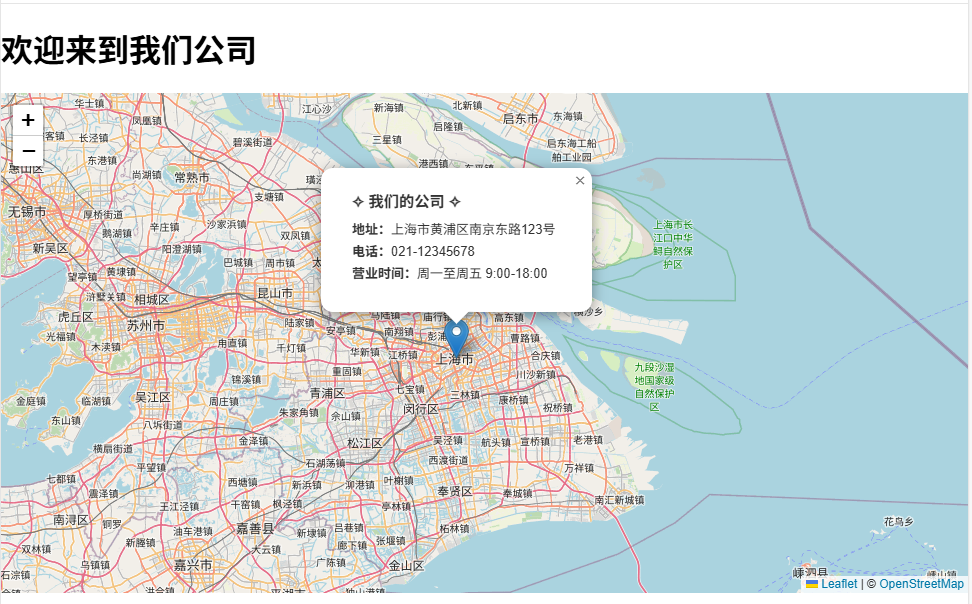
最后我们只需要更换经纬度就好了,那么经纬度也可以去找到。就是去openstreetmap官网。不过这里需要魔法。
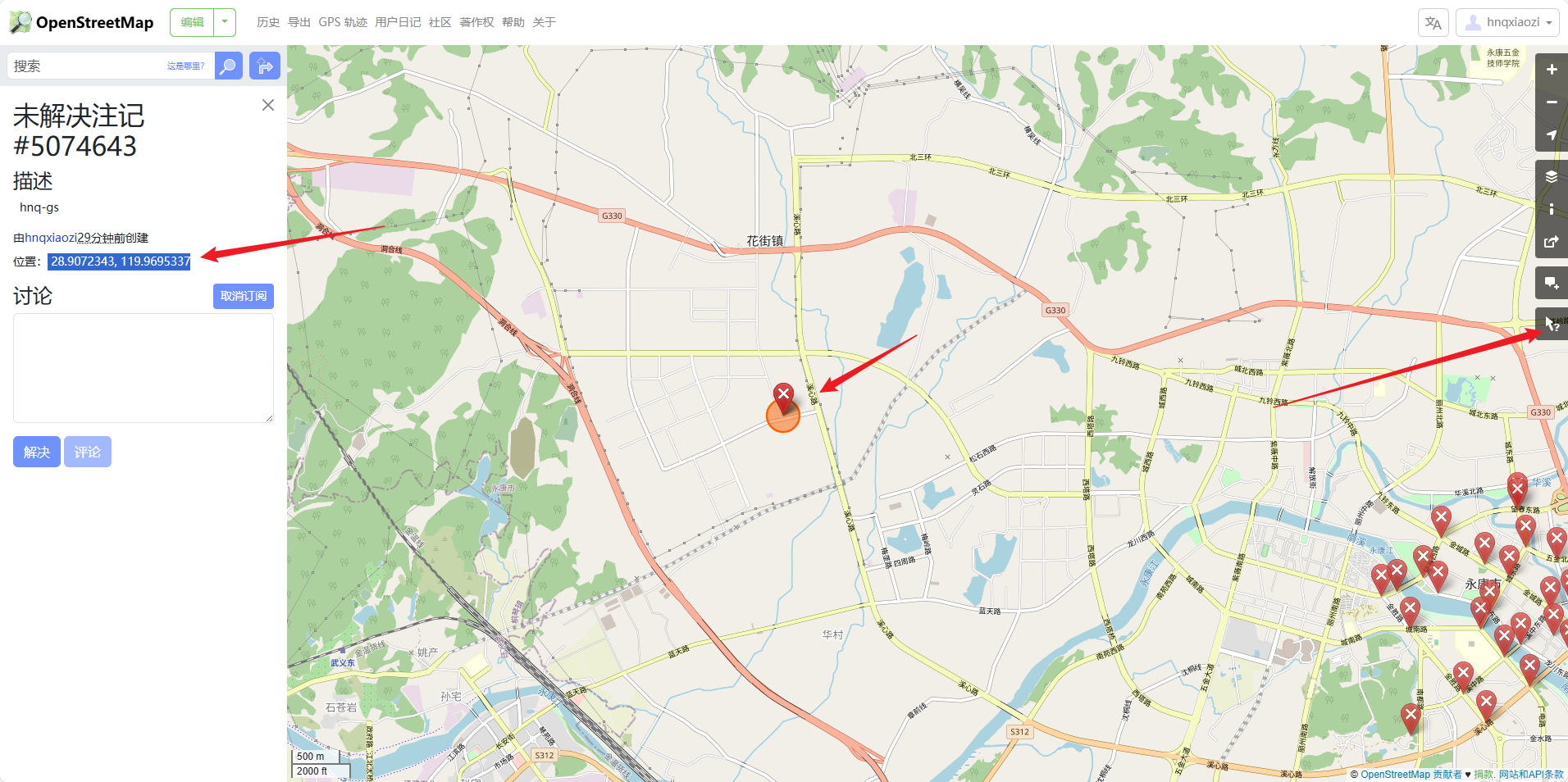
这里拿到经纬度替换就好了。