模糊搜索
我们上学的时候,班级里会有很多学生,每个学生都不一样,有的时候,我们需要查找到每个姓"张"的学生,怎么处理呢,我们创建一个class数据库,创建一个students表,并写入一些数据:
select * from students where name like '%三%';
现在,我需要找到所有姓"李"的学生,就可以使用:select .... like ...
select * from students where name like '李%';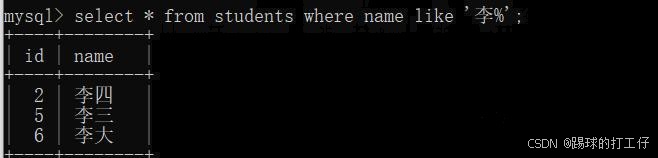
我现在又改了,我要找到所有名字里带"三"字的学生:
select * from students where name like '%三%';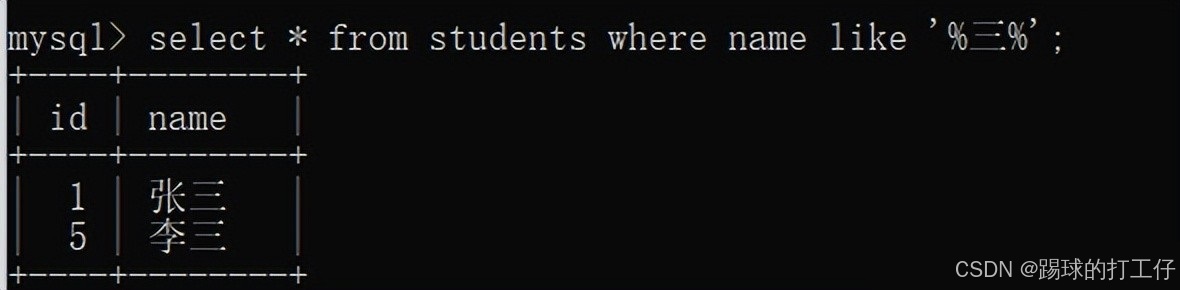
注:mysql中的like就是模糊搜索的意思,其中%表示可以匹配任何值。
排序
一年一度的考试结束啦,学生们的成绩也出来了,所以,我们给上面的students里添加一个score字段,并写入分数;
alter table students add column score int not null default 0;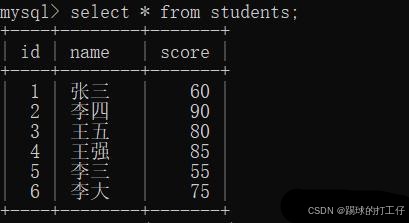
我想要按照分数score从大到小排列:
select * from students order by score desc;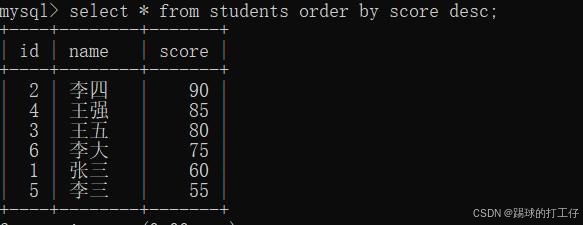
注:排序是使用的:order by 字段名 desc(或者 asc);
asc:表示从小到大;
desc:表示从大到小;
分组
期末考试结束了,大家的成绩都出来了,我想要知道每个学生的总分,这个就需要我们的group by分组功能了,好吧,让我们先来创建一个scores 数据表,字段有id,学生名称name,科目名称subject,以及科目的得分;
create table scores (id int not null primary key auto_increment,name varchar(100),subject varchar(100),score int not null default 0);
现在,我想要统计每个学生的总分,请看如下sql:
select name,SUM(score) as sum from scores group by name;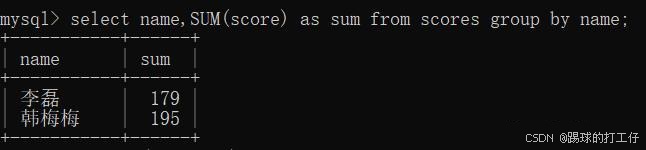
哈哈,意不意外,我们查到了每个学生的总分。
注:分组的功能常用来做统计,而mysql也给我们提供了许多统计功能的函数,例如以上的sum(score) group by name 表示按照name分组,并通过sum得出score的总和;类似的还有avg得平均分,count得总数,min取最小值,max取最大值等等,大家可以底下进行手写尝试一下!
拓展:我们上面得到了每个学生的总分,那么,在上面的结果上,我还想得到sum的总分大于180的,怎么写呢?这里给大家一个提示:having