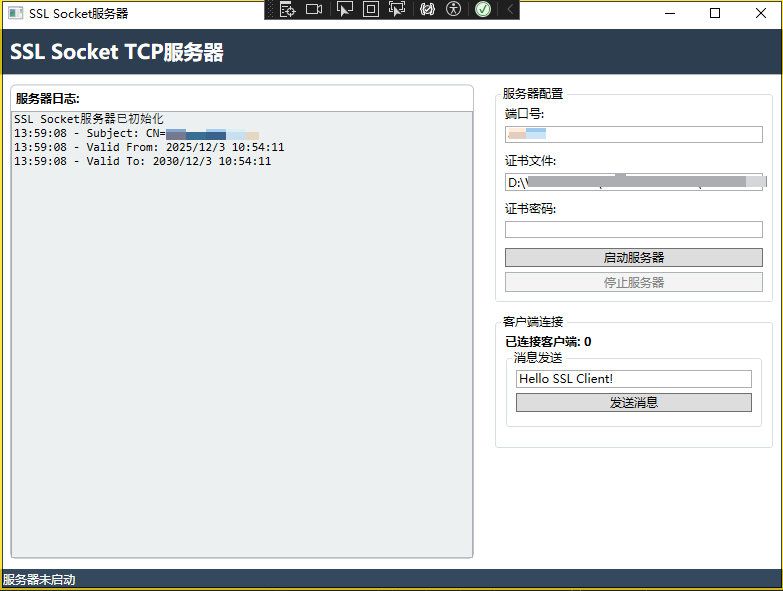
1.界面代码
<Window x:Class="SSLSocketServer.MainWindow"
        xmlns="http://schemas.microsoft.com/winfx/2006/xaml/presentation"
        xmlns:x="http://schemas.microsoft.com/winfx/2006/xaml"
        Title="SSL Socket服务器" Height="600" Width="800">
    <Grid>
        <Grid.RowDefinitions>
            <RowDefinition Height="Auto"/>
            <RowDefinition Height="*"/>
            <RowDefinition Height="Auto"/>
        </Grid.RowDefinitions>

        <!-- 标题栏 -->
        <Border Grid.Row="0" Background="#2c3e50" Padding="10">
            <TextBlock Text="SSL Socket TCP服务器"
                   Foreground="White"
                   FontSize="20"
                   FontWeight="Bold"/>
        </Border>

        <!-- 主内容区域 -->
        <Grid Grid.Row="1">
            <Grid.ColumnDefinitions>
                <ColumnDefinition Width="*"/>
                <ColumnDefinition Width="300"/>
            </Grid.ColumnDefinitions>

            <!-- 日志显示区域 -->
            <Border Grid.Column="0" Margin="10" BorderBrush="#bdc3c7" BorderThickness="1" CornerRadius="5">
                <Grid>
                    <Grid.RowDefinitions>
                        <RowDefinition Height="Auto"/>
                        <RowDefinition Height="*"/>
                    </Grid.RowDefinitions>

                    <TextBlock Grid.Row="0" Text="服务器日志:" FontWeight="SemiBold" Margin="5"/>
                    <ScrollViewer Grid.Row="1" VerticalScrollBarVisibility="Auto">
                        <TextBox x:Name="LogTextBox"
                               IsReadOnly="True"
                               TextWrapping="Wrap"
                               VerticalScrollBarVisibility="Auto"
                               FontFamily="Consolas"
                               FontSize="12"
                               Background="#ecf0f1"/>
                    </ScrollViewer>
                </Grid>
            </Border>

            <!-- 控制面板 -->
            <StackPanel Grid.Column="1" Margin="10" Orientation="Vertical">

                <!-- 服务器配置 -->
                <GroupBox Header="服务器配置" Margin="0,0,0,10">
                    <StackPanel Orientation="Vertical" Margin="5">
                        <TextBlock Text="端口号:" Margin="0,0,0,5"/>
                        <TextBox x:Name="PortTextBox" Text="8443" Margin="0,0,0,10"/>

                        <TextBlock Text="证书文件:" Margin="0,0,0,5"/>
                        <TextBox x:Name="CertPathTextBox" Text="D:\VisualStudio\SSLSocketServer\SSLSocketServer\server.pfx" Margin="0,0,0,10"/>

                        <TextBlock Text="证书密码:" Margin="0,0,0,5"/>
                        <PasswordBox x:Name="CertPasswordBox" Margin="0,0,0,10"/>

                        <Button x:Name="StartButton" Content="启动服务器" Click="StartButton_Click" Margin="0,0,0,5"/>
                        <Button x:Name="StopButton" Content="停止服务器" Click="StopButton_Click" IsEnabled="False"/>
                    </StackPanel>
                </GroupBox>

                <!-- 客户端管理 -->
                <GroupBox Header="客户端连接" Margin="0,0,0,10">
                    <StackPanel Orientation="Vertical" Margin="5">
                        <TextBlock x:Name="ClientCountText" Text="已连接客户端: 0" FontWeight="SemiBold"/>

                        <!-- 消息发送 -->
                        <GroupBox Header="消息发送" Margin="0,0,0,10">
                            <StackPanel Orientation="Vertical" Margin="5">
                                <TextBox x:Name="MessageTextBox" Text="Hello SSL Client!" Margin="0,0,0,5"/>
                                <Button x:Name="SendButton" Content="发送消息" Click="SendButton_Click" Margin="0,0,0,5"/>
                            </StackPanel>
                        </GroupBox>
                    </StackPanel>
                </GroupBox>
            </StackPanel>
        </Grid>

        <!-- 状态栏 -->
        <StatusBar Grid.Row="2" Background="#34495e">
            <StatusBarItem>
                <TextBlock x:Name="StatusText" Text="服务器未启动" Foreground="White"/>
            </StatusBarItem>
        </StatusBar>
    </Grid>
</Window>
2.功能代码
using System;
using System.Collections.Generic;
using System.IO;
using System.Net;
using System.Net.Security;
using System.Net.Sockets;
using System.Security.Authentication;
using System.Security.Cryptography.X509Certificates;
using System.Text;
using System.Threading;
using System.Threading.Tasks;
using System.Windows;

namespace SSLSocketServer
{
    public partial class MainWindow : Window
    {
        private TcpListener tcpListener;
        private X509Certificate2 serverCertificate;
        private CancellationTokenSource cancellationTokenSource;
        private List<TcpClient> connectedClients = new List<TcpClient>();
        private bool isServerRunning = false;

        public MainWindow()
        {
            InitializeComponent();
            LogTextBox.Text = "SSL Socket服务器已初始化\r\n";


            var cert = new X509Certificate2("D:\\VisualStudio\\SSLSocketServer\\SSLSocketServer\\server.pfx", "123456");
            LogMessage($"Subject: {cert.Subject}");
            LogMessage($"Valid From: {cert.NotBefore}");
            LogMessage($"Valid To: {cert.NotAfter}");

        }

        private async void StartButton_Click(object sender, RoutedEventArgs e)
        {
            try
            {
                if (!int.TryParse(PortTextBox.Text, out int port))
                {
                    MessageBox.Show("请输入有效的端口号");
                    return;
                }

                // 加载服务器证书
                serverCertificate = new X509Certificate2(
                    "D:\\VisualStudio\\SSLSocketServer\\SSLSocketServer\\server.pfx",
                    CertPasswordBox.Password,
                    X509KeyStorageFlags.UserKeySet
                );

                tcpListener = new TcpListener(IPAddress.Any, port);
                cancellationTokenSource = new CancellationTokenSource();

                // 启动服务器监听
                tcpListener.Start();
                isServerRunning = true;

                UpdateUIState();
                LogMessage($"SSL服务器启动成功,监听端口: {port}");

                // 开始接受客户端连接
                _ = Task.Run(async () => await AcceptClientsAsync(cancellationTokenSource.Token));
            }
            catch (Exception ex)
            {
                MessageBox.Show($"启动服务器失败: {ex.Message}");
            }
        }

        private async Task AcceptClientsAsync(CancellationToken cancellationToken)
        {
            while (!cancellationToken.IsCancellationRequested)
            {
                try
                {
                    TcpClient client = await tcpListener.AcceptTcpClientAsync();
                    connectedClients.Add(client);
                    UpdateClientCount();

                    LogMessage($"客户端连接来自: {((IPEndPoint)client.Client.RemoteEndPoint).Address}");

                    // 为每个客户端创建处理任务
                    _ = Task.Run(async () => await HandleClientAsync(client, cancellationToken));
                }
                catch (OperationCanceledException)
                {
                    break;
                }
                catch (Exception ex)
                {
                    LogMessage($"接受客户端连接失败: {ex.Message}");
                }
            }
        }

        private async Task HandleClientAsync(TcpClient client, CancellationToken cancellationToken)
        {
            try
            {
                using (SslStream sslStream = new SslStream(client.GetStream(), false))
                {
                    // 进行SSL握手
                    await sslStream.AuthenticateAsServerAsync(
                        serverCertificate,
                        false,
                        SslProtocols.Tls12,
                        false
                    );

                    LogMessage("SSL握手完成");

                    // 开始处理客户端消息
                    StreamReader reader = new StreamReader(sslStream, Encoding.UTF8);
                    StreamWriter writer = new StreamWriter(sslStream, Encoding.UTF8)
                    {
                        AutoFlush = true
                    };

                    string clientMessage;
                    while ((clientMessage = await reader.ReadLineAsync()) != null)
                    {
                        LogMessage($"收到客户端消息: {clientMessage}");

                        // 处理消息并发送响应
                        string response = ProcessMessage(clientMessage);
                        await writer.WriteLineAsync(response);
                        LogMessage($"发送响应: {response}");

                        if (clientMessage.Equals("QUIT", StringComparison.OrdinalIgnoreCase))
                        {
                            break;
                        }
                    }
                }
            }
            catch (Exception ex)
            {
                LogMessage($"处理客户端消息失败: {ex.Message}");
            }
            finally
            {
                connectedClients.Remove(client);
                client.Close();
                UpdateClientCount();
            }
        }

        private string ProcessMessage(string message)
        {
            string upperMessage = message.ToUpper();
            switch (upperMessage)
            {
                case "HELLO":
                    return "Hello Client! Welcome to SSL Server.";
                case "TIME":
                    return $"服务器时间: {DateTime.Now}";
                case "STATUS":
                    return "服务器运行状态: 正常";
                case "HELP":
                    return "可用命令: HELLO, TIME, STATUS, HELP, QUIT";
                default:
                    return $"ECHO: {message}";
            }
        }

        private void StopButton_Click(object sender, RoutedEventArgs e)
        {
            try
            {
                cancellationTokenSource?.Cancel();
                tcpListener?.Stop();

                // 关闭所有客户端连接
                foreach (var connectedClient in connectedClients)
                {
                    connectedClient.Close();
                }
                connectedClients.Clear();
                isServerRunning = false;

                UpdateUIState();
                LogMessage("SSL服务器已停止");
            }
            catch (Exception ex)
            {
                MessageBox.Show($"停止服务器失败: {ex.Message}");
            }
        }

        private void LogMessage(string message)
        {
            Dispatcher.Invoke(() =>
            {
                LogTextBox.AppendText($"{DateTime.Now:HH:mm:ss} - {message}\r\n");
                LogTextBox.ScrollToEnd();
            });
        }
            private void UpdateUIState()
        {
            Dispatcher.Invoke(() =>
            {
                StartButton.IsEnabled = !isServerRunning;
                StopButton.IsEnabled = isServerRunning;
                StatusText.Text = isServerRunning ? "服务器运行中" : "服务器已停止";
            });
        }

        private void UpdateClientCount()
        {
            Dispatcher.Invoke(() =>
            {
                ClientCountText.Text = $"已连接客户端: {connectedClients.Count}";
            });
         }
        private void SendButton_Click(object sender, RoutedEventArgs e)
        {
            string message = MessageTextBox.Text;
            if (string.IsNullOrEmpty(message))
            {
                return;
            }

            // 向所有连接的客户端发送消息
            foreach (var client in connectedClients)
            {
                try
                {
                    StreamWriter writer = new StreamWriter(client.GetStream(), Encoding.UTF8)
                    {
                        AutoFlush = true
                    };
                    writer.WriteLine(message);
                    LogMessage($"广播消息: {message}");
                }
                catch (Exception ex)
                {
                    MessageBox.Show($"客户端发送消息失败: {ex.Message}");
                }
            }
        }
            private async Task SendMessageToAllClientsAsync(string message)
        {
            var tasks = new List<Task>();

            foreach (var client in connectedClients)
            {
                tasks.Add(SendMessageToClientAsync(client, message));
            }

            await Task.WhenAll(tasks);
        }


        private async Task SendMessageToClientAsync(TcpClient client, string message)
        {
            try
            {
                using (StreamWriter writer = new StreamWriter(client.GetStream(), Encoding.UTF8) { AutoFlush = true })
                {
                    await writer.WriteLineAsync(message);
                    await writer.FlushAsync();
                }
            }
            catch (Exception ex)
            {
                LogMessage($"发送消息到客户端失败: {ex.Message}");
            }
        }
    }
}
3.使用Blend for Visual Studio 2022运行