winget 是微软官方推出的 Windows 包管理器(Windows Package Manager) ,代号 "winget-cli"。一句话理解:"让 Windows 像 Linux apt/yum 一样,一行命令装、卸、更新软件。"
────────────────
- 诞生背景
• 2020 年 Build 大会公布,2021 随 Windows 11 内置,Win10 2004+ 通过 App Installer 更新获得。
• 解决痛点:
-- 官网找 EXE/MSI 麻烦;
-- 安装包带广告/捆绑;
-- 更新靠手动。
────────────────
- 核心概念
| 概念 | 说明 | 示例 |
|---|---|---|
| manifest | YAML 清单文件,描述软件名、版本、下载地址、哈希 | Mozilla.Firefox |
| 源(source) | 清单仓库,默认微软官方 winget;可自建 |
winget source add contoso https:// |
| 包 id | 唯一标识符,通常是 Publisher.App |
VideoLAN.VLC |
| 包版本 | manifest 中写死的版本号,可指定安装 | --version 3.0.18 |
────────────────
-
常用命令(Win+R → cmd / PowerShell / Terminal 直接输)
搜索
winget search vscode
安装(静默 + 阻止重启)
winget install Microsoft.VisualStudioCode --silent --accept-source-agreements
更新指定包
winget upgrade Mozilla.Firefox
更新所有
winget upgrade --all
卸载
winget uninstall 7zip.7zip
查看已装
winget list
导出/导入机器清单
winget export -o myapps.json
winget import myapps.json
────────────────
- 与 Chocolatey / Scoop 的区别
| 维度 | winget | Chocolatey | Scoop |
|---|---|---|---|
| 官方背景 | 微软官方 | 社区 | 社区 |
| 包格式 | EXE/MSI/MSIX/Zip | NuPkg | 便携压缩包 |
| 权限 | 部分需管理员 | 管理员 | 用户级 |
| 生态数量 | 5 k+ | 10 k+ | 6 k+ |
| 默认安装位置 | 原安装器决定 | ProgramData | 用户目录 |
────────────────
- 进阶玩法
• 自定义源 :公司内网可放私有仓库(Git 静态站即可)。
• 脚本化装机 :新机一键 winget import dev.json,20 秒装好开发环境。
• 与 Dev Home / WinGet Configuration 集成:YAML 描述整台机器环境(IDE、SDK、WSL 发行版)。
────────────────
- 一句话速记
"Windows 上想装软件 → 先 winget search,再 winget install 包ID --silent,爽到飞起。"
实践
到windows商店查找winget ,找到了Winget-AutoUpdate-aaS
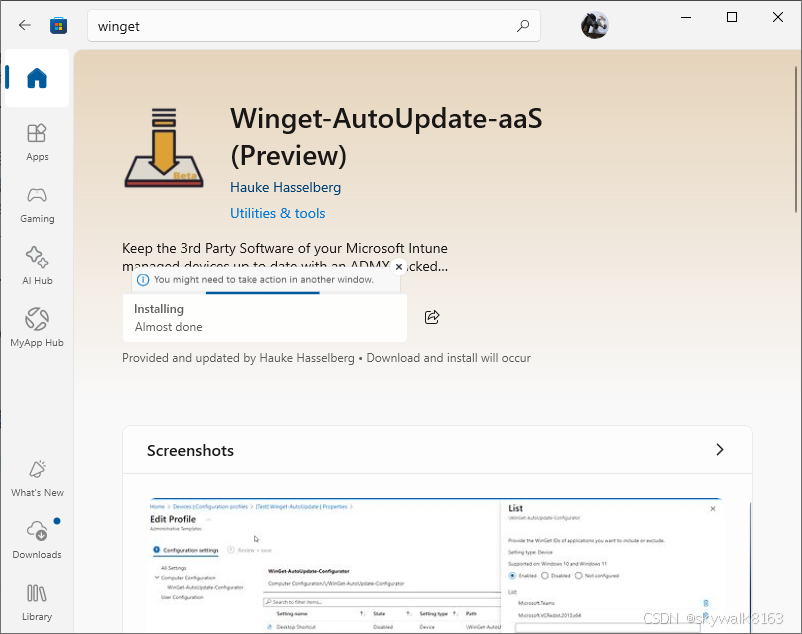
安装
在中安装
Set-ExecutionPolicy RemoteSigned Invoke-WebRequest -Uri "https://gitcode.com/gh_mirrors/wi/winget-install/raw/main/install.ps1" -OutFile "install.ps1"
.\install.ps1
失败
看官网:使用 WinGet 安装和管理应用程序 | Microsoft Learn
从这里下载:https://aka.ms/getwingetpreview
下载速度非常慢。
总结:
现在我卡在安装这里,真的很无语。
我感觉微软把这个工具的使用难度(仅仅是安装难度)给搞到天际了,我已经十多年不怎么吐槽微软了...
下载速度爆慢...
调试
运行报错winget search vscode
winget search vscode
'winget' is not recognized as an internal or external command,
operable program or batch file.
Add-AppxPackage -RegisterByFamilyName -MainPackage 注册失败
 Add-AppxPackage -RegisterByFamilyName -MainPackage Microsoft.DesktopAppInstaller_8wekyb3d8bbwe
Add-AppxPackage : Deployment failed with HRESULT: 0x80073D02, The package could not be installed because resources it
modifies are currently in use.
error 0x80073D02: Unable to install because the following apps need to be closed
Microsoft.DesktopAppInstaller_1.27.350.0_x64__8wekyb3d8bbwe.
NOTE: For additional information, look for [ActivityId] de7cbf54-5c6e-0016-5c48-a9de6e5cdc01 in the Event Log or use
the command line Get-AppPackageLog -ActivityID de7cbf54-5c6e-0016-5c48-a9de6e5cdc01
At line:1 char:1
+ Add-AppxPackage -RegisterByFamilyName -MainPackage Microsoft.DesktopA ...
+ ~~~~~~~~~~~~~~~~~~~~~~~~~~~~~~~~~~~~~~~~~~~~~~~~~~~~~~~~~~~~~~~~~~~~~
    + CategoryInfo          : NotSpecified: (Microsoft.Deskt...r_8wekyb3d8bbwe:String) [Add-AppxPackage], Exception
    + FullyQualifiedErrorId : DeploymentError,Microsoft.Windows.Appx.PackageManager.Commands.AddAppxPackageCommand