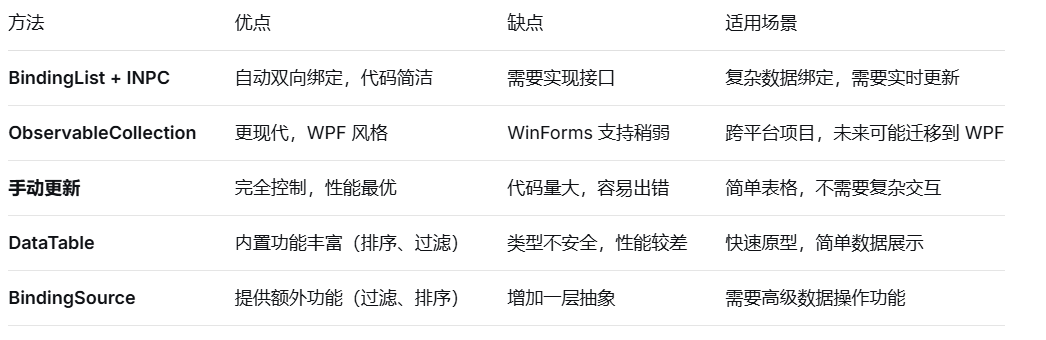
BindingList<T> 的作用:
-
-
自动数据绑定通知:当集合中的元素被添加、删除或修改时,会自动通知 UI 控件更新
-
支持排序和搜索:实现了 IBindingList 接口,支持高级数据绑定功能
-
支持属性更改通知:当集合中的元素属性变化时,也能通知 UI(需要结合 INotifyPropertyChanged)
-
在代码中的具体优势:
cs
// 添加新记录时,DataGridView 会自动刷新
dataSource.Insert(insertIndex, newRecord);

// 修改计数时,UI 自动更新
existingRecord.Count = _value;

// 不需要手动调用 dataGridView.Refresh() 或 dataGridView.DataSource = null
对比普通 List:
cs
// 如果用 List<T>,需要:
list.Add(newRecord);
dataGridView.DataSource = null;
dataGridView.DataSource = list; // 需要重新绑定

// 如果用 BindingList<T>:
bindingList.Add(newRecord); // 自动更新 UI
用了 BindingList 为什么还要用 INotifyPropertyChanged?
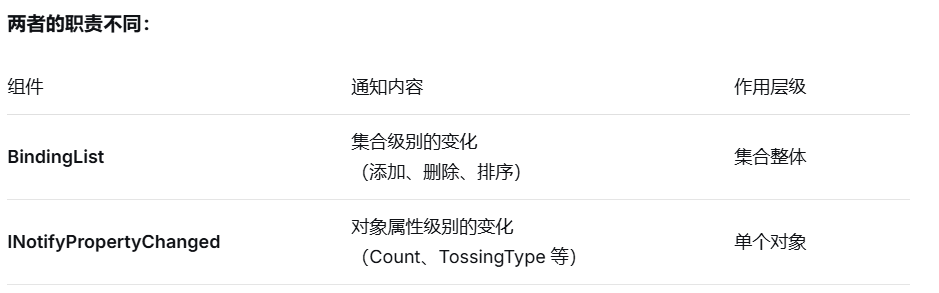
底层原理:
cs
// 1. BindingList 的监听机制
public class BindingList<T> : Collection<T>, IBindingList, ICancelAddNew, IRaiseItemChangedEvents
{
    // 当添加/删除元素时,触发 ListChanged 事件
    protected override void InsertItem(int index, T item)
    {
        base.InsertItem(index, item);
        OnListChanged(new ListChangedEventArgs(ListChangedType.ItemAdded, index));
    }

    // 如果 T 实现了 INotifyPropertyChanged,会监听 PropertyChanged 事件
    private void HookPropertyChanged(T item)
    {
        if (item is INotifyPropertyChanged inpc)
        {
            inpc.PropertyChanged += new PropertyChangedEventHandler(Child_PropertyChanged);
        }
    }
}

// 2. DataGridView 的响应机制
// DataGridView 会订阅:
// - BindingList.ListChanged(集合变化)
// - 每个 TossingRecord.PropertyChanged(属性变化)

// 3. 完整的通知链条:
// 当 Count 变化时:
record.Count = 10;
    ↓
OnPropertyChanged("Count") 被调用
    ↓
PropertyChanged 事件触发
    ↓
BindingList 监听到事件
    ↓
BindingList 触发 ListChanged(ListChangedType.ItemChanged)
    ↓
DataGridView 收到通知
    ↓
DataGridView 更新对应单元格显示
为什么需要两者结合:
cs
// 如果没有 INotifyPropertyChanged:
record.Count = 10; // DataGridView 不知道这个变化

// 有了 INotifyPropertyChanged:
record.Count = 10; // 触发 PropertyChanged → BindingList → DataGridView
使用 BindingSource 作为中介
cs
public partial class TossingReport : UserControl
{
    private BindingList<TossingRecord> dataSource;
    private BindingSource bindingSource;

    public TossingReport()
    {
        dataSource = new BindingList<TossingRecord>();
        bindingSource = new BindingSource();
        bindingSource.DataSource = dataSource;
        dataGridView.DataSource = bindingSource;

        // 可以添加过滤、排序等功能
        bindingSource.Filter = "Count > 0";
        bindingSource.Sort = "Count DESC";
    }
}
总结对比: