前言
在前面2篇文章
我们看了Init、Zygote进程,本文是Android 15 Framework解析系列的第三篇,一起来看看 SystemServer 进程的启动与核心服务的初始化全流程吧。
注意:本文出现的源码基于Android - 15.0.0_r1。另外本文关注主要逻辑,省略部分代码。
一、 Android系统启动流程
本文是介绍SystemServer,照例先看下Android系统启动流程: 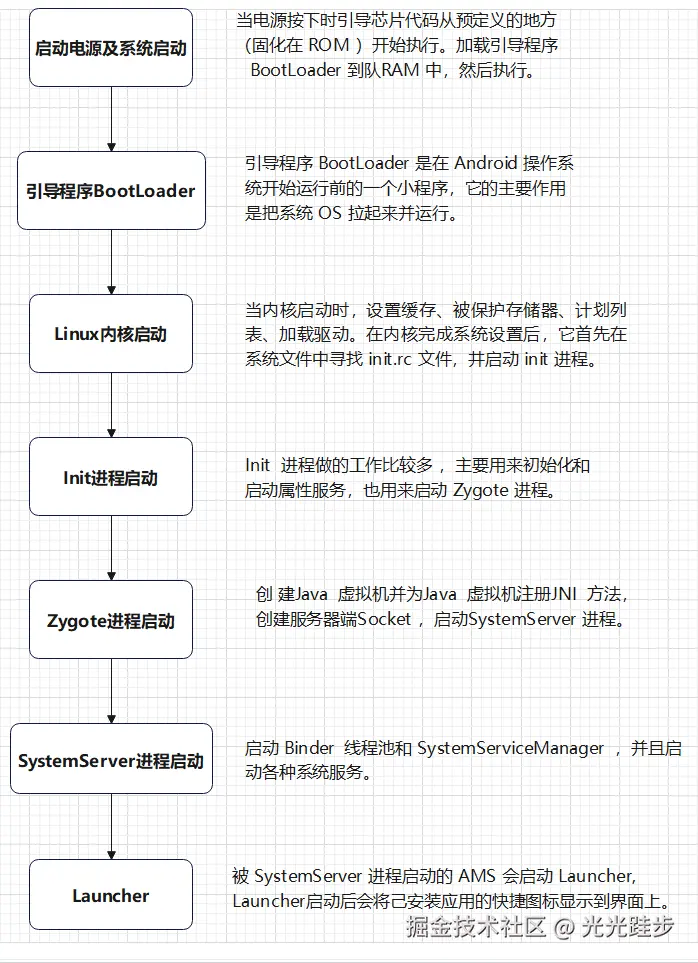
启动电源及系统启动 -> Bootloader -> Linux内核启动 -> Init -> Zygote -> SystemServer -> Launcher
二、 SystemServer
SystemServer 是 Android 系统的核心进程,它会启动并管理几乎所有关键的系统服务,如 AMS、WMS等。
我们就从SystemServer的启动开始看吧。
2.1 SystemServer的启动
SystemServer的启动是在ZygoteInit::main方法中,调用了forkSystemServer方法 /frameworks/base/core/java/com/android/internal/os/ZygoteInit.java
Java
    @UnsupportedAppUsage
    public static void main(String[] argv) {
        ...
        if (startSystemServer) {
           // 此处调用了forkSystemServer
           Runnable r = forkSystemServer(abiList, zygoteSocketName, zygoteServer);
           ...
        }
        ...
    }

    private static Runnable forkSystemServer(String abiList, String socketName,
            ZygoteServer zygoteServer) {
        // 特权能力
        long capabilities = posixCapabilitiesAsBits(
                OsConstants.CAP_IPC_LOCK,
                OsConstants.CAP_KILL,
                OsConstants.CAP_NET_ADMIN,
                OsConstants.CAP_NET_BIND_SERVICE,
                OsConstants.CAP_NET_BROADCAST,
                OsConstants.CAP_NET_RAW,
                OsConstants.CAP_SYS_MODULE,
                OsConstants.CAP_SYS_NICE,
                OsConstants.CAP_SYS_PTRACE,
                OsConstants.CAP_SYS_TIME,
                OsConstants.CAP_SYS_TTY_CONFIG,
                OsConstants.CAP_WAKE_ALARM,
                OsConstants.CAP_BLOCK_SUSPEND
        );
        /* Containers run without some capabilities, so drop any caps that are not available. */
        StructCapUserHeader header = new StructCapUserHeader(
                OsConstants._LINUX_CAPABILITY_VERSION_3, 0);
        StructCapUserData[] data;
        try {
            data = Os.capget(header);
        } catch (ErrnoException ex) {
            throw new RuntimeException("Failed to capget()", ex);
        }
        capabilities &= Integer.toUnsignedLong(data[0].effective) |
                (Integer.toUnsignedLong(data[1].effective) << 32);

        /* Hardcoded command line to start the system server */
        String[] args = {
                "--setuid=1000",
                "--setgid=1000",
                "--setgroups=1001,1002,1003,1004,1005,1006,1007,1008,1009,1010,1018,1021,1023,"
                        + "1024,1032,1065,3001,3002,3003,3005,3006,3007,3009,3010,3011,3012",
                "--capabilities=" + capabilities + "," + capabilities,
                "--nice-name=system_server",
                "--runtime-args",
                "--target-sdk-version=" + VMRuntime.SDK_VERSION_CUR_DEVELOPMENT,
                "com.android.server.SystemServer",
        };
        ZygoteArguments parsedArgs;

        int pid;

        try {
            ZygoteCommandBuffer commandBuffer = new ZygoteCommandBuffer(args);
            try {
                parsedArgs = ZygoteArguments.getInstance(commandBuffer);
            } catch (EOFException e) {
                throw new AssertionError("Unexpected argument error for forking system server", e);
            }
            commandBuffer.close();
            Zygote.applyDebuggerSystemProperty(parsedArgs);
            Zygote.applyInvokeWithSystemProperty(parsedArgs);

            if (Zygote.nativeSupportsMemoryTagging()) {
                String mode = SystemProperties.get("persist.arm64.memtag.system_server", "");
                if (mode.isEmpty()) {
                  /* The system server has ASYNC MTE by default, in order to allow
                   * system services to specify their own MTE level later, as you
                   * can't re-enable MTE once it's disabled. */
                  mode = SystemProperties.get("persist.arm64.memtag.default", "async");
                }
                if (mode.equals("async")) {
                    parsedArgs.mRuntimeFlags |= Zygote.MEMORY_TAG_LEVEL_ASYNC;
                } else if (mode.equals("sync")) {
                    parsedArgs.mRuntimeFlags |= Zygote.MEMORY_TAG_LEVEL_SYNC;
                } else if (!mode.equals("off")) {
                    /* When we have an invalid memory tag level, keep the current level. */
                    parsedArgs.mRuntimeFlags |= Zygote.nativeCurrentTaggingLevel();
                    Slog.e(TAG, "Unknown memory tag level for the system server: \"" + mode + "\"");
                }
            } else if (Zygote.nativeSupportsTaggedPointers()) {
                /* Enable pointer tagging in the system server. Hardware support for this is present
                 * in all ARMv8 CPUs. */
                parsedArgs.mRuntimeFlags |= Zygote.MEMORY_TAG_LEVEL_TBI;
            }

            /* Enable gwp-asan on the system server with a small probability. This is the same
             * policy as applied to native processes and system apps. */
            parsedArgs.mRuntimeFlags |= Zygote.GWP_ASAN_LEVEL_LOTTERY;

            if (shouldProfileSystemServer()) {
                parsedArgs.mRuntimeFlags |= Zygote.PROFILE_SYSTEM_SERVER;
            }

            /* Request to fork the system server process */
            pid = Zygote.forkSystemServer(
                    parsedArgs.mUid, parsedArgs.mGid,
                    parsedArgs.mGids,
                    parsedArgs.mRuntimeFlags,
                    null,
                    parsedArgs.mPermittedCapabilities,
                    parsedArgs.mEffectiveCapabilities);
        } catch (IllegalArgumentException ex) {
            throw new RuntimeException(ex);
        }

        /* For child process */
        if (pid == 0) {
            if (hasSecondZygote(abiList)) {
                waitForSecondaryZygote(socketName);
            }

            zygoteServer.closeServerSocket();
            return handleSystemServerProcess(parsedArgs);
        }

        return null;
    }

    static int forkSystemServer(int uid, int gid, int[] gids, int runtimeFlags,
            int[][] rlimits, long permittedCapabilities, long effectiveCapabilities) {
        ZygoteHooks.preFork();

        int pid = nativeForkSystemServer(
                uid, gid, gids, runtimeFlags, rlimits,
                permittedCapabilities, effectiveCapabilities);

        // Set the Java Language thread priority to the default value for new apps.
        Thread.currentThread().setPriority(Thread.NORM_PRIORITY);

        ZygoteHooks.postForkCommon();
        return pid;
    }

// com_android_internal_os_Zygote.cpp
static jint com_android_internal_os_Zygote_nativeForkSystemServer(
        JNIEnv* env, jclass, uid_t uid, gid_t gid, jintArray gids,
        jint runtime_flags, jobjectArray rlimits, jlong permitted_capabilities,
        jlong effective_capabilities) {
  ...

  // ForkCommon会调用fork函数
  pid_t pid = zygote::ForkCommon(env, true,
                                 fds_to_close,
                                 fds_to_ignore,
                                 true);
  ...
  return pid;
}

pid_t zygote::ForkCommon(JNIEnv* env, bool is_system_server,
                         const std::vector<int>& fds_to_close,
                         const std::vector<int>& fds_to_ignore,
                         bool is_priority_fork,
                         bool purge) {
  ...

  pid_t pid = fork();
  ...

  return pid;
}
在forkSystemServer中,调用了nativeForkSystemServer方法,最后会调用fork,并将返回pid。执行完forkSystemServer之后,会继续看后面的代码,会执行handleSystemServerProcess
Java
    private static Runnable handleSystemServerProcess(ZygoteArguments parsedArgs) {
        // set umask to 0077 so new files and directories will default to owner-only permissions.
        Os.umask(S_IRWXG | S_IRWXO);

        if (parsedArgs.mNiceName != null) {
            Process.setArgV0(parsedArgs.mNiceName);
        }

        final String systemServerClasspath = Os.getenv("SYSTEMSERVERCLASSPATH");
        if (systemServerClasspath != null) {
            // Capturing profiles is only supported for debug or eng builds since selinux normally
            // prevents it.
            if (shouldProfileSystemServer() && (Build.IS_USERDEBUG || Build.IS_ENG)) {
                try {
                    Log.d(TAG, "Preparing system server profile");
                    final String standaloneSystemServerJars =
                            Os.getenv("STANDALONE_SYSTEMSERVER_JARS");
                    final String systemServerPaths = standaloneSystemServerJars != null
                            ? String.join(":", systemServerClasspath, standaloneSystemServerJars)
                            : systemServerClasspath;
                    prepareSystemServerProfile(systemServerPaths);
                } catch (Exception e) {
                    Log.wtf(TAG, "Failed to set up system server profile", e);
                }
            }
        }

        // parsedArgs.mInvokeWith 为null,走else分支
        if (parsedArgs.mInvokeWith != null) {
            String[] args = parsedArgs.mRemainingArgs;
            // If we have a non-null system server class path, we'll have to duplicate the
            // existing arguments and append the classpath to it. ART will handle the classpath
            // correctly when we exec a new process.
            if (systemServerClasspath != null) {
                String[] amendedArgs = new String[args.length + 2];
                amendedArgs[0] = "-cp";
                amendedArgs[1] = systemServerClasspath;
                System.arraycopy(args, 0, amendedArgs, 2, args.length);
                args = amendedArgs;
            }

            WrapperInit.execApplication(parsedArgs.mInvokeWith,
                    parsedArgs.mNiceName, parsedArgs.mTargetSdkVersion,
                    VMRuntime.getCurrentInstructionSet(), null, args);

            throw new IllegalStateException("Unexpected return from WrapperInit.execApplication");
        } else {
            // 创建SystemServerClassLoader, 实现是构建的PathClassLoader对象
            ClassLoader cl = getOrCreateSystemServerClassLoader();
            if (cl != null) {
                Thread.currentThread().setContextClassLoader(cl);
            }

            // 调用ZygoteInit.zygoteInit
            return ZygoteInit.zygoteInit(parsedArgs.mTargetSdkVersion,
                    parsedArgs.mDisabledCompatChanges,
                    parsedArgs.mRemainingArgs, cl);
        }

        /* should never reach here */
    }

    public static Runnable zygoteInit(int targetSdkVersion, long[] disabledCompatChanges,
            String[] argv, ClassLoader classLoader) {
        if (RuntimeInit.DEBUG) {
            Slog.d(RuntimeInit.TAG, "RuntimeInit: Starting application from zygote");
        }

        Trace.traceBegin(Trace.TRACE_TAG_ACTIVITY_MANAGER, "ZygoteInit");
        RuntimeInit.redirectLogStreams();

        RuntimeInit.commonInit();
        ZygoteInit.nativeZygoteInit();
        return RuntimeInit.applicationInit(targetSdkVersion, disabledCompatChanges, argv,
                classLoader);
    }

    protected static Runnable applicationInit(int targetSdkVersion, long[] disabledCompatChanges,
            String[] argv, ClassLoader classLoader) {
        // If the application calls System.exit(), terminate the process
        // immediately without running any shutdown hooks.  It is not possible to
        // shutdown an Android application gracefully.  Among other things, the
        // Android runtime shutdown hooks close the Binder driver, which can cause
        // leftover running threads to crash before the process actually exits.
        nativeSetExitWithoutCleanup(true);

        VMRuntime.getRuntime().setTargetSdkVersion(targetSdkVersion);
        VMRuntime.getRuntime().setDisabledCompatChanges(disabledCompatChanges);

        final Arguments args = new Arguments(argv);

        // The end of of the RuntimeInit event (see #zygoteInit).
        Trace.traceEnd(Trace.TRACE_TAG_ACTIVITY_MANAGER);

        // Remaining arguments are passed to the start class's static main
        return findStaticMain(args.startClass, args.startArgs, classLoader);
    }

    protected static Runnable findStaticMain(String className, String[] argv,
            ClassLoader classLoader) {
        Class<?> cl;

        try {
            // 根据类名动态加载目标类
            cl = Class.forName(className, true, classLoader);
        } catch (ClassNotFoundException ex) {
            throw new RuntimeException(
                    "Missing class when invoking static main " + className,
                    ex);
        }

        Method m;
        try {
            // 获取目标类的 main 方法
            m = cl.getMethod("main", new Class[] { String[].class });
        } catch (NoSuchMethodException ex) {
            throw new RuntimeException(
                    "Missing static main on " + className, ex);
        } catch (SecurityException ex) {
            throw new RuntimeException(
                    "Problem getting static main on " + className, ex);
        }

        int modifiers = m.getModifiers();
        // 验证方法修饰符:必须是 public static
        if (! (Modifier.isStatic(modifiers) && Modifier.isPublic(modifiers))) {
            throw new RuntimeException(
                    "Main method is not public and static on " + className);
        }

        // MethodAndArgsCaller实现了Runnable接口,后续ZygoteInit会调用run() 方法
        // 最终结果:子进程直接从目标类的 main 方法开始执行, 这里就是SystemServer::main方法
        return new MethodAndArgsCaller(m, argv);
    }

    // RuntimeInit.java
    static class MethodAndArgsCaller implements Runnable {
        /** method to call */
        private final Method mMethod;

        /** argument array */
        private final String[] mArgs;

        public MethodAndArgsCaller(Method method, String[] args) {
            mMethod = method;
            mArgs = args;
        }

        public void run() {
            try {
                mMethod.invoke(null, new Object[] { mArgs });
            } catch (IllegalAccessException ex) {
                throw new RuntimeException(ex);
            } catch (InvocationTargetException ex) {
                Throwable cause = ex.getCause();
                if (cause instanceof RuntimeException) {
                    throw (RuntimeException) cause;
                } else if (cause instanceof Error) {
                    throw (Error) cause;
                }
                throw new RuntimeException(ex);
            }
        }
    }
从上面代码可以看到,先通过fork创建子进程,再通过反射找到SystemServer::main方法,后续在ZygoteInit.main()中,调用run方法,会执行mMethod.invoke,从而也就到了SystemServer::main,即启动了SystemServer
还记得在handleSystemServerProcess方法中,调用了getOrCreateSystemServerClassLoader,去创建SystemServerClassLoader,这个方法调用链,我贴下面吧,感兴趣可以自己看看,也可以越过这部分,直接看2.2小节,不影响Android启动流程
Java
    private static ClassLoader getOrCreateSystemServerClassLoader() {
        if (sCachedSystemServerClassLoader == null) {
            final String systemServerClasspath = Os.getenv("SYSTEMSERVERCLASSPATH");
            if (systemServerClasspath != null) {
                sCachedSystemServerClassLoader = createPathClassLoader(systemServerClasspath,
                        VMRuntime.SDK_VERSION_CUR_DEVELOPMENT);
            }
        }
        return sCachedSystemServerClassLoader;
    }

    static ClassLoader createPathClassLoader(String classPath, int targetSdkVersion) {
        String libraryPath = System.getProperty("java.library.path");

        // We use the boot class loader, that's what the runtime expects at AOT.
        ClassLoader parent = ClassLoader.getSystemClassLoader().getParent();

        // 注意这里的classLoaderName传的是null,后面会根据这个参数来判断使用哪种ClassLoader
        return ClassLoaderFactory.createClassLoader(classPath, libraryPath, libraryPath,
                parent, targetSdkVersion, true /* isNamespaceShared */, null /* classLoaderName */);
    }

    // classLoaderName为null
    public static ClassLoader createClassLoader(String dexPath,
            String librarySearchPath, String libraryPermittedPath, ClassLoader parent,
            int targetSdkVersion, boolean isNamespaceShared, String classLoaderName) {
        List<String> nativeSharedLibraries = new ArrayList<>();
        nativeSharedLibraries.add("ALL");

        return createClassLoader(dexPath, librarySearchPath, libraryPermittedPath,
            parent, targetSdkVersion, isNamespaceShared, classLoaderName, null,
            nativeSharedLibraries, null);
    }

     // classLoaderName为null
    public static ClassLoader createClassLoader(String dexPath,
            String librarySearchPath, String libraryPermittedPath, ClassLoader parent,
            int targetSdkVersion, boolean isNamespaceShared, String classLoaderName,
            List<ClassLoader> sharedLibraries, List<String> nativeSharedLibraries,
            List<ClassLoader> sharedLibrariesAfter) {

        final ClassLoader classLoader = createClassLoader(dexPath, librarySearchPath, parent,
                classLoaderName, sharedLibraries, sharedLibrariesAfter);
        ...

        return classLoader;
    }

     // classLoaderName为null
    public static ClassLoader createClassLoader(String dexPath,
            String librarySearchPath, ClassLoader parent, String classloaderName,
            List<ClassLoader> sharedLibraries, List<ClassLoader> sharedLibrariesLoadedAfter) {
        ClassLoader[] arrayOfSharedLibraries = (sharedLibraries == null)
                ? null
                : sharedLibraries.toArray(new ClassLoader[sharedLibraries.size()]);
        ClassLoader[] arrayOfSharedLibrariesLoadedAfterApp = (sharedLibrariesLoadedAfter == null)
                ? null
                : sharedLibrariesLoadedAfter.toArray(
                        new ClassLoader[sharedLibrariesLoadedAfter.size()]);
        // 在createPathClassLoader方法调用ClassLoaderFactory.createClassLoader时,传递的classloaderName为null
        // isPathClassLoaderName判断这个参数为null,会返回true
        if (isPathClassLoaderName(classloaderName)) {
            // 因此SystemServerClassLoader是用的PathClassLoader
            return new PathClassLoader(dexPath, librarySearchPath, parent, arrayOfSharedLibraries,
                    arrayOfSharedLibrariesLoadedAfterApp);
        } else if (isDelegateLastClassLoaderName(classloaderName)) {
            return new DelegateLastClassLoader(dexPath, librarySearchPath, parent,
                    arrayOfSharedLibraries, arrayOfSharedLibrariesLoadedAfterApp);
        }

        throw new AssertionError("Invalid classLoaderName: " + classloaderName);
    }

    // 这里的参数name,也就是从传下来classloaderName,为null,此方法返回true
    public static boolean isPathClassLoaderName(String name) {
        return name == null || PATH_CLASS_LOADER_NAME.equals(name) ||
                DEX_CLASS_LOADER_NAME.equals(name);
    }
2.2 SystemServer
通过上一小节的调用,就跑到了SystemServer::main方法中
Java
    public static void main(String[] args) {
        new SystemServer().run();
    }

    public SystemServer() {
        ...

        mStartCount = SystemProperties.getInt(SYSPROP_START_COUNT, 0) + 1;
        // 设备启动(开机)以来经过的真实时间
        mRuntimeStartElapsedTime = SystemClock.elapsedRealtime();
        // 设备启动以来经过的有效运行时间
        mRuntimeStartUptime = SystemClock.uptimeMillis();
        Process.setStartTimes(mRuntimeStartElapsedTime, mRuntimeStartUptime,
                mRuntimeStartElapsedTime, mRuntimeStartUptime);

        // Remember if it's runtime restart or reboot.
        mRuntimeRestart = mStartCount > 1;
    }

    private void run() {
        TimingsTraceAndSlog t = new TimingsTraceAndSlog();
        try {
            t.traceBegin("InitBeforeStartServices");

            // 设置一些属性值
            SystemProperties.set(SYSPROP_START_COUNT, String.valueOf(mStartCount));
            SystemProperties.set(SYSPROP_START_ELAPSED, String.valueOf(mRuntimeStartElapsedTime));
            SystemProperties.set(SYSPROP_START_UPTIME, String.valueOf(mRuntimeStartUptime));

            EventLog.writeEvent(EventLogTags.SYSTEM_SERVER_START,
                    mStartCount, mRuntimeStartUptime, mRuntimeStartElapsedTime);

            // Set the device's time zone (a system property) if it is not set or is invalid.
            SystemTimeZone.initializeTimeZoneSettingsIfRequired();

            // If the system has "persist.sys.language" and friends set, replace them with
            // "persist.sys.locale". Note that the default locale at this point is calculated
            // using the "-Duser.locale" command line flag. That flag is usually populated by
            // AndroidRuntime using the same set of system properties, but only the system_server
            // and system apps are allowed to set them.
            //
            // NOTE: Most changes made here will need an equivalent change to
            // core/jni/AndroidRuntime.cpp
            if (!SystemProperties.get("persist.sys.language").isEmpty()) {
                final String languageTag = Locale.getDefault().toLanguageTag();

                SystemProperties.set("persist.sys.locale", languageTag);
                SystemProperties.set("persist.sys.language", "");
                SystemProperties.set("persist.sys.country", "");
                SystemProperties.set("persist.sys.localevar", "");
            }

            // The system server should never make non-oneway calls
            Binder.setWarnOnBlocking(true);
            // The system server should always load safe labels
            PackageItemInfo.forceSafeLabels();

            // Default to FULL within the system server.
            SQLiteGlobal.sDefaultSyncMode = SQLiteGlobal.SYNC_MODE_FULL;

            // Deactivate SQLiteCompatibilityWalFlags until settings provider is initialized
            SQLiteCompatibilityWalFlags.init(null);

            // Here we go!
            Slog.i(TAG, "Entered the Android system server!");
            final long uptimeMillis = SystemClock.elapsedRealtime();
            EventLog.writeEvent(EventLogTags.BOOT_PROGRESS_SYSTEM_RUN, uptimeMillis);
            if (!mRuntimeRestart) {
                FrameworkStatsLog.write(FrameworkStatsLog.BOOT_TIME_EVENT_ELAPSED_TIME_REPORTED,
                        FrameworkStatsLog
                                .BOOT_TIME_EVENT_ELAPSED_TIME__EVENT__SYSTEM_SERVER_INIT_START,
                        uptimeMillis);
            }

            // In case the runtime switched since last boot (such as when
            // the old runtime was removed in an OTA), set the system
            // property so that it is in sync. We can't do this in
            // libnativehelper's JniInvocation::Init code where we already
            // had to fallback to a different runtime because it is
            // running as root and we need to be the system user to set
            // the property. http://b/11463182
            SystemProperties.set("persist.sys.dalvik.vm.lib.2", VMRuntime.getRuntime().vmLibrary());

            // Mmmmmm... more memory!
            VMRuntime.getRuntime().clearGrowthLimit();

            // Some devices rely on runtime fingerprint generation, so make sure
            // we've defined it before booting further.
            Build.ensureFingerprintProperty();

            // Within the system server, it is an error to access Environment paths without
            // explicitly specifying a user.
            Environment.setUserRequired(true);

            // Within the system server, any incoming Bundles should be defused
            // to avoid throwing BadParcelableException.
            BaseBundle.setShouldDefuse(true);

            // Within the system server, when parceling exceptions, include the stack trace
            Parcel.setStackTraceParceling(true);

            // Ensure binder calls into the system always run at foreground priority.
            BinderInternal.disableBackgroundScheduling(true);

            // Increase the number of binder threads in system_server
            BinderInternal.setMaxThreads(sMaxBinderThreads);

            // Prepare the main looper thread (this thread).
            android.os.Process.setThreadPriority(
                    android.os.Process.THREAD_PRIORITY_FOREGROUND);
            android.os.Process.setCanSelfBackground(false);
            Looper.prepareMainLooper();
            Looper.getMainLooper().setSlowLogThresholdMs(
                    SLOW_DISPATCH_THRESHOLD_MS, SLOW_DELIVERY_THRESHOLD_MS);

            SystemServiceRegistry.sEnableServiceNotFoundWtf = true;

            // 加载libandroid_servers.so
            System.loadLibrary("android_servers");

            // Allow heap / perf profiling.
            initZygoteChildHeapProfiling();

            // Debug builds - spawn a thread to monitor for fd leaks.
            if (Build.IS_DEBUGGABLE) {
                spawnFdLeakCheckThread();
            }

            // Check whether we failed to shut down last time we tried.
            // This call may not return.
            performPendingShutdown();

            // 创建 system context.
            createSystemContext();

            // Call per-process mainline module initialization.
            ActivityThread.initializeMainlineModules();

            // Sets the dumper service
            ServiceManager.addService("system_server_dumper", mDumper);
            mDumper.addDumpable(this);

            // Create the system service manager.
            mSystemServiceManager = new SystemServiceManager(mSystemContext);
            mSystemServiceManager.setStartInfo(mRuntimeRestart,
                    mRuntimeStartElapsedTime, mRuntimeStartUptime);
            mDumper.addDumpable(mSystemServiceManager);

            LocalServices.addService(SystemServiceManager.class, mSystemServiceManager);
            // Prepare the thread pool for init tasks that can be parallelized
            SystemServerInitThreadPool tp = SystemServerInitThreadPool.start();
            mDumper.addDumpable(tp);

            // Lazily load the pre-installed system font map in SystemServer only if we're not doing
            // the optimized font loading in the FontManagerService.
            if (!com.android.text.flags.Flags.useOptimizedBoottimeFontLoading()
                    && Typeface.ENABLE_LAZY_TYPEFACE_INITIALIZATION) {
                Slog.i(TAG, "Loading pre-installed system font map.");
                Typeface.loadPreinstalledSystemFontMap();
            }

            // Attach JVMTI agent if this is a debuggable build and the system property is set.
            if (Build.IS_DEBUGGABLE) {
                // Property is of the form "library_path=parameters".
                String jvmtiAgent = SystemProperties.get("persist.sys.dalvik.jvmtiagent");
                if (!jvmtiAgent.isEmpty()) {
                    int equalIndex = jvmtiAgent.indexOf('=');
                    String libraryPath = jvmtiAgent.substring(0, equalIndex);
                    String parameterList =
                            jvmtiAgent.substring(equalIndex + 1, jvmtiAgent.length());
                    // Attach the agent.
                    try {
                        Debug.attachJvmtiAgent(libraryPath, parameterList, null);
                    } catch (Exception e) {
                        Slog.e("System", "*************************************************");
                        Slog.e("System", "********** Failed to load jvmti plugin: " + jvmtiAgent);
                    }
                }
            }
        } finally {
            t.traceEnd();  // InitBeforeStartServices
        }

        // Setup the default WTF handler
        RuntimeInit.setDefaultApplicationWtfHandler(SystemServer::handleEarlySystemWtf);

        // 启动服务
        try {
            t.traceBegin("StartServices");
            // 引导服务,如ATMS, AMS,DMS
            startBootstrapServices(t);
            // 核心服务,如BatteryService
            startCoreServices(t);
            // 其他服务,如WMS, IMS
            startOtherServices(t);
            startApexServices(t);
            // Only update the timeout after starting all the services so that we use
            // the default timeout to start system server.
            updateWatchdogTimeout(t);
            CriticalEventLog.getInstance().logSystemServerStarted();
        } catch (Throwable ex) {
            Slog.e("System", "******************************************");
            Slog.e("System", "************ Failure starting system services", ex);
            throw ex;
        } finally {
            t.traceEnd(); // StartServices
        }

        StrictMode.initVmDefaults(null);

        if (!mRuntimeRestart && !isFirstBootOrUpgrade()) {
            final long uptimeMillis = SystemClock.elapsedRealtime();
            FrameworkStatsLog.write(FrameworkStatsLog.BOOT_TIME_EVENT_ELAPSED_TIME_REPORTED,
                    FrameworkStatsLog.BOOT_TIME_EVENT_ELAPSED_TIME__EVENT__SYSTEM_SERVER_READY,
                    uptimeMillis);
            final long maxUptimeMillis = 60 * 1000;
            if (uptimeMillis > maxUptimeMillis) {
                Slog.wtf(SYSTEM_SERVER_TIMING_TAG,
                        "SystemServer init took too long. uptimeMillis=" + uptimeMillis);
            }
        }

        // Set binder transaction callback after starting system services
        Binder.setTransactionCallback(new IBinderCallback() {
            @Override
            public void onTransactionError(int pid, int code, int flags, int err) {
                mActivityManagerService.frozenBinderTransactionDetected(pid, code, flags, err);
            }
        });

        // Loop forever.
        Looper.loop();
        throw new RuntimeException("Main thread loop unexpectedly exited");
    }
在SystemServer::main中,先调用SystemServer的构造方法,然后再调用了SystemServer::run。run方法中,做了很多事,我们还是只看比较重要的。
- createSystemContext
- startBootstrapServices
- startCoreServices
- startOtherServices
- startApexServices
那么就依次看看具体代码吧
2.2.1 createSystemContext
Java
    private void createSystemContext() {
        // 获取ActivityThread
        ActivityThread activityThread = ActivityThread.systemMain();
        mSystemContext = activityThread.getSystemContext();
        mSystemContext.setTheme(DEFAULT_SYSTEM_THEME);

        final Context systemUiContext = activityThread.getSystemUiContext();
        systemUiContext.setTheme(DEFAULT_SYSTEM_THEME);
        Trace.registerWithPerfetto();
    }

    // ActivityThread.java
    public static ActivityThread systemMain() {
        ThreadedRenderer.initForSystemProcess();
        ActivityThread thread = new ActivityThread();
        thread.attach(true, 0);
        return thread;
    }

    private void attach(boolean system, long startSeq) {
        sCurrentActivityThread = this;
        mConfigurationController = new ConfigurationController(this);
        mSystemThread = system;
        mStartSeq = startSeq;
        mDdmSyncStageUpdater.next(Stage.Attach);

        // system为true,执行eles分支
        if (!system) {
            ...
        } else {
            // Don't set application object here -- if the system crashes,
            // we can't display an alert, we just want to die die die.
            android.ddm.DdmHandleAppName.setAppName("system_process",
                    UserHandle.myUserId());
            try {
                mInstrumentation = new Instrumentation();
                mInstrumentation.basicInit(this);
                // 创建ContextImpl
                ContextImpl context = ContextImpl.createAppContext(
                        this, getSystemContext().mPackageInfo);
                // 通过反射创建mInitialApplication,调用onCreate()
                mInitialApplication = context.mPackageInfo.makeApplicationInner(true, null);
                mInitialApplication.onCreate();
            } catch (Exception e) {
                throw new RuntimeException(
                        "Unable to instantiate Application():" + e.toString(), e);
            }
        }

        ...
    }

    public ContextImpl getSystemContext() {
        synchronized (this) {
            if (mSystemContext == null) {
                mSystemContext = ContextImpl.createSystemContext(this);
            }
            return mSystemContext;
        }
    }

   // ContextImpl.java
   static ContextImpl createSystemContext(ActivityThread mainThread) {
        LoadedApk packageInfo = new LoadedApk(mainThread);
        ContextImpl context = new ContextImpl(null, mainThread, packageInfo,
                ContextParams.EMPTY, null, null, null, null, null, 0, null, null,
                DEVICE_ID_DEFAULT, false);
        context.setResources(packageInfo.getResources());
        context.mResources.updateConfiguration(context.mResourcesManager.getConfiguration(),
                context.mResourcesManager.getDisplayMetrics());
        context.mContextType = CONTEXT_TYPE_SYSTEM_OR_SYSTEM_UI;
        return context;
    }
在createSystemContext方法中,会创建System Context, 并且还通过反射创建mInitialApplication,调用它的onCreate()。
2.2.2 startBootstrapServices
Java
    private void startBootstrapServices(@NonNull TimingsTraceAndSlog t) {
        ...

        // 启动看门狗
        final Watchdog watchdog = Watchdog.getInstance();
        watchdog.start();
        ...

        // 开启Installer
        Installer installer = mSystemServiceManager.startService(Installer.class);
        ...

        // 开启PowerStatsService
        mSystemServiceManager.startService(PowerStatsService.class);
        ...

        // 开启ATMS, AMS
        ActivityTaskManagerService atm = mSystemServiceManager.startService(
                ActivityTaskManagerService.Lifecycle.class).getService();
        mActivityManagerService = ActivityManagerService.Lifecycle.startService(
                mSystemServiceManager, atm);
        mActivityManagerService.setSystemServiceManager(mSystemServiceManager);
        mActivityManagerService.setInstaller(installer);

        ...
        mDisplayManagerService = mSystemServiceManager.startService(DisplayManagerService.class);
        ...

        // 添加一个设备重启监听
        watchdog.init(mSystemContext, mActivityManagerService);
        ...
    }

    public <T extends SystemService> T startService(Class<T> serviceClass) {
        try {
            final String name = serviceClass.getName();
            Slog.i(TAG, "Starting " + name);
            Trace.traceBegin(Trace.TRACE_TAG_SYSTEM_SERVER, "StartService " + name);

            // Create the service.
            if (!SystemService.class.isAssignableFrom(serviceClass)) {
                throw new RuntimeException("Failed to create " + name
                        + ": service must extend " + SystemService.class.getName());
            }
            final T service;
            try {
                // 获取构造方法
                Constructor<T> constructor = serviceClass.getConstructor(Context.class);
                // 构造实例
                service = constructor.newInstance(mContext);
            } catch (InstantiationException ex) {
                throw new RuntimeException("Failed to create service " + name
                        + ": service could not be instantiated", ex);
            } catch (IllegalAccessException ex) {
                throw new RuntimeException("Failed to create service " + name
                        + ": service must have a public constructor with a Context argument", ex);
            } catch (NoSuchMethodException ex) {
                throw new RuntimeException("Failed to create service " + name
                        + ": service must have a public constructor with a Context argument", ex);
            } catch (InvocationTargetException ex) {
                throw new RuntimeException("Failed to create service " + name
                        + ": service constructor threw an exception", ex);
            }

            // 启动服务
            startService(service);
            // 返回服务实例
            return service;
        } finally {
            Trace.traceEnd(Trace.TRACE_TAG_SYSTEM_SERVER);
        }
    }

    public void startService(@NonNull final SystemService service) {
        // Check if already started
        String className = service.getClass().getName();
        // mServiceClassnames是一个Set, 防止反复启动同一服务
        if (mServiceClassnames.contains(className)) {
            Slog.i(TAG, "Not starting an already started service " + className);
            return;
        }
        mServiceClassnames.add(className);

        // Register it.
        mServices.add(service);

        // Start it.
        long time = SystemClock.elapsedRealtime();
        try {
            // 调用启动服务的onStart方法,实际就是往ServiceManager中注册当前启动的服务
            service.onStart方法();
        } catch (RuntimeException ex) {
            throw new RuntimeException("Failed to start service " + service.getClass().getName()
                    + ": onStart threw an exception", ex);
        }
        warnIfTooLong(SystemClock.elapsedRealtime() - time, service, "onStart");
    }
在startBootstrapServices中, 会启动看门狗以及启动一些服务,比如ATMS, AMS,DMS等。看门狗的作用是进程监听并管理, 如果监听的进程出现了问题,会把SystemServer杀死,而Zygote收到SystemServer被杀死之后,会把自己也杀死,然后Init会重新启动Zygote,Zygote再重新启动SystemServer。
而在startBootstrapServices中启动服务是通过mSystemServiceManager.startService(xxx.class)的方式,会通过反射获取服务实例,后续还会调用service.onStart方法(),向ServiceManager中注册当前启动的服务。这样client端才能通过Binder和Server端通信。
后续还会写Binder的文章,到时再一起讲ServiceManage
2.2.3 startCoreServices
Java
    private void startCoreServices(@NonNull TimingsTraceAndSlog t) {
        t.traceBegin("startCoreServices");

        // Service for system config
        t.traceBegin("StartSystemConfigService");
        mSystemServiceManager.startService(SystemConfigService.class);
        t.traceEnd();

        t.traceBegin("StartBatteryService");
        // Tracks the battery level.  Requires LightService.
        mSystemServiceManager.startService(BatteryService.class);
        t.traceEnd();

        // Tracks application usage stats.
        t.traceBegin("StartUsageService");
        mSystemServiceManager.startService(UsageStatsService.class);
        mActivityManagerService.setUsageStatsManager(
                LocalServices.getService(UsageStatsManagerInternal.class));
        t.traceEnd();

        // Tracks whether the updatable WebView is in a ready state and watches for update installs.
        if (mPackageManager.hasSystemFeature(PackageManager.FEATURE_WEBVIEW)) {
            t.traceBegin("StartWebViewUpdateService");
            mWebViewUpdateService = mSystemServiceManager.startService(WebViewUpdateService.class);
            t.traceEnd();
        }

        // Tracks and caches the device state.
        t.traceBegin("StartCachedDeviceStateService");
        mSystemServiceManager.startService(CachedDeviceStateService.class);
        t.traceEnd();

        // Tracks cpu time spent in binder calls
        t.traceBegin("StartBinderCallsStatsService");
        mSystemServiceManager.startService(BinderCallsStatsService.LifeCycle.class);
        t.traceEnd();

        // Tracks time spent in handling messages in handlers.
        t.traceBegin("StartLooperStatsService");
        mSystemServiceManager.startService(LooperStatsService.Lifecycle.class);
        t.traceEnd();

        // Manages apk rollbacks.
        t.traceBegin("StartRollbackManagerService");
        mSystemServiceManager.startService(RollbackManagerService.class);
        t.traceEnd();

        // Tracks native tombstones.
        t.traceBegin("StartNativeTombstoneManagerService");
        mSystemServiceManager.startService(NativeTombstoneManagerService.class);
        t.traceEnd();

        // Service to capture bugreports.
        t.traceBegin("StartBugreportManagerService");
        mSystemServiceManager.startService(BugreportManagerService.class);
        t.traceEnd();

        // Service for GPU and GPU driver.
        t.traceBegin("GpuService");
        mSystemServiceManager.startService(GpuService.class);
        t.traceEnd();

        // Handles system process requests for remotely provisioned keys & data.
        t.traceBegin("StartRemoteProvisioningService");
        mSystemServiceManager.startService(RemoteProvisioningService.class);
        t.traceEnd();

        // TODO(b/277600174): Start CpuMonitorService on all builds and not just on debuggable
        // builds once the Android JobScheduler starts using this service.
        if (Build.IS_DEBUGGABLE || Build.IS_ENG) {
          // Service for CPU monitor.
          t.traceBegin("CpuMonitorService");
          mSystemServiceManager.startService(CpuMonitorService.class);
          t.traceEnd();
        }

        t.traceEnd(); // startCoreServices
    }
在startCoreServices中,同样是通过SystemServiceManager::startService启动了很多服务,如SystemConfigService,BatteryService...
2.2.4 startOtherServices
Java
private void startOtherServices(@NonNull TimingsTraceAndSlog t) {
        t.traceBegin("startOtherServices");
        mSystemServiceManager.updateOtherServicesStartIndex();

        final Context context = mSystemContext;
        DynamicSystemService dynamicSystem = null;
        IStorageManager storageManager = null;
        NetworkManagementService networkManagement = null;
        VpnManagerService vpnManager = null;
        VcnManagementService vcnManagement = null;
        NetworkPolicyManagerService networkPolicy = null;
        WindowManagerService wm = null;
        NetworkTimeUpdateService networkTimeUpdater = null;
        InputManagerService inputManager = null;
        ...

        try {
            ...

            t.traceBegin("StartInputManagerService");
            inputManager = new InputManagerService(context);
            t.traceEnd();

            t.traceBegin("DeviceStateManagerService");
            mSystemServiceManager.startService(DeviceStateManagerService.class);
            t.traceEnd();

            if (!disableCameraService) {
                t.traceBegin("StartCameraServiceProxy");
                mSystemServiceManager.startService(CameraServiceProxy.class);
                t.traceEnd();
            }

            t.traceBegin("StartWindowManagerService");
            // WMS needs sensor service ready
            mSystemServiceManager.startBootPhase(t, SystemService.PHASE_WAIT_FOR_SENSOR_SERVICE);
            // 启动WMS,WMS需要IMS的协助处理,因此会将IMS对象传入WMS中
            wm = WindowManagerService.main(context, inputManager, !mFirstBoot,
                    new PhoneWindowManager(), mActivityManagerService.mActivityTaskManager);
            ServiceManager.addService(Context.WINDOW_SERVICE, wm, /* allowIsolated= */ false,
                    DUMP_FLAG_PRIORITY_CRITICAL | DUMP_FLAG_PRIORITY_HIGH
                            | DUMP_FLAG_PROTO);
            ServiceManager.addService(Context.INPUT_SERVICE, inputManager,
                    /* allowIsolated= */ false, DUMP_FLAG_PRIORITY_CRITICAL);
            t.traceEnd();

            t.traceBegin("SetWindowManagerService");
            mActivityManagerService.setWindowManager(wm);
            t.traceEnd();

            t.traceBegin("WindowManagerServiceOnInitReady");
            wm.onInitReady();
            t.traceEnd();

            ...

            t.traceBegin("StartInputManager");
            inputManager.setWindowManagerCallbacks(wm.getInputManagerCallback());
            // 启动InputManagerService
            inputManager.start();
        }
        ...


        t.traceBegin("StartSystemUI");
        try {
            // 启动SystemUi
            startSystemUi(context, windowManagerF);
        } catch (Throwable e) {
            reportWtf("starting System UI", e);
        }
        t.traceEnd();

        t.traceEnd(); // startOtherServices
    }

    private static void startSystemUi(Context context, WindowManagerService windowManager) {
        PackageManagerInternal pm = LocalServices.getService(PackageManagerInternal.class);
        Intent intent = new Intent();
        intent.setComponent(pm.getSystemUiServiceComponent());
        intent.addFlags(Intent.FLAG_DEBUG_TRIAGED_MISSING);
        //Slog.d(TAG, "Starting service: " + intent);
        context.startServiceAsUser(intent, UserHandle.SYSTEM);
        windowManager.onSystemUiStarted();
    }

    // InputManagerService.java
    public void start() {
        Slog.i(TAG, "Starting input manager");
        mNative.start();

        // Add ourselves to the Watchdog monitors.
        Watchdog.getInstance().addMonitor(this);
    }

// com_android_server_input_InputManagerService.cpp
static void nativeStart(JNIEnv* env, jobject nativeImplObj) {
    NativeInputManager* im = getNativeInputManager(env, nativeImplObj);

    status_t result = im->getInputManager()->start();
    if (result) {
        jniThrowRuntimeException(env, "Input manager could not be started.");
    }
}
在startOtherServices中,同样也是启动了很多服务,比较重要的有WMS, IMS等,最后还会启动SystemUI
2.2.5 startApexServices
Java
    private void startApexServices(@NonNull TimingsTraceAndSlog t) {
        if (Flags.recoverabilityDetection()) {
            // For debugging RescueParty
            if (Build.IS_DEBUGGABLE
                    && SystemProperties.getBoolean("debug.crash_system", false)) {
                throw new RuntimeException();
            }
        }

        t.traceBegin("startApexServices");
        // TODO(b/192880996): get the list from "android" package, once the manifest entries
        // are migrated to system manifest.
        List<ApexSystemServiceInfo> services = ApexManager.getInstance().getApexSystemServices();
        for (ApexSystemServiceInfo info : services) {
            String name = info.getName();
            String jarPath = info.getJarPath();
            t.traceBegin("starting " + name);
            if (TextUtils.isEmpty(jarPath)) {
                mSystemServiceManager.startService(name);
            } else {
                mSystemServiceManager.startServiceFromJar(name, jarPath);
            }
            t.traceEnd();
        }

        // make sure no other services are started after this point
        mSystemServiceManager.sealStartedServices();

        t.traceEnd(); // startApexServices
    }
startApexServices其实就是去遍历List<ApexSystemServiceInfo>,启动此list中的services。
贴下官网APEX的图: 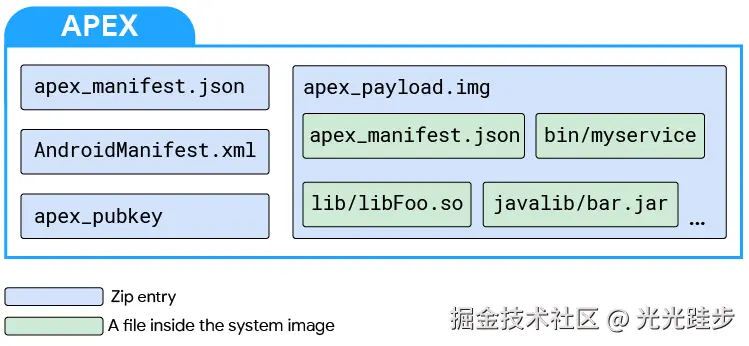
具体APEX的说明,请去官网了解: APEX 文件格式 | Android Open Source Project
这里就简单介绍下APEX
定义 :APEX(Android Pony EXpress)是从 Android 10 (Q) 开始引入的系统模块更新容器格式 。它与APK类似,但专为更新底层系统模块(如运行时库、硬件抽象层HAL)而设计。
目的 :用于支持无需完整OTA的系统模块动态更新。这解决了传统APK模型无法在系统启动早期加载、以及对底层模块更新不灵活的问题。
启动时机:在 startOtherServices 之后, 所有常规服务启动完成之后,会调用 startApexServices, 这避免 APEX 被正在初始化的核心服务所依赖,从而保证系统启动流程稳定。
三、小结
本文介绍了Andorid系统启动流程中的SystemServer,它创建System Context了,并启动各种服务,比如AMS, WMS,IMS等等,最后还启动SystemUi。
用一个时序图总结下SystemServer吧 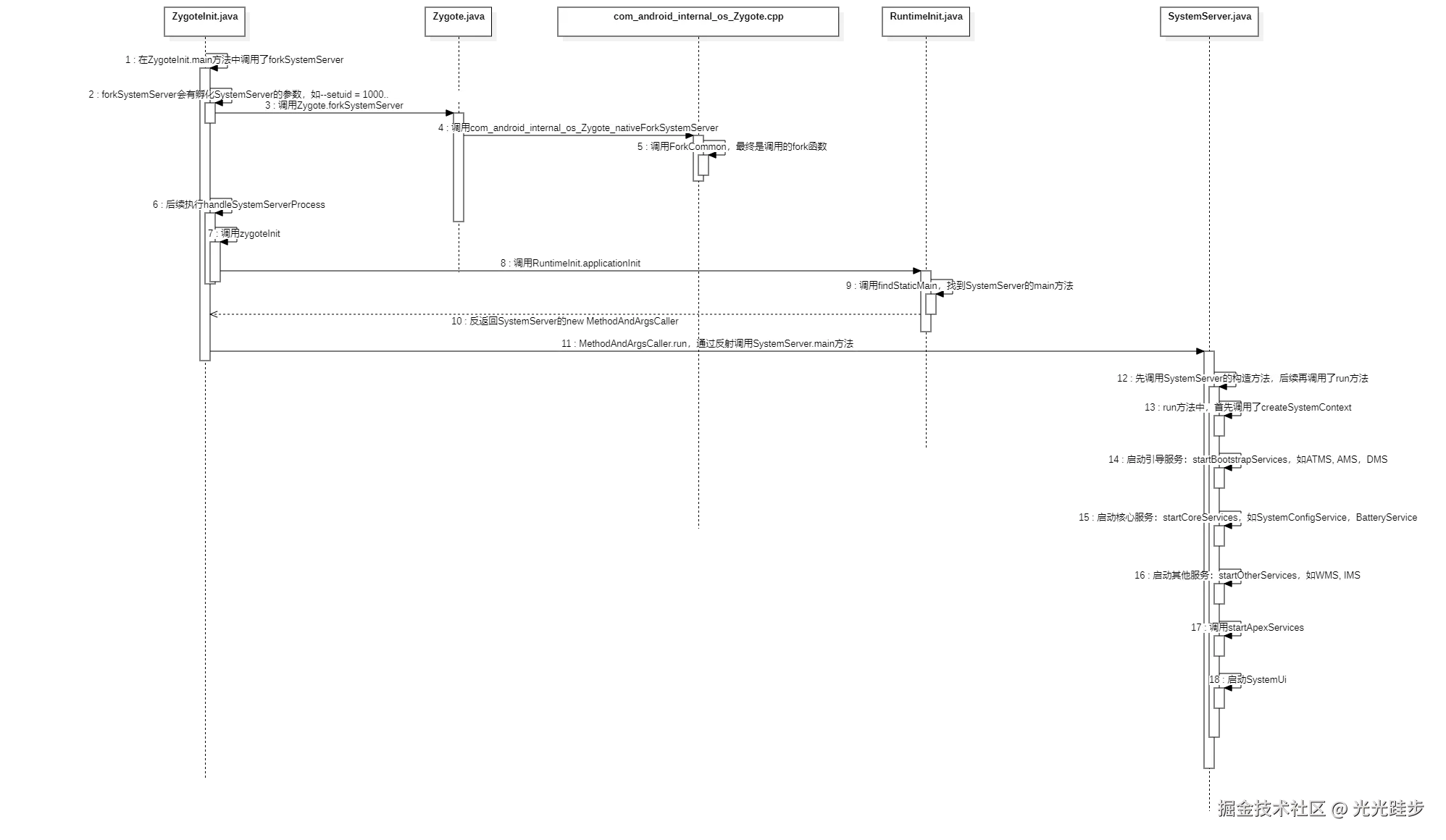
感谢阅读,希望本文对你有所帮助,如有任何不对的地方,欢迎大家指出。
四、参考资料
- 《Android进阶解密》
- APEX 文件格式 | Android Open Source Project