生物信息中的分析流程往往需要消耗很大的内存,读写以TB计算的数据,属于典型的高性能计算(HPC)应用。生信分析流程中要调用大量的分析程序以及内部开发脚本,环境的配置与管理极为复杂,可重复性低,导致流程的升级、管理、迁移成为大难题。
传统生信流程的三大痛点
-
环境依赖黑洞:BWA、GATK、STAR等工具依赖数百个库文件
-
版本管理噩梦:同一集群需支持Python2/3、Perl5/34等多版本并存
-
计算资源争夺战:单任务占用128G内存导致集群雪崩
现有的IT技术中其实有解决以上问题的方法,如Docker。然而生信分析集群和普通的IT服务器又有很大区别,如开发人员无root权限,分析任务需要进行资源管理(内存,CPU)。这些问题都让Docker技术在HPC环境的应用受限,Singularity因此应运而生。
容器技术是一种以应用软件为中心的虚拟化技术。以应用软件为单元,将软件及所有的依赖打包成容器镜像,打包后的容器镜像可直接拷贝到不同的Linux主机上运行。通过容器技术,可以很好的解决安装软件时,依赖库的安装问题、软件环境的隔离以及软件环境的移植问题。
传统虚拟化 vs Docker vs Singularity架构对比
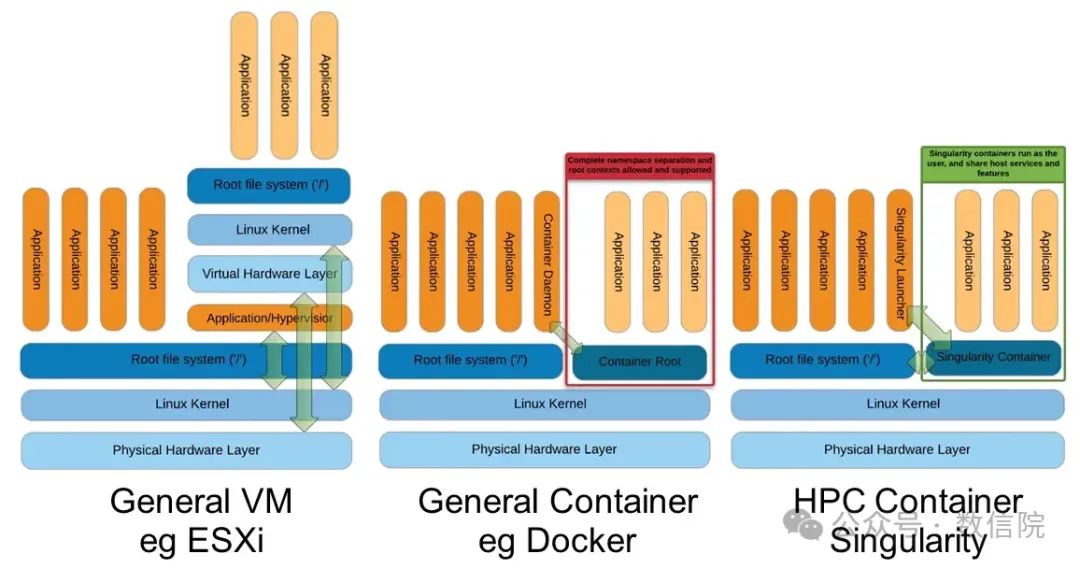
Singularity 的优势
相对于 Docker,Singularity 优势:
-
依赖简单:Singularity 所有依赖均在镜像中
-
和现有系统无缝整合:系统用户权限、网络等均直接继承宿主机,并且无需进入镜像执行命令,可以直接在外部调用镜像内的命令,像执行一个本地安装的指令一样
-
无 Daemon 进程:Singularity 提供的完全是一个运行时的环境,不使用时不需要单独的进程,不占用任何资源
-
实现轻量级的容器云
singularity的安装和使用
安装依赖
sudo apt-get update && sudo apt-get install -y \
build-essential \
uuid-dev \
libgpgme-dev \
squashfs-tools \
libseccomp-dev \
wget \
pkg-config \
git \
cryptsetup-bin
安装GO语言
wget https://go.dev/dl/go1.24.0.linux-amd64.tar.gz #下载
tar -C /pub/software -xzvf go1.24.0.linux-amd64.tar.gz #解压
rm go1.24.0.linux-amd64.tar.gz #删除压缩包
添加到环境变量
echo 'export PATH=/pub/software/go/bin(你的路径):$PATH' >> ~/.bashrc下载singularity
下载地址:https://github.com/hpcng/singularity/releases
wget https://github.com/apptainer/singularity/releases/download/v3.8.7/singularity-3.8.7.tar.gz
tar -xzf singularity-3.8.7.tar.gz #解压
cd singularity
安装singularity
./mconfig
cd builddir
make
sudo make install
记得添加到环境变量 没有出现报错信息就不用管提示
help
$ singularity
Usage:
  singularity [global options...] <command>

Available Commands:
  build       Build a Singularity image
  cache       Manage the local cache
  capability  Manage Linux capabilities for users and groups
  config      Manage various singularity configuration (root user only)
  delete      Deletes requested image from the library
exec        Run a command within a container
  inspect     Show metadata for an image
  instance    Manage containers running as services
  key         Manage OpenPGP keys
  oci         Manage OCI containers
  overlay     Manage an EXT3 writable overlay image
  plugin      Manage Singularity plugins
  pull        Pull an image from a URI
  push        Upload image to the provided URI
  remote      Manage singularity remote endpoints, keyservers and OCI/Docker registry credentials
  run         Run the user-defined default command within a container
  run-help    Show the user-defined helpfor an image
  search      Search a Container Library for images
  shell       Run a shell within a container
  sif         siftool is a program for Singularity Image Format (SIF) file manipulation
  sign        Attach digital signature(s) to an image
test        Run the user-defined tests within a container
  verify      Verify cryptographic signatures attached to an image
  version     Show the version for Singularity

Run 'singularity --help'for more detailed usage information.
image
Singularity 镜像文件(Singularity Image File, sif)是一种内容只读的文件格式,其文件内容不能被修改。
Definition File
Singularity 文件类似与 Docker 中的 Dockerfile,通过 镜像定义文件(Definition File) 定制镜像的内容
cat << EOF >> Singularity
Bootstrap: docker
From: ubuntu

%help
    help info for Ubuntu

%post
    apt-get -y update
    apt-get -y install vim sudo

%environment
    export AAA=aaa

%startscript
    /usr/bin/abc --start

%runscript
    echo"Hello World"
EOF
快速上手
下载镜像
可以从 Container Library(https://cloud.sylabs.io/library)
例如:singularity pull library://cenat/default/blast.sif:latestor Docker Hub(https://hub.docker.com/)下载images。
例如:singularity pull docker://ncbi/blast

singularity pull --arch amd64 library://library/default/ubuntu:20.04
创建沙箱
刚下载下来的ubuntu_20.04.sif 只是一个纯净的系统,我们需要创建一个沙箱,给里面装软件。
singularity build --sandbox blast ubuntu_20.04.sif进入容器
默认会自动挂载home, $pwd , /tmp , /proc , /sys , /dev 目录。
singularity shell --writable --fakeroot blast在容器中安装软件,建议不要使用anaconda 安装,而是手动安装,我们要尽量保持容器轻量。
添加环境变量
退出容器后, 在blast/environment 中添加PATH
vi blast/environment
#!/bin/sh
# Custom environment shell code should follow
export PATH=/opt/ncbi-blast-2.10.1+/bin:$PATH
打包
软件全部安装完成之后将容器打包
singularity build blast.sif blast运行程序
singularity exec blast.sif blasp XXX 后面接软件的用法运行容器
交互式运行
singularity shell blast.sif bash直接运行
singularity exec blast.sif blastp

例子
singularity exec deeptools.sif computeMatrix scale-regions \
  -S ../02.bowtie2/clean_bams/OE.bw \
  ../02.bowtie2/clean_bams/C.bw \
  ../02.bowtie2/clean_bams/OE.bw \
  ../02.bowtie2/clean_bams/OE.bw \
  --samplesLabel OE C OE OE \
  -R ../ref/genes.bed ../ref/genes.bed  \
  --regionBodyLength 4000 \
  -b 2000 -a 2000  \
  --binSize 50 \
  -o tss_tes_matrix.gz  \
  -p 4 1>plot_heatmap_scale_regions.log 2>&1
用户和权限
使用容器不得不考虑安全性,安全性来自两个方面,一个是使用了不被信任的容器,这个就像你在电脑上安装了不被信任的软件一样,Singularity提供了签名机制来验证;另一方面是容器会不会越权对Host 做一些不该做的事情,这个是需要考虑的。
singularity 的解决办法是会在容器内动态创建一个用户,该用户与Host里的用户名、组名、权限等都保持一致。这样你在Host 中做不了的事情,在容器里也干不了。