日志
预备工作
下面开始,我们结合我们之前所做的所有封装,进行⼀个线程池的设计。在写之前,我们要做如下准备
- 准备线程的封装
- 准备锁和条件变量的封装
- 引入日志,对线程进行封装
对线程的封装:
Thread.hpp
#ifndef __THREAD_HPP__
#define __THREAD_HPP__

#include <iostream>
#include <string>
#include <pthread.h>
#include <unistd.h>
#include <functional>
#include <sys/syscall.h>

#define get_lwp_id() syscall(SYS_gettid)

using func_t = std::function<void()>;
const std::string threadnamedefault = "None-Name";

class Thread
{
public:
    Thread(func_t func, const std::string &name = threadnamedefault)
        : _name(name),
          _func(func),
          _isrunning(false)
    {
        std::cout << "create thread obj success" << std::endl;
    }
    static void *start_routine(void *args)
    {
        Thread *self = static_cast<Thread *>(args);
        self->_isrunning = true;
        self->_lwpid = get_lwp_id();
        self->_func();
        pthread_exit((void *)0);
    }
    void Start()
    {
        int n = pthread_create(&_tid, nullptr, start_routine, this);
        if (n == 0)
        {
            std::cout << "run thread success" << std::endl;
        }
    }
    void Join()
    {
        if (!_isrunning)
            return;

        int n = pthread_join(_tid, nullptr);
        if (n == 0)
        {
            std::cout << "pthread_join success" << std::endl;
        }
    }
    ~Thread()
    {
    }
private:
    bool _isrunning;
    pthread_t _tid;
    pid_t _lwpid;
    std::string _name;
    func_t _func;
};

#endif
对锁的封装:
Mutex.hpp
#pragma once
#include<pthread.h>
#include<mutex>

class Mutex
{
public:
Mutex()
{
    pthread_mutex_init(&_lock,nullptr);
}
void Lock()
{
    pthread_mutex_lock(&_lock);
}
void Unlock()
{
    pthread_mutex_unlock(&_lock);
}
~Mutex()
{
    pthread_mutex_destroy(&_lock);
}
pthread_mutex_t* Get()
{
    return &_lock;
}
private:
pthread_mutex_t _lock;
};
class LockGuard
{
public:
LockGuard(Mutex*lock):_lock(lock)
{
    _lock->Lock();
}
~LockGuard()
{
    _lock->Unlock();
}
    private:
    Mutex*_lock;
};
对条件变量的封装:
Cond.hpp
#pragma once
#include <pthread.h>
#include <iostream>
#include "Mutex.hpp"

class Cond
{
public:
    Cond()
    {
        pthread_cond_init(&_cond, nullptr);
    }
    void NotifyAll()
    {
        int n = pthread_cond_broadcast(&_cond);
        (void)n;
    }
    void NotifyOne()
    {
        int n = pthread_cond_signal(&_cond);
        (void)n;
    }
    void Wait(Mutex &lock)
    {
        pthread_cond_wait(&_cond, lock.Get());
    }
    ~Cond()
    {
        pthread_cond_destroy(&_cond);
    }

private:
    pthread_cond_t _cond;
};
日志与策略模式
设计模式
前人针对一些常见的场景给出的一定的解决方案。比如日志中,前人已经规定好了设计模式,直接根据那个设计模式找思路即可,不用从头开始想。
日志的概念
日志 是程序运行时产生的文本记录,用于跟踪程序的执行状态、行为、错误和调试信息,帮助快速定位问题并支持程序员进行问题修复。
日志的构成要素
今天我们需要构建下面这个图片的日志格式:
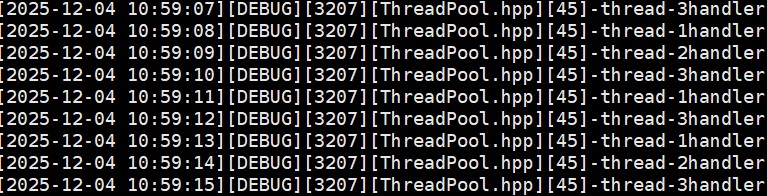
里面的要素有:
- 时间戳
- 日志等级
- 线程的id
- 写日志的文件名
- 文件行号
- 日志内容
日志有现成的解决方案,如:spdlog、glog、Boost.Log、Log4cxx等等,我们依旧采用自定义日志的方式。
代码
Logger.hpp
#ifndef _LOGGER_HPP_
#define _LOGGER_HPP_

#include "Mutex.hpp"
#include <string>
#include <unistd.h>
#include <sstream>
#include <ctime>
#include <iostream>
#include <filesystem> //C++17
#include <fstream>
#include <system_error>
#include<memory>
// 枚举
enum class LogLevel
{
    DEBUG,   // 调试信息
    INFO,    // 普通信息
    WARNING, // 警告
    ERROR,   // 错误
    FATAL    // 致命错误
};

// 把数字转化为字符
std::string LevelToString(LogLevel level)
{
    switch (level)
    {
    case LogLevel::DEBUG:
        return "DEBUG";
    case LogLevel::INFO:
        return "INFO";
    case LogLevel::WARNING:
        return "WARNING";
    case LogLevel::ERROR:
        return "ERROR";
    case LogLevel::FATAL:
        return "FATAL";
    default:
        return "Unknown";
    }
}
// 把时间戳格式化
std::string GetcurrTime()
{
    // 获取时间戳
    time_t currtime = time(nullptr);
    // 将时间戳转化为本地时间
    struct tm currtm;
    localtime_r(&currtime, &currtm);
    // 将时间转化为字符串
    char buffer[64];
    snprintf(buffer, sizeof(buffer), "%4d-%02d-%02d %02d:%02d:%02d",
             currtm.tm_year + 1900,
             currtm.tm_mon+1,
             currtm.tm_mday,
             currtm.tm_hour,
             currtm.tm_min,
             currtm.tm_sec);
    return buffer;
}
// 刷新策略
// 基类
//设计模式:工厂模式
class LogStrategy
{
public:
    virtual ~LogStrategy() = default;
    virtual void SyncLog(const std::string &logmessage) = 0;
};
// 显示器刷新
class ConsoleLogStrategy : public LogStrategy
{
public:
    ~ConsoleLogStrategy()
    {
    }
    void SyncLog(const std::string &logmessage) override
    {
        LockGuard lockguard(&_lock);
        std::cout << logmessage << std::endl;
    }

private:
    Mutex _lock;
};
std::string logdir = "log";      // 目录
std::string logname = "log.txt"; // 文件名
// 文件刷新
class FileLogStrategy : public LogStrategy
{
public:
    FileLogStrategy(std::string dir = logdir, std::string name = logname)
        : _dir(dir), _filename(name)
    {
        LockGuard locckguard(&_lock);
        if (std::filesystem::exists(_dir))
        {
            return;
        }
        try
        {
            std::filesystem::create_directories(_dir);
        }
        catch (const std::filesystem::filesystem_error &e)
        {
            std::cerr << e.what() << "\r\n";
        }
    }
    void SyncLog(const std::string &logmessage) override
    {
        LockGuard lockguard(&_lock);
        std::string target = _dir;
        target += "/";
        target += _filename;
        std::ofstream out(target.c_str(), std::ios::app);
        if (!out.is_open())
        {
            return;
        }
        out << logmessage << "\n";
        out.close();
    }
    ~FileLogStrategy()
    {
    }

private:
    std::string _dir;
    std::string _filename;
    Mutex _lock;
};
class Logger
{
    public:
    Logger()
    {}
    void EnableFileLogStrategy()
    {
        _strategy=std::make_unique<FileLogStrategy>();//创建对象
    }
    void EnableConsoleLogStrategy()
    {
        _strategy=std::make_unique<ConsoleLogStrategy>();//创建对象
    }
    class LogMessage
    {
    public:
        LogMessage(LogLevel level, std::string &filename, int line, Logger &logger)
            : _curr_time(GetcurrTime()), _level(level), _pid(getpid()), _filename(filename), _line(line), _logger(logger)
        {
            std::stringstream ss;
            ss << "[" << _curr_time << "]"
               << "[" << LevelToString(_level) << "]"
               << "[" << _pid << "]"
               << "[" << _filename << "]"
               << "[" << _line << "]"
               << "-";
            _loginfo = ss.str();
        }
        template<typename T>
        LogMessage& operator<<(const T&info)
        {
            std::stringstream ss;
            ss<<info;
            _loginfo+=ss.str();
            return *this;
        }
        ~LogMessage()
        {
            //刷新缓冲区
            if(_logger._strategy)
            {
                _logger._strategy->SyncLog(_loginfo);
            }
        }
    private:
        std::string _curr_time; // 日志时间
        LogLevel _level;        // 日志等级
        pid_t _pid;             // 进程pid
        std::string _filename;  // 写日志的文件名
        int _line;              // 第几行
        std::string _loginfo;   // 保存一条完整的日志信息
        Logger &_logger;        // 提供刷新策略的具体做法
    };
    ~Logger()
    {}
    LogMessage operator()(LogLevel level,std::string filename,int line)
    {
        return LogMessage(level,filename,line,*this);
    }
    private:
    std::unique_ptr<LogStrategy> _strategy;
};
Logger logger;

#define LOG(level) logger(level,__FILE__,__LINE__)
#define EnableFileLogStrategy() logger.EnableFileLogStrategy()
#define EnableConsoleLogStrategy() logger.EnableConsoleLogStrategy()
#endif
测试:
#include<iostream>
#include"Logger.hpp"

int main()
{
    EnableConsoleLogStrategy();

    LOG(LogLevel::DEBUG) << "Test 1: simple string";

    LOG(LogLevel::DEBUG) << "Test 2: " << 123;

    LOG(LogLevel::DEBUG) << "Test 3: " << 3.14;

    LOG(LogLevel::DEBUG) << "Test 4: " << "hello" << ", " << 123;

    LOG(LogLevel::DEBUG) << "hello world" << ",3.14" << (int)123;
    return 0;
}
运行结果:
root@ubuntu:/home/slmx/d1/Logger# g++ -o main main.cc -lpthread -std=c++17
root@ubuntu:/home/slmx/d1/Logger# ./main
[2025-12-04 11:28:54][DEBUG][3270][main.cc][8]-Test 1: simple string
[2025-12-04 11:28:54][DEBUG][3270][main.cc][10]-Test 2: 123
[2025-12-04 11:28:54][DEBUG][3270][main.cc][12]-Test 3: 3.14
[2025-12-04 11:28:54][DEBUG][3270][main.cc][14]-Test 4: hello, 123
[2025-12-04 11:28:54][DEBUG][3270][main.cc][16]-hello world,3.14123
线程池设计
概念定义
线程池:一种线程使用模式。线程过多会带来调度开销,进而影响缓存局部性和整体性能。而线程池维护着多个线程,等待着监督管理者分配可并发执行的任务。这避免了在处理短时间任务时创建与销毁线程的代价。线程池不仅能够保证内核的充分利用,还能防止过分调度。可用线程数量应该取决于可用的并发处理器、处理器内核、内存、网络sockets等的数量。
线程池的应用场景
-
需要大量的线程来完成任务,且完成任务的时间比较短。比如WEB服务器完成网页请求这样的任务,使用线程池技术是非常合适的。因为单个任务小,而任务数量巨大,你可以想象一个热门网站的点击次数。但对于长时间的任务,比如一个Telnet连接请求,线程池的优点就不明显了。因为Telnet会话时间比线程的创建时间大多了。
-
对性能要求苛刻的应用,比如要求服务器迅速响应客户请求。
-
接受突发性的大量请求,但不足以使服务器因此产生大量线程的应用。突发性大量客户请求,在没有线程池情况下,将产生大量线程,虽然理论上大部分操作系统线程数目最大值不是问题,短时间内产生大量线程可能使内存到达极限,出现错误。
线程池的种类
a. 创建固定数量线程池
循环从任务队列中获取任务对象,获取到任务对象后,执行任务对象中的任务接口
b. 浮动线程池
其他同上
此处,我们选择固定线程个数的线程池。
设计思路
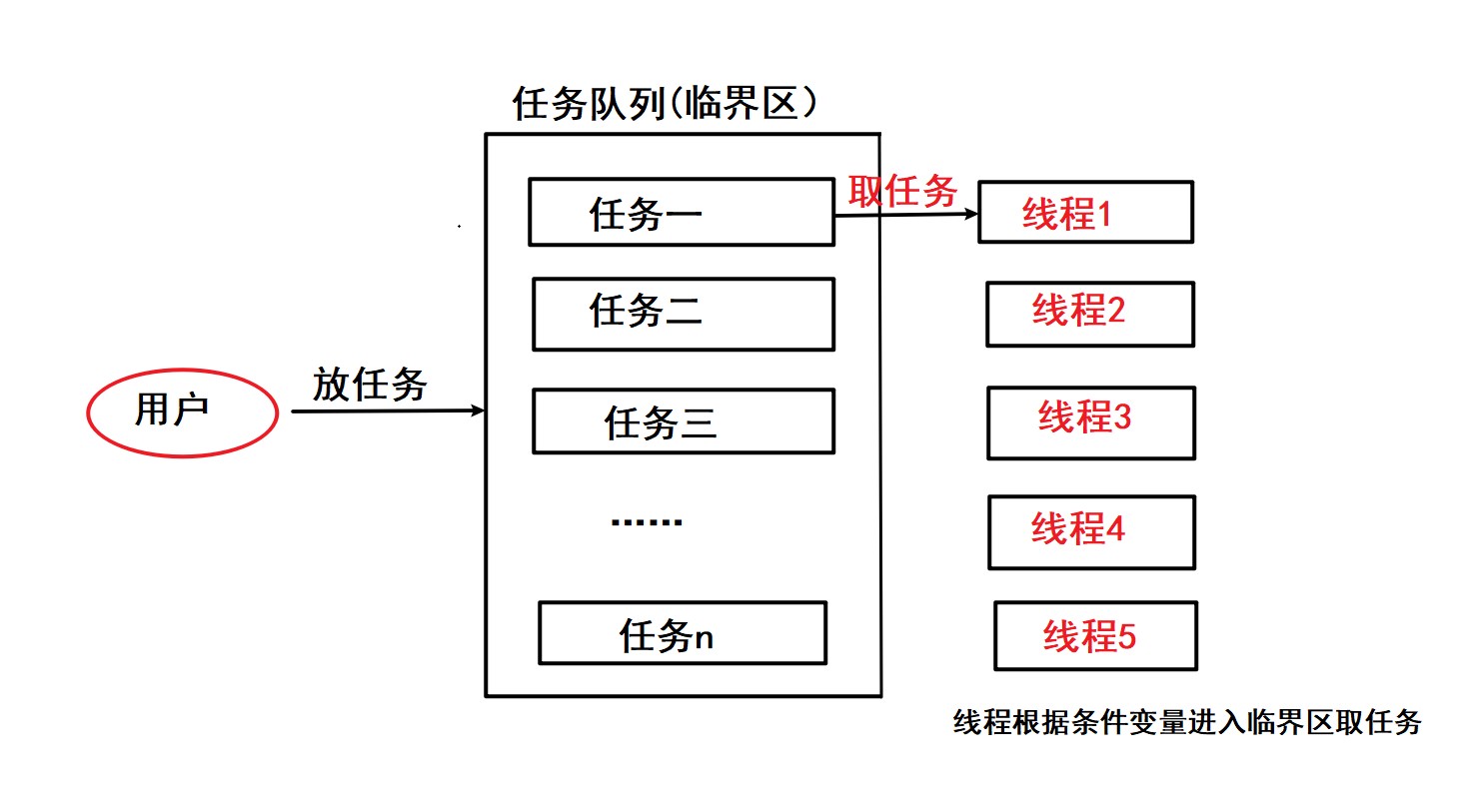
线程安全的单例模式
概念
单例模式(Singleton Pattern)是一种创建型设计模式 ,确保一个类只有一个实例,并提供一个全局访问点。
实现方式
有两种实现方式:懒汉方式和饿汉方式。
用吃饭的例子举例:
懒汉就是吃完饭不洗碗等到下顿饭的时候再洗。即只要需要了才创建实例
饿汉就是吃完饭了就洗碗,等到下顿饭就可以直接开始吃了。即在还没被需要的时候,就已经创建了实例,可能会导致资源浪费。
饿汉方式实现单例模式
template<typename T>
class Singleton{
static T data;
public:
static T* GetInstance(){
return &data;
}
};
只需要通过这个Singleton这个包装类来使用T对象,则一个进程中只有一个T对象的实例。
懒汉方式实现单例模式
template <typename T>
class Singleton {
static T* inst;
public:
static T* GetInstance() {
if (inst == NULL) {
inst = new T();
}
return inst;
}
};
存在一个严重的问题, 线程不安全.
第一次调用 GetInstance 的时候, 如果两个线程同时调用, 可能会创建出两份 T 对象的实例.
但是后续再次调用, 就没有问题了.
懒汉方式实现单例模式(线程安全版本)
ThreadPool.hpp
#ifndef _PROCCESS_POOL_HPP_
#define _PROCESS_POOL_HPP_

#include <pthread.h>
#include <iostream>
#include "Mutex.hpp"
#include "Cond.hpp"
#include "Logger.hpp"
#include <queue>
#include "Task.hpp"
#include"Thread.hpp"
//单例线程池------懒汉模式
const int defaultthreadnum = 3;
template <class T>
class ThreadPool
{
    private:
    bool QueueIsEmpty()
    {
        return _q.empty();
    }
    // 线程从任务队列中拿取任务
    void Routine(const std::string &name)
    {
        while (true)
        {
            T t;
            {
                LockGuard lockguard(&_lock);
                while (QueueIsEmpty() && _is_running)
                {
                    _wait_thread_num++;
                    _cond.Wait(_lock);
                    _wait_thread_num--;
                }
                if (!_is_running && QueueIsEmpty())
                {
                    LOG(LogLevel::INFO) << "线程池已退出&&任务队列为空," << name << "退出";
                    break;
                }
                t = _q.front();
                _q.pop();
            }
            t();//处理任务不需要在临界区
            LOG(LogLevel::DEBUG) << name << "handler task:" << t.ResultString();
        }
    }

public:
    ThreadPool(int threadnum = defaultthreadnum)
        : _threadnum(threadnum), _wait_thread_num(0), _is_running(false)
    {
        for (int i = 0; i < _threadnum; i++)
        {
            std::string name = "thread-" + std::to_string(i + 1);
            // 方法1
            auto f = std::bind(&ThreadPool::Routine, this,name);
            _threads.emplace_back(f,name);
            // 方法2
            // _threads.emplace_back([this,name]()
            //                       { this->Routine(name); }, name); // emplace_back会自动构造Thread对象
        }
        LOG(LogLevel::INFO)<<"thread pool obj create success";
    }
    void Push(const T &t)
    {
        if(!_is_running)
        return;
        {
            LockGuard lockguard(&_lock);
            _q.push(t);
            if(_wait_thread_num)
            {
                _cond.NotifyAll();
            }
        }
    }
    void Wait()
    {
        for(auto&t:_threads)
        {
            t.Join();
        }
        LOG(LogLevel::INFO)<<"thread pool wait success";
    }
    void Start()
    {
        if(_is_running)
        {
            return ;
        }
        _is_running=true;
        for(auto &t:_threads)
        {
            //创建线程
            t.Start();
        }
    }
     // 核心思想:我们应该让线程走正常的唤醒逻辑退出
    // 线程池要退出
    // 1. 如果被唤醒 && 任务队列没有任务 = 让线程退出
    // 2. 如果被唤醒 && 任务队列有任务 = 线程不能立即退出,而应该让线程把任务处理完,在退出
    // 3. 线程本身没有被休眠,我们应该让他把他能处理的任务全部处理完成, 在退出
    void Stop()
    {
        if(!_is_running)
        {
            return;
        }
        _is_running=false;
        if(_wait_thread_num)//防止有些线程在等待任务而不知道停止信号
        {
            _cond.NotifyAll();
        }
    }
    ~ThreadPool()
    {}
    //DEBUG
    static std::string ToHex(ThreadPool<T>*inst)
    {
        char buffer[64];
        snprintf(buffer,sizeof(buffer),"%p",inst);
        return buffer;
    }
    static ThreadPool<T>*GetInstance()
    {
        if(_inst==NULL)
        {
            _singleton_lock.Lock();
            if(!_inst)
            {
                _inst=new ThreadPool<T>();
                LOG(LogLevel::DEBUG)<<"线程池单例首次被使用,创建并初始化,address:"<<ToHex(_inst);
                _inst->Start();
            }
        }
        return _inst;
    }
private:
    std::queue<T> _q;
    std::vector<Thread> _threads;
    int _threadnum;
    int _wait_thread_num;
    Mutex _lock;
    Cond _cond;
    bool _is_running;
    static Mutex _singleton_lock;
    //volatile static ThreadPool<T>* _inst;//设置关键字,防止被编译器优化
    static ThreadPool<T>* _inst;
};
template <class T>
ThreadPool<T>*ThreadPool<T>::_inst=nullptr;
template <class T>
Mutex ThreadPool<T>::_singleton_lock;
#endif#include"ThreadPool.hpp"
#include<ctime>
#include<unistd.h>
int main()
{
srand(time(nullptr)^getpid());
EnableConsoleLogStrategy();
int cnt=20;
while(cnt--)
{
int x=rand()%10+1;
int y=rand()%5+1;
usleep(rand()%73);
Task t(x,y);
ThreadPool<Task>::GetInstance()->Push(t);
sleep(1);
}
ThreadPool<Task>::GetInstance()->Stop();
ThreadPool<Task>::GetInstance()->Wait();
return 0;
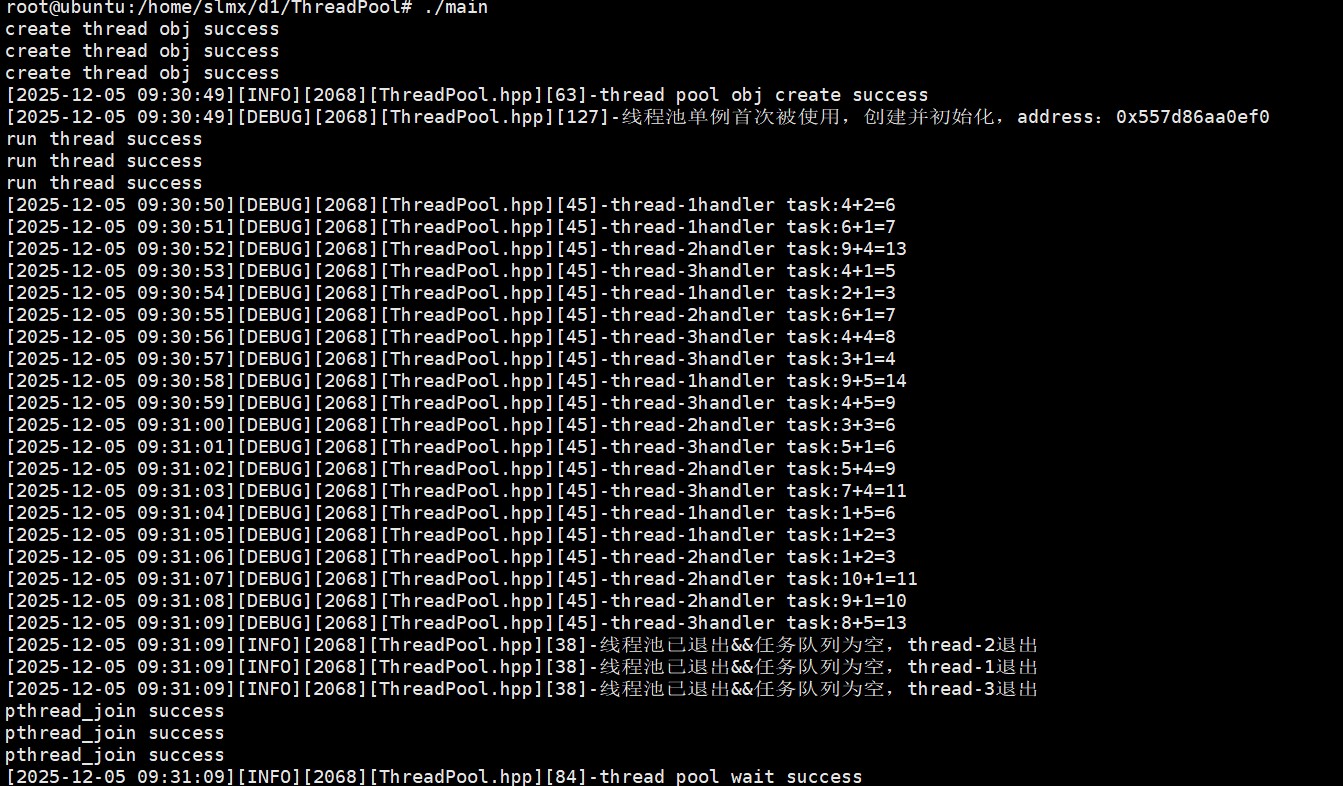
}运行结果: