IO文件流
文件在程序中是以流的形式来操作的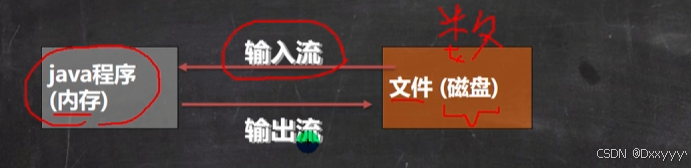
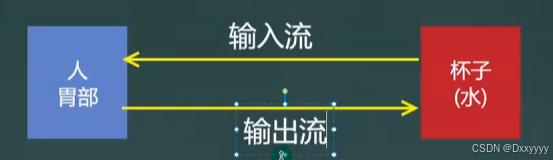
流:数据在数据源(文件)和程序(内存)之间经历的路径
输入流:数据从数据源(文件)到程序(内存)的路径
输出流:数据从程序(内存)到数据源(文件)的路径
常用文件操作
>相关方法
new File(String pathname)//根据路径构建一个File对象
new File(File parent,String child)//根据父目录文件+子路径构建
new File(String parent,String child)//根据父目录+子路径构建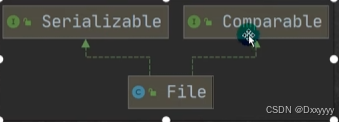
java
package com.file;

import org.junit.Test;

import java.io.File;
import java.io.IOException;

public class filecreate {
    public static void main(String[] args) {

    }

    //方式1 new File(String pathname)直接写具体路径
    @Test
    public void create01(){
        String filepath = "D:\\idea_java_project\\Filechapter\\filetext\\file01.txt";

        File file = new File(filepath);
        try {
            file.createNewFile();
            System.out.println("文件创建成功");
        } catch (IOException e) {
            throw new RuntimeException(e);
        }
    }
@Test
    //方式2  new File(File parent,String filename)//根据父目录文件+文件名构建
    public void create02(){
        File parent = new File("D:\\idea_java_project\\Filechapter\\filetext");
        String filename = "file02.txt";
        File file = new File(parent, filename);
        try {
            file.createNewFile();
            System.out.println("文件创建成功");
        } catch (IOException e) {
            throw new RuntimeException(e);
        }
    }
    @Test
    //方式3 new File(String parent,String child)//根据父目录+子路径构建
    public void create03(){
        String parent ="D:\\idea_java_project\\Filechapter\\filetext";
        String child = "file03.txt";
        File file = new File(parent, child);
        try {
            file.createNewFile();
            System.out.println("文件创建成功");
        } catch (IOException e) {
            throw new RuntimeException(e);
        }
    }
}
获取文件相关信息的方法
java
package com.file;

import java.io.File;
import java.io.IOException;

public class FileInformation {
    public static void main(String[] args) {
        FileInformation fileInformation = new FileInformation();
        fileInformation.info();
    }

    //获取文件信息
    public void info(){
        File file = new File("D:\\idea_java_project\\Filechapter\\filetext\\file04.txt");
        try {
            boolean newFile = file.createNewFile();
        } catch (IOException e) {
            throw new RuntimeException(e);
        }

        //获取文件名
        System.out.println("文件名"+file.getName());

        //获取绝对路径
        System.out.println("绝对路径" + file.getAbsolutePath());

        //获取父目录
        System.out.println("文件父级目录="+file.getParent());
        //获取文件大小
        System.out.println("文件大小(字节)="+file.length());
        //文件是否存在
        System.out.println("文件是否存在="+file.exists());//T
        //是不是一个文件
        System.out.println("是不是一个文件="+file.isFile());//T
        //是不是一个目录
        System.out.println("是不是一个目录="+file.isDirectory());//F
    }
}
目录的操作和文件的删除
mkdir创建一级目录
mkdirs创建多级目录
delete删除空目录或文件
java
package com.file;

import org.junit.Test;

import java.io.File;
import java.io.IOException;

public class Directory {
    public static void main(String[] args) {

    }

    //删除文件,或者目录
    @Test
    public void m1() {
        String filePath = "D:\\idea_java_project\\Filechapter\\filetext\\file05.txt";
        File file = new File(filePath);
        try {
            file.createNewFile();
        } catch (IOException e) {
            throw new RuntimeException(e);
        }
        if (file.exists()) {
            if (file.delete()) {
                System.out.println(filePath + "删除成功");
            } else {
                System.out.println(filePath + "删除失败");
            }
        } else {
            System.out.println("该文件不存在...");
        }
    }

    //创建一级(或多级)目录
    @Test
    public void m3() {
        String directoryPath = "D:\\idea_java_project\\Filechapter\\filetext\\directory1\\a\\b\\c";
        File file = new File(directoryPath);
        if (file.exists()) {
            System.out.println(directoryPath + "存在..");
        } else {
            if (file.mkdirs()){//创建单机目录
                System.out.println(directoryPath + "创建成功..");
            }else{
                System.out.println(directoryPath + "创建失败...");
            }
        }
    }
}
IO流原理及流的分类
Java lO流原理
1.I/O是lnput/Output的缩写,I/O技术是非常实用的技术,用于处理数据传输。如读/写文件,网络通讯等。
2.Java程序中,对于数据的输入/输出操作以"流(stream)"的方式进行。
3.java.io包下提供了各种"流"类和接口,用以获取不同种类的数据,并通过方法输入或输出数据
4.输入input:读取外部数据(磁盘、光盘等存储设备的数据)到程序(内存)中。
5.输出output:将程序(内存)数据输出到磁盘、光盘等存储设备中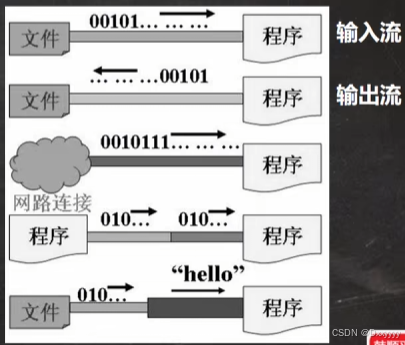
流的分类
1 按操作数据单位不同分为:字节流(8bit),字符流(按字符)
2 按数据流的流向不同分为:输入流,输出流
3 按流的角色的不同分为:节点流,处理流/包装流
InputStream

java
package com.inputstreama;

import org.junit.Test;

import java.io.FileInputStream;
import java.io.IOException;

public class fileinputstream_ {
    public static void main(String[] args) {

    }
    @Test
    public void read01() {
        String filepath = "D:\\idea_java_project\\Filechapter\\filetext\\inputstream\\test1.txt";//不含汉字
        int readnum = 0;
        FileInputStream fileInputStream = null;
        try {
            //创建fileinputstream对象,用于读取test1文件
            fileInputStream = new FileInputStream(filepath);
            //返回单个字节 如果过返回-1,表示读取完毕
            while (readnum != -1) {
                //写出的时候转为char
                //但是汉字会乱码(因为一个汉字三个字节,而read只读取一个字节就转化了)
                // -->使用read(byte[] b)读取
                readnum = fileInputStream.read();
                System.out.print((char) readnum);

            }
        } catch (IOException e) {
            throw new RuntimeException(e);
        } finally {
            //关闭文件流,释放空间
            try {
                fileInputStream.close();
            } catch (IOException e) {
                throw new RuntimeException(e);
            }
        }
    }

    @Test
    public void read02() {
        String filepath = "D:\\idea_java_project\\Filechapter\\filetext\\inputstream\\test2.txt";//含有汉字
        FileInputStream fileInputStream = null;
        byte[] bytes = new byte[8];//创建一个字符数组,使用read(byte[] b)读取
        int readlength = 0;//读取长度
        try {
            //创建fileinputstream对象,用于读取test1文件
            fileInputStream = new FileInputStream(filepath);
            //返回单个字节 如果过返回-1,表示读取完毕
            while ((readlength = fileInputStream.read(bytes))!= -1) {//此时返回的长度是:不足8个,该多少就是多少,超过8个,算8个
                // -->使用read(byte[] b)读取
                System.out.print(new String(bytes,0,readlength));
            }
        } catch (IOException e) {
            throw new RuntimeException(e);
        } finally {
            //关闭文件流,释放空间
            try {
                fileInputStream.close();
            } catch (IOException e) {
                throw new RuntimeException(e);
            }
        }
    }
}
FileOutStream

要求:请使用FileOutputStream在a.txt文件,中写入"hello,world".如果文件不存在,会创建文件
java
package com.outputstream;

import org.junit.Test;

import java.io.FileNotFoundException;
import java.io.FileOutputStream;
import java.io.IOException;

public class OutPut {
    public static void main(String[] args) {

    }

    @Test
    public void writeFile() {
        String filepath = "D:\\idea_java_project\\Filechapter\\filetext\\Out\\a.txt";
        FileOutputStream fileOutputStream = null;
        try {
            fileOutputStream = new FileOutputStream(filepath);
            //2.newFileoutputstream(filePath,true)创建方式,当写入内容是,是追加到文件后面
            //fileOutputStream = new FileOutputStream(filepath,true);


            //写入一个字节
            fileOutputStream.write('a');
            //写入字符串
             String str = "hello,world";
            //str.getBytes()可以把字符串->字节数组
             fileOutputStream.write(str.getBytes());
            //也可以设置从开始到结束
            fileOutputStream.write(str.getBytes(),0,str.length());

        } catch (IOException e) {
            throw new RuntimeException(e);
        } finally {
            try {
                fileOutputStream.close();
            } catch (Exception e) {
                throw new RuntimeException(e);
            }
        }

    }
}
文件拷贝
思路分析
1、创建文件的输入流,将文件读入到程序
2、创建文件的输出流,将读取到的文件数据,写入到指定的文件。
java
package com.outputstream;

import org.junit.Test;

import java.io.FileInputStream;
import java.io.FileNotFoundException;
import java.io.FileOutputStream;
import java.io.IOException;

public class FIleCopy {
    public static void main(String[] args) {

    }
    @Test
    public void copy(){
        String srcFilePath = "D:\\idea_java_project\\Filechapter\\filetext\\Out\\a.txt";
        String destFilePath = "D:\\idea_java_project\\Filechapter\\filetext\\inputstream\\b.txt";
        FileInputStream fileInputStream = null;
        FileOutputStream fileOutputStream = null;

        try {
            fileInputStream = new FileInputStream(srcFilePath);//创建输入流
            fileOutputStream = new FileOutputStream(destFilePath);//创建输出流
            //创建一个数组,提高效率
            int readlen = 0;
            byte[] bf = new byte[256];
            while ((readlen = fileInputStream.read(bf))!= -1){
                fileOutputStream.write(bf,0,bf.length);
            }
            System.out.println("copy成功");
        } catch (IOException e) {
            throw new RuntimeException(e);
        } finally {
            if(fileInputStream!= null){
                try {
                    fileInputStream.close();
                    fileOutputStream.close();
                } catch (IOException e) {
                    throw new RuntimeException(e);
                }
            }
        }
    }
}
FileReader
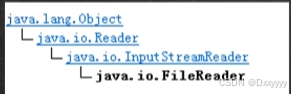
FileReader相关方法:
- new FileReader(File/String)
2)read:每次读取单个字符,返回该字符,如果到文件末尾返回-1
3)read(char ):批量读取多个字符到数组,返回读取到的字符数,如果到文件末尾返回-1
相关API:
1)new String(char ):将char[转换成String
2)new String(char , off, len):将char\[\]的指定部分转换成String
FileWriter
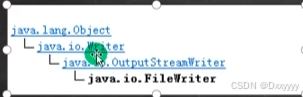
FileWriter常用方法
1)newFileWriter(File/String):覆盖模式,相当于流的指针在首端
2)newFileWriter(File/String,true):追加模式,相当于流的指针在尾端
3)write(int):写入单个字符
4)write(char ):写入指定数组
5)write(char .off,len):写入指定数组的指定部分
6)write(string):写入整个字符串
7)write(string,off,len):写入字符串的指定部分
相关API:String类:toCharArray:将String转换成char\[\]
>注意:
FileWriter使用后,必须要关闭(close)或刷新(flush),否则写入不到指定的文件!
-------------------------------------------------
Day41 End